
Table of contents
TL;DR
How do you build a Duolingo clone?
This article will go through the exact steps of building a Duolingo clone. You can follow along, or scroll to the bottom and remix the version we already made you. It's $0 on a new account!
As of November 2026, Oyelabs sells a Duolingo clone script from $2,998. AppZoro, an agency, puts a first version in one language at $80,000 to $200,000. Ours is $0 to remix on a new account.
Duolingo has:
- A path of short lessons
- Word chips you tap into a sentence
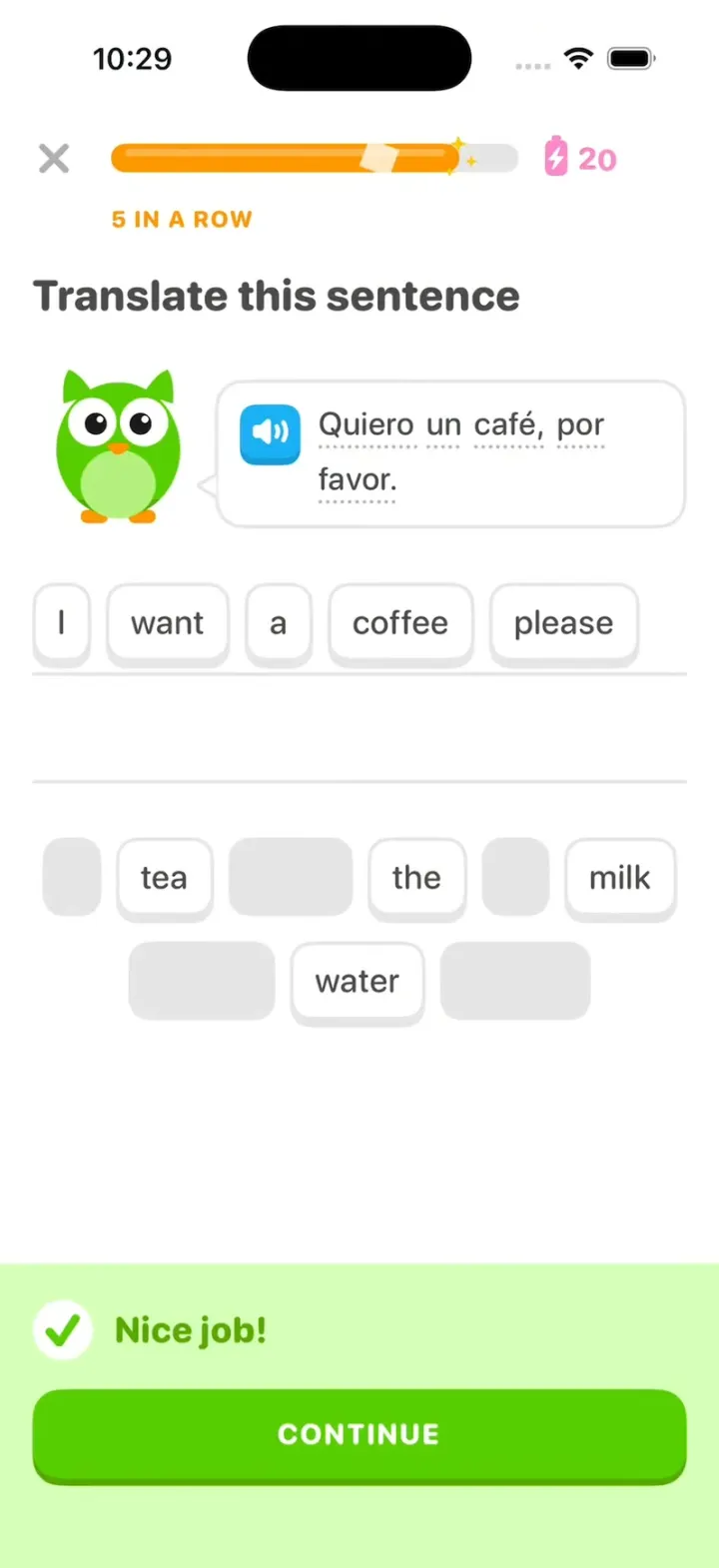
- A green "Nice job!" when you're right
- A streak, XP and leagues
- Daily quests with chests
Our Duolingo Clone has all of them, as a native iPhone app in Swift on sample data.
The real work is your course. Below, one message turns it into Japanese for travelers, and another into practice for the driver's permit test.
- Vibecode template$0to remix on a new account
- Clone script$2,998and up, at Oyelabs
- Agency build$80,000+per AppZoro, first version
See it running
Template
Duolingo CloneiOS
Duolingo clone · Swift and SwiftUI
A lesson path, word chips that fly to the answer line, "Nice job!", the streak, leagues and daily quests.
Remix copies the working Swift app into your Vibecode account, and a new account's first remix is free. Or open a new iOS app with the prompt below to build a fresh copy.
Open the template pageThe prompt we used
We built Duolingo Clone in two messages on Claude Opus 5.5. The first was the brief. The second fixed three things we saw in a 30 fps screen recording.
Word chips jumped instead of flying, two exercises overlapped on CONTINUE, and the START bubble hid behind a node. Together the two messages took 83 minutes and $16.26 of credits for the agent and its pictures.
Below, both are folded into one prompt. Paste it into a new iOS app project to build your own copy, or change the details first.
Prompt · 1,270 words
Build a polished native iOS clone of Duolingo in SwiftUI: the path, lessons with word-bank chips and the "Nice job!" banner, energy, the streak, Leaderboards, Quests and Profile.

It is Duolingo on screen: its name, colours and words, and Duo the owl drawn in SwiftUI (round green body, lighter belly, big white eyes with black pupils, small orange beak, ear tufts, small wings, orange feet; poses: idle with a blink, cheer, sad, wave). The learner is Sam Rivera, on a 27-day Spanish streak.

SHELL
Tabs (icons; selected in a Macaw-blue outlined tile): Learn (house), Leaderboards (shield), Quests (chest), Profile (face). Opens on Learn: no splash, onboarding, login, paywall or permission prompt. Top bar: Spanish flag, orange flame "27", gem "505", pink energy battery with a bolt "25".

SCREENS
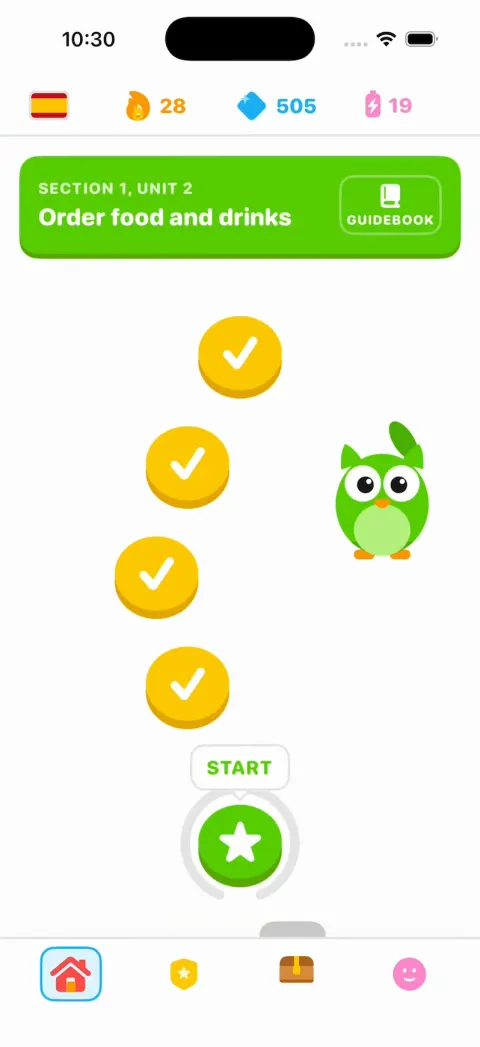
1. Learn: a green unit banner "SECTION 1, UNIT 2" / "Order food and drinks" with a "GUIDEBOOK" button; a winding path of round 3D nodes: 3 done (gold), node 4 current (green star) with a bouncing "START" bubble (fully visible above it, drawn above every node and the path, never overlapping another node), locked grey nodes, a chest and a trophy; Duo stands beside the path and waves. Node 4 opens a popover "Order food" / "Lesson 2 of 4" / "START +10 XP".
2. Lesson (full screen): X, a green progress bar that steps with a white shine (Fox orange with sparkles after 3 right in a row), energy at the right dropping 1 per CHECK. Seven exercises:
a) "Select the correct image": a blue speaker button + "el café"; 2x2 picture cards café, té, agua, leche (selected = Macaw border, #DDF4FF fill).
b) "Translate this sentence": Duo beside a speech bubble (blue speaker icon, dotted underlines) "Un café con leche, por favor."; two ruled answer lines; bank: A, coffee, with, milk, please, tea, the, water.
c) "Tap the matching pairs": café/coffee, té/tea, agua/water, pan/bread, leche/milk.
d) "Complete the sentence": "Yo ___ un café." quiero / quieres / quiere.
e) "Select the correct image": "la manzana" (apple, bread, cheese, orange).
f) "Translate this sentence": "Quiero un café, por favor." = I want a coffee, please (bank adds tea, the, milk, water).
g) "Translate this sentence": "Me gusta el café." = I like coffee (bank adds tea, you, milk).
Chips: white, 2 pt Swan border, 4 pt bottom edge, 19 pt text, 48 pt tall; a tapped chip visibly travels to its place on the line over 0.30 s (one floating copy in an overlay at the lesson's root, drawn above everything, animating between the two measured positions), leaving a grey slot; tap it to fly it back. CHECK (full width, Feather Green) is grey until there is an answer. CONTINUE is one clean page slide: the whole old exercise (header, Duo, bubble, its answer still on the line, its bank) moves left off screen as one piece while the new one comes in from the right, both over 0.25 s ease-in-out, nothing fading or overlapping; the banner is gone within 0.18 s; the top bar stays still. Right: a #D7FFB8 banner slides up with a white round check, praise ("Nice job!", "Amazing!", "Great job!") and a green CONTINUE. Wrong: a #FFDFE0 banner, "Correct solution:" and the answer, a red GOT IT; the picked card shakes.
3. Lesson complete: Duo jumps in confetti, "Lesson complete!", three stat boxes (coloured header, white body): TOTAL XP 15 (gold), AMAZING 86% (green), SPEEDY 2:14 (blue), CLAIM XP. Then the streak: a big flame with Duo, the orange number rolls 27 to 28 over "day streak", a Su Mo Tu We Th Fr Sa row whose orange check circles fill in turn up to today, today last, Duo's bubble "Keep it up! I'm off to brag about your streak.", CONTINUE back to Learn with node 4 done and node 5 current.
4. Leaderboards: "Ruby League", a row of league shields, "Top 10 advance to the next league", "3 days"; 30 learners (initial avatars, XP), PROMOTION ZONE and DEMOTION ZONE dividers, Sam 6th. After a lesson Sam's row slides up past two rows: "You moved up to 4th place!".
5. Quests: "Daily Quests" (Earn 30 XP 15/30, Get 10 in a row 3/10, Score 90% or higher in 2 lessons 1/2) with chests; a lesson updates them and full chests pop open.
6. Profile: "Sam Rivera", "SamRivera927", "Joined March 2025", Statistics (Day streak 27, Total XP 4,120, Ruby, 2 top 3 finishes), Achievements Wildfire 27/30, Sage 4,120/5,000, Scholar 214/250.

HOOK (the video's first 3 seconds)
- HOOK MODE: tapping an invisible 44x44 pt area at the top right, just below the status bar, on every screen, plays this run through the real lesson code, identical every time (seconds from the tap): 0.0 close everything and open the lesson at exercise f, 5 of 7 done, 4 in a row (orange bar), energy 21, "I want a" already on the line, held still; 0.40 "coffee," flies; 0.62 "please" flies; 1.00 CHECK; 1.05 "Nice job!"; 1.40 CONTINUE: the banner drops and g slides in from the right over 0.25 s; 1.75, 1.88, 2.01 "I", "like", "coffee" fly; 2.32 CHECK; 2.37 "Amazing!", the bar fills to 100% with a shine; 2.75 CONTINUE: Lesson complete, XP counts 0 to 15; 3.30 CLAIM XP: the flame ignites, 27 rolls to 28 by 3.75; the circles fill 3.75 to 4.10, today last with a pop.
- Holds use these times, never the app's normal delays. Every screen is fully drawn on its first frame (no whole-screen fades); only its contents animate. A chip stays visible through its whole flight; praise holds at full opacity until CONTINUE. Flashes at most 0.12 s at 35%. Motion stays in the middle 80% of the screen. Warm up haptics at launch.

LOOK
White; text #4B4B4B; Feather Green #58CC02 (edge #58A700), #89E219, Macaw #1CB0F6, red #FF4B4B (#EA2B2B text), gold #FFC800, Fox #FF9600, energy #FF86CD, borders #E5E5E5, #F7F7F7. SF Pro Rounded, heavy for titles and numbers. Buttons and nodes have a 4 pt darker bottom edge that sinks when pressed.

RULES
- Native SwiftUI, iOS 26 (keep the template's target), iPhone portrait; standard TabView, NavigationStack and sheets, so it also runs on iPhone Duo.
- Deterministic fixtures. No backend, login, permissions, analytics or network calls. No persistence: delete the SwiftData starter, no UserDefaults or files, so every launch starts the same.
- Picture cards: emoji first; once the app runs, flat gpt-image-1.5 illustrations (run env; $OPENAI_BASE_URL/images/generations with the project's OPENAI_API_KEY; white background, no text), curl-checked, never reviewed by eye, decoded off the main thread.
- Springs under 350 ms, haptics on key taps, pressed states, no dead buttons.
- Files under 300 lines, big bodies split into subviews, no long chained expressions.

REMIX-READY
Brand.swift (name, Duo views, a Copy enum with every word), Theme.swift (role colours, fonts; no colour literals elsewhere), Fixtures.swift (course, lessons, exercises, league, quests, profile), DemoScript.swift (HOOK MODE run and timings). Codable models; exercise kinds as an enum with one view each; one AppDataSource protocol (FixtureDataSource) behind an @Observable store; views never read Fixtures. Feature folders. README.md under 80 lines: file map; how to rename, recolour, swap the course; 3 one-prompt remixes ("Duolingo for X"). "Read README.md first." atop CLAUDE.md and ios/AGENTS.md; replace ios/CLAUDE.md's structure block with this app's files. No scratch folders.

FILMING
Long-press the top bar's flag to reset everything to launch.

BUILD
Theme, Brand, Fixtures, then each screen in small files, a one-line status per screen; launch in the simulator every two or three files. Images only after the app runs. Walk each flow once and fix what breaks; no pixel measuring or debug modes. Deliver the whole app, not a plan.
Duolingo clone features
What Duolingo Clone includes today, and what you add next. Everything in the template runs on sample data, with no login and no backend, so it works the moment you open it.
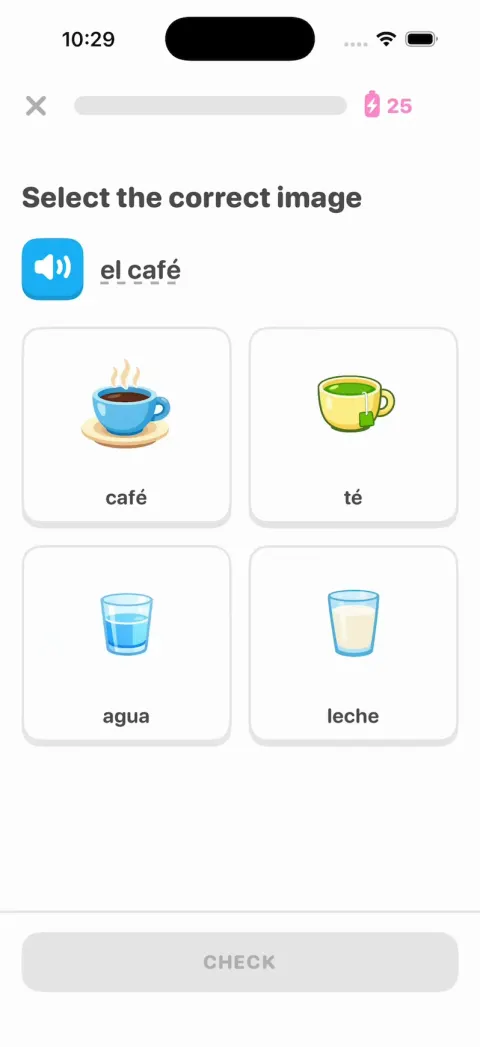
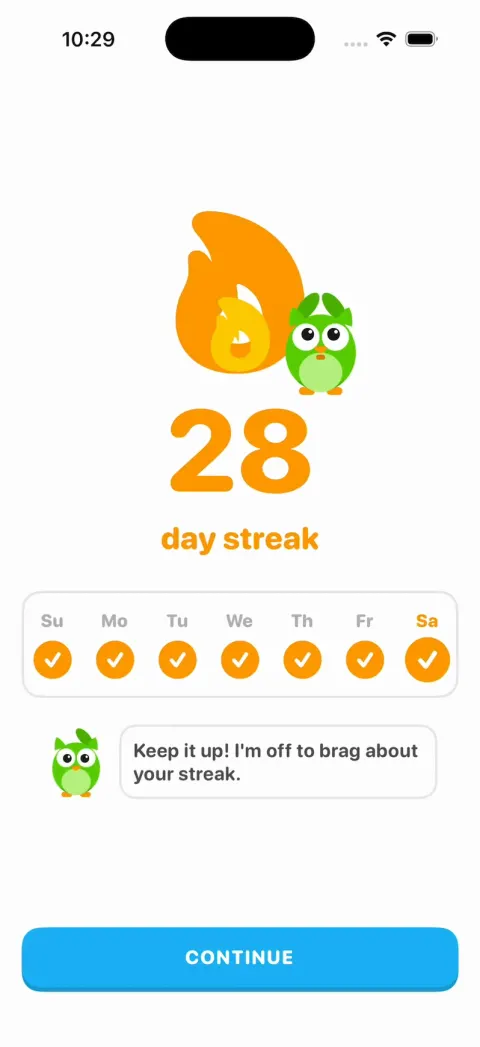
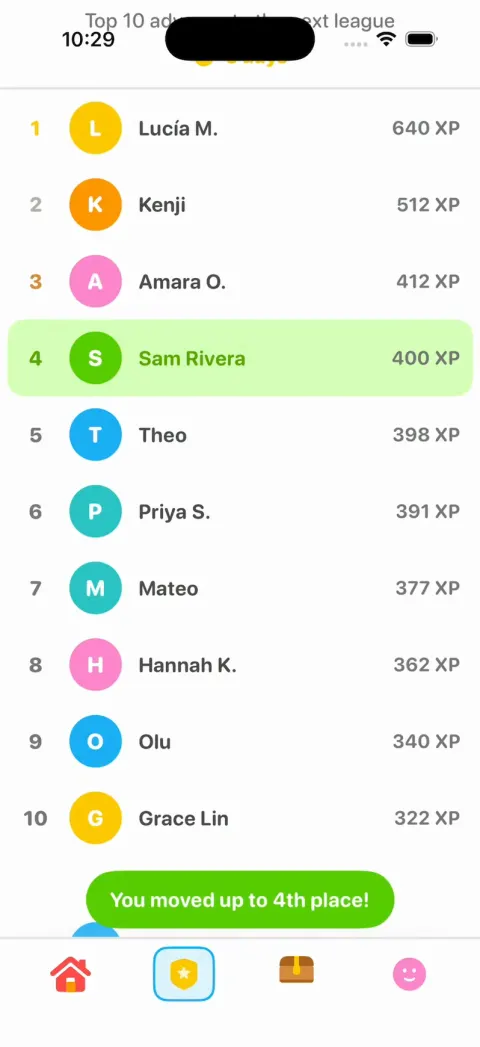
In the template
Learn path
SECTION 1, UNIT 2, a winding path of gold and green nodes, a bouncing START bubble, a chest, a trophy and Duo waving.
Seven-exercise lessons
Picture cards, sentences you build from word chips, matching pairs and fill-in-the-blank, all in Spanish.
Word chips that fly
A tapped chip flies from the bank to the answer line in 0.3 seconds, and back again when you tap it.
CHECK and the banners
A green "Nice job!" or a red "Correct solution:" with GOT IT. A wrong picture card shakes.
Speaker buttons
Tap the blue speaker to hear the Spanish, read by the iPhone's built-in voice.
Energy
A pink battery in the top bar that drops by 1 every time you press CHECK.
Lesson complete and the streak
TOTAL XP, AMAZING and SPEEDY boxes, then the flame lights up and the streak rolls from 27 to 28.
Leagues, quests and profile
The Ruby League with 30 learners, Daily Quests with chests that pop open, and the Wildfire, Sage and Scholar achievements.
Add with a prompt
Your own course
New words, sentences and pictures. We made a Japanese course and a driving test below.
Your own brand
A new name, mascot, colors and app icon, before it goes on the App Store.
Recorded voices
Audio that sounds like a person for every phrase, a slow turtle button and a "Tap what you hear" exercise.
Mistakes review
Words you miss come back tomorrow, then in 3 days, then in 7.
Accounts and saved progress
Sign-in, and XP and streaks that survive a reinstall. The template starts fresh on every launch.
Reminders
A daily notification before the streak runs out.
A paid plan
A subscription with a free trial, sold through Apple's in-app purchase.
How to build a Duolingo clone with Vibecode
- 1
Remix the template
Open the Duolingo Clone share page and press Remix. Vibecode copies the whole Swift project into your account, so you start from a working app instead of an empty screen. A new account's first remix is free.
- 2
Make it yours by chatting
Tell the agent what to change, in plain English. For example: "Rename the app to Tabi, make the accent cherry red, and turn the Spanish course into Japanese for travelers." Each change rebuilds the app and runs it in Vibecode's cloud iOS simulator, right in your browser.
- 3
Publish to the App Store
Click Publish, choose Publish to App Store and sign in with your Apple ID. Vibecode builds, signs and uploads the app to Apple, with no Mac and no Xcode. You need an Apple Developer account ($99/year) and the Plus plan or higher.
The hard parts of a real Duolingo clone
Screens are the quick part. These are what take the time once real people use it.
Your course is the real work
Every sentence needs a right answer, wrong chips that almost fit, and a picture. AI can draft a unit in minutes, but a fluent speaker should check it.
AppZoro, an agency, puts the content alone at $50,000 to $300,000 a year for each language course.
Listening and speaking
The template's speakers use the iPhone's built-in voice. It's free and works offline.
For voices that sound like a person, record each phrase once with text-to-speech and ship the files in the app. In our run, all the recordings together came to 8 cents of credits.
Speaking exercises are harder. They need the microphone, speech recognition and a fair way to grade an accent.
Sources: ElevenLabs text-to-speech in VibecodeElevenLabs text-to-speech
Streaks and leagues need a backend
The template forgets everything when you close it. That's on purpose, so every demo starts on day 27.
A real streak needs saved progress, plus rules for time zones and missed days.
Real leagues need a backend that groups learners each week. Until then, the other 29 learners in the Ruby League are sample data.
Source: Add a database and user login
Teaching kids
If you list the app in Apple's Kids Category, it has extra rules.
No links out of the app and no purchases, unless they sit behind a parental gate. No third-party ads or analytics either, apart from a few exceptions.
You also have to follow the privacy laws on collecting data from children.
Source: App Review Guideline 1.3
Take it from template to real app
Steps 1 to 7 each ran in a fresh remix of the template. Steps 1 to 3 each replace the Spanish course, so pick one. Step 5 voices the Spanish course; for another course, name its language instead. Send the rest one at a time and test before the next.
- 1
Make it Duolingo for something else
The day we built the template, one more message made a remix Duolingo for brainrot. It took 7 minutes and $2.15 of credits on Claude Opus 5.5.
The course became Brainrot, with a 💀 flag. Its lessons teach Gen Alpha slang, and XP is called aura.
HOOK MODE is the template's built-in demo. It plays the end of a lesson in about 4 seconds, so the app is easy to film.
Prompt
Make this Duolingo for brainrot. Keep every screen, animation and HOOK MODE timing. The course becomes Brainrot (a 💀 flag): its lessons teach Gen Alpha slang (cooked, rizz, aura, mid, mog, tuff, 6 7) under the header "Translate this brainrot", and XP is called aura. HOOK MODE still opens on the one Spanish exercise kept from this app exactly as it is ("Translate this sentence", "Quiero un café, por favor.", "Nice job!"); then it's Duo saying "bro is cooked 💀" = He is doomed, its banner slides up like "Nice job!" and reads "+1000 aura", TOTAL AURA counts to 1000, and the streak rolls 66 to 67.
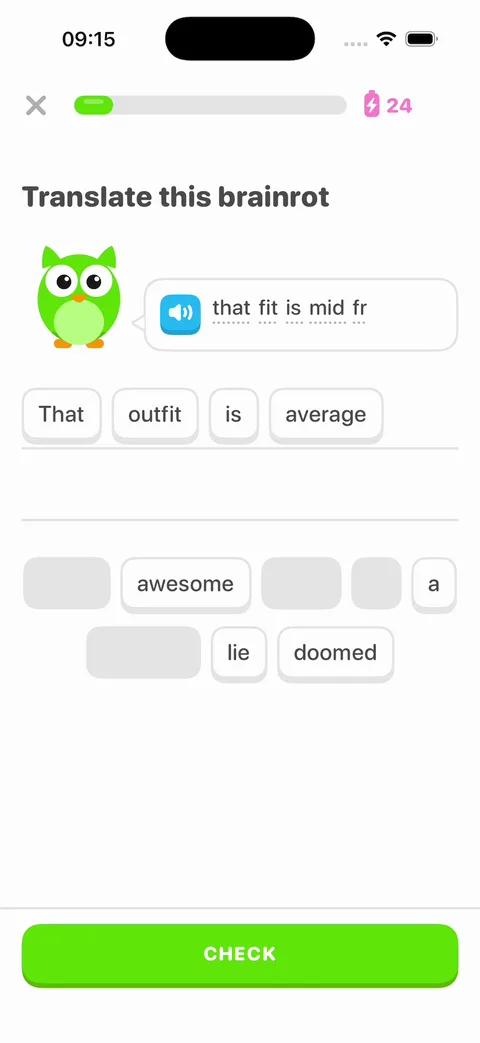
Duolingo for Brainrot: Translate this brainrot, with Duo saying that fit is mid fr and That outfit is average built from chips - 2
Teach another language
We sent this message to a fresh remix on November 17, 2026, to make a Japanese course for travelers. It took 6 minutes and $7.67 of credits on Claude Opus 5.5.
You pick the model for each message. We picked Claude Opus 5.5 for every message we ran. Changes default to GPT-6.1 Sol, so your minutes and credits may differ.
Our credit figures are what the agent used. Simulator and build time came on top, 61 cents to $1.10 per step.
Every phrase now shows in Japanese with its romaji under it. The agent made new ramen and station pictures, then played four exercises and the demo to check them.
To keep the demo's timing, it put "How much" on a single chip.
Prompt
Make this Duolingo for Japanese, for people visiting Japan. Keep every screen, animation and HOOK MODE timing. The course becomes Travel Japanese (a 🇯🇵 flag), and the unit banner reads "SECTION 1, UNIT 2" / "Eat and get around". Show each Japanese phrase in Japanese script with its romaji in grey under it. Picture cards: ラーメン (ramen), 駅 (station), 水 (water), お茶 (tea). Sentences to translate: "すみません、駅はどこですか?" = Excuse me, where is the station?, "ラーメンをください。" = Ramen, please, and "これはいくらですか?" = How much is this? Matching pairs: はい/yes, いいえ/no, ありがとう/thank you, すみません/excuse me, おはよう/good morning. HOOK MODE plays the same beats on the new sentences.
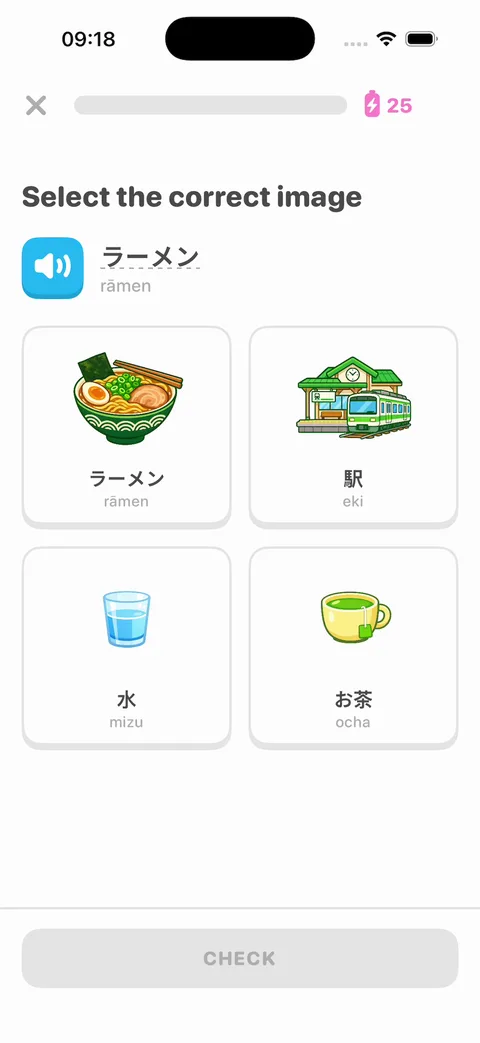
Travel Japanese after one message: Select the correct image for ラーメン (rāmen), with picture cards for ramen, a train station, water and tea - 3
Teach something that isn't a language
The exercises work for any subject with right and wrong answers. This message turned a fresh remix into practice for the driver's permit test, in 7 minutes for $6.84 of credits.
The agent drew the four road signs in SwiftUI, with no image files. It played the four exercises we asked for and the demo, and checked that a wrong match shakes red.
It also switched the speakers from a Spanish voice to an English one, without being asked.
Prompt
Make this Duolingo for the driver's permit test. Keep every screen, animation and HOOK MODE timing. The course becomes Permit Test (a 🚗 flag), and the unit banner reads "SECTION 1, UNIT 2" / "Signs and signals". Draw the road signs in SwiftUI: a red octagon STOP sign, a red and white YIELD triangle, a white railroad crossbuck and a yellow pentagon school sign. Exercises: "Which sign means stop?" with the four signs as picture cards; "Finish the rule", where word chips build "At a stop sign, come to a full stop."; matching pairs of each sign and its meaning; and "A flashing red light means ___." with stop / slow down / speed up. HOOK MODE plays the same beats on the new exercises.
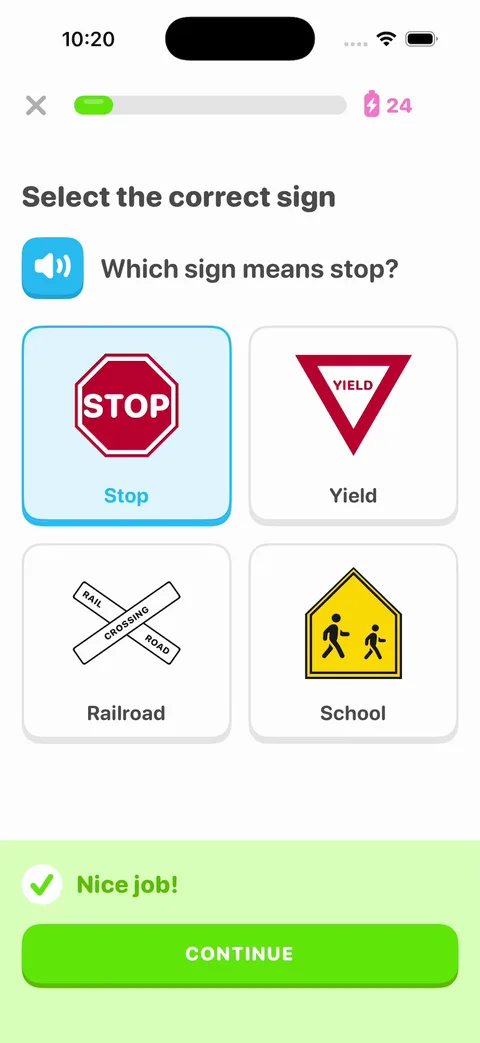
Permit Test after one message: Which sign means stop? with STOP, YIELD, railroad crossing and school signs drawn in SwiftUI, and Nice job! - 4
Give it your own name and mascot
Before the App Store, the app needs a name and look of its own. This message renamed a fresh remix Tabi, in 5 minutes for $4.29 of credits.
Kit, a red fox drawn in SwiftUI, took Duo's place with the same four poses. Cherry red replaced the green, and the new app icon cost 7 cents.
The agent made wrong answers orange, so they don't look like the new brand color. It also warned that the screens still follow Duolingo's layout closely.
Prompt
Rename the app to Tabi and give it a look of its own, so it can go on the App Store. Replace every "Duolingo" in the app, the home screen name and the app icon included. Replace Duo with Kit, a red fox drawn in SwiftUI with the same poses (idle with a blink, cheer, sad, wave). Make the accent cherry red (#D7263D) in place of Feather Green. Keep every screen, animation and HOOK MODE timing.
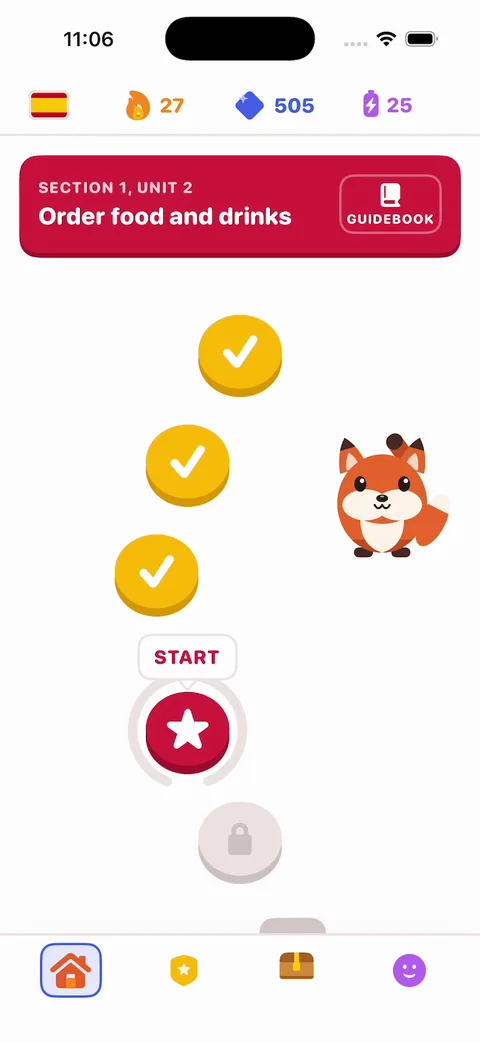
Tabi after one message: a cherry red unit banner and START node, with Kit the red fox waving beside the lesson path - 5
Record voices that sound like a person
After this message, every Spanish word and sentence plays an ElevenLabs recording instead of the iPhone's built-in voice. The files ship inside the app.
It took 8 minutes and $6.81 of credits. All the recordings, at two speeds and with retakes, came to 8 cents of that.
The agent added a turtle button for slow audio and a new "Tap what you hear" exercise. It turned the audio back into text, and every sentence matched.
It used a standard ElevenLabs voice set to Spanish, so have a native speaker listen.
Prompt
Make the blue speaker buttons talk. Use ElevenLabs text-to-speech to record every Spanish word and sentence in the course now, in one natural Spanish voice, and ship the audio files inside the app, so playing them costs no credits and works offline. Tapping a speaker plays its phrase, and each exercise with a speaker plays it once when it opens. Add a turtle button beside the speaker that plays it slower. Add a "Tap what you hear" exercise to the lesson: a big speaker and a turtle, then word chips to build the Spanish sentence you heard. Keep every other screen and every HOOK MODE time exactly as it is.
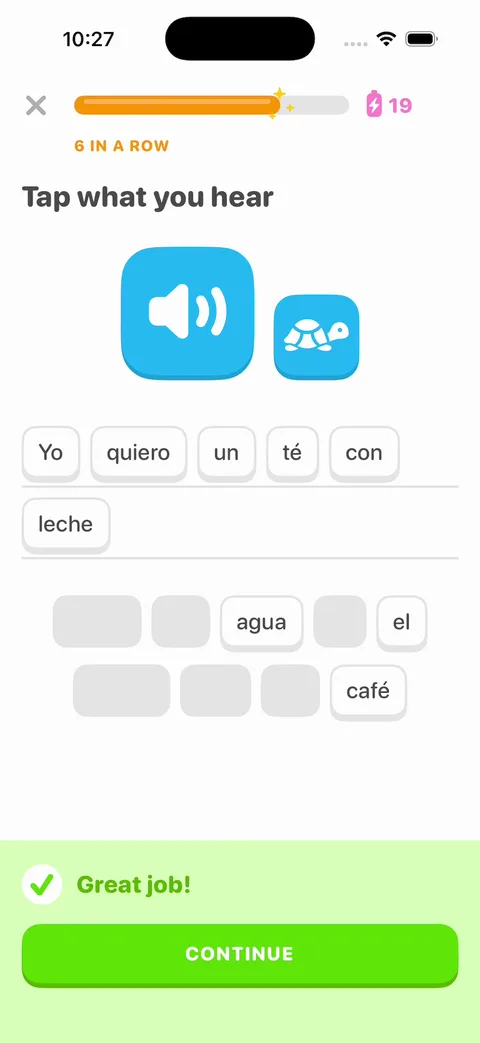
The new Tap what you hear exercise: a big speaker and a turtle button, Yo quiero un té con leche built from Spanish chips, and Great job! - 6
Bring back the words you miss
This message added a Practice tab with a mistakes review. It took 9 minutes and $7.46 of credits.
A wrong answer comes back tomorrow. Right answers push it to 3 days, then 7, and the third right answer in a row clears it.
The agent ran a review, got one wrong on purpose, and checked that the list survived closing the app.
Prompt
Add a Practice tab with a mistakes review. Every word or sentence you get wrong goes into Your mistakes and comes back for review 1 day later, then 3 days, then 7 days, until you get it right three times in a row. Save it on the phone so it survives a relaunch. Practice shows how many are due today, a START REVIEW button that runs them through the same exercise screens, and the full list with when each one is next due. Seed 6 sample mistakes, 4 of them due today, so the tab isn't empty. Keep every other screen and every HOOK MODE time as it is.
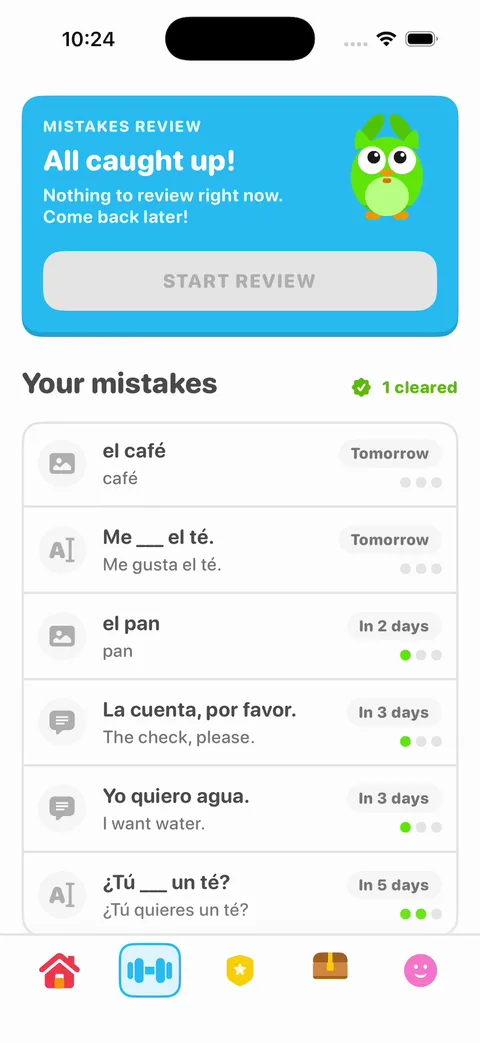
The Practice tab after one review: all caught up, each mistake due again tomorrow or in 2, 3 or 5 days, and 1 cleared - 7
Save progress with accounts
Vibecode Cloud adds a database, and sign-in with a code sent by email. This message set it up in 12 minutes for $8.20 of credits.
New people still start without an account. After their first lesson, a sheet asks them to save their progress.
The agent signed up, signed out and back in, and got the same streak and XP back. It read the sign-in codes from the database, since it couldn't open an inbox.
Before the app goes on a real phone, its backend has to be deployed.
Prompt
Add Vibecode Cloud so progress is saved. Let learners sign in with an email code. Save each learner's XP, streak, gems, finished lessons and league rank in the database, so it is all still there after they delete the app or switch phones. New people still open straight on Learn and can play without an account. After their first lesson, show a sheet that says "Create a profile to save your progress!" with the email sign-in. Add Sign out and Delete account to Profile. Keep every other screen and every HOOK MODE time as it is.
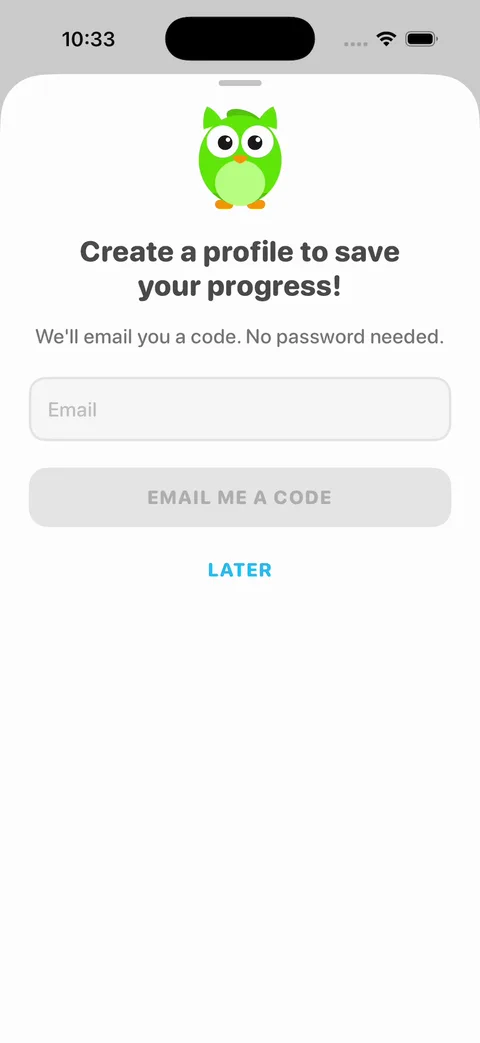
The sign-up sheet after the first lesson: Create a profile to save your progress! with an email field, EMAIL ME A CODE and LATER - 8
Charge for a paid plan
Duolingo charges for Super, a subscription. On iPhone, that usually goes through Apple's in-app purchase.
Our RevenueCat docs say the agent sets it up from one message in a native iPhone app. You need a paid Vibecode plan, an Apple Developer account and a RevenueCat account.
We haven't run this step. It creates real products in App Store Connect, and it needs you to sign in to RevenueCat and Apple.
Prompt
Add a monthly and a yearly subscription called Pro, with a 7-day free trial. Pro removes the energy limit. Show the paywall when energy runs out, and add Restore Purchases.
What a Duolingo clone costs
The Vibecode template is the only iPhone app here you can start for $0. A new account's first remix is free. Changes after that use credits.
It's a native iPhone app on sample data. So it fits when you want to see your own course running first.
To make an app like Duolingo any other way, you start from code or pay someone. Lingo, the top Duolingo clone on GitHub, is free under the MIT license. It's a web app you host with your own Clerk, Postgres and Stripe accounts.
We checked each price below on the company's own page on November 17, 2026.
| Option | Upfront cost | What you own | First version | Still on you |
|---|---|---|---|---|
| Open-source code | $0 for Lingo on GitHub (MIT license) | The code. It's a web app, not an iPhone app. | Depends on your setup. You add your own Clerk, Postgres and Stripe keys. | Hosting, your course, an iPhone app and every change |
| Clone script | $300 (Bobolingo on Patreon, web only) to $2,998 and up (Oyelabs, with the apps) | Source code. Bobolingo is sold as-is. | About 10 days, per Oyelabs. Bobolingo's setup is on you. | Your course, and paying for changes after launch |
| Development agency | From £30,000 (Wall & Fifth). $80,000 to $200,000 for a first version in one language (AppZoro). | What your contract says | 8 weeks (Wall & Fifth). 6 to 9 months (AppZoro). | Your course, and paying for each change after launch |
| Vibecode templateThis template | $0 to remix on a new account. Plans from $20 a month. | The app and its code. Download it on Pro ($50 a month). | Under a minute to remix. 6 minutes for our Japanese course, on sample data. | Your course, recorded audio, accounts, a paid plan, and your own name and look |
Sources: Lingo, the top Duolingo clone on GitHubBobolingo source code on PatreonOyelabs Duolingo cloneWall & Fifth: build an app like DuolingoAppZoro: how to make an app like DuolingoVibecode pricingVibecode terms (who owns your app)
Frequently asked questions
Is it legal to build a Duolingo clone?
Yes. A lesson path, word chips, streaks and leagues are common patterns. Lots of learning apps use them.
Duolingo's name, Duo the owl and its green belong to Duolingo. So give the app its own name, mascot, colors and icon before you publish it.
One message did all of that for us. It renamed a remix Tabi, swapped Duo for Kit the fox and made it cherry red, in 5 minutes. Step 4 under "Take it from template to real app" has the prompt.
Can I publish a Duolingo clone to the App Store?
Yes, as your own app.
Apple doesn't allow another developer's name or icon in your app's name or icon without their OK (4.1(c)). It also rejects apps that copy a popular app with only small changes (4.1(a)). So give yours its own name, look and course.
A new name and mascot are a start. Our Tabi remix still had Duolingo's layouts, leagues and gems, so change a few of those too.
If you sell a subscription, Apple asks for in-app purchase (3.1.1), though US apps may also link to a web checkout. Before you submit, ask the agent to remove the hidden demo button at the top right.
Vibecode publishes to the App Store on the Plus plan and up, with your Apple Developer account.
Sources: App Review Guideline 4.1App Review Guideline 3.1.1How to publish to the App Store with Vibecode
Does the Duolingo clone work on Android?
No. Duolingo Clone is a native iPhone app written in Swift, so it runs on iPhone only.
For Android, start a new app in Vibecode and choose Legacy, then Mobile app (Legacy). It builds React Native apps for iPhone and Android. Paste the prompt from this page there and ask for React Native instead of SwiftUI.
You submit the Android app to Google Play yourself.
Can I add a real backend to the Duolingo clone?
Yes. Duolingo Clone runs on sample data, so it works the moment you remix it.
When you need real users, Vibecode Cloud adds a database, sign-in and file storage with one prompt. That's enough for learner accounts, XP, streaks, finished lessons and league points. It's on the Plus plan and up.
You can also connect Supabase, Firebase or your own API.
Can a Duolingo clone teach something other than a language?
Yes. The exercises work for any subject with right and wrong answers.
One message turned a remix into practice for the driver's permit test, with road signs drawn in SwiftUI. It took 7 minutes.
Step 3 under "Take it from template to real app" has the prompt.
Does the Duolingo clone play audio?
Yes. The blue speaker buttons read each phrase with the iPhone's built-in voice, in Spanish.
For voices that sound like a person, step 5 recorded every phrase with ElevenLabs and put the files in the app. All the recordings came to 8 cents of credits, and playing them is free.
Sources: ElevenLabs text-to-speech in VibecodeElevenLabs text-to-speech
How long does it take to make an app like Duolingo?
Remixing this template gives you a working app in under a minute. Our Japanese course took one more message and 6 minutes.
A real course takes longer. You write and check every lesson, add audio, and save each learner's progress.
Wall & Fifth, an agency, quotes 8 weeks for a first version. AppZoro, another agency, puts a first version in one language at 6 to 9 months.
Sources: Wall & Fifth: build an app like DuolingoAppZoro: how to make an app like DuolingoCan I vibe code Duolingo? Our verdictHow to make an app
What does a Duolingo clone app cost to run?
On Vibecode, plans start at $20 a month with $20 of credits. Each change you ask for uses credits.
The changes on this page used $2.15 to $8.20 of credits each for the agent, plus 61 cents to $1.10 of build and simulator time.
Once the app has accounts, its backend needs a deployment. Plus includes 1, and each extra one is $20 a month.
Apple charges $99 a year to publish. RevenueCat is free below $2,500 of monthly tracked revenue, then takes 1%.
Sources: Vibecode pricingVibecode deploymentsApple Developer ProgramRevenueCat pricingSubscriptions with RevenueCat in Vibecode
How is this different from a Duolingo clone script?
A script is ready-made code, often for a web app, phone apps and an admin panel. You buy it and set it up, or pay a vendor to.
Oyelabs sells one from $2,998 and says it launches in about 10 days. Bobolingo's code is $300, sold as-is, for a web app.
Our template is a native iPhone app in Swift, on sample data. It's $0 to remix on a new account, and you change it by chatting.
None of them writes your course for you.
Sources: Oyelabs Duolingo cloneBobolingo source code on PatreonVibecode terms (who owns your app)
Is the Duolingo Clone template free?
A new account's first remix is free. It counts as that account's free first build. You get your own copy of the Swift project, with 2 free minutes in the simulator.
After that, remixing and running an app need credits. Every change you ask the agent for uses credits too.
Publishing to the App Store needs a paid plan (Plus and up) and an Apple Developer account ($99/year). Downloading the source code is on the Pro and Max plans. See the pricing page for current plans.
More templates
All templates- View template
ChatGPT Clone
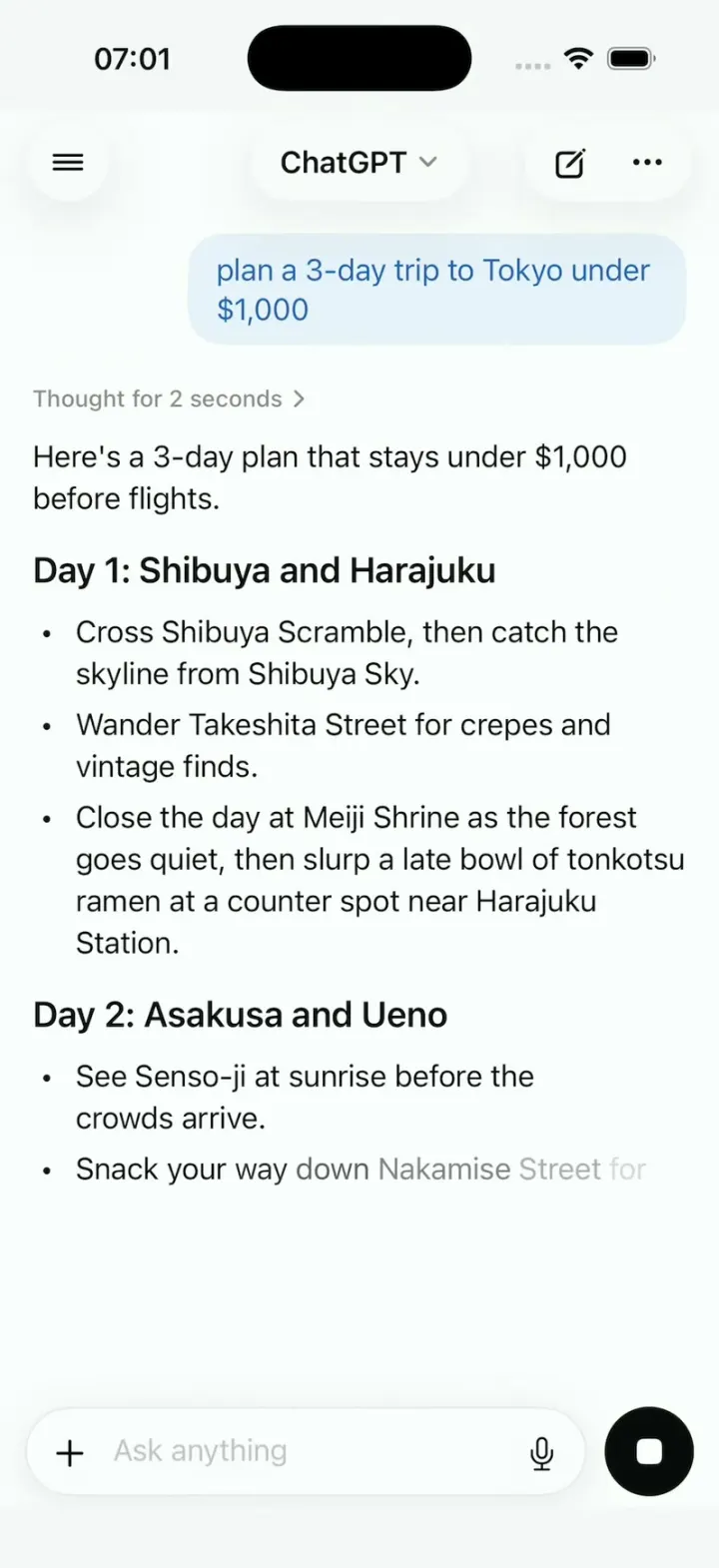
iOSChatGPT on iPhone: answers stream in word by word, a Tokyo map sharpens from a blur, and voice mode breathes.
- View template
Netflix Clone
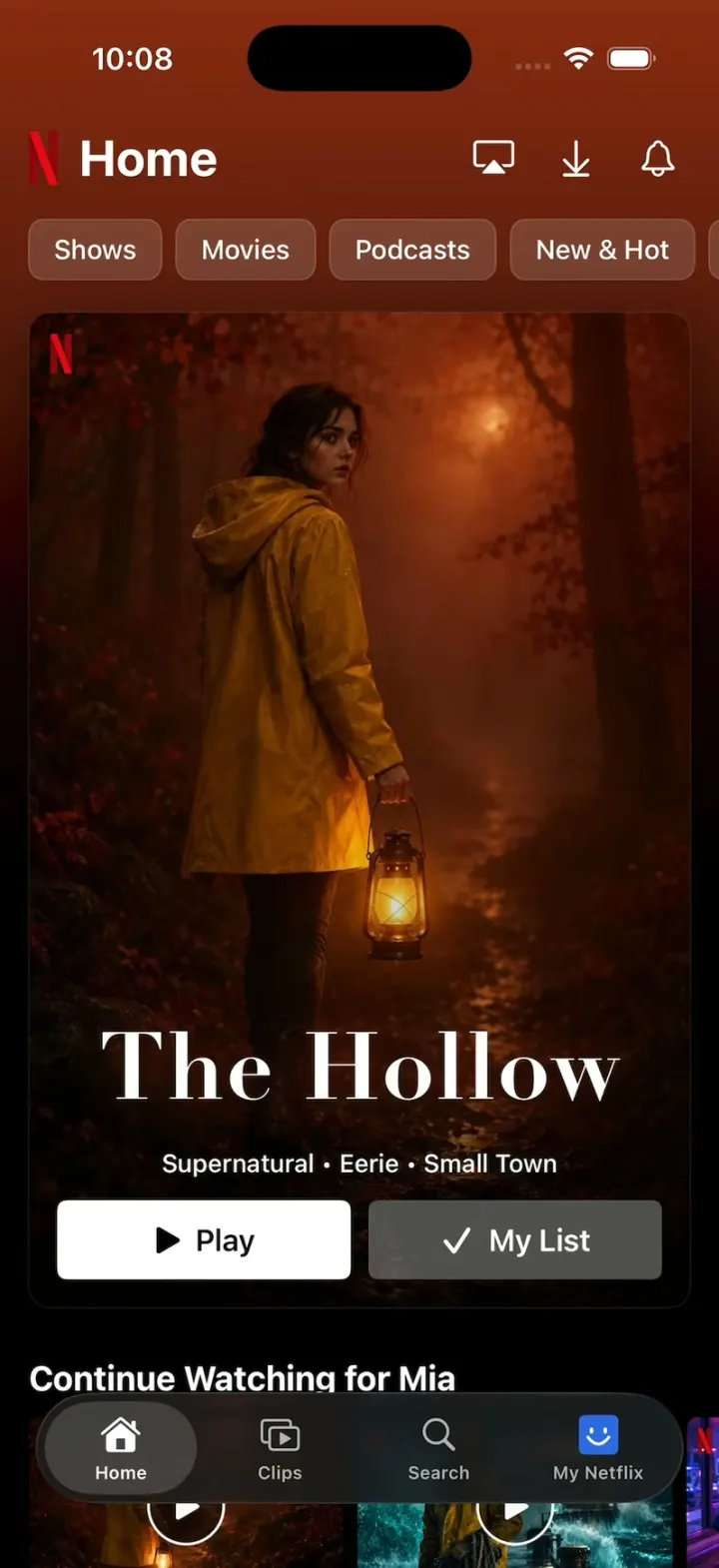
iOSNetflix's real look: chips swap the hero and its colour, giant Top 10 numerals, trailers, Clips and Love this!
- View template
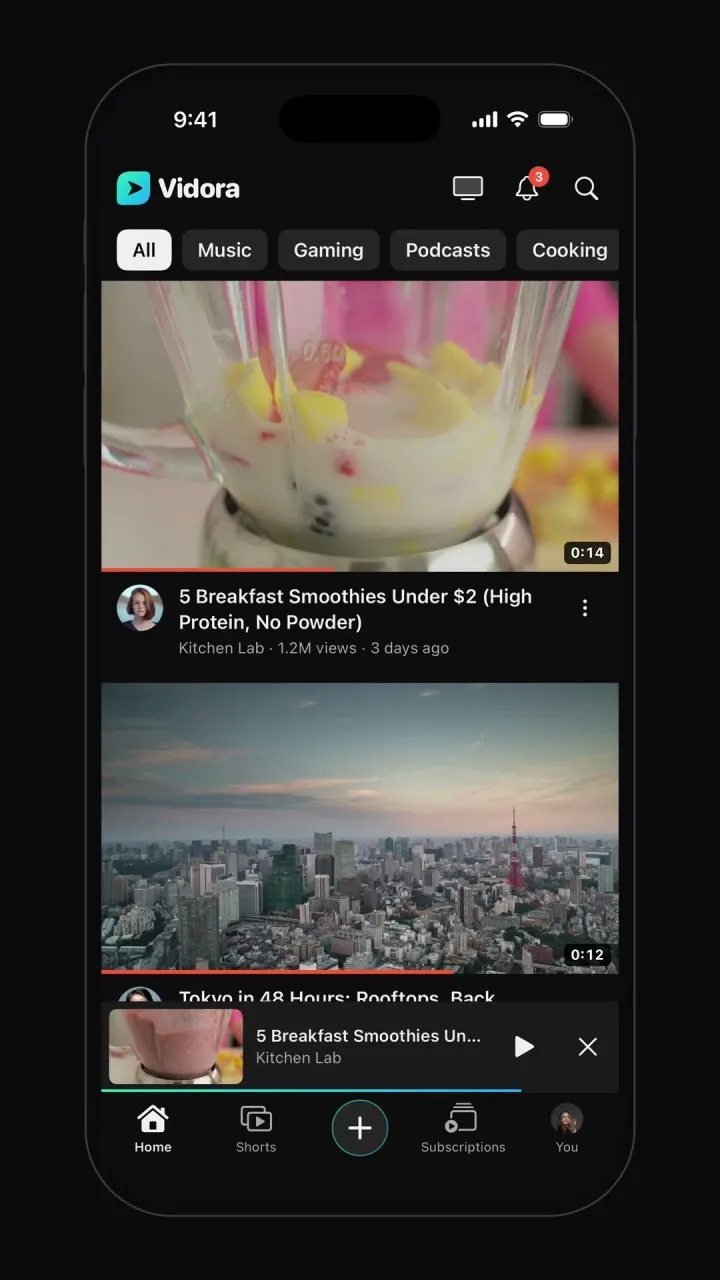
YouTube clone
iOSTopic-chip home feed, watch page with up next, draggable mini-player, Shorts, search and subscriptions.

Other guides: Instagram cloneUber cloneDoorDash cloneAirbnb cloneTikTok cloneSpotify cloneTinder cloneCash App cloneDiscord clone
Browse all app templates. Each one is a native Swift app made with Vibecode's iOS app builder.
Have an idea of your own? The free Can I vibe code it? checker tells you what it takes and writes your first prompt.
Choosing a builder? Read the best AI mobile app builders guide or compare Vibecode with other app builders.
About the editorial team
Vishal is a product engineer at Vibecode. Before Vibecode he did product engineering at EarnIn and co-founded Ivella (YC S21), a banking app for couples. He studied computer science at Duke.