
Table of contents
TL;DR
How do you build a DoorDash clone?
This article will go through the exact steps of building a DoorDash clone. You can follow along, or scroll to the bottom and remix the version we already made you. It's $0 on a new account!
Miracuves sells a white-label DoorDash clone for $3,399. Appinventiv, an agency, quotes $25,000 to $100,000 or more. Ours is $0 to remix on a new account.
DoorDash has:
- Restaurant pages with menus
- Sizes and add-ons
- A Dasher tip at checkout
- Live tracking on a map
- A drop-off photo at your door
Our DoorDash Clone has all of them, on sample data. It's the app customers order from.
A real DoorDash also needs a restaurant app, a Dasher app and an admin panel, with dispatch in the middle. Below, we build a restaurant dashboard and a courier app too.
- Vibecode template$0to remix on a new account
- White-label script$3,399one time, at Miracuves
- Agency build$25,000+per Appinventiv
See it running

Template
DoorDash CloneiOS
DoorDash clone · Swift and SwiftUI
Store pages and menus, sizes and add-ons, checkout with a Dasher tip, then the Dasher driving to your door and the drop-off photo.
Remix copies the working Swift app into your Vibecode account, and a new account's first remix is free. Or open a new iOS app with the prompt below to build a fresh copy.
Open the template pageThe prompt we used
We built DoorDash Clone in two messages on Claude Opus 5.5. The first was a brief with 6 screenshots of the real DoorDash app. The second fixed five things we saw when we watched it at 30 frames a second. Together they took 46 minutes and $34.11 of credits for the agent and its pictures.
Below, both are folded into one prompt, without the screenshots. Paste it into a new iOS app project to build your own copy, or change the details first.
Prompt · 2,292 words
Build a polished native iOS clone of DoorDash in SwiftUI: Home, Search, store pages, item options, the cart, checkout with a Dasher tip, live order tracking on a map with the four-step tracker, Order Complete with the drop-off photo, Orders and Account, in DoorDash's current design.

It is DoorDash on screen: its name, its red, the dash mark (exact geometry below) and its own words (quoted). The attached screenshots are the real app: 1 Home, 2 a store page, 3 an item, 4 the cart, 5 tracking, 6 Order Complete. Copy their layouts, sizes and words; every restaurant, dish, person and photo is fictional (below). Light mode only. The user is Sam Rivera at 412 5th Ave, Brooklyn.

SHELL
A NavigationStack rooted at Home, no tab bar (as attached). A floating white "Search DoorDash" capsule sits over Home's bottom edge; once the cart has items a red "View Cart" capsule (count circle, "View Cart", subtotal) rides above it. Opens on Home: no splash, onboarding, login, paywall or permission prompt. The status bar is always visible (white over hero photos).

SCREENS
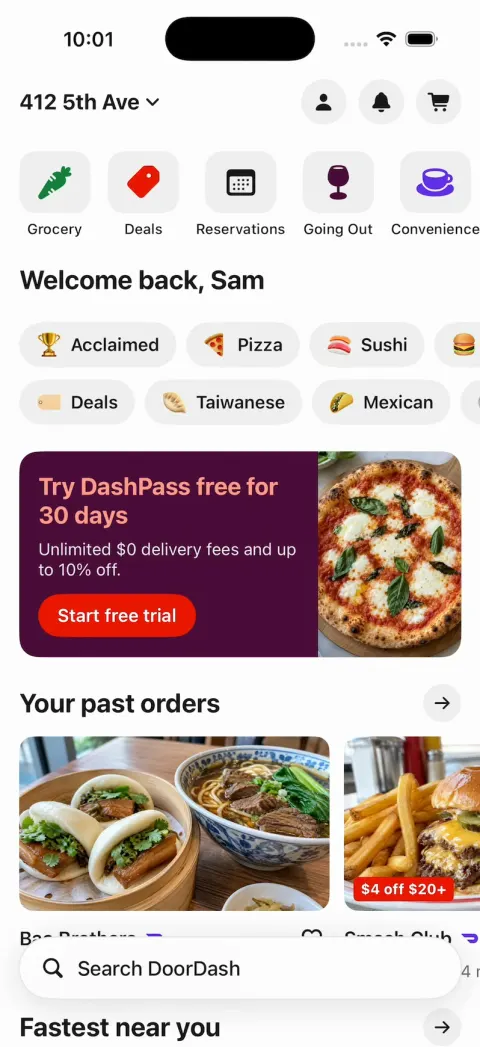
1. Home (as attached): "412 5th Ave ⌄"; account, bell and cart circles (#F1F1F1; the cart gets a red badge); icons over labels: Grocery, Deals, Reservations, Going Out, Convenience, Retail; "Welcome back, Sam"; two rows of cuisine chips (emoji + label): 🏆 Acclaimed, 🍕 Pizza, 🍣 Sushi, 🍔 Burgers / 🏷️ Deals, 🥟 Taiwanese, 🌮 Mexican, 🥗 Healthy; a wine promo card (#4C0C3A): "Try DashPass free for 30 days" (salmon), "Unlimited $0 delivery fees and up to 10% off.", red pill "Start free trial", a pizza photo; carousels "Your past orders" and "Fastest near you" (photo, name, ♡, "4.8 ★ (2k+) · 0.3 mi · 18 min", a red "$4 off $20+" tag on some); "Most popular local spots" (full-width photo cards, name + DashPass mark, "$0 delivery fee over $12"). Chips open filtered lists; the account circle opens Account.
2. Search: "Recent searches" chips, "Top categories" emoji tiles; typing filters stores and dishes live.
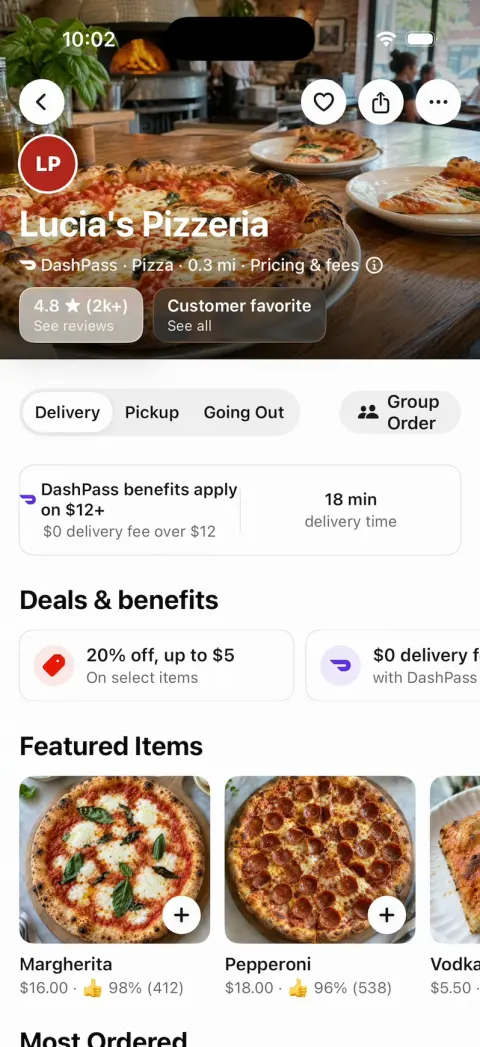
3. Store page (as attached): full-bleed 300 pt hero with a dark fade; white circles back, ♡, share, ⋯; logo circle (initials on the store colour), name (white, bold 30), "DashPass · Pizza · 0.3 mi · Pricing & fees ⓘ"; glass chips "4.8 ★ (2k+) / See reviews", "Customer favorite / See all"; segmented "Delivery Pickup Going Out" + "Group Order"; "DashPass benefits apply on $12+" | "18 min delivery time"; "Deals & benefits"; "Featured Items" (photo cards with a + circle, "👍 98% (412)"); "Most Ordered"; menu rows with photo right. Once the hero scrolls away, a white sticky bar fades in (0.15 s) behind a dark status bar: the back circle, the store name (semibold 17, centred), the ♡, share and ⋯ circles; it fades out when the hero returns.
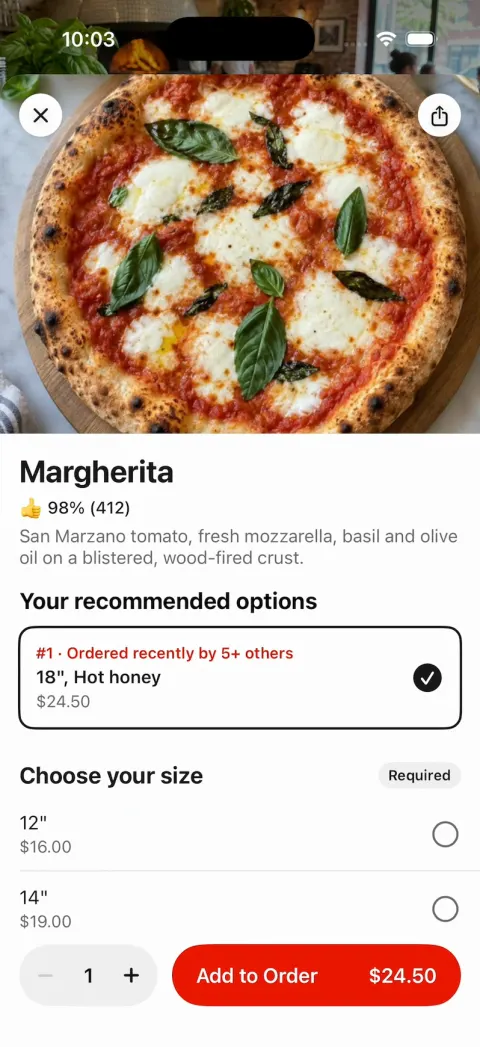
4. Item sheet (as attached): hero, X and share circles; name (bold 26); "👍 98% (412)"; description; "Your recommended options" ("#1 · Ordered recently by 5+ others"); "Choose your size" (Required) when a dish has sizes; "Add On's · Optional · Select up to 5" rows with ⊕; a quantity stepper; a red "Add to Order" bar with the live total. It closes the sheet and the View Cart capsule springs up (0.9 → 1.06 → 1.0).
5. Cart (as attached): "Cart", X; store card ("18–28 min", subtotal, "Add items"); trash / count / + steppers; purple "Add $2 to save with DashPass" + progress bar; "Complement your cart"; red "Continue".
6. Checkout: Delivery | Pickup; "Address details" (412 5th Ave, Apt 3R, "Leave it at my door"); "Delivery time": Standard 18–28 min / Schedule Ahead; "Cart summary"; "Dasher tip" ("100% of your tip goes to your Dasher", $3 $4 $5 Other); "Price summary" (Subtotal, Delivery Fee $0.00, Service Fee, Estimated Tax, Dasher Tip, Total); a red "Place Order": haptic, the cart empties, the order's tracking slides up.
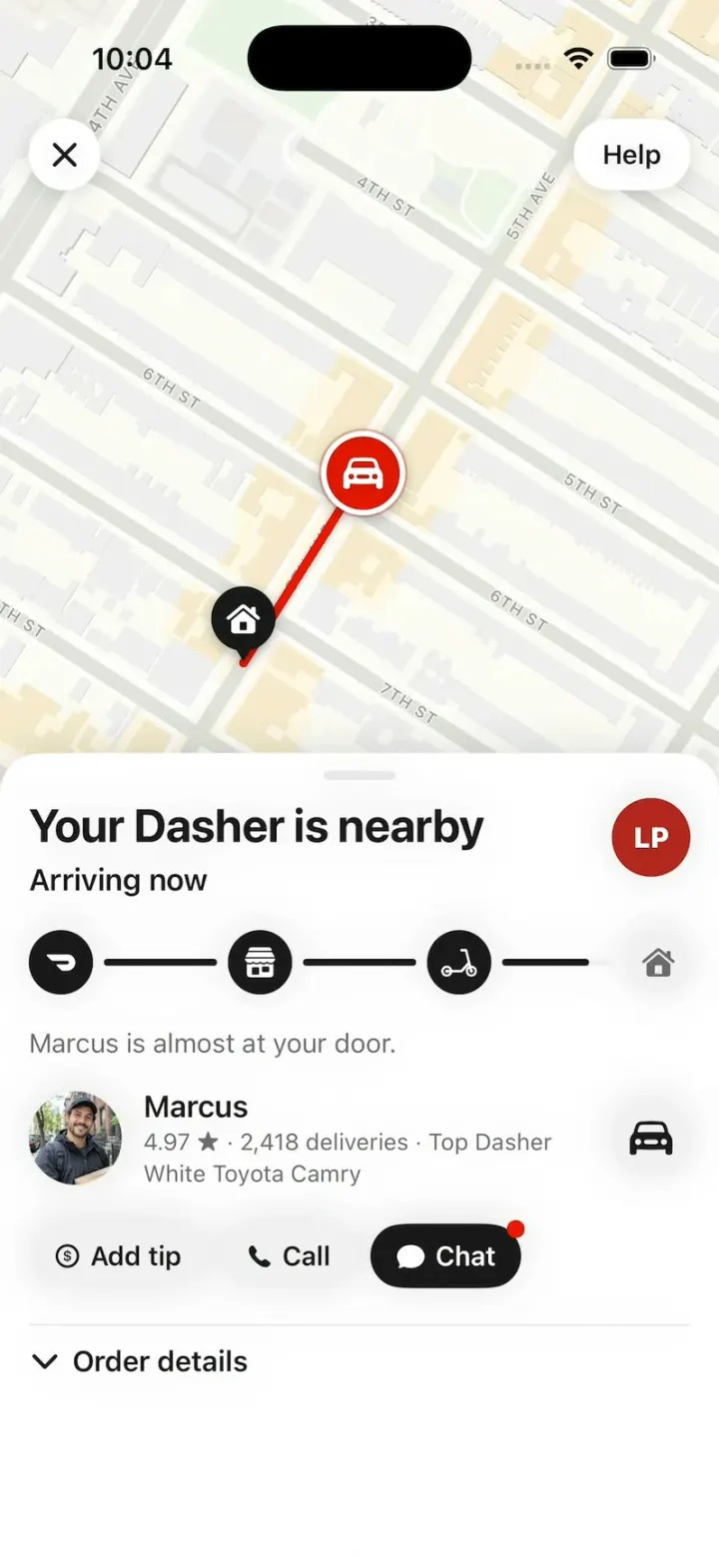
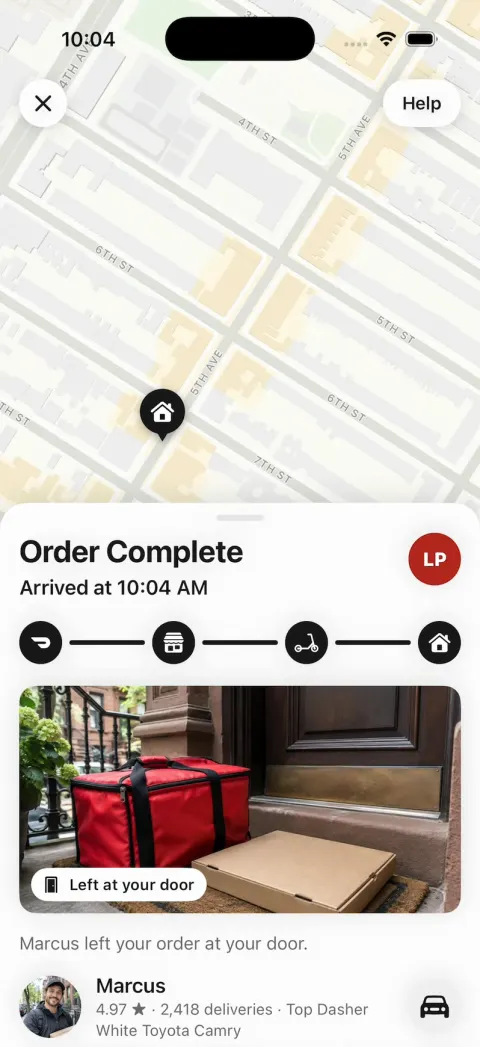
7. Tracking (as attached; the hook lives here): a full-bleed map; X circle top left, "Help" pill top right. Pins: home = black teardrop with a white house; store = black teardrop with a white storefront; the Dasher = a 44 pt #EB1700 circle with a white car, a white ring and a soft pulsing red halo, never rotated, above the pins; a 5 pt red route line from the Dasher to home, shortening as he drives. On arrival the red circle shrinks into the home pin over 0.3 s (scale 1 → 0.4, opacity 1 → 0) while the home pin pops (1 → 1.25 → 1, spring) with the house step. The sheet (grabber; its default height leaves the top 48% of the map visible): title (bold 26), subtitle (semibold 17), the store's logo circle; the tracker: four 36 pt circles (the dash mark, a storefront, a scooter, a house), black when reached, #F1F1F1 when not, joined by 4 pt lines that fill black as the order moves; helper text (15 pt, #6B6B6B); the Dasher row (52 pt photo, name, "4.97 ★ · 2,418 deliveries · Top Dasher", the car); "Add tip", "Call", "Chat" (black, red dot) pills; "⌄ Order details". States: "Confirming order" / "Arrives h:mm–h:mm"; "Preparing your order" ("<store> is preparing your order."); "<Dasher> is heading to you" / "Arrives h:mm" ("<Dasher> picked up your order from <store>."); the drive's last 25% "Your Dasher is nearby" / "Arriving now"; then "Order Complete" / "Arrived at h:mm" ("<Dasher> left your order at your door."), the drop-off photo card (full width, 190 pt, a "Left at your door" chip) under the tracker, and "Rate order" joins the pills. Times = the device clock plus the order's minutes. Between states the words swap in one frame, on the frame the tracker step changes (no fade, never an empty sheet).
8. Order life (compressed): Confirming 2 s, Preparing 5 s, a 14 s drive at constant speed, Order Complete. "Add tip" opens the tip sheet ("Add to tip for your Dasher.", $1 $2 $5 Other, red "Got it"); "Chat" a two-line chat; "Rate order" 5 stars; "Help" a sheet.
9. Orders (from Account): the live order's card ("Track"); "Completed" rows (store + DashPass mark, "$35.24 · 2 items", item names, "Receipt" / "Reorder"). 10. Account: a DashPass purple header (Sam, "You've saved $46.85 in the last 30 days"), tiles Orders, Settings, Profile, Rewards. No dead buttons: rows open small sheets.

STORES (fictional: logo initials + colour, cuisine, distance, minutes, rating, menu)
Lucia's Pizzeria (LP #B3261E) Pizza 0.3 mi 18 min 4.8 (2k+), "20% off, up to $5": Margherita (12" $16 / 14" $19 / 18" $23; add-ons Extra mozzarella +$2.50, Hot honey +$1.50), Pepperoni, Vodka Slice $5.50, Garlic Knots $6.50, Tiramisu $8. Sakura Sushi (SS #2F4858) Sushi 3.4 mi 32 min 4.7: Salmon Avocado Roll $9.50, Spicy Tuna Roll $10, Miso Soup $4. Bao Brothers (BB #E8A33D) Taiwanese 0.6 mi 22 min 4.8: Pork Belly Bao $11, Beef Noodle Soup $17. Smash Club (SC #1F1F1F) Burgers 0.4 mi 16 min 4.6, "$4 off $20+": Double Smash $14, Truffle Fries $7. Taqueria El Sol (TS #F28C28) Mexican 0.5 mi 20 min 4.7: Al Pastor Tacos $12, Chips & Guac $8. Green Fork (GF #2E7D32) Healthy 0.4 mi 15 min: Harvest Bowl $15.
Dashers: Marcus (4.97, 2,418 deliveries, Top Dasher, white Toyota Camry), Priya (4.99, 3,104 deliveries, silver Honda Civic). Past orders: Bao Brothers $35.24 Oct 30, Smash Club $28.10 Oct 24.

ROUTES (lat,lon; home 40.67015,-73.98549)
Lucia's: 40.67440,-73.98195; 40.67015,-73.98549
Sakura (Bay Ridge): 40.63446,-74.02317; 40.63462,-74.02353; 40.63677,-74.02265; 40.63822,-74.02103; 40.63987,-74.02170; 40.64143,-74.02096; 40.66608,-73.99520; 40.67146,-73.99102; 40.66917,-73.98630; 40.67015,-73.98549
Other stores: a smooth arc to home.

MAPS
Every tracking map is an MKMapSnapshotter image (mutedStandard, light, no points of interest), rendered once and cached (the hook's two at launch) and drawn on its first frame; route, pins and the Dasher are SwiftUI on top, projected through the snapshot. Frame the route above the sheet with 40 pt margins; the hook's first order frames only Marcus's last 250 m (his start to home, 50 pt margins), so his drive crosses most of the visible map.

HOOK (the video's first 3 seconds)
- HOOK MODE: tapping an invisible 44x44 pt area centred at the top, just below the status bar, on every screen (above every sheet, banner and map; a tap closes whatever is open) plays this run through the real tracking, banner and order code, identical every time (seconds from the tap): 0.00 order 1 (Lucia's Pizzeria: Margherita 18", Garlic Knots) tracking full screen, "Your Dasher is nearby" / "Arriving now", steps 1-3 black, the last line half-filled, Marcus 250 m up 5th Ave and already moving; 0.00-1.30 he drives home at constant speed, the line filling with him; 1.30 the house step turns black and pops (1.0 → 1.18 → 1.0, 0.25 s), haptic, and "Order Complete" / "Arrived at <now>", "Marcus left your order at your door." take over the sheet in the same frame; 1.50-1.80 the drop-off photo card grows in, fully drawn; 2.20 the banner beat: a white in-app banner slides down from the top (0.3 s spring; 16 pt corners, shadow, 12 pt from the screen sides, 44 pt avatar, semibold 17 title, 17 pt text): "Sakura Sushi 🍣" / "Your second order is on its way"; 2.80 the banner is tapped (pressed 0.96) and leaves, and order 2's tracking fades in on top of order 1 as one image over 0.25 s (order 1 stays fully opaque underneath, so no frame is lighter than either screen), fully drawn on its first frame (map on the whole Bay Ridge route): "Priya is heading to you" / "Arrives <now + 38 min>", Priya's row; 3.10-8.60 Priya drives the whole route at constant speed; 8.60 arrival as above with her drop-off photo; hold to 11.0.
- The banner beat and order 2 are data in DemoScript (store, banner title, text, avatar, Dasher, vehicle, helper text, route, drop-off photo) so a remix can swap them.
- What the eye must see: the Dasher and pins at full size on every frame, never hidden under the sheet; the map never blank or grey; no flash. HOOK MODE uses these times, never the normal delays. Decode every image at launch, off the main thread.

DOORDASH MARK (Simple Icons "doordash", CC0; frame 1.76 wide per 1 tall; white in the tracker's first step; the DashPass mark is the same glyph in #622EEA)
struct DoorDashMark: Shape {
    func path(in r: CGRect) -> Path {
        func pt(_ x: CGFloat, _ y: CGFloat) -> CGPoint { CGPoint(x: r.minX + x * r.width, y: r.minY + y * r.height) }
        var p = Path()
        p.move(to: pt(0.961, 0.237))
        p.addCurve(to: pt(0.736, 0.000), control1: pt(0.917, 0.091), control2: pt(0.831, -0.001))
        p.addLine(to: pt(0.024, 0.000))
        p.addCurve(to: pt(0.002, 0.027), control1: pt(0.014, 0.000), control2: pt(0.006, 0.011))
        p.addCurve(to: pt(0.007, 0.074), control1: pt(-0.002, 0.043), control2: pt(0.000, 0.061))
        p.addLine(to: pt(0.162, 0.348))
        p.addCurve(to: pt(0.214, 0.386), control1: pt(0.176, 0.372), control2: pt(0.195, 0.386))
        p.addLine(to: pt(0.716, 0.386))
        p.addCurve(to: pt(0.781, 0.499), control1: pt(0.752, 0.385), control2: pt(0.781, 0.436))
        p.addCurve(to: pt(0.717, 0.614), control1: pt(0.782, 0.562), control2: pt(0.753, 0.613))
        p.addLine(to: pt(0.371, 0.614))
        p.addCurve(to: pt(0.349, 0.641), control1: pt(0.361, 0.614), control2: pt(0.353, 0.625))
        p.addCurve(to: pt(0.354, 0.687), control1: pt(0.345, 0.657), control2: pt(0.347, 0.675))
        p.addLine(to: pt(0.509, 0.962))
        p.addCurve(to: pt(0.561, 1.000), control1: pt(0.523, 0.986), control2: pt(0.541, 1.000))
        p.addLine(to: pt(0.717, 1.000))
        p.addCurve(to: pt(0.961, 0.237), control1: pt(0.921, 1.000), control2: pt(1.075, 0.617))
        p.closeSubpath()
        return p
    }
}

LOOK
DoorDash red #EB1700 (buttons, the Dasher, tags), ink #191919, chips and pills #F1F1F1, secondary #6B6B6B, hairlines #E7E7E7, DashPass purple #622EEA, promo wine #4C0C3A. SF Pro; titles bold and tight.

RULES
- Native SwiftUI, iOS 26 (keep the template's target), iPhone portrait, light mode.
- Deterministic fixtures. No backend, login, permissions, location, analytics or network calls except map snapshots. No persistence: delete the SwiftData starter, no UserDefaults or files.
- Images with gpt-image-2.5-flare (run env; POST https://api.openai.com/v1/images/generations with the project's OPENAI_API_KEY): a 3:2 hero per store; square photos of each dish listed; portraits of Marcus, Priya and Sam; 3:2 drop-off photos (Marcus: a red insulated delivery bag and a pizza box on a Brooklyn brownstone doormat; Priya: a paper takeout bag on a doormat). Bright, appetising, natural phone-photo look; fictional people; no text, logos or celebrities. A #F1F1F1 tile until each exists.
- Springs under 350 ms, haptics on Add to Order, Place Order and arrival, nothing hidden under the floating bars.
- Files under 300 lines, big bodies split into subviews, no long chained expressions.

REMIX-READY
Theme/Brand.swift (name, a Copy enum with every word), Theme/Theme.swift (role colours, fonts; no colour literals elsewhere), Theme/DoorDashMark.swift, Data/Fixtures.swift (stores with menus, Dashers, past orders, the user; Codable, String ids; a new store = one entry), Data/Routes.swift, Data/DemoScript.swift (HOOK MODE times, the banner beat, order 2), Ordering/OrderEngine.swift (cart, checkout, order life behind an OrderTransport protocol with ScriptedTransport: the seam for a real backend). One AppDataSource protocol (FixtureDataSource) feeding one @Observable AppStore; views never read Fixtures. Features/<Screen>/, Components/. README.md under 80 lines: file map; how to rename, recolour, add a store or dish, change the hook's second order, plug in a real backend; 3 one-prompt remixes ("DoorDash for mom's cooking: Mom's Kitchen, and Dad is the Dasher", "for home cooks in your neighborhood", "for your campus dining hall"). "Read README.md first." atop CLAUDE.md and ios/AGENTS.md; replace ios/CLAUDE.md's structure block with this app's files. No scratch folders.

FILMING
Long-press "412 5th Ave" on Home to reset everything to launch.

BUILD
Theme, Brand, the mark, Fixtures, Routes, then Home, the store page, the item sheet, cart and checkout, then tracking with the order engine, the banner and HOOK MODE, then the rest, in small files with a one-line status per screen; launch in the simulator every two or three files. Start the images as a background job once Home runs; check each file exists, never view them. Walk each flow once and fix what breaks; no pixel measuring or debug modes. Deliver the whole app, not a plan.
DoorDash clone features
What DoorDash Clone includes today, and what you add next. Everything in the template runs on sample data, with no login and no backend, so it works the moment you open it.
In the template
Home
412 5th Ave, the Grocery, Deals and Going Out icons, cuisine chips, a DashPass card, Your past orders and Fastest near you.
Search
Recent searches, top categories, and results that narrow to dishes and stores as you type.
Store pages
A big photo, the rating and distance, the Delivery, Pickup and Going Out tabs, Group Order, Featured Items and the whole menu.
Sizes and add-ons
Choose your size, up to 5 add-ons and a quantity, then a red Add to Order bar with the live total.
Cart and checkout
Steppers for each dish, your address, Standard or Schedule Ahead, a Dasher tip of $3, $4, $5 or Other, and the full price summary.
Live tracking
Confirming, then Preparing, then the red Dasher dot driving a real Brooklyn route as the four-step tracker fills.
Order Complete
The drop-off photo marked Left at your door, and Marcus, 4.97 stars, with Add tip, Call and Chat.
Orders and Account
Past orders with Receipt and Reorder, and Sam's account with DashPass savings, Payment and Addresses.
Add with a prompt
Restaurant side
New orders coming in, Accept with a prep time, and Mark ready. We built one as a web app below.
Dasher app
Offers with a countdown, pickup, drop-off and the day's earnings. We built one from a second remix.
Accounts and dispatch
Sign-in, a backend that saves every order, and offering each order to a nearby Dasher.
Live location
The Dasher's real position on a map that pans and zooms.
Payments and payouts
A card or Apple Pay charge for each order, and each restaurant's and Dasher's share paid out.
Admin panel
A place for you to see orders, restaurants and Dashers, and to give refunds.
How to build a DoorDash clone with Vibecode
- 1
Remix the template
Open the DoorDash Clone share page and press Remix. Vibecode copies the whole Swift project into your account, so you start from a working app instead of an empty screen. A new account's first remix is free.
- 2
Make it yours by chatting
Tell the agent what to change, in plain English. For example: "Rename the app to Stoop, make the accent brownstone red, and turn the Dashers into neighbors on bikes." Each change rebuilds the app and runs it in Vibecode's cloud iOS simulator, right in your browser.
- 3
Publish to the App Store
Click Publish, choose Publish to App Store and sign in with your Apple ID. Vibecode builds, signs and uploads the app to Apple, with no Mac and no Xcode. You need an Apple Developer account ($99/year) and the Plus plan or higher.
The hard parts of a real DoorDash clone
Screens are the quick part. These are what take the time once real people use it.
Three sides from day one
DoorDash is a customer app, a restaurant app and a Dasher app, with dispatch in the middle. The template is only the first one.
None of it works until all three sides show up. Restaurants want orders before they join. Dashers want orders before they log in.
So most of the work is the business. You sign up local restaurants and couriers before the first real order.
Live location and dispatch
A real Dasher app sends its location every few seconds. Each update has to reach the customer's phone right away.
Dashers also need location while the app is in the background. Apple allows that only for features that need it, and the app has to say why.
Dispatch offers each order to one nearby Dasher at a time, with a timer. If they decline, it moves on to the next.
Sources: App Review Guideline 2.5.4App Review Guideline 5.1.5
Maps and delivery times
The template's maps are Apple Maps pictures of Brooklyn. The route, pins and Dasher are drawn on top, so they don't pan or zoom.
On iPhone, a live map, real directions and arrival times come from Apple's MapKit.
The template's delivery times are sample times. Real ones depend on how long the kitchen takes and how far the Dasher goes.
Charging customers and paying everyone
Food is eaten outside the app. So Apple requires a card or Apple Pay, not in-app purchase.
Stripe charges 2.9% + 30¢ for each US card payment. In an iPhone app, its payment sheet needs your own backend to create each charge.
Paying each restaurant and Dasher their share is a marketplace setup called Stripe Connect. It has its own sign-up and identity checks.
Sources: App Review Guideline 3.1.3(e)Stripe pricingStripe's payment sheet for iOSStripe Connect for marketplaces
Take it from template to real app
Send each prompt to the agent on its own and test before the next one.
- 1
Make it DoorDash for something else
The day we built the template, one more message made a remix DoorDash for mom's cooking. It took 4 minutes and $1.94 of credits on Claude Opus 5.5.
Mom's Kitchen joined the stores, with a lasagna, chicken soup and three Tupperwares to bring back. Dad became the second Dasher, in a 2014 Honda Odyssey.
Copy holds every word in the app, Fixtures the sample data and DemoScript the demo's timing. HOOK MODE is the built-in demo, which plays two deliveries in about 11 seconds.
Prompt
Make this DoorDash for mom's cooking. Keep every screen, animation and HOOK MODE timing; change only Copy, Fixtures, DemoScript and images. Add Mom's Kitchen ❤️ ("Free · open whenever you call"): Lasagna (the good one), Chicken Soup (for when you're sick), 3 Tupperwares (bring them back). HOOK MODE still opens on Marcus delivering Lucia's Pizzeria exactly as it is; its banner beat becomes Mom's Kitchen ❤️ / "made too much lasagna. Dad's on his way 🚐", and order 2's Dasher is Dad (his photo, 2014 Honda Odyssey, "drives 5 under the limit"). His drop-off photo has his thumb over the lens.
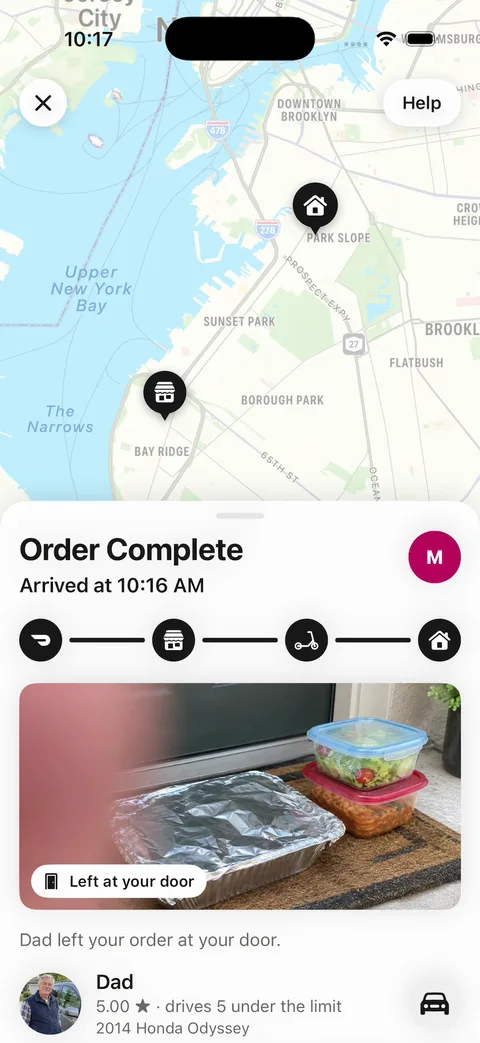
The mom's cooking remix: Order Complete, with Dad's drop-off photo of a lasagna and two Tupperwares and his thumb over the lens - 2
Turn it into your own delivery app
We wrote this message for a neighborhood delivery service and sent it to a fresh remix on November 12, 2026. It took 5 minutes and $3.32 of credits on Claude Opus 5.5.
We picked that model for every message we ran. Changes default to GPT-6.1 Sol, so your minutes and credits may differ.
The app became Stoop, with a three-step mark, brownstone red and new photos. Dashers became neighbors on bikes. The agent played the built-in demo, and both deliveries finished.
It left one scooter icon in the tracker, because our prompt kept that screen's file off limits.
Prompt
Make this Stoop, a delivery app for Park Slope's own restaurants, delivered by people who live nearby. Rename every "DoorDash" in the app to Stoop, and replace the dash mark with a simple mark of three brownstone steps. The accent becomes brownstone red (#A2412C). Keep every screen, animation, map route and HOOK MODE timing; change only Brand, Theme, the mark, Copy, Fixtures, DemoScript and images. DashPass becomes Stoop Club: "$4.99 a month for $0 delivery". The promo card reads "Restaurants keep 90% of every order on Stoop". Dashers become neighbors on bikes: Marcus on a bike and Priya on a cargo bike, with new photos, and the tip line reads "100% of your tip goes to your neighbor".
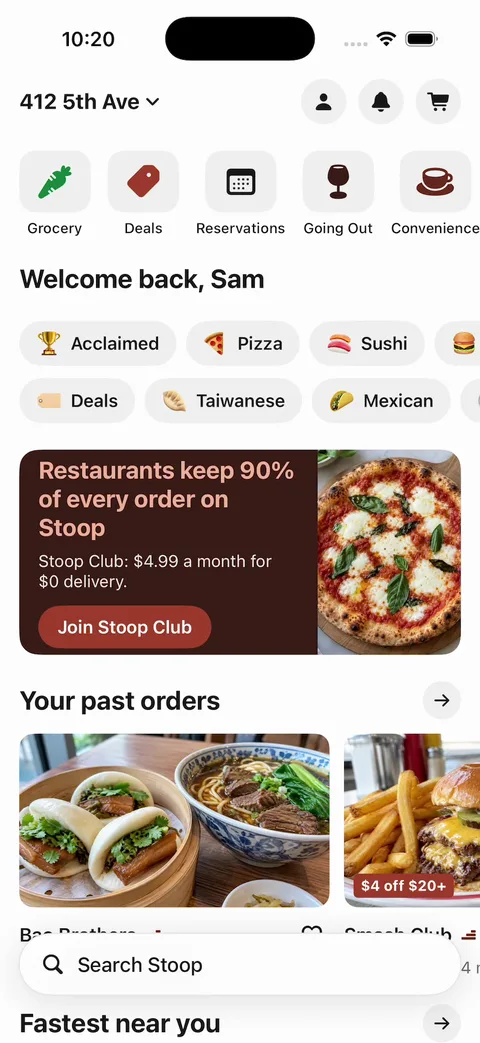
Stoop after one message: a brownstone red card that reads Restaurants keep 90% of every order on Stoop, Join Stoop Club and Search Stoop - 3
Make it one restaurant's own app
A restaurant can skip the marketplace. This message turned a fresh remix into Lucia's Pizzeria's own app, in 9 minutes for $5.88 of credits.
Home is now Lucia's page, with a Delivery or Pickup switch. Pickup skips the map and says the order is ready in 15 minutes at the counter. The rewards card shows 7 of 10 pizzas.
The agent tested a pickup order, the rewards card and the demo. It also removed Priya, since Marcus is Lucia's only driver.
Prompt
Make this the ordering app for one restaurant, Lucia's Pizzeria, with no other stores. Rename the app to Lucia's, use the LP logo circle as its mark, and keep Lucia's red (#B3261E) as the accent. Home becomes Lucia's store page as it is now: the hero photo, Featured Items and the full menu. Remove the cuisine chips, the other stores, Search and DashPass. Add a Delivery or Pickup switch at the top of Home. Pickup skips the map and shows "Ready in 15 min. Come to the counter." Delivery keeps checkout, the tip and live tracking, with Marcus as Lucia's own driver. Under the menu, add a rewards card: "Every 10th pizza is on us", with 7 of 10 pizzas filled. Keep every animation and HOOK MODE timing, with its second order also from Lucia's.
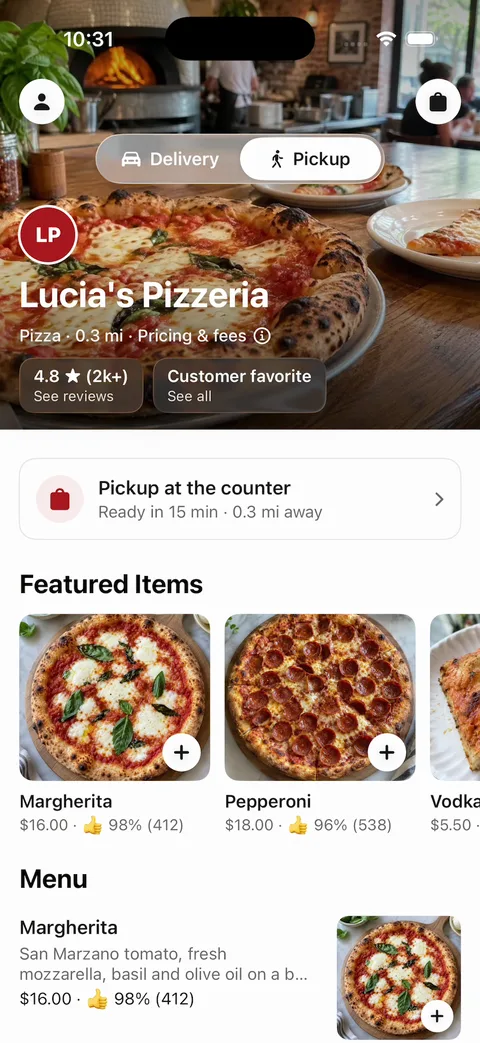
Lucia's own app: the LP logo, a Delivery and Pickup switch set to Pickup, Ready in 15 min, Featured Items and the menu - 4
Build the restaurant side
Restaurants need a screen at the counter. We built it as a new web app, since any tablet can open a web page.
This message took 8 minutes and $4.33 of credits. It made an order dashboard for Lucia's, with a real database and an API that takes new orders.
We sent an order to that API ourselves, and it showed up under New. Accept asked for a prep time, and the order moved to Preparing with a countdown.
The agent also tested Decline and the sold-out switch. At 11-inch iPad size, the Accept button ran past the edge of its card.
Prompt
Build Stoop for Restaurants, the web dashboard where a restaurant takes orders from Stoop, a Park Slope delivery app. The restaurant is Lucia's Pizzeria. Use a clean light look with brownstone red (#A2412C) as the accent and a large layout that works on a tablet at the counter. Keep orders in a real database: order number, customer first name, items with sizes and add-ons, total, time placed, status (new, preparing, ready, picked up or declined), prep minutes, and the courier's name and arrival time. Seed 6 sample orders from Lucia's menu: Margherita (12" $16, 14" $19, 18" $23), Pepperoni $18, Vodka Slice $5.50, Garlic Knots $6.50 and Tiramisu $8. Add an API: POST /api/orders creates an order, and PATCH /api/orders/:id changes its status. Orders page: four columns, New, Preparing, Ready and Picked up. A new order arrives with a chime and a pulsing border. Accept asks for a prep time (10, 15, 20 or 30 min) and moves it to Preparing with a countdown. Decline asks for a reason. Mark ready moves it to Ready, where the courier's name and "arriving in 4 min" show. The page checks for new orders every 5 seconds. Put a Today strip on top with orders, sales and average prep time. A Menu page lists every item with a sold-out switch.
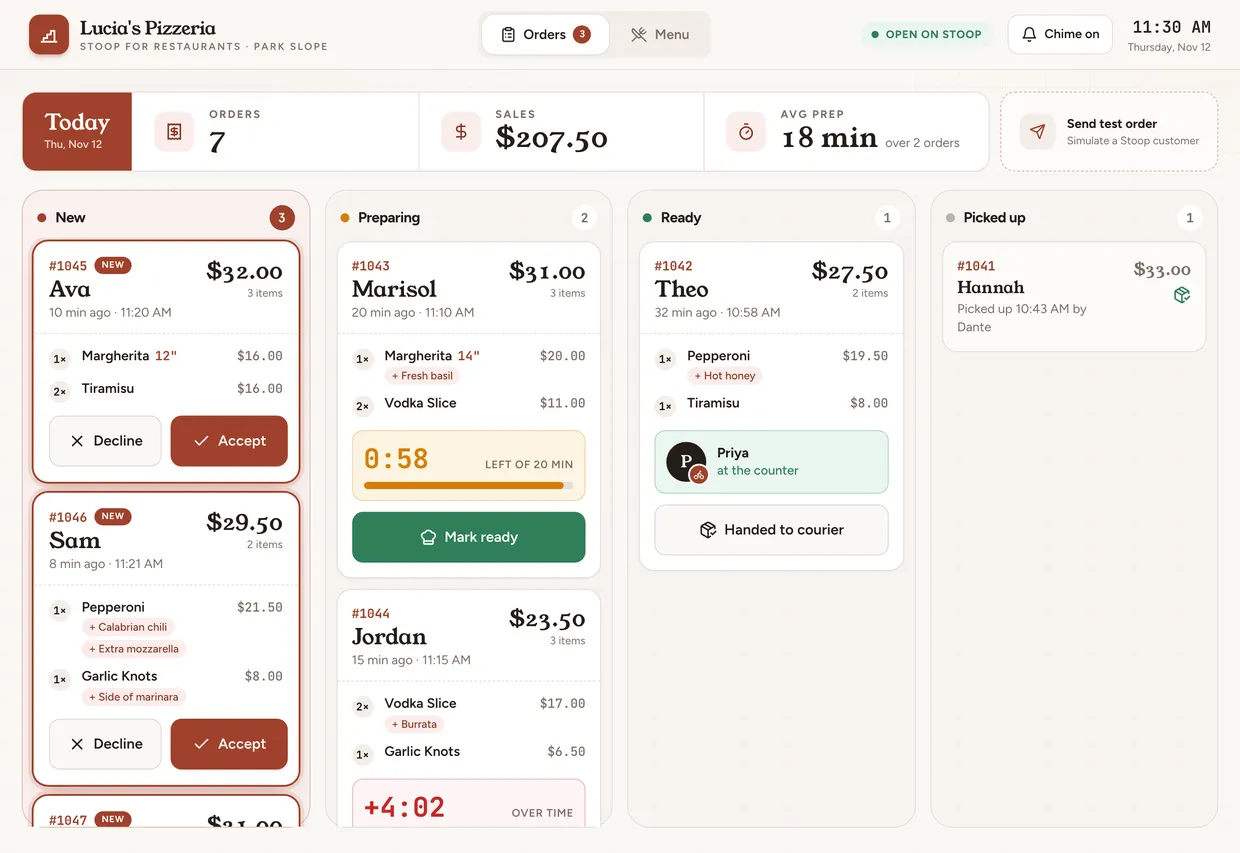
Stoop for Restaurants: Lucia's orders in New, Preparing, Ready and Picked up columns, with a prep countdown and today's 7 orders and $207.50 in sales - 5
Build the courier app
Couriers need an app of their own, so we turned a second remix into Stoop Courier.
The agent stopped 9 minutes in, when our test account ran out of credits. By then it had used $5.05 and tapped through a delivery up to the drop-off photo.
So we ran one delivery ourselves, start to finish. The offer counted down from 30, then came Accept, a pickup checklist, the drop-off and a photo. It ended on "Delivery complete. You earned $7.50."
It runs on sample data and doesn't talk to the other two apps yet.
Prompt
Turn this into Stoop Courier, the app Stoop's neighbors use to deliver orders. Stoop is our Park Slope delivery app: the same look, with brownstone red (#A2412C) as the accent and a mark of three brownstone steps in place of the dash mark. Keep the map snapshots, routes, pins, photos and file layout. Tabs: Home, Earnings, Account. Home: the map, today's earnings ($0.00) in a pill at the top, and a big "Start delivering" button. Once you start, an offer slides up after 3 seconds: Lucia's Pizzeria to 412 5th Ave, 0.6 mi, about 12 min, "$7.50 guaranteed, tip included", with a 30-second countdown ring, Accept and Decline. Declining brings the next offer after 5 seconds. Accept runs the delivery: "Head to Lucia's Pizzeria" with the route, "Confirm pickup" with a checklist of the items (Margherita 18", Garlic Knots), then "Deliver to Sam" along the route to 412 5th Ave, "Take a photo", which shows the drop-off photo, and "Delivery complete. You earned $7.50", added to today's total. Earnings: today's total, the list of deliveries and a bar chart for this week. Account: Marcus, 4.97 stars, 2,418 deliveries, bike. All sample data, no backend, no location permission.
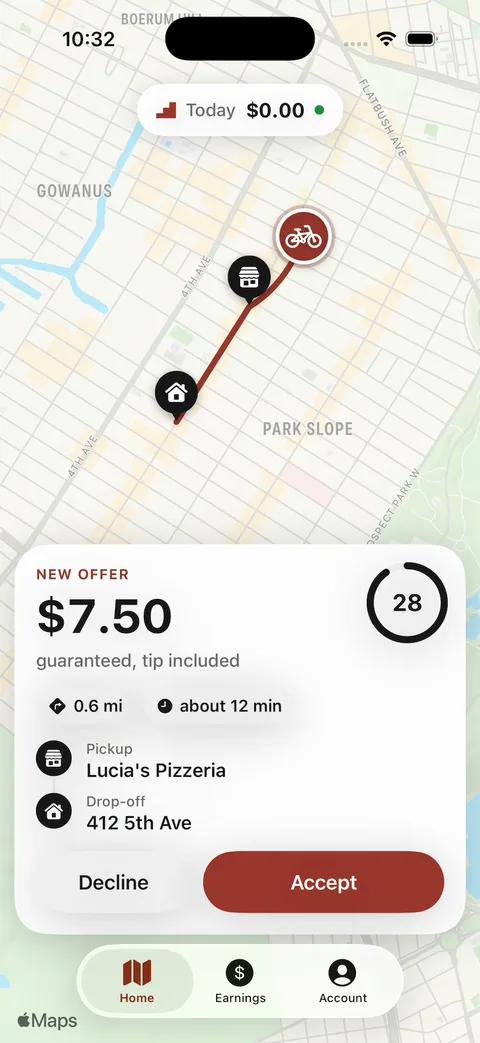
Stoop Courier after one message: a $7.50 offer from Lucia's Pizzeria to 412 5th Ave, with a countdown ring, Decline and Accept - 6
Connect the three apps
Right now each app runs on its own. The iPhone app forgets orders when you close it, the dashboard has its own database, and the courier app runs on sample data.
Connecting them takes one backend that all three use. The template's README marks where a real backend plugs in.
Live updates and dispatch are the hard part. We haven't run this step, so plan on several messages and on testing with two phones.
Prompt
Add Vibecode Cloud. Let customers sign up and save every order in the database. When an order is placed, send it to my restaurant dashboard's POST /api/orders (its address is in the Env Var tab as DASHBOARD_URL), and show the status the restaurant sets on the tracking screen. Then tell me what the courier app needs to use the same backend.
- 7
Charge for orders
Customers pay by card or Apple Pay, through a processor such as Stripe. Vibecode's built-in Stripe setup is for web apps. So an iPhone app needs Stripe's own payment sheet and a backend that keeps your secret key.
Paying restaurants and Dashers is a second step with Stripe Connect. We haven't run this one either.
Prompt
Charge the customer with Stripe when they place an order. Show Stripe's payment sheet with Apple Pay and cards, keep the secret key on the backend, and show the receipt in Orders. My Stripe keys are in the Env Var tab.
What a DoorDash clone costs
The Vibecode template is the only option here you can start for $0. A new account's first remix is free. Changes after that use credits.
It's only the customer app, on sample data. So it fits when you want to see your own version running first.
DoorDash clone app development otherwise means a script or an agency.
On CodeCanyon, you buy the code and host it yourself. White-label vendors like Miracuves set it up for you, for thousands.
Some vendors publish no price at all. Ordering.co, the top result for "doordash clone", says there's "no single price or timeline" and offers a demo call.
We checked each price below on the company's own page on November 12, 2026.
| Option | Upfront cost | What you own | First version | Still on you |
|---|---|---|---|---|
| Clone script | $49 (Karenderia, web only) to $69 (Go4Food, with the apps) on CodeCanyon. Karenderia's Extended License is $225. | Code you install and host. Go4Food's seller says charging users needs the Extended License. | Depends on your setup. Go4Food needs a Mac with Xcode for iPhone. | Servers, setup, your brand, store accounts, payments and every change |
| White-label script | $3,399 one time (Miracuves). $3,999 for one domain (RentAllScript). | Full source code (both vendors) | Six working days (Miracuves). A few weeks (RentAllScript). | Restaurants and couriers, and paying for changes after launch |
| Development agency | $25,000 to $100,000 or more (Appinventiv) | What your contract says | 3 to 4 months for a simple app (Appinventiv) | Paying for each change after launch |
| Vibecode templateThis template | $0 to remix on a new account. Plans from $20 a month. | The app and its code. Download it on Pro ($50 a month). | Under a minute to remix. 5 minutes for our Stoop version, on sample data. | The restaurant and Dasher apps (a prompt each, below), an admin panel, your own name and look, sign-in, dispatch, live location, payments and payouts |
Sources: CodeCanyon DoorDash clone scriptsKarenderia on CodeCanyonGo4Food on CodeCanyonMiracuves DoorDash cloneRentAllScript DoorDash clone scriptOrdering.co: DoorDash clone, how to build oneAppinventiv: the cost to build an app like DoorDashVibecode pricingVibecode terms (who owns your app)
Frequently asked questions
Is it legal to build a DoorDash clone?
Yes. Menus, a cart, a tip and a courier on a map are common patterns. Lots of delivery apps use them.
DoorDash's name, red and dash mark belong to DoorDash. So give the app its own name, logo, colors and icon before you publish it. The name and every word live in Brand.swift, and the colors in Theme.swift, so that's one message.
Our Stoop remix above did exactly that in 5 minutes.
Can I publish a DoorDash clone to the App Store?
Yes, as your own service.
Apple doesn't allow another developer's name or icon in your app's name or icon without their OK (4.1(c)). It also rejects apps that copy a popular app with only small changes (4.1(a)). So give yours its own name, look and market, like one neighborhood, a campus or one restaurant.
Food is paid by card or Apple Pay, not in-app purchase (3.1.3(e)). Before you submit, ask the agent to remove the hidden demo button at the top of the screen.
Vibecode publishes to the App Store on the Plus plan and up, with your Apple Developer account.
Sources: App Review Guideline 4.1App Review Guideline 3.1.3(e)How to publish to the App Store with Vibecode
Does the DoorDash clone work on Android?
No. DoorDash Clone is a native iPhone app written in Swift, so it runs on iPhone only.
For Android, start a new app in Vibecode and choose Legacy, then Mobile app (Legacy). It builds React Native apps for iPhone and Android. Paste the prompt from this page there and ask for React Native instead of SwiftUI.
You submit the Android app to Google Play yourself.
Can I add a real backend to the DoorDash clone?
Yes. DoorDash Clone runs on sample data, so it works the moment you remix it.
When you need real users, Vibecode Cloud adds a database, sign-in and file storage with one prompt. That's enough for customer accounts, menus and an orders table. It's on the Plus plan and up.
You can also connect Supabase, Firebase or your own API.
Does the DoorDash clone include a Dasher app?
No. The template is the customer app, and its Dashers are sample data.
We built a courier app from a second remix, with one message. Step 5 under "Take it from template to real app" has that prompt.
It runs on sample data too. The apps only work together once they share one backend.
Can I use it for just my restaurant?
Yes, and that's simpler than a marketplace. One message turned a remix into Lucia's Pizzeria's own app in 9 minutes.
With one restaurant, there's no dispatch between stores. Your own driver delivers, or customers pick up at the counter.
Step 3 under "Take it from template to real app" has the prompt.
Does it use real maps and GPS?
It uses real Apple Maps pictures, but no GPS.
Each map is a picture of Brooklyn from Apple Maps, with the route, pins and Dasher drawn on top. So it doesn't pan or zoom, and the app never asks for your location.
To make it live, ask the agent for a map that pans and zooms, location permission and real directions.
How long does it take to make an app like DoorDash?
Remixing this template gives you a working customer app in under a minute. Our Stoop version took one message and 5 minutes.
The restaurant dashboard took one more message and 8 minutes. The courier app ran 9 minutes before our test account ran out of credits.
A real service with sign-in, dispatch, live location and payments takes much longer. Appinventiv, an agency, puts a simple app at 3 to 4 months.
Sources: Appinventiv: the cost to build an app like DoorDashCan I vibe code DoorDash? Our verdictHow to make an app
What does a DoorDash clone app cost to run?
On Vibecode, plans start at $20 a month with $20 of credits. Each change you ask for uses credits.
The changes we ran for this guide used $1.94 to $5.88 of credits each for the agent and its pictures, plus build and simulator time.
Once the app has a backend for real customers, that backend needs a deployment. Plus includes 1, and each extra one is $20 a month.
Apple charges $99 a year to publish. Stripe takes 2.9% + 30¢ of each US card payment.
Sources: Vibecode pricingVibecode deploymentsApple Developer ProgramStripe pricing
How is this different from a DoorDash clone script?
A script is ready-made code for a customer app, a restaurant app, a Dasher app and an admin panel. You buy it and set it up, or pay a vendor to.
Miracuves sells one for $3,399 and says it goes live in six working days.
Our template is only the customer app, on sample data. But it's $0 to remix on a new account, you own the app, and you change it by chatting.
Neither one brings you restaurants or Dashers. With our template, you also build the backend that connects them.
Sources: Miracuves DoorDash cloneVibecode terms (who owns your app)
Can I build an Uber Eats clone with it?
Yes. An app like Uber Eats works the same way as DoorDash: menus, a cart, a tip and a courier on a map.
Rename the app and change its colors, and the same template becomes an Uber Eats-style app. Our Stoop remix shows how in one message.
For rides instead of food, start from our Uber clone.
Sources: Can I vibe code Uber Eats? Our verdictUber clone guide
Is the DoorDash Clone template free?
A new account's first remix is free. It counts as that account's free first build. You get your own copy of the Swift project, with 2 free minutes in the simulator.
After that, remixing and running an app need credits. Every change you ask the agent for uses credits too.
Publishing to the App Store needs a paid plan (Plus and up) and an Apple Developer account ($99/year). Downloading the source code is on the Pro and Max plans. See the pricing page for current plans.
More templates
All templates- View template
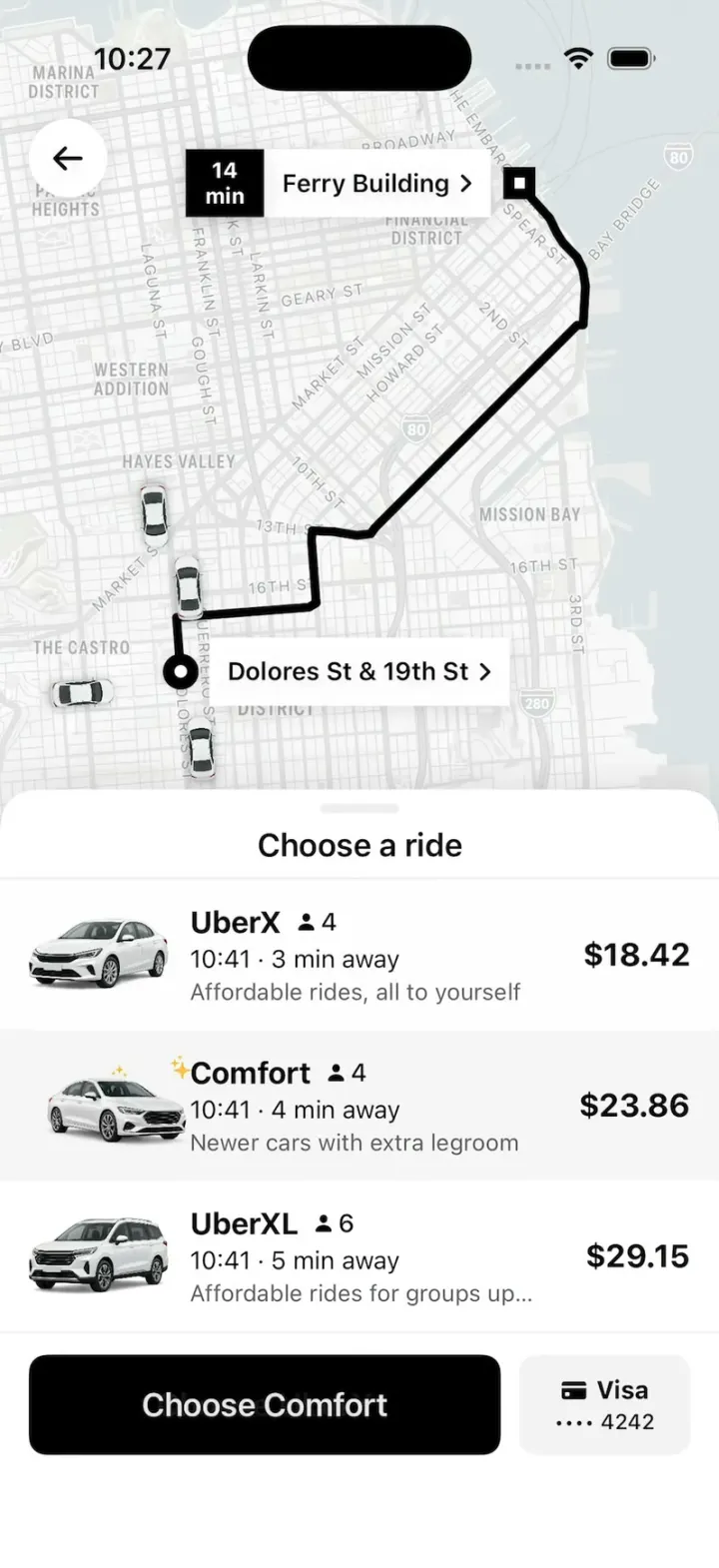
Uber Clone
iOSUber's real look: pick a ride at an upfront price, watch your driver drive up on the map, then rate and tip.
- View template
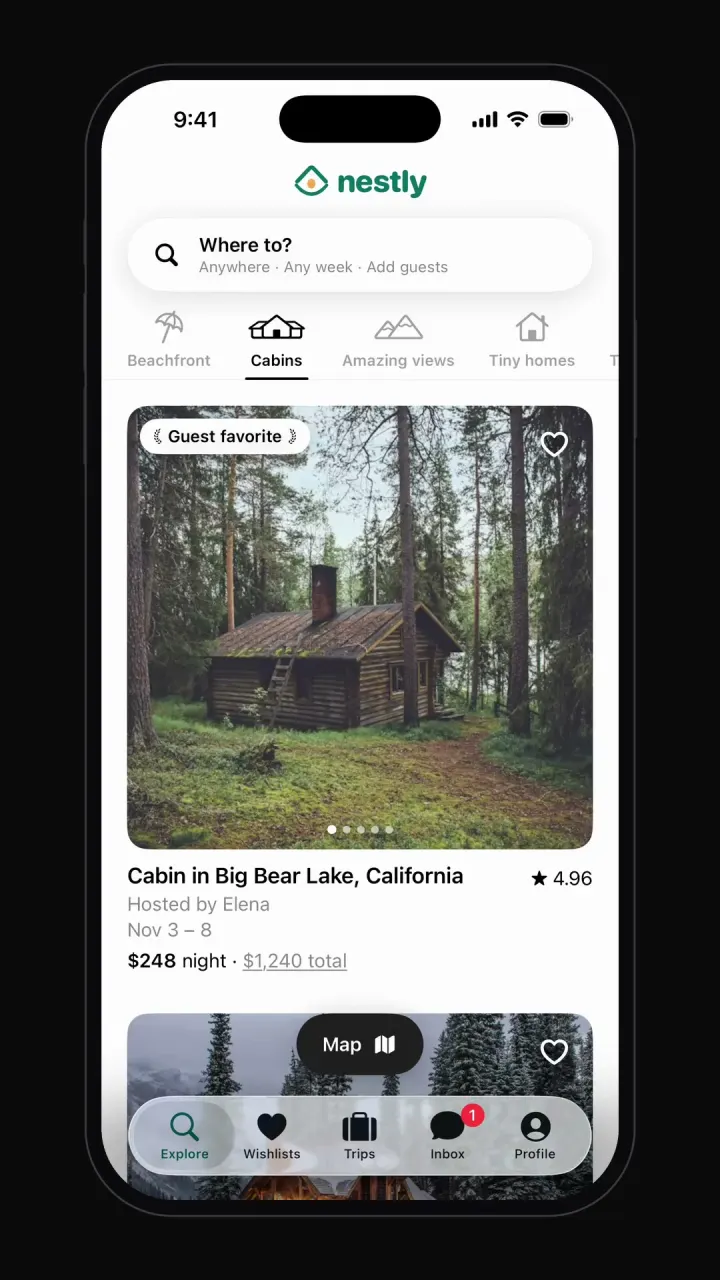
Airbnb clone
iOSCategory browsing, map view, date and guest search, listing pages, checkout, wishlists and trips.
- View template
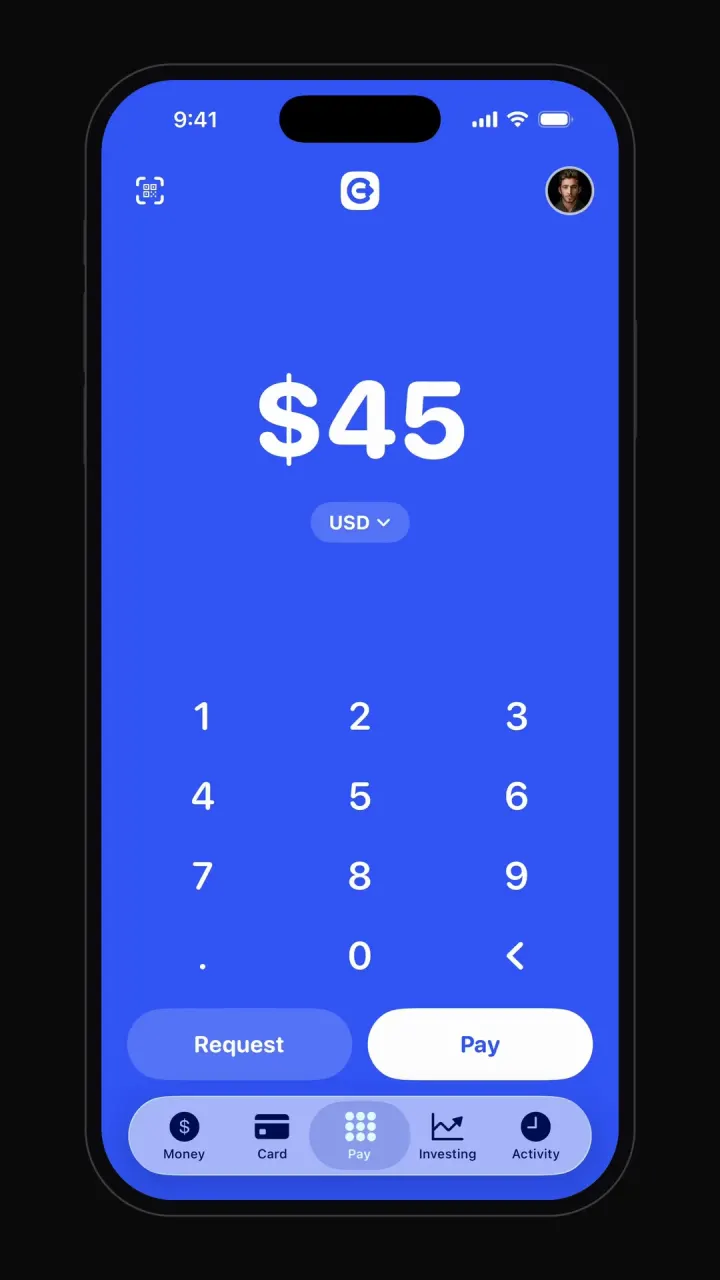
Cash App clone
iOSBig-number pay pad, pay and request flows, balance, debit card, investing charts and activity.



Other guides: Instagram cloneTikTok cloneYouTube cloneNetflix cloneSpotify cloneTinder cloneDiscord cloneChatGPT clone
Browse all app templates. Each one is a native Swift app made with Vibecode's iOS app builder.
Have an idea of your own? The free Can I vibe code it? checker tells you what it takes and writes your first prompt.
Choosing a builder? Read the best AI mobile app builders guide or compare Vibecode with other app builders.
About the editorial team
Vishal is a product engineer at Vibecode. Before Vibecode he did product engineering at EarnIn and co-founded Ivella (YC S21), a banking app for couples. He studied computer science at Duke.