
Table of contents
- How to make an app in 6 steps
- 4 ways to create an app
- A real app in three messages: Juniper
- How to test your app on your phone
- How to publish your app
- Do you need to know how to code?
- How to make an iPhone app without a Mac
- How to make an app for free
- What still takes work
- Your next step
- Frequently asked questions
TL;DR
- To make an app, write down what it does for one person, pick how you'll build it, build a small first version, test it on your phone, then publish it.
- You can create an app with an AI app builder, a no-code builder, your own code, or a developer you hire. They differ most in time and cost.
- Our coffee shop app, Juniper, took 3 messages and 45 minutes of build time in Vibecode. Publishing an iPhone app needs Apple's $99 a year Developer Program.
To make an app, you don't need to code or own a Mac. Describe it in plain English to an AI app builder, or drag it together in a no-code tool, then test it on your phone and publish it. Below is how to make an app step by step, shown on Juniper, a coffee shop app we built on October 27, 2026. Watch Juniper, or start with step 1.
How to make an app in 6 steps
- Write down what the app does, and for whom. Cut it to one main screen and one job. You'll have one sentence, like ours: "regulars order coffee ahead and collect stamps."
- Pick where it runs. An iPhone app, a mobile app for iPhone and Android, or a web app. You'll know which kind of project to start.
- Pick how you'll build it. The table below compares all four ways. You'll know which tool to open, or whom to hire.
- Build a first version with sample data. You'll have an app you can tap. Juniper's took one message and 14 minutes.
- Test it on your phone. Tap every screen in a simulator, then on your phone, and fix what breaks. You'll have a version that works.
- Publish it to the App Store, Google Play or the web. You'll have an app waiting for review, or a link anyone can open.
4 ways to create an app
| AI app builder | No-code builder | Code it yourself | Hire a developer | |
|---|---|---|---|---|
| Best for | Non-coders who want an app fast | Fans of visual editors | Learning to code | Businesses with a budget |
| Do you write code? | No | No | Yes | No |
| Mac for iPhone? | No | No | Xcode: yes. Expo: no | No |
| First version in | Minutes. Juniper took 14, or 45 for all three messages | Days or weeks to a full first version, says Bubble | Months. A senior engineer took 3 for a commercial app | About 11 months for a full project, says Clutch |
| Cost to start | Vibecode: free first build, then $20/mo | Adalo: $65/mo. Bubble: $49/mo for mobile | Free tools. $99/yr to publish | $18 to $39/hr on Upwork |
| What you get | Vibecode: iPhone, Android or web apps | iPhone and Android apps | Any app you can code | A custom app |
AI app builders. To make an app with AI, you describe it in plain English. An AI agent writes the code, runs the app and fixes what breaks. Vibecode builds native iPhone apps in Swift, apps for iPhone and Android, and web apps. It submits its native Swift apps to the App Store for you. Base44 and Lovable build web apps. Lovable has no built-in way into the App Store or Google Play. Base44's paid plans start at $16 a month, billed yearly. From its Builder plan, $40 a month billed yearly, it can wrap your web app in a web view and give you store files to upload yourself. Your words steer everything, so a vague request gets a vague app.
No-code builders. You drag screens together and connect your data in a visual editor. Adalo and Bubble both publish apps to the App Store and Google Play. Both can now draft an app from a description, too: Adalo with its AI helper, Ada, and Bubble with its AI app builder. Google AppSheet turns a spreadsheet into an app for your team, free while you test it with up to 10 people. The downside is that every tool has its own editor to learn, and complex logic gets fiddly.
Code it yourself. Apple's Xcode is free but runs only on a Mac, and a free Apple Account lets it run your app on your own iPhone. Android Studio builds Android apps on Windows, Mac, Linux and ChromeOS. Expo builds one React Native app for both phones, and its cloud builds mean you don't need a Mac for iPhone. It's the most flexible way to build an app, and the slowest. In the Reddit thread that ranks first for this search, an engineer with 18 years of experience says a commercial app took 3 months of full-time work. To learn how to code an app from scratch, start with Apple's Develop in Swift tutorials or Google's Android Basics with Compose course.
Hire a developer or an agency. You explain what you want and pay someone to develop it. Mobile app developers on Upwork typically charge $18 to $39 an hour. Most app projects on Clutch cost $10,000 to $49,999 and take about 11 months. Every change costs money, so plan the first version well.
Want more options? See the best AI app builders for mobile and the best no-code app builders.
Describe your app and Vibecode builds itA real app in three messages: Juniper
We built Juniper in Vibecode on October 27, 2026, in three messages. In Vibecode you pick the model for each message. By default a new app's first build uses Claude Opus 5.5 and later changes use GPT-6.1 Sol. We ran all three messages on Claude Opus 5.5. We built Juniper on a Max plan, but nothing in it needs more than Plus.

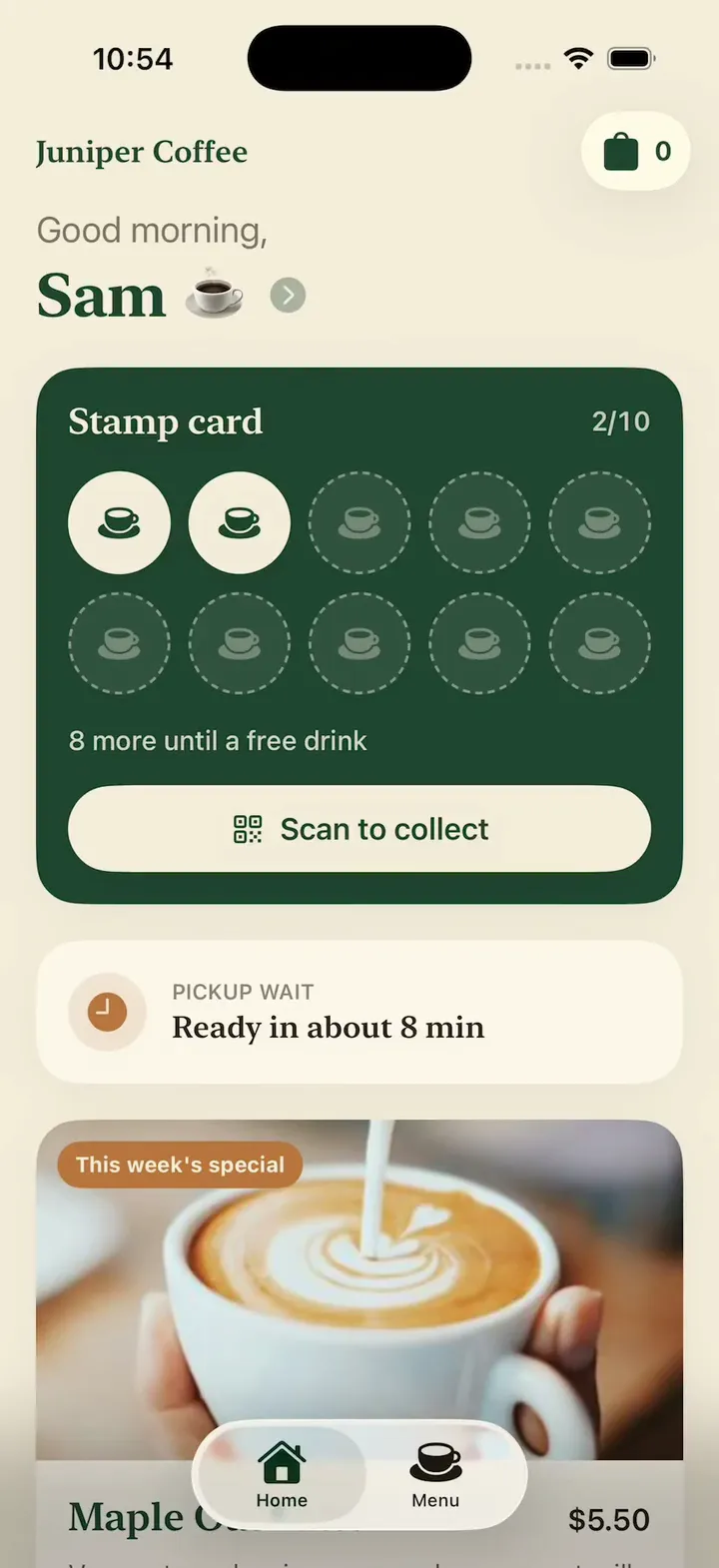
Message 1: the first version
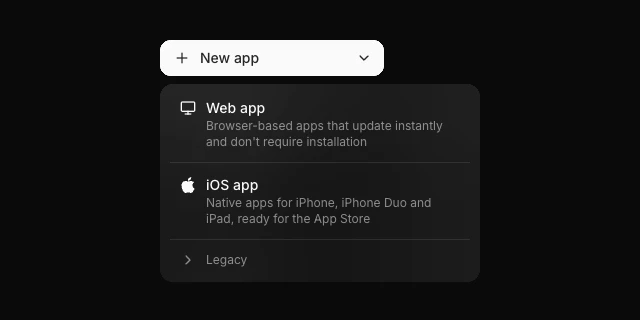
We clicked New app, then iOS app, which makes a native Swift app for iPhone and iPad.
Our first prompt was 277 words. It names each screen, what each tap does, the colors and the font. It also asks for sample data, so the app looks like a real shop's app from the first build. Copy it and swap in your own shop, menu and colors:
Message 1: the first version · 277 words
Build an iPhone app for Juniper Coffee, my neighborhood coffee shop, so regulars can order ahead and collect stamps.

The Home tab greets the customer by first name and shows their stamp card: 10 coffee-cup stamps with 7 filled and "3 more until a free drink". A Scan to collect button opens a big QR code for the barista to scan. Below the card, show the wait for pickup ("Ready in about 8 min") and this week's special, a maple oat latte, with a photo and an Order button.

The Menu tab has four sections, Coffee, Tea, Cold drinks and Pastries, with 16 items in all. Each item has a photo, a name, a short description and a price. Tap a drink to pick a size (small, medium or large, and the price updates), a milk (whole, oat or almond) and an extra shot, then tap Add to order. Tap a pastry to add it.

A bag button shows how many items are in the order. The bag lists each item with its choices and the total, lets me pick it up as soon as possible or at a set time later today, and has a Place order button. After I place an order, show its number and three steps, Received, Making it and Ready, that move forward on their own, and add a stamp to my card with a small bounce. At 10 stamps the card turns into a free drink I can use on my next order.

Use deep green and warm cream, a serif font for headings and rounded cards. Use real photos of coffee, tea and pastries, and check that every photo loads.If this is your free first build, it runs on GPT-6.1 Sol and builds a first version with up to 3 features, not every screen in a long prompt. Start with the menu and ordering, then add the rest one message at a time.
The agent wrote the app, built it and opened it in a live iPhone simulator in the browser. To test its own work, it ordered a large latte with oat milk and an extra shot and watched the price go from $4.50 to $6.85. It placed the order and watched it move from Received to Ready, and it kept ordering until the card reached 10 stamps, and the free drink came off the next order.
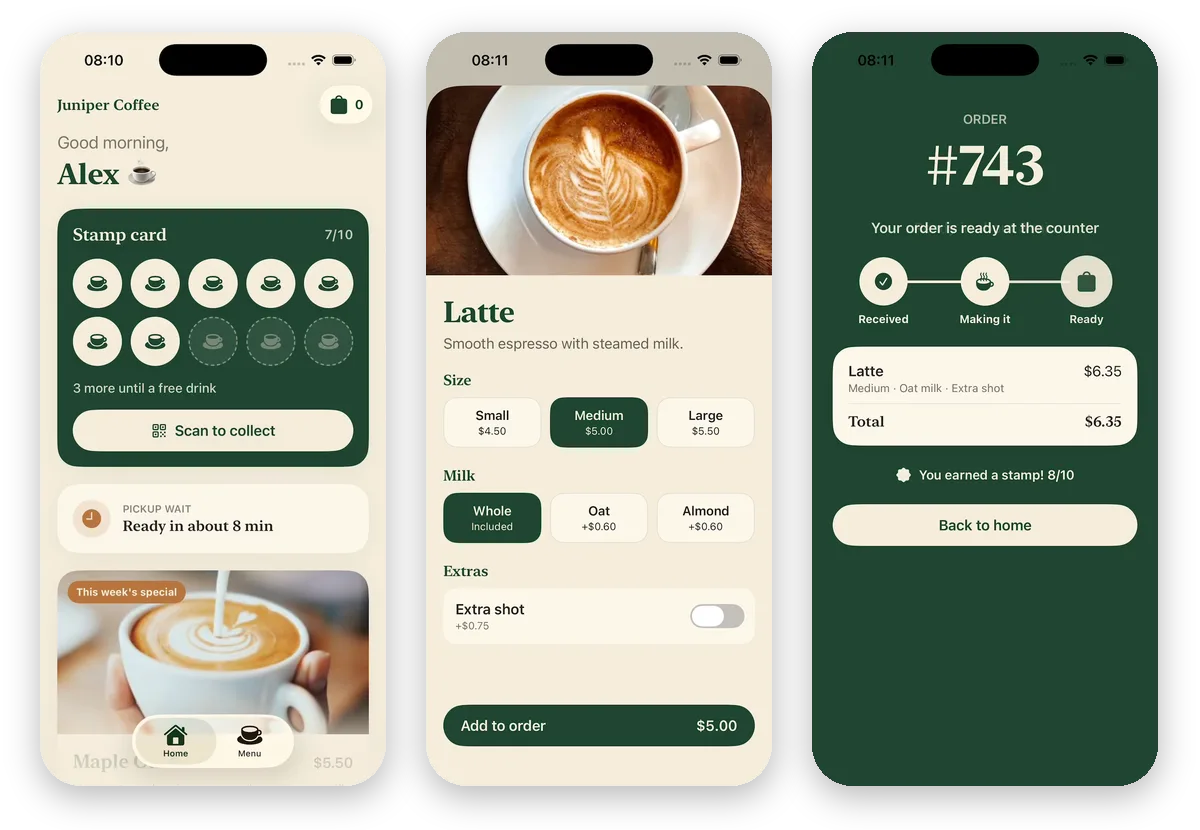
What you get. A first version you can tap. Juniper's was ready 13 minutes and 59 seconds after we pressed send. The agent also said what it had faked: "Everything stays on the phone for now. There are no customer accounts, no payment, and orders don't reach the shop."
Message 2: accounts, the cloud and a screen for baristas
After message 1, everything lived on one phone. A real shop needs more. Customers need accounts, their stamps need to follow them to a new phone, and orders need to reach the counter. That takes a backend, a server with a database and sign-in.
In Vibecode, that's one message. Vibecode Cloud adds a database, sign-in and file storage, and it comes with the Plus plan and up. You can also open the Database tab and click Enable database, which puts a setup request in your prompt box. Already use Supabase or Firebase? The backend and auth guide compares all three.
Message 2: accounts, the cloud and a screen for baristas · 148 words
Make Juniper a real app with Vibecode Cloud. Customers sign up with their email and first name, and the Home tab greets them by name. Save each customer's stamps and orders in the cloud, so they're still there on a new phone. Keep the menu in the database too.

Add a staff screen for my baristas, opened from a Staff button at the bottom of the Home tab with a 4-digit code (use 2468 for now). It lists new orders as they come in, oldest first, with the customer's name, each item with its size, milk and extra shot, and the pickup time. Orders no longer move along by themselves: a barista taps Start to move an order to Making it, then Ready, and the customer's order screen follows within a few seconds. Baristas can also mark an item sold out, which greys it out on the menu.
The agent set up the database, wrote the server and rebuilt the screens on top of it. In its tests, it made an account for a test customer, Sam, and placed an order that stayed on Received until a barista acted. It tried a wrong staff code, which the app turned down, and then 2468. When it tapped Start, Sam's order screen changed to Making it within 3 seconds. It marked a croissant sold out, and the menu greyed it out. After it signed out and back in, Sam's stamp and order came back from the cloud.
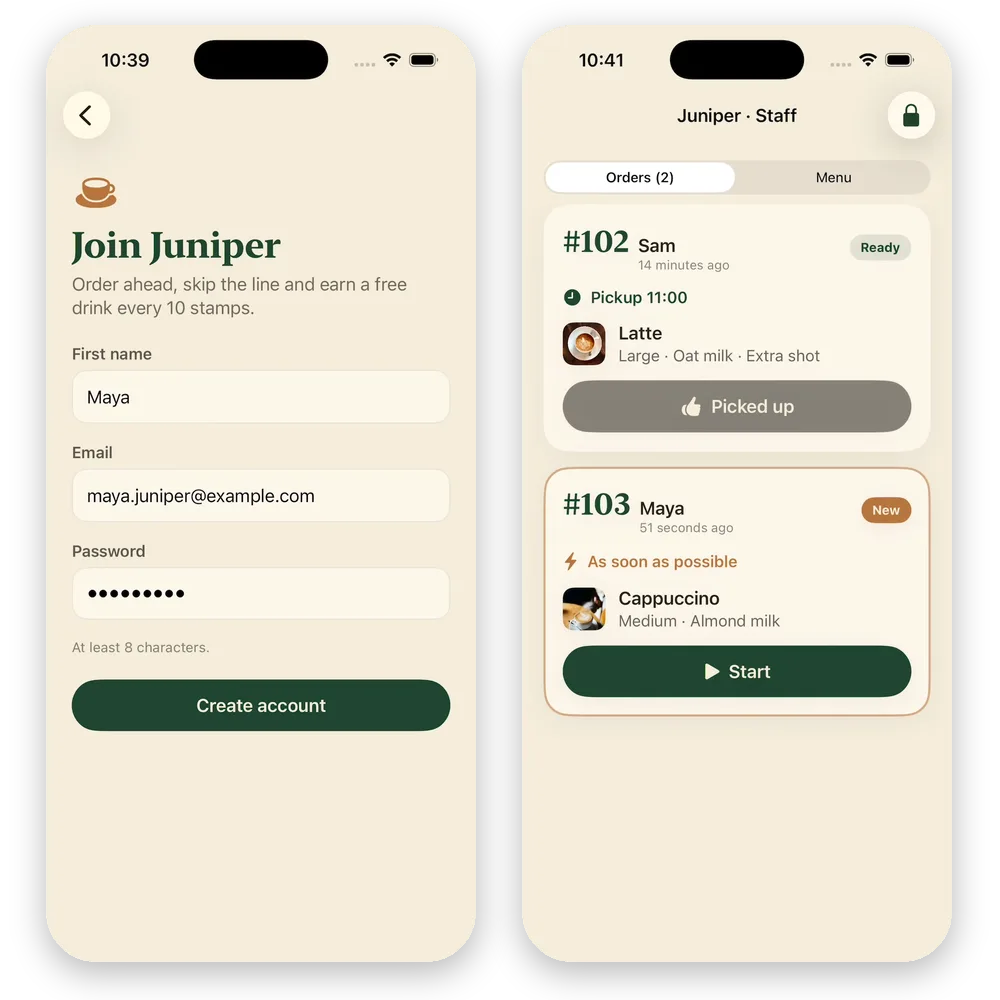
What you get. A working shop app. Customers sign up with their first name, email and a password. Their stamps and orders live in the cloud, so they come back on a new phone. Baristas see each order with its size, milk and pickup time, and every tap on Start or Ready shows up on the customer's screen. Message 2 took 22 minutes and 11 seconds.
The agent also listed what it couldn't check. It couldn't test the emailed sign-in code or the password reset, because it can't receive email. Orders go through without payment. And until you publish, the app runs on a test server, so real customers can't use it yet.
To see the data, open the Database tab. Juniper's has tables for users, the 16 menu items, orders and order items, all holding our test data. Once the backend is live, real customers' data is under Deployments in the sidebar, then your app's Database tab.
Message 3: what Apple requires, and one fix
Apple says an app that lets people create an account must also let them delete it inside the app. Juniper has had sign-up since message 2, so message 3 adds Delete account on a new Profile screen, plus a Reorder button for regulars. It also fixes the one bug we found while testing. After we placed an order, Back to home opened the Menu tab instead of Home.
Message 3: profile, reorder and delete account · 96 words
Before Juniper goes to the App Store, add a Profile screen that opens when I tap my name on the Home tab. It shows my name and email, my past orders with a Reorder button that puts the same items back in my bag, Sign out, and Delete account. Delete account asks me to confirm, then deletes my account, my stamps and my orders. Apple requires account deletion inside the app for any app with sign-up.

Also, after I place an order, Back to home takes me to the Menu tab instead of Home. Fix that.
The agent tested the fix first. It placed an order from the Menu tab, and Back to home landed on Home. Next it opened Sam's Profile and tapped Reorder on an old order, which put the same large oat latte back in the bag. To test Delete account without losing Sam, it made a throwaway account with one order, deleted it and checked the server. The account, its stamp and its order were gone, and the old password no longer signed in. It also spotted a grammar slip in the confirmation, "your 1 stamps", and changed it to "1 stamp", though it didn't open the confirmation again to check.
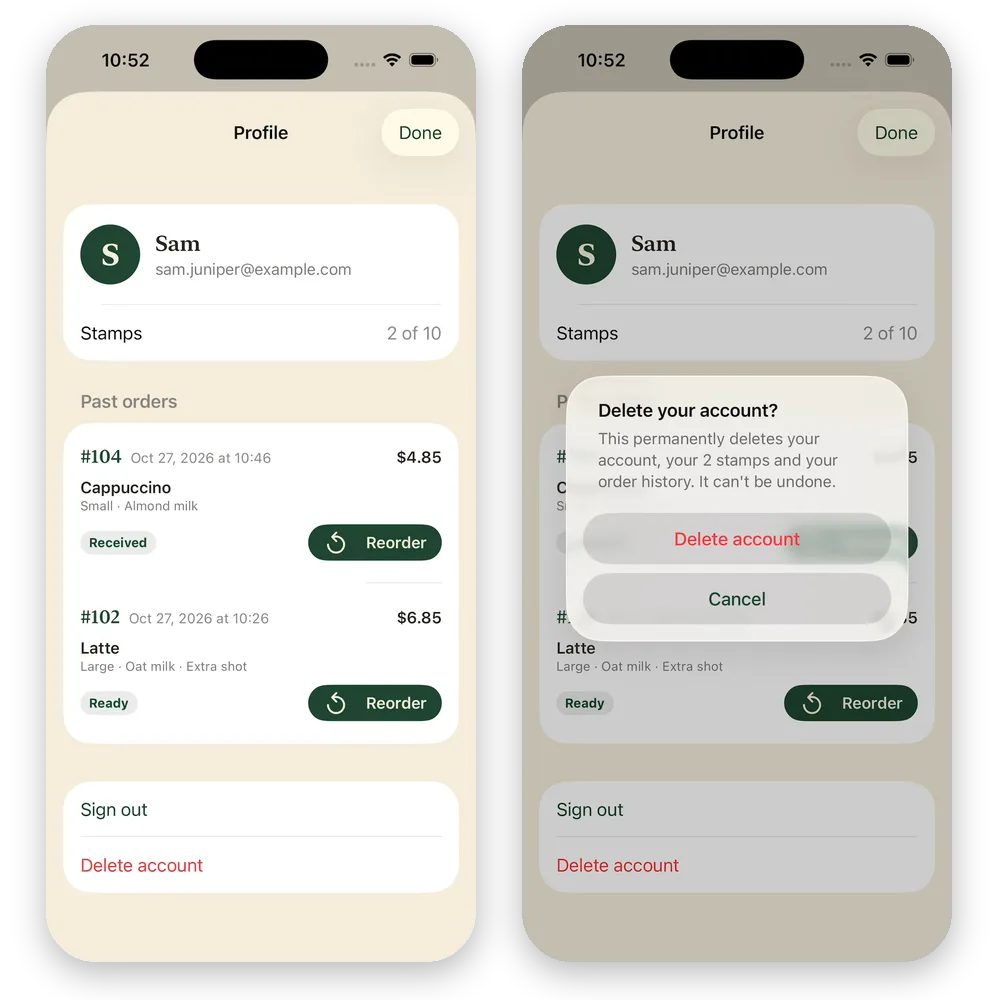
Juniper now meets Apple's rule on deleting accounts, and regulars get a Profile with their past orders. Message 3 took 8 minutes and 53 seconds.
Juniper, message by message
Here is the whole build in one place. Each time runs from pressing send to the agent's last message.
| Message | Time | AI credits |
|---|---|---|
| 1. First version | 13 min 59 s | $4.06 |
| 2. Accounts, the cloud and a staff screen | 22 min 11 s | $19.65 |
| 3. Profile, reorder and delete account | 8 min 53 s | $18.17 |
| Total | 45 min 3 s | $41.88 |
What Juniper cost. The three messages used $41.88 of credits for the AI agent. The cloud iPhone simulator and the app builds used another $5.73, including the time we spent testing and filming, for $47.61 in all. That's more than the $20 of credits that come with Plus each month, so on Plus you'd add credits partway through. Pro includes $55 of credits a month.
Two things are worth knowing before you build your own:
- Long chats cost more per step. The agent rereads the whole conversation at every step. By message 3 it reread about five times as much per step as in message 1. That's why a small change like message 3 cost $18.17, almost as much as message 2. If your next change doesn't need the earlier chat, click Clear context at the top of the chat first.
- A shared staff code is only for testing. Anyone who sees 2468 can open the staff screen. Before launch, ask the agent for staff accounts with their own sign-in.
How to test your app on your phone
While the agent works, Vibecode runs your app in a live iPhone simulator in your browser. You tap through every screen there, and the agent tests its own changes in the same simulator.
To try the app on your own iPhone, click Install on iPhone. Vibecode builds the app, signs it with your Apple Developer account and gives you a link to install it on your registered iPhone. Vibecode's docs put the first setup at about 10 minutes. It needs Apple's Developer Program, and an app with a backend, like Juniper, needs its backend deployed first. We tested Juniper in the simulator only.
To share the app with other people before launch, use TestFlight, Apple's free beta app. Ask the agent to "upload this build to TestFlight." Apple checks the first build before people outside your App Store Connect team can install it.
How to publish your app
For an iPhone app, click Publish, then Publish to App Store. Vibecode builds the app, signs it with your Apple Developer account, uploads it and submits it for Apple's review. App Store submission comes with the Plus plan and up, and Apple's Developer Program costs $99 a year. Apple also requires a privacy policy and a support page, and for an iOS app Vibecode writes and hosts both when you publish.
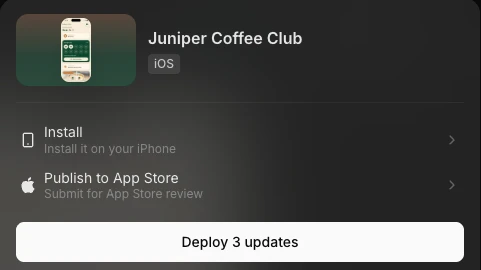
Juniper has a backend, so we would deploy it before submitting. Then the app on people's phones has a live server to talk to. Vibecode's docs put App Store setup at 15 to 30 minutes, plus Apple's review. The App Store publishing guide has every step.
For Android, click New app, open Legacy and pick Mobile app (Legacy). It builds a React Native app that runs on iPhone and Android. To put it on Google Play, download the code on Pro and up and publish it with your own Google Play Console account, which has a one-time $25 fee. A new personal Play account must first run a closed test with at least 12 testers for 14 days.
For a web app, pick Web app instead. It goes live at a yourapp.vibecode.run address or your own domain, with no store review.
What you get. An app waiting for Apple's review, or a link anyone can open. We didn't submit Juniper, because it's a demo for this guide.
Describe your app and Vibecode builds itDo you need to know how to code?
No. With an AI app builder or a no-code builder, you never write code. If you're a beginner, start with an AI app builder and one small app, like Juniper's first version. Describe it in plain English, test it, and change one thing at a time. How to vibe code walks through that way of working in more depth, and Can I vibe code? covers what you can build without code.
Code still helps in three cases:
- A custom backend. Your app talks to your own systems, like a shop's point of sale.
- Sensitive data. Health, money or legal records need a developer who checks every line.
- A team that owns the code. Developers who will keep working on the app want it in their own tools.
On Vibecode's Pro plan and up, you can download your app's full code and hand it to a developer at any time.
To design an app before you build it, sketch each screen on paper, then check Apple's Human Interface Guidelines for how iPhone apps should look.
How to make an iPhone app without a Mac
Apple's Xcode runs only on a Mac. You can skip it three ways:
- Use Vibecode. It builds native iPhone apps in the cloud and runs them in a live simulator in your browser. It also signs your app and submits it to the App Store for you. See the iOS app builder and our guide to publishing an app without a Mac.
- Use Expo's cloud builds. If you write React Native code yourself, Expo builds the iPhone version on its own Macs in the cloud.
- Use your iPhone. The Vibecode iPhone app builds, runs and publishes the same native apps from your phone.
With a Mac, Xcode is the free way to build in Swift yourself. To publish, or to install the app through Vibecode, you need Apple's Developer Program.
How to make an app for free
You can build a first version for free. Publishing to the app stores costs money.
Free:
- Vibecode's first app build, for new accounts that sign up with Google or Apple. It runs on GPT-6.1 Sol and builds a first version with up to 3 features on sample data. You then get 2 minutes to try it in the simulator.
- Free plans from other builders. Base44 includes 25 message credits a month, Lovable 5 build credits a day, up to 30 a month, and Adalo one free app build.
- Xcode, if you have a Mac. With a free Apple Account, it can run your app on your own iPhone.
Not free:
- Apple's Developer Program, at $99 a year. You need it to publish to the App Store, to use TestFlight, and for Vibecode to install your app on your iPhone. Nonprofits, accredited schools and government bodies can ask Apple to waive the fee. Here's how to join.
- Google Play, at a one-time $25.
- Accounts and a database. In Vibecode, they come with Vibecode Cloud on the Plus plan and up, from $20 a month.
What still takes work
The screens come fast now. These parts take longer:
- Accounts and data. Once people share data, like orders that must reach a shop, or need their data on a new phone, your app needs a backend: a server, a database and sign-in. In Vibecode, one message adds Vibecode Cloud, as message 2 did for Juniper. Plus includes one live backend, and each extra one is $20 a month. You can use Supabase or Firebase instead.
- Payments. Apple says anything people buy to use inside an iPhone app, like a subscription, must use its in-app purchase. On the US App Store, apps may also link to other ways to pay. Real things used outside the app, like a coffee, must be paid another way, such as Apple Pay or a card. New developers, and those who earned up to $1 million the year before, can join Apple's Small Business Program and pay a 15% commission. In a native iPhone app built with Vibecode, ask the agent for a subscription and it sets one up with RevenueCat. For web apps, Vibecode uses Stripe. Juniper doesn't take payments yet.
- App Store review. Apple turns down apps that are just a website in a wrapper, and apps with sign-up must let people delete their account in the app. Read the App Store rejections checklist before you submit.
- Your first users. A shop already has customers. Put a sign by the register, tell regulars about the stamp card, and ask the first ten what's missing. For an app without a shop behind it, start with one group of people you already know.
Your next step
To make your own app, write down its one job, then describe it to an AI app builder and test what it builds. Copy this starter prompt, fill in the brackets, and send it:
Your first prompt · 62 words
Build an iPhone app for [my business], so [my customers] can [the one thing they do]. The main screen shows [what they see first]. Tapping [a button] lets them [the main action], and they see [the result]. Add [a second screen] for [what it's for]. Use [two colors], a [rounded or classic] font, and realistic sample data so every screen looks real.
Prefer to start from a working app? Browse templates. Making a social app? Follow how to create a social media app. Not sure your idea can be built? Check it with Can I vibe code it?
Frequently asked questions
How do I make an app with no experience?
Start with one small idea and an AI app builder. Describe what the app does in plain English, test what it builds, and ask for one change at a time. You don't need to code. Our example, Juniper, was a working coffee shop app 14 minutes after the first prompt.
Can I make an app for free?
You can start for free. Vibecode makes your first app build free for new accounts that sign up with Google or Apple. It builds a first version with up to 3 features on sample data. Accounts, a database and App Store submission need a paid plan, from $20 a month. Apple also charges $99 a year to publish to the App Store, and Google Play charges $25 once.
How long does it take to make an app?
With an AI app builder, a first version takes minutes. Juniper's first version took 14 minutes. Two more messages added sign-up, a cloud database, a screen for baristas and account deletion, for 45 minutes in all. Clutch says app projects with an agency usually take about 11 months. Plan extra time for testing, Apple's review and finding your first users.
Can I make an app on my iPhone?
Yes. Vibecode's iPhone app lets you describe an app, build it and publish it from your phone. Apple's own tool, Xcode, runs only on a Mac.
Do I need a Mac to make an iPhone app?
No. Vibecode builds native iPhone apps in the cloud, runs them in a simulator in your browser and submits them to the App Store for you. Expo's cloud builds also make iPhone apps without a Mac. You need a Mac only if you build with Apple's Xcode yourself.
Can AI make an app for me?
Yes. An AI app builder writes the code from your description, runs the app and fixes what breaks. You still decide what the app does, test it, and ask for changes. Our first message to Vibecode built a coffee shop app with a menu, a bag, ordering and a stamp card.
How do apps make money?
Apps make money from subscriptions, paid extras, or selling real goods and services. Apple's rules say digital extras in an iPhone app must use its in-app purchase, though apps on the US App Store may also link to other ways to pay. Physical goods, like a coffee, must be paid another way, such as Apple Pay or a card. In Apple's Small Business Program, for new developers and those who earned up to $1 million the year before, Apple takes 15% of paid apps and in-app purchases.
About the editorial team
Vishal is a product engineer at Vibecode. Before Vibecode he did product engineering at EarnIn and co-founded Ivella (YC S21), a banking app for couples. He studied computer science at Duke.

More from the Vibecode blog
Tutorial
How to create a social media app
We built a social app for home bakers in three messages. Here are the six steps, every prompt we sent, an Instagram clone and the $40.06 it cost.
Tips
Can I vibe code? What you need, what you can build and what it costs
Yes, you can vibe code without knowing how to code. What you need, what you can build today, what's still hard, what it costs, and a real test from a one-line idea.
New to AI app building? Read what vibe coding means or compare the best AI mobile app builders. Have an idea? See if you can vibe code it.