

Table of contents
TL;DR
- Pick an app builder that builds and runs the whole app, not a chatbot.
- Describe one app in plain English, test what it builds, and change it one message at a time.
- Try it on your phone, then publish it, which for an iPhone app needs Apple's $99 a year Developer Program.
To vibe code, you describe the app you want in plain English. An AI agent writes the code, runs the app and shows you the result. You try it, say what to change, and repeat until it works. You never have to read the code.
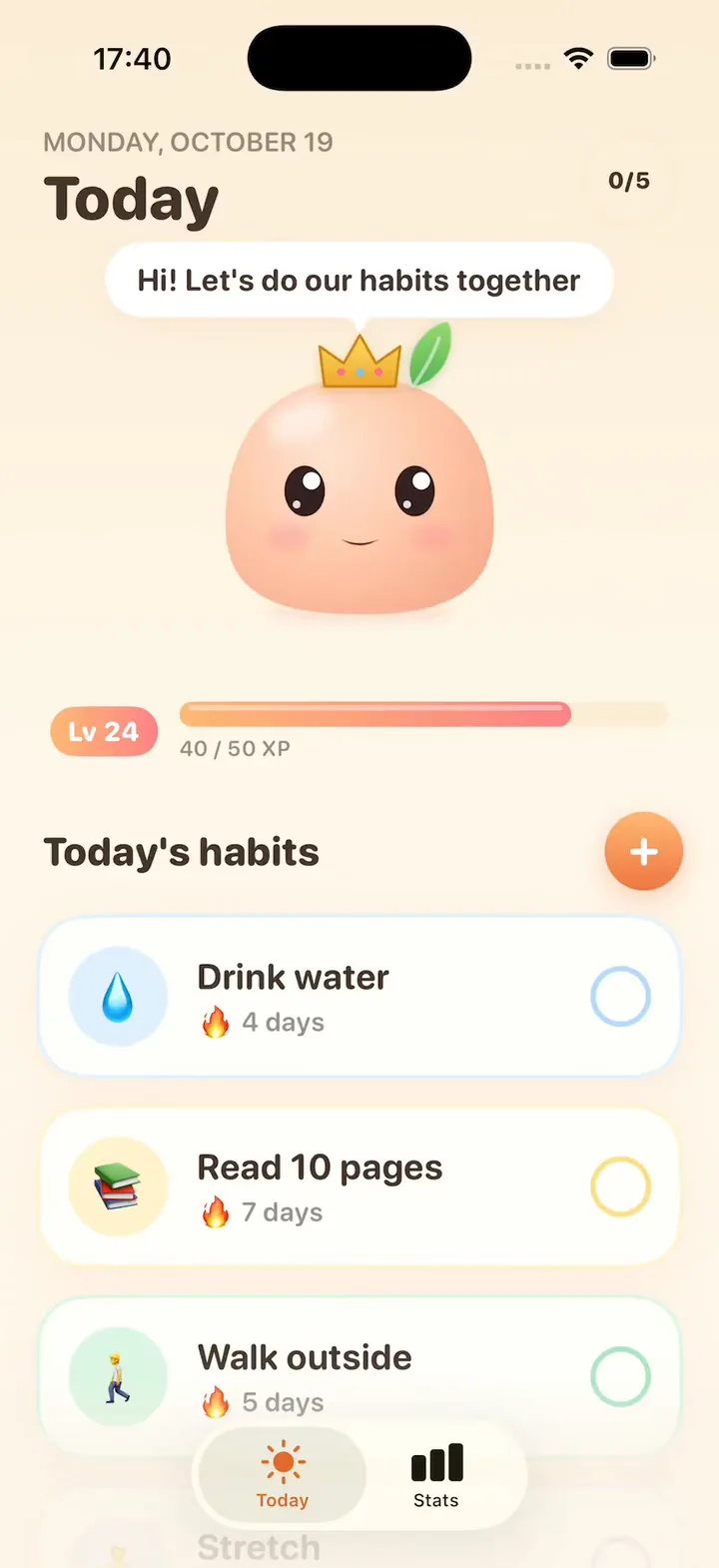
Most guides explain what vibe coding is. This beginner's guide shows how to vibe code, step by step, on a real app. On October 19, 2026, we built Mochi in Vibecode: a habit tracker with a little pet that hops when you check off a habit and grows as you level up. Below are the demo, real screenshots, and how long each message took and what it cost.
Want the definition first? Read what vibe coding means. Ready to build? Jump to step 1, or watch Mochi first.

How to vibe code in 6 steps
1. Pick a tool that builds and runs the whole app
A chatbot can write code, but then you have to run it, fix setup errors and get it onto a phone yourself. An app builder does those parts for you. That is why it's the right first tool.
There are two kinds of vibe coding tools:
- App builders run your app in the browser while you chat. Vibecode builds iPhone apps and web apps. Lovable, Bolt and Replit build web apps from a chat too.
- Coding agents write and edit the code in your project. Claude Code, Cursor and Codex suit people who can read code.
What you get: an empty project with a prompt box. In Vibecode, we clicked New app, then iOS app. If you're torn, see 10 vibe coding tools compared.
2. Write your first prompt: one app, one job
Say who the app is for, what the main screen shows, what one tap does and how it should look. Ask for sample data, so you can judge the design right away instead of staring at an empty screen.
Our first prompt is about 190 words. It still asks for one main screen, but it says what Mochi looks like, what happens on every tap and which colors to use. The more of that you spell out, the less the agent has to guess. Copy it, change the details and make it yours:
Message 1: the first build · 194 words
Build an iPhone app called Mochi, a habit tracker with a little pet that cheers you on.

Mochi is a round, soft, peach-colored blob with big shiny eyes and pink cheeks. It sits at the top of the Today screen, bobs gently and blinks now and then. Draw it with shapes, not an image, so it can squish and hop. Mochi looks happier as you finish habits: a small smile at first, a big open grin when everything is done.

Below Mochi, show today's habits as big rounded cards with an emoji, a name and a 🔥 streak count. Tap a card to check it off: the card fills with its color, Mochi hops, "+10 XP" floats up and the phone gives a light buzz. Tap it again to undo. An XP bar under Mochi fills toward the next level. When every habit is done, show confetti and "All done! Mochi is proud of you."

Start with 5 sample habits: Drink water 💧, Read 10 pages 📚, Walk outside 🚶, Stretch 🧘 and No phone in bed 📵. Use a warm cream background, pastel cards and a rounded font. Save everything on the phone.
If this is your free first build, it runs on GPT-6.1 Sol, and the sample history is random, so your Mochi will look a little different.
What you get: the agent starts at once, and the chat shows what it's doing.
3. Watch it build and test itself
The agent writes the code, builds the app and opens it in a live iPhone simulator in your browser. Then it checks its own work. For Mochi, it checked off a habit, undid one, finished all five to see the confetti, then restarted the app to make sure nothing was lost.
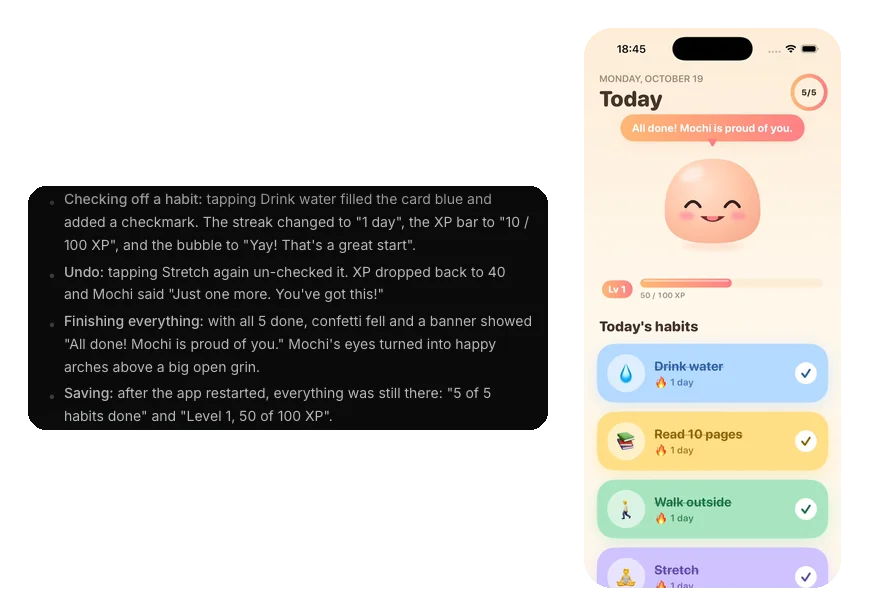
What you get: a first version you can tap. Mochi's was ready 16 minutes and 50 seconds after we pressed send. The agent also added things we didn't ask for: a ring that counts today's habits, a speech bubble where Mochi reacts to each check-off, and fresh check-offs every morning with streaks that carry over.
4. Change it by chatting
Use the app the way a real user would. Then ask for one change per message, and name the screen you mean.
We sent Mochi three changes, one at a time: a Stats tab, a way to add your own habits, and levels that make Mochi grow. After each one, the agent rebuilt the app and tested the new part, just like in step 3. Here is the level-up change:
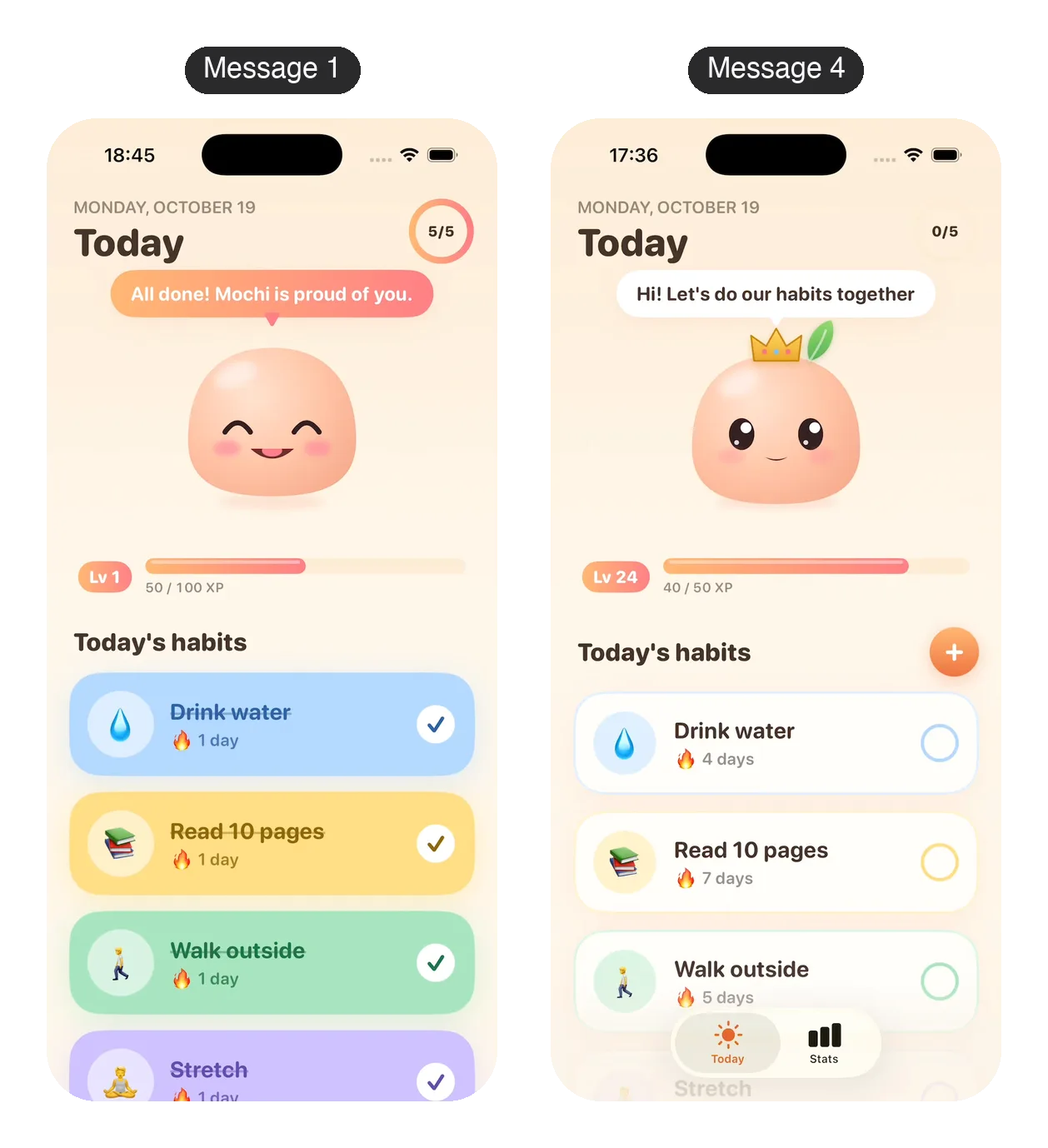
What you get: a better app after each message, and you never touch the code. Our three changes took between 5 and 14 minutes each. The exact prompts are in the full build below.
5. Try it on your phone
A simulator is not a phone. Hold the app in your hand before you call it done. You have two ways to do that with an iPhone app:
- Open the project in the Vibecode iPhone app. It streams the same live preview to your phone, and you don't need an Apple developer account.
- Install the real app. Click Install on iPhone, connect your Apple Developer account, and scan a QR code to register your phone. Vibecode builds the app and gives you an install link. This needs Apple's Developer Program, which costs $99 a year. The install guide has every step.
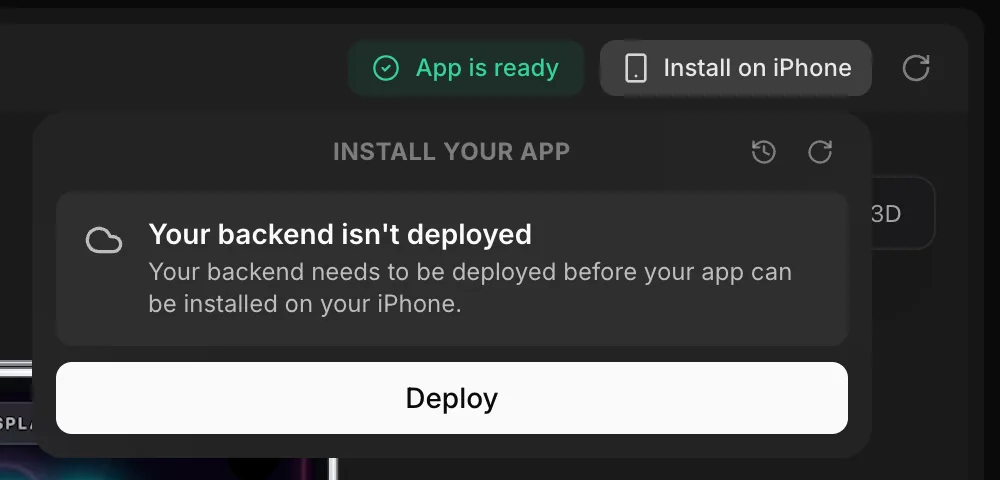
A web app is simpler. Open its link on your phone.
What you get: your app on your own phone. We kept Mochi in the browser preview for this guide and didn't install it, so this step has no time of ours to report. Vibecode's docs put the first install at about 10 minutes.
6. Publish it
For an iPhone app, click Publish, then Publish to App Store. Vibecode builds the app, signs it with your Apple Developer account, uploads it and submits it for Apple's review. App Store submission is included from the Plus plan. For a web app, you deploy it to a yourapp.vibecode.run address or your own domain instead.
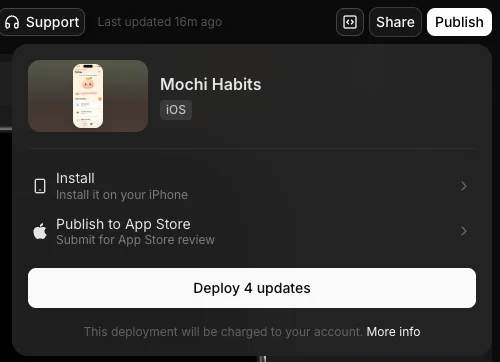
What you get: an app waiting for Apple's review, or a live link for a web app. We didn't submit Mochi, because it's a demo for this guide. Vibecode's docs put App Store setup at 15 to 30 minutes, plus Apple's review. Before you submit your own app, read the App Store rejections checklist.
Mochi, start to finish
Here is the whole build in one place. You pick the model for each message. By default a new app's first build uses Claude Opus 5.5 and later changes use GPT-6.1 Sol. We switched the three follow-ups to Claude Opus 5.5 too. We built it on a Max plan, but nothing in it needs more than Plus. Each time runs from pressing send to the agent's last message.
| Message | Time | AI credits |
|---|---|---|
| 1. First version | 16 min 50 s | $2.77 |
| 2. Stats tab | 11 min 30 s | $3.10 |
| 3. Add a habit | 13 min 15 s | $8.53 |
| 4. Levels | 5 min 12 s | $1.20 |
| Total | 46 min 47 s | $15.60 |
The first prompt is in step 2. These are the three follow-ups, word for word:
Message 2: a Stats tab · 71 words
In Mochi, add a Stats tab. Show the current streak and the best streak as big numbers, a calendar of the last 5 weeks where each day is a circle that fills in when every habit was done that day, and a bar chart of how many habits I did on each of the last 7 days. Make up 30 days of history so the screen looks real from the start.
Mochi got a Stats tab and a bar at the bottom to switch between Today and Stats. The agent tested that the numbers update live: after it checked off all five habits, the current streak went from 4 to 5 days and today's circle filled in. The made-up history also counts toward XP, so Mochi jumped to level 12 on the Today screen.
Message 3: add your own habits · 46 words
In Mochi, add a + button on the Today screen to add your own habit. The sheet asks for a name, an emoji, a color and the days it repeats, with Mon to Sun as round toggles. Swipe left on a habit card to delete it.
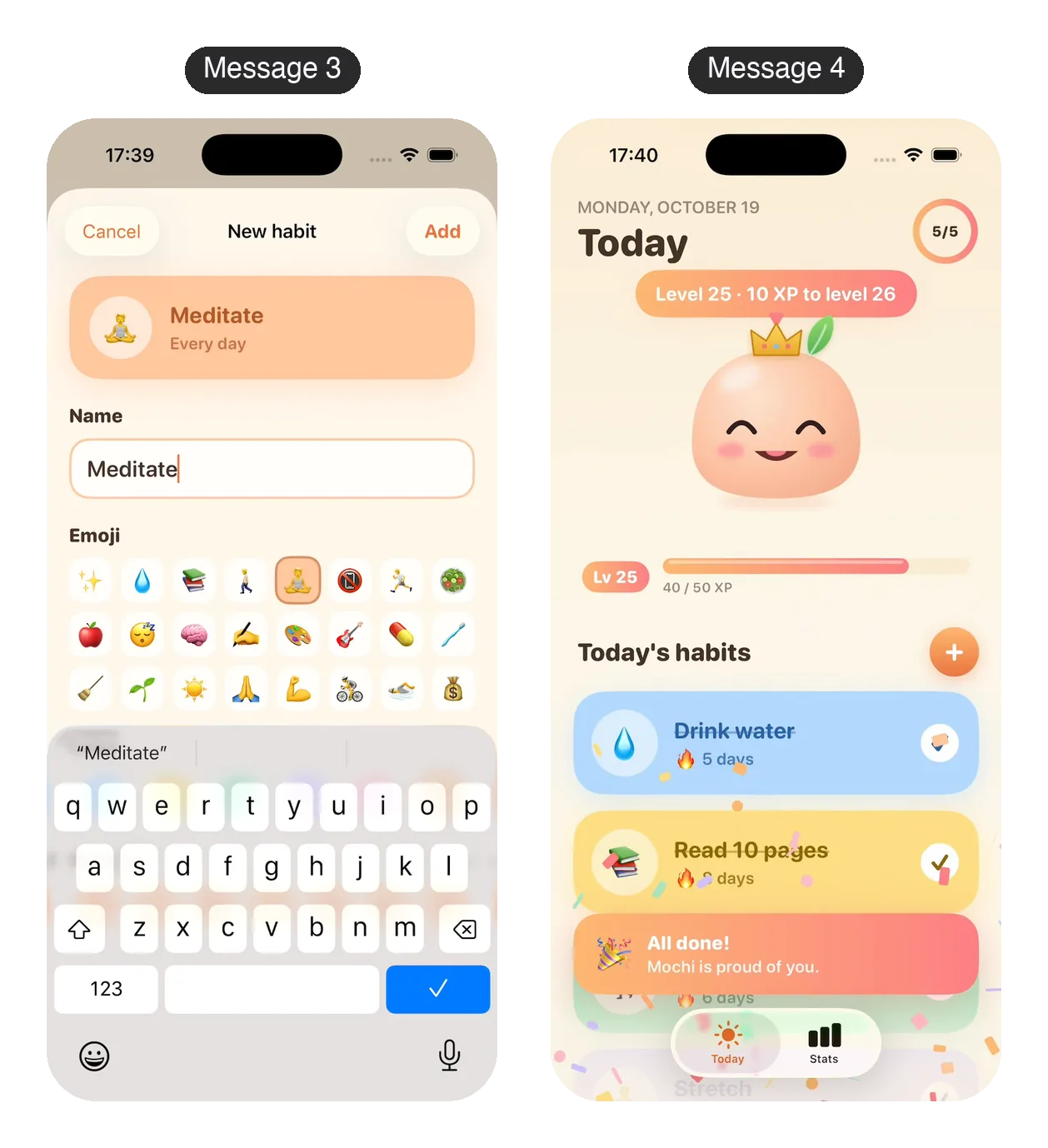
The + button opens a sheet with a preview card that updates as you choose. To test it, the agent added "Learn Spanish" with 🧠 in mint green for weekdays only, swiped Stretch away, then restarted the app to check both changes stuck. It also asked us something: deleting a habit removes the XP it earned, so should earned XP stay? We left it as it was.
Message 4: levels that make Mochi grow · 67 words
Make Mochi grow as it levels up. Every 50 XP is a new level. At level 2 Mochi sprouts a little green leaf on its head, and at level 3 it gets a tiny gold crown. When it levels up, Mochi does a big bounce with sparkles and "Level up!" appears. Tap Mochi to see its level and how much XP is left until the next one.
Mochi now wears a leaf and a tiny gold crown, because the made-up history had already earned it 24 levels. Tap Mochi and its speech bubble shows its level and the XP left to the next one. When a check-off fills the XP bar, Mochi does a big squishy bounce, sparkles burst around it and a level-up badge pops up. The agent noted one rough edge itself: the badge overlaps the crown a little at the top of the bounce.
Three things are worth knowing before you try this yourself.
- The agent asks when a choice is yours. After message 3, it pointed out that deleting a habit also deletes the XP it earned, and offered to change that. A one-line reply such as "Keep XP after a habit is deleted" would settle it.
- Sample data counts. The made-up history from message 2 earned Mochi so much XP that it starts at level 24, crown and all. If you'd rather watch it grow from level 1, you could ask the agent to start XP at zero.
- The preview can start over. Our simulator session ended once between messages, and the app came back as a fresh install with new sample history. While you build, treat what you save in the preview as test data.
How to write prompts that work
Good prompts are specific. Each rule below shows a vague prompt and a better one, and the better ones are lines we really sent while building Mochi, except the last.
1. Say who it's for and the one job it does. A vague idea gets a generic app.
- Vague: "Make a habit app."
- Better: "Build an iPhone app called Mochi, a habit tracker with a little pet that cheers you on."
2. Say how it should look. Colors and a font turn a plain list into an app you'd want to open.
- Vague: "Make it look nice."
- Better: "Use a warm cream background, pastel cards and a rounded font."
3. Ask for sample data. Empty screens hide layout problems.
- Vague: "Show my stats."
- Better: "Make up 30 days of history so the screen looks real from the start."
4. Change one thing per message, and name the screen. If you ask for five things at once, it's hard to tell which one broke something.
- Vague: "Make it better and add more stuff."
- Better: "In Mochi, add a + button on the Today screen to add your own habit."
5. Use exact numbers. The agent can't guess what "often" or "a while" means.
- Vague: "Mochi should level up after a while."
- Better: "Every 50 XP is a new level."
6. When something breaks, say what you saw and what you expected. "It's broken" gives the agent nothing to check.
- Vague: "The button doesn't work."
- Better: "When I tap Add on the New habit sheet, nothing happens. The new habit should show up at the bottom of today's habits."
What vibe coding is good at, and where it breaks
Vibe coding is great for apps with one clear job: trackers, simple games, personal tools, a first version to show friends or investors. The agent writes the screens, the saved data and the animations. It also tests the app in the simulator and fixes what it finds.
It gets harder when your app needs any of these:
- Accounts and logins. Sign-in needs a backend. Ask the agent to "Add sign-in and save each user's data" and it sets up Vibecode Cloud, which comes with Plus and up. You can also connect Supabase or Firebase. See backend and auth.
- Payments. For digital goods, Apple requires its own in-app purchase system, though US apps may also link to a web checkout. On Pro and up, Vibecode sets most of this up with RevenueCat for React Native apps. It isn't available for native Swift apps yet. See RevenueCat setup.
- Real users' data. Know what your app saves and where. Don't collect anything you don't need.
- App Store review. Apple rejects apps that crash, feel unfinished or only wrap a website. Check the App Store rejections checklist before you submit.
- Growing apps. Every change can break something that used to work. Test the old screens after each new feature, not only the new one.
Before real people use your app, test it on a real phone, try wrong inputs on purpose, and read your app's sign-in and privacy screens like a stranger would.
How to vibe code an app vs a website
The steps are the same. What changes is where the app ends up.
- An iPhone app. Pick iOS app. Vibecode writes a native Swift app, runs it in a cloud iPhone simulator and can send it to the App Store. To install it on your phone or publish it, you need Apple's Developer Program, which costs $99 a year. Start at iOS app builder.
- A website or web app. Pick Web app. You test it in the browser, then deploy it to a yourapp.vibecode.run address or your own domain. No Apple account needed. See AI app builder and the web app guide.
Need Android too? Vibecode's React Native projects run on iPhone and Android, and you publish to Google Play yourself.
What it costs to start
- Your first app build is free for new accounts that sign up with Google or Apple. A new account's free first build always runs on GPT-6.1 Sol.
- After that you need credits. Plus is $20 a month with $20 of credits, Pro is $50 with $55, and Max is $200 with $220. Unused credits roll over. See pricing.
- App Store submission starts on Plus. Downloading your code starts on Pro.
- Apple charges $99 a year for its Developer Program, which you need to install the app on your own iPhone or publish it.
What Mochi cost. The four messages used $15.60 of credits for the AI agent. The cloud iPhone simulator and the app builds used another $5.46 while the agent built and tested it, for $21.06 in all. That's a little more than the $20 of credits that come with Plus each month. Message 3 cost the most. The longer a chat runs, the more the agent rereads at every step, and in message 3 it reread about five times as much as in message 1. Message 4 started a fresh agent session, so it cost only $1.20.
Vibe coding with Claude, ChatGPT or Cursor
Claude. Claude Code is Anthropic's coding agent. You describe what you want, and it plans, writes code and runs tests in your code project. It comes with Claude's Pro and Max plans. Vibecode runs Claude Code too, in a cloud sandbox, so you get the same agent plus a simulator and App Store publishing. More in Vibecode and Claude Code.
ChatGPT. Yes, ChatGPT can vibe code, with limits. In a normal chat it writes code that you then run yourself. Codex, OpenAI's coding agent, comes with ChatGPT plans, including Free. To run and ship a native iPhone app from that code yourself, you need a Mac with Xcode.
Cursor. Cursor calls itself "your coding agent for building ambitious software." It suits people who already work in code.
Not sure yet? Start in an app builder. You can move to a coding agent later, and on Vibecode's Pro plan you can download your project's code to take with you.
Your next step
Pick one small app you would use this week. Copy this starter prompt, fill in the brackets, and send it:
Your first prompt · 44 words
Build an iPhone app called [name] for [who it's for]. The main screen shows [what you see first]. Tap [something] to [what happens]. Start with [3 to 5] sample [items], and use [colors] and a [rounded or classic] font. Save everything on the phone.
Prefer to start from a working app? Browse templates and change one by chatting. For another vibe coding tutorial, see creating your first app in the docs, or read how to build an iPhone app with AI.
Frequently asked questions
How do I start with vibe coding?
Pick an app builder that runs the app for you, describe one app in a few plain sentences, and send it. Test what it builds, then ask for one change at a time. Mochi, our example app, was working 17 minutes after the first prompt.
Is vibe coding difficult?
Getting a first version is easy. You type what you want and the tool builds it. The harder part comes later. You have to describe changes clearly, test every screen, and handle logins, payments and App Store review. An app with one main job is the easiest place to start.
What is the most effective way to vibe code?
Work in small steps. Start with one main screen and sample data, test after every change, and ask for one change per message. Name the screen you mean, say how it should look, use exact numbers, and when something breaks, say what you saw and what you expected.
Can ChatGPT vibe code?
Yes, with limits. In a normal chat, ChatGPT writes code, but you have to run it and get it onto a phone yourself. Codex, OpenAI's coding agent, comes with ChatGPT plans, including Free. To run and ship a native iPhone app from that code yourself, you need a Mac with Xcode. Vibecode builds, runs and publishes it in the cloud instead.
Can I vibe code for free?
You can start for free. Vibecode makes your first app build free for new accounts that sign up with Google or Apple. After that you need credits, which come with paid plans from $20 a month. Apple charges $99 a year if you want to install your app on your own iPhone or publish it to the App Store.
Do I need to know how to code?
No. You describe the app in plain English and the agent writes the code. Knowing a little helps when something breaks, because you can describe the problem more clearly. On Vibecode's Pro plan and up, you can download the code to learn from it or hand it to a developer.
About the editorial team

Vishal is a product engineer at Vibecode. Before Vibecode he did product engineering at EarnIn and co-founded Ivella (YC S21), a banking app for couples. He studied computer science at Duke.
More from the Vibecode blog
Case Study
App Case Study: Daily Grid
Zac Zimmerman always wanted to build a mobile app. The Vibecode Holiday Challenge inspired him to finally build one with the Vibecode App and he finished third out of 49 entries.
Case Study
App Case Study: Project Adulting
Commercial real estate developer — with no coding experience — built an app using Vibecode, published to the App Store, and has more than 100 downloads.
New to AI app building? Read what vibe coding means or compare the best AI mobile app builders.