AI app builder

Free AI app builder for iOS, Android and web apps

Describe the app you want in plain English. Vibecode's AI agent writes the code, runs the app in a live simulator in your browser, and publishes it to the App Store. No coding, no Mac, no setup.

Your first app build is free for new accounts. Paid plans start at $20 a month.

Updated

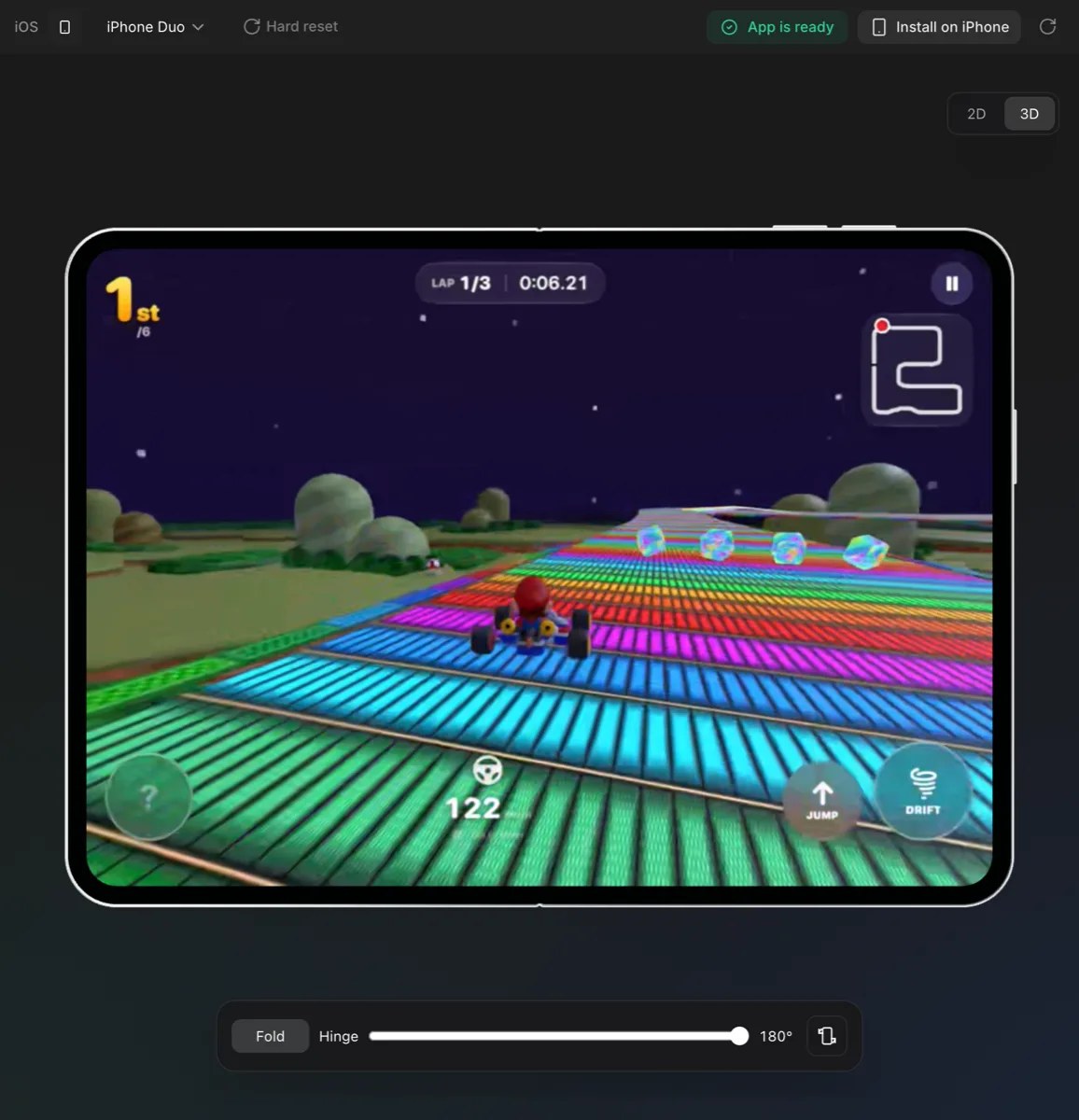
Tilt Kart, a native Swift 3D kart racing game built with Vibecode, mid-race in the Vibecode iOS Simulator in the browser on an unfolded iPhone Duo
A Swift app running in the live iOS Simulator, streamed to the browser. No Mac needed.

What is an AI app builder?

An AI app builder turns a written description into a working app. You say what the app should do, an AI agent writes the code, and you keep changing it by chatting instead of programming.

Vibecode builds three kinds of app: native Swift apps for iPhone and iPad, React Native apps that run on both iPhone and Android, and web apps. It previews each one live, tests it after every change, and publishes to the App Store from the same workspace.

How it works

  1. Step 1

    Describe it

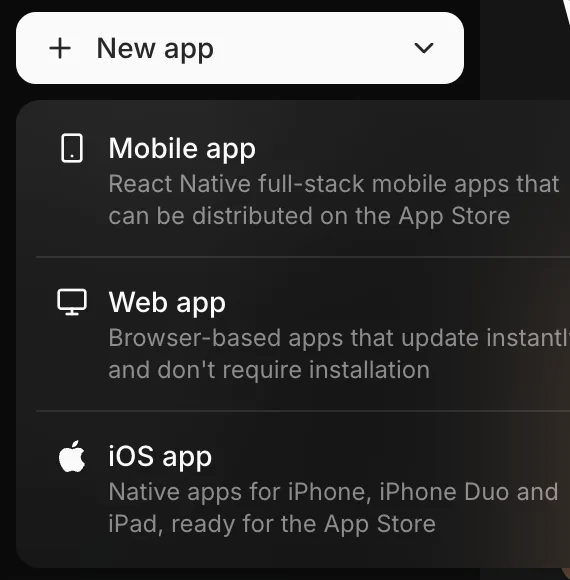
    Pick iOS, Mobile or Web and describe the app in a sentence or a page. Mention screens, data and the look you want.

    The Vibecode New app menu with three choices: Mobile app (React Native), Web app, and iOS app (native)
    Pick a project type: native iOS (Swift), Mobile (React Native for iOS and Android) or Web.
  2. Step 2

    Watch it build and test

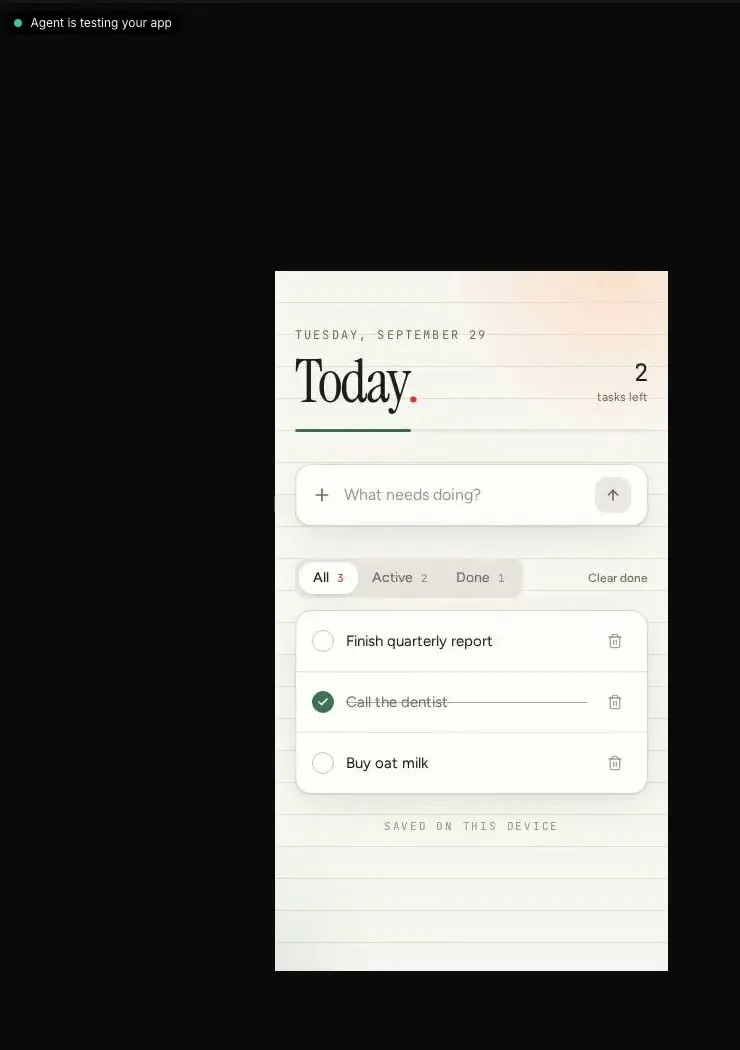
    The agent writes the code, builds it, then opens the app and taps through what it changed. Ask for changes in plain English.

    A to-do app in the Vibecode preview with the label 'Agent is testing your app'
    After each change the agent opens the app and taps through what it built.
  3. Step 3

    Publish

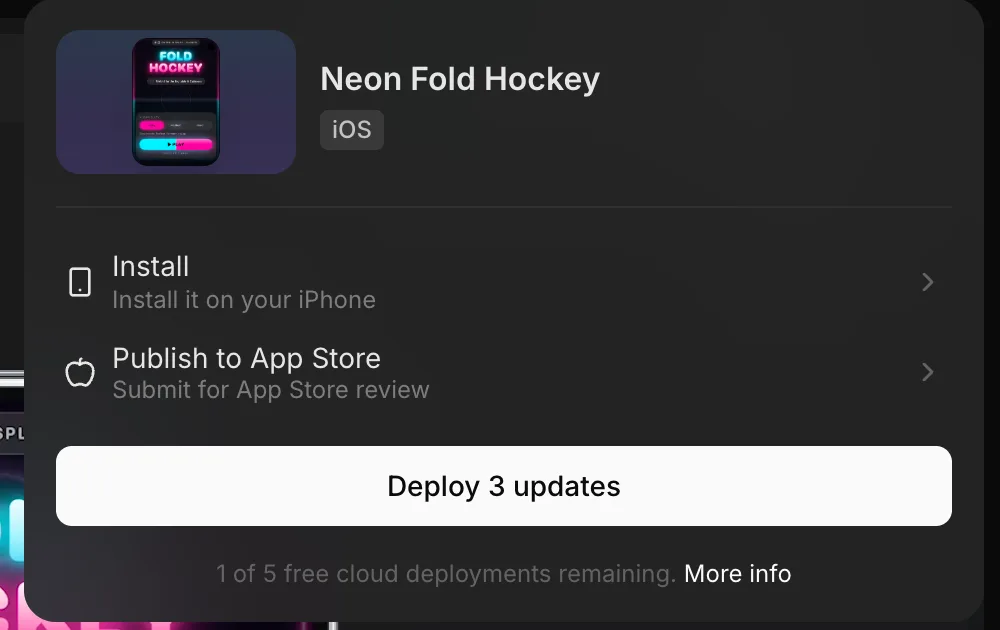
    Install it on your iPhone, submit it to the App Store, or deploy a web app to a public URL.

    The Vibecode Publish menu for an iOS project with Install on your iPhone and Publish to App Store options
    Publish: install on your iPhone or submit to the App Store for review.

What you can build

You choose the project type when you start. Want a real iPhone app? Read more about the AI iOS app builder.

Vibecode project types: the technology, where the app runs, how you preview it and where it publishes
Project typeBuilt withRuns onPreviewPublish to
iOS appSwift and SwiftUI (an Xcode project)iPhone and iPadLive iOS Simulator in your browserApp Store and TestFlight, built in
Mobile appReact Native and Expo (TypeScript)iPhone and Android from one codebaseOn your phone or in the web previewApp Store via Expo Launch; Google Play from the exported project
Web appTypeScript web appAny browserIn the browseryourapp.vibecode.run or your own domain

What's included

  • Backend

    Vibecode Cloud (database, auth, file storage) on paid plans, or connect Supabase, Firebase and other APIs.

  • App Store publishing

    Built in. For Swift apps Vibecode builds, signs, uploads and submits for review with your Apple Developer account; React Native apps go through Expo Launch. TestFlight on request. Available on Plus and up.

  • Your code

    Yes, on Pro ($50/mo) and up: full Xcode, Expo or web project, plus SSH.

  • The AI agent

    Every build runs Claude Code, Anthropic's coding agent, in a cloud sandbox, and you pick the model for each message from Claude, OpenAI GPT, Google Gemini, Meta Muse, Kimi and GLM models. By default a new app's first build uses Claude Opus 5.5 and later changes use GPT-6.1 Sol. A new account's free first build always runs on GPT-6.1 Sol.

  • AI in your app

    Add Claude, GPT or Gemini features to the app you build, paid for with your plan's credits. No API keys of your own.

  • Images, sound and video

    Generate app icons, images, sound effects and music for your app on paid plans.

  • Integrations

    Payments with RevenueCat or Stripe, maps, email, AI models and more, added by asking the agent.

Apps built with Vibecode

More than 800 apps built with Vibecode were live on the App Store as of October 2026. A few of them:

Is it free? Plans and prices

US dollars, checked against the pricing page. Credits pay for AI usage and roll over while your plan is active.

Vibecode plans: monthly price, annual price, credits and what each includes
PlanMonthlyAnnualCreditsIncludes
Free$0—First app build free
  • Your first app build is free for new accounts that sign up with Google or Apple
  • Premium AI models, no API keys needed
Plus$20/mo$200/yr$20 credits/mo
  • Access to Premium models
  • Build any AI apps with just prompts, no API keys required
  • Generate custom image and sound assets
  • Connect database and authentication for each project
  • App store submission
Pro$50/mo$500/yr$55 credits/mo
  • Access to Premium models
  • Build any AI apps with just prompts, no API keys required
  • Generate custom image and sound assets
  • Connect database and authentication for each project
  • App store submission
  • Download source code
  • SSH to Cursor
Max$200/mo$2,000/yr$220 credits/mo
  • Access to Premium models
  • Build any AI apps with just prompts, no API keys required
  • Generate custom image and sound assets
  • Connect database and authentication for each project
  • App store submission
  • Download source code
  • SSH to Cursor
  • 24/7 priority support

How Vibecode compares with other AI app builders

The biggest difference between AI app builders is what they produce. Most build web apps; a few build mobile apps; very few build native Swift. Facts below come from each product's own site.

Native Swift, Android and App Store publishing across AI app builders
BuilderWhat it buildsApp Store publishing
VibecodeNative Swift/SwiftUI iPhone and iPad apps, React Native (Expo) apps for iOS and Android, and web apps. You pick per project.
Yes.

Built in. For Swift apps Vibecode builds, signs, uploads and submits for review with your Apple Developer account; React Native apps go through Expo Launch. TestFlight on request.

LovableWeb apps and websites in React. New projects use TanStack Start (since May 2026).
No.

Not built in. The docs point to a PWA or a Capacitor wrapper you build and submit yourself.

RorkNative Swift/SwiftUI iPhone apps, native Kotlin (Jetpack Compose) Android apps and React web apps. New projects can't be Expo/React Native.
Yes.

Built in. Rork builds on its Macs and uploads to App Store Connect and TestFlight; you finish the listing and submit for review in App Store Connect. Google Play: uploads a signed AAB to internal testing, and the agent can promote it to closed, open or production tracks, including staged rollouts.

ReplitWeb apps, Expo (React Native) mobile apps, data visualizations, slide decks, animated videos, scripts and general code in many languages.
Partly.

Partly built in. Launch builds the app on Expo's servers, signs it and uploads it to App Store Connect and TestFlight; you complete the listing and submit for review in App Store Connect.

BoltFull-stack JavaScript web apps; mobile apps through Expo (React Native).
No.

No submit button documented. Bolt's Expo guide: download the code and run Expo's EAS CLI to reach TestFlight; Android builds are uploaded in Play Console.

FlutterFlowFlutter apps for iOS, Android, web and desktop from one project.
Yes.

One-click App Store deployment from Basic: FlutterFlow builds the app and uploads it to App Store Connect, then you add the listing details and submit for review there.

AI app builder FAQ

Is there a free AI app builder?

Yes. On Vibecode, the first app build on a new account is free when you sign up with Google or Apple on the web or the iPhone app. After that you need credits: paid plans start at $20 a month (Plus), and Pro is $50. Publishing to the App Store needs a paid Vibecode plan plus Apple's own $99-a-year Apple Developer Program membership, which every app on the App Store needs.

Can AI really generate a fully working app just from a description?

For most first versions, yes. Vibecode's agent writes the code, builds it, opens the app in a simulator and taps through what it changed, then fixes what it finds. Complex apps still take several rounds of describing what's wrong or missing, and anything that handles payments or personal data deserves careful testing before real users rely on it.

Can an AI app builder make a native iPhone app?

Vibecode can. Pick iOS app and it writes a native Swift and SwiftUI app for iPhone and iPad, compiles it on cloud Macs and shows it in a live iOS Simulator in your browser. Many other AI app builders make web apps or React Native apps instead.

How can I build an iPhone app with AI and publish it to the App Store without coding?

Describe the app in Vibecode, choose iOS app, and iterate in the chat until it works the way you want. Then click Publish and choose Publish to App Store: Vibecode builds the app, signs it with your Apple Developer account, uploads it, updates your App Store listing and submits it for review. You need an Apple Developer Program membership ($99 a year) and a Plus plan or higher.

Does Vibecode build Android apps?

Yes, through Mobile app projects, which are React Native (Expo) apps that run on Android and iPhone from one codebase. You can test them on your phone with the Vibecode app. Google Play submission is not a built-in step yet: download the Expo project (Pro plan and up) and publish it with Expo's tools.

Do I need to know how to code to use an AI app builder?

No. You describe what you want and ask for changes in plain English. Coding knowledge helps when you want to review the code, connect unusual services or debug something the agent can't fix, and Pro and Max plans let you download the code or connect over SSH.

Can I build a web app too?

Yes. Web app projects run in any browser and deploy to a public yourapp.vibecode.run address or your own custom domain.

Do I own the code an AI app builder creates?

With Vibecode, yes: you own the code and data you create. On Pro ($50 a month) and Max you can download the full project, which is an Xcode project for iOS apps, an Expo project for mobile apps or a web project, and open it in your own tools.

How long does it take to build an app with AI?

A simple first version usually appears within minutes of your first prompt. Bigger apps take more back-and-forth. Publishing to the App Store takes roughly 15 to 30 minutes of setup the first time, then Apple's review.

Can ChatGPT or Claude build an app on their own?

They can write code, but a chat assistant doesn't compile an iPhone app, run it in a simulator, host its backend, sign it or submit it to the App Store. An AI app builder wraps those steps around the model. Vibecode runs Claude Code, Anthropic's coding agent, in a cloud sandbox for every build, and you pick the model per message: Claude, OpenAI's GPT, Google's Gemini and others.

Describe your app. Get a working one.

Your first build is free. Preview it live, keep editing in plain English, and publish when it's ready.