
The Publishing Process at a Glance
Which AI App Builders Submit to the App Store for You
Every route to the App Store needs Apple’s Developer Program, at $99 a year (Apple), and Apple reviews every app. What differs is who builds the app, who uploads it and who presses submit. We checked each tool’s own docs on October 29, 2026, and each name links to the page we read:Before You Start
You’ll need the following before submitting your app:- Apple Developer Program membership ($99/year)
- Enroll at developer.apple.com/programs or in the Apple Developer app. See How to Create an Apple Developer Account.
- Make sure you’ve completed payment and received the confirmation email
- App Store Connect access
- Sign in at appstoreconnect.apple.com and accept any pending agreements
- Charging money? Also complete the Paid Apps Agreement, tax, and banking under Business
- A Vibecode plan with App Store submission: Plus or higher (compare plans)
- For Mobile app (React Native) projects: a free Expo account. Vibecode uses Expo Launch to build and upload.
- For iOS app (Swift) projects: an App Store Connect API key with the Admin role, or App Manager with access to Certificates, Identifiers & Profiles, which Vibecode uses to upload and submit. Sign in with your Apple ID and Vibecode creates the key for you. On a new app’s first release, Vibecode also needs a current Apple ID sign-in, because the key can’t create the app in App Store Connect or confirm its App Privacy answers. If you connected with an API key, or your last sign-in has expired, the agent sends you a link.
- An Apple device for 2FA: keep your iPhone, iPad, or Mac nearby for two-factor authentication codes
- A privacy policy URL and a support URL. Apple requires both for every app. For an iOS app (Swift), Vibecode writes and hosts both pages when you publish, adds them to your listing and links the privacy policy inside the app. For a Mobile app, have your own ready.
iOS App or Mobile App: Which Steps to Follow
Vibecode projects are one of three types. Two of them can go to the App Store, and they publish differently:Publish a Native iOS (Swift) App
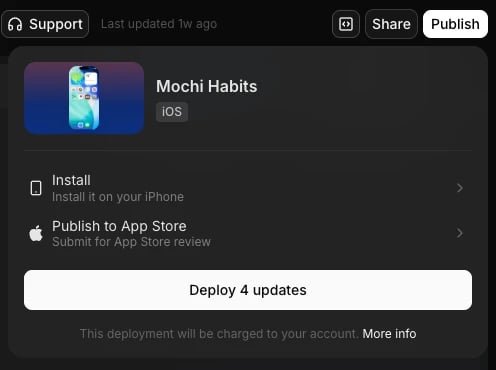
Native iOS projects don’t use Expo, and you don’t need a Mac, because Vibecode builds the app on its cloud Macs (more on publishing without a Mac). We ran these steps on October 29, 2026 with Mochi Habits, a habit tracker built in Vibecode, from the web app. Our run stopped at the Apple ID sign-in in step 7, so the last step’s time comes from a different app we submitted from the same account on October 27, 2026.Open Publish to App Store
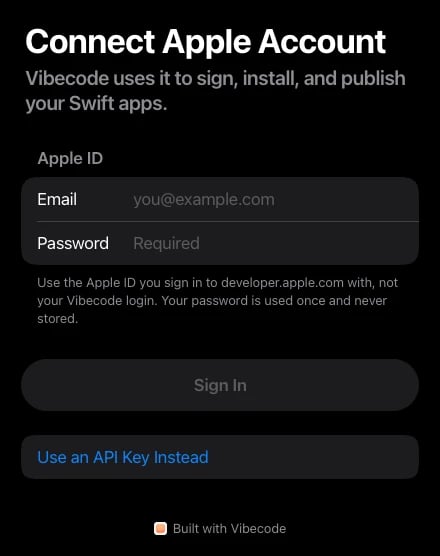
Connect your Apple account (first time only)
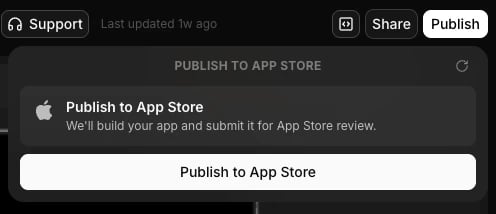
Click Publish to App Store
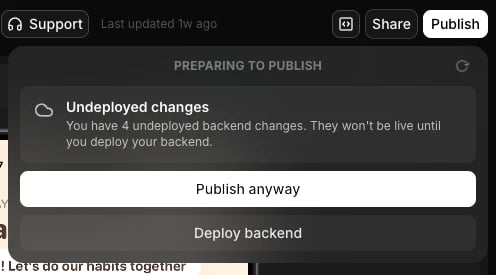
Confirm your bundle ID
com.vibecode.mochihabits-q5mvqf. You can edit it now, but not after you publish. Click Confirm and publish.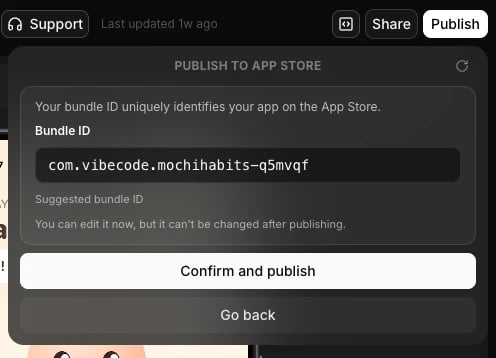
Send the publish request
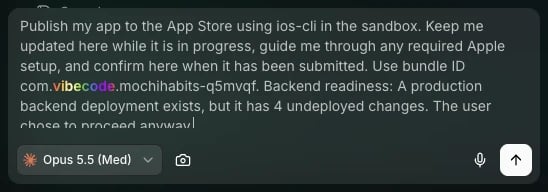
Let the agent prepare the release
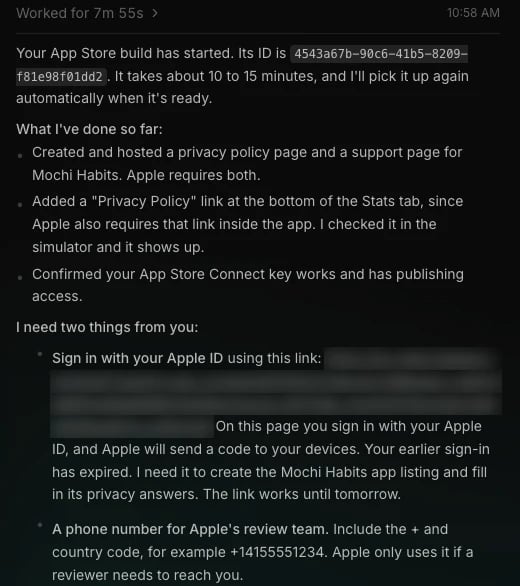
- wrote and hosted a privacy policy page and a support page, and added a Privacy Policy link inside the app, which Apple also requires. It checked the link in the simulator. This took 7 minutes.
- ran a first cloud build of the app in 5 minutes
- took three screenshots of the app in the simulator and wrote the description, keywords and category, as a free app in all countries. This took 6 minutes.
- ran a readiness check, which lists anything Apple will still ask for
Give the agent what only you can
- A phone number for Apple’s reviewers. Apple only uses it if a reviewer needs to reach you.
- An Apple ID sign-in. Vibecode uploads and submits with your App Store Connect key, but on a new app’s first release only an Apple ID can create the app in App Store Connect and confirm its App Privacy answers. The agent sends you a link, and Apple sends a code to your iPhone or Mac. Apple’s sign-ins expire, so the agent asks again when yours has. Ours had.
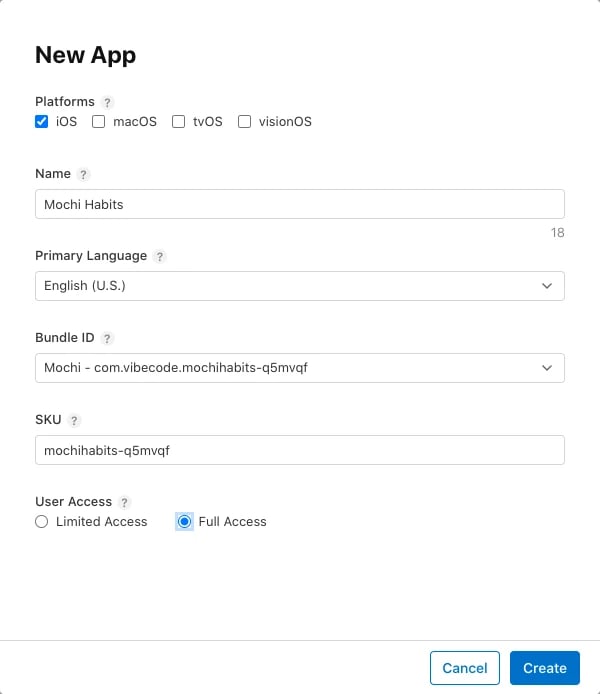
Vibecode submits it for review
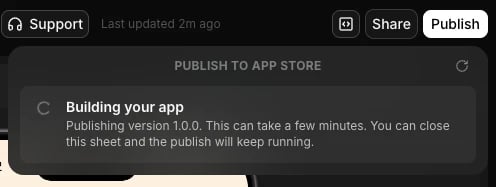
How Long It Took
Publish a Mobile (React Native) App
Mobile app projects are built with Expo. Vibecode prepares the app, Expo Launch builds it in the cloud and uploads it to App Store Connect, and you submit it for review.Run Preflight First
Preflight is an automated check that scans your app for common issues that cause Apple to reject it. It’s optional, but it can save you days of waiting on a rejection over a simple fix.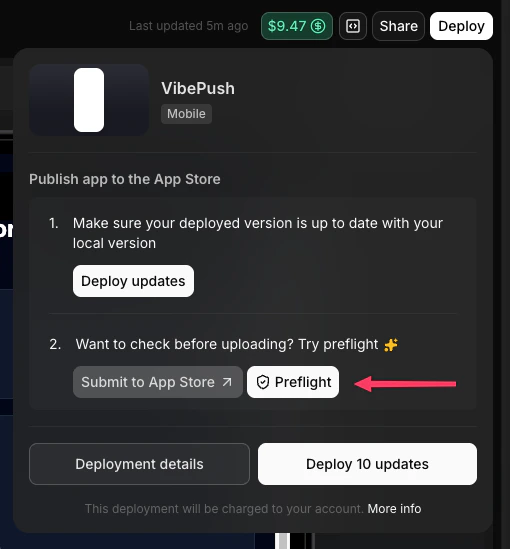
- Open the Deploy menu (Deployments once your app is published)
- Hover over the App Store section. The Preflight button slides in next to Submit to App Store.
- Click Preflight. This runs the
/appstore-preflightskill in your chat, and you can also run it there yourself at any time. - The agent works through the checklist, fixes what it can, and reports what’s left
Submit With Expo Launch
Start the submission
Confirm the prerequisites
Add your Expo access token
Confirm your app details and icon
1.0.0), and Support iPad (if on, Apple also requires iPad screenshots). Review your app icon too; you can generate one in Vibecode.Choose a bundle ID (first build only)
com.yourcompany.appname. Vibecode suggests one and you can change it, but treat it as permanent once your first build is submitted.Start Expo Launch
Submit for review
Later Builds
You won’t need a new bundle ID. Start Expo Launch again with a higher version number, then follow the new build in Expo and App Store Connect.Complete Your Listing and Submit
Before Apple reviews your app, its App Store listing must be complete. For Mobile apps you fill this in at App Store Connect → Apps → your app. For iOS apps, the agent fills in what it can on your first publish and tells you what’s left.- Open your app and the version you’re preparing (for example 1.0 Prepare for Submission)
- Under Build, select the build Expo Launch uploaded
- Choose how to release it: manually, automatically after approval, or on a date
- Click Add for Review, then submit it to App Review
Questions Apple Asks on Your First Submission
Besides the listing, Apple asks a few questions before it takes a new app. For iOS apps, the agent answers App Privacy, the age rating and encryption from your app’s code. EU trader status is yours to set.- App Privacy. What data the app collects and whether it tracks people. Your answers become the privacy label on your App Store page, and Apple needs them for every new app and update (Apple). Mochi keeps everything on the phone, so we answered Data Not Collected.
- Age rating. A questionnaire about your app’s content and features. The ratings are 4+, 9+, 13+, 16+ and 18+, and AI chat features count toward the answers (Apple). It also asks about social media features, and Apple has required those answers for new apps and updates since September 2026 (Apple). For iOS apps, the agent answers from your app’s code. When nothing applies, it answers None or No to every question, which gives a 4+ rating.
- Encryption (export compliance). Whether the app uses encryption beyond what Apple’s system provides, such as HTTPS. Vibecode’s iOS apps answer No in the app’s Info.plist file (
ITSAppUsesNonExemptEncryption), which is right unless you add your own encryption (Apple). - EU trader status. Under the EU’s Digital Services Act, every developer says whether they’re a trader, even if they don’t sell in the EU. A trader’s address, phone number and email appear on the app’s App Store page in the EU. The Account Holder or an Admin sets this once for your account, in App Store Connect under Business → Agreements (Apple).
- Accessibility (optional). You can list the accessibility features your app supports, like VoiceOver or larger text (Apple).
After You Submit
- Review: see How Long Does App Store Review Take? for timelines and expedited reviews.
- Rejections: paste Apple’s message from App Store Connect into your project chat, ask the agent to fix it, and submit again. The App Store rejections checklist covers the common reasons.
- Release: if you chose manual release, click Release This Version in App Store Connect. Your app appears on the App Store shortly after.
- Updates: make changes in Vibecode, then publish again. For an iOS app, open Publish and click Publish a new version. Vibecode builds your changes, raises the version number (
1.0becomes1.0.1), keeps your listing and submits the update for review. For a Mobile app, start Expo Launch again with a higher version number. Every update goes through App Review. - TestFlight: builds that reach App Store Connect are available in TestFlight, so you can share a beta before release.
- Keep your membership active: if your Apple Developer membership expires, your apps are no longer available for download, and you can’t submit new apps or updates (Apple).
Why Apps Get Rejected
Apple says that “over 40% of unresolved issues are related to guideline 2.1: App Completeness, which covers crashes, placeholder content, incomplete information, and more” (App Review). Apple’s list of common issues points to these guidelines:Troubleshooting
Asked to sign in with your Apple ID?- Vibecode needs a fresh Apple ID sign-in to create a new app in App Store Connect and answer Apple’s privacy questions. Your App Store Connect key can’t do those two steps, and Apple’s sign-ins expire.
- Open the link the agent sends, sign in, and enter the code Apple sends to your devices. The agent picks the publish back up after you sign in. If it doesn’t, send it a message.
- If your Apple ID belongs to more than one developer team, pick the team you publish with.
- Created the app yourself in App Store Connect? Tell the agent. On a first release it still needs your sign-in to confirm the App Privacy answers before it submits.
- Until the Account Holder accepts Apple’s latest agreements, Apple blocks your team’s App Store Connect key, so Vibecode can’t publish. The Account Holder accepts every pending agreement in App Store Connect under Business → Agreements, and any banner at developer.apple.com/account. If this came up while you connected your Apple account, sign in again on the Connect Apple Account page. If the agent asked during a publish, tell it once you’ve accepted, and it carries on.
- Names are unique across the App Store, so a common name may be gone. When the agent creates the app, it adds a short suffix to a taken name and tells you the final name. If you create the app yourself, try a short description after a colon, such as “Mochi: Habit Tracker”.
- Verify your Expo token is valid and hasn’t expired
- Make sure you’ve accepted all agreements in App Store Connect
- If Expo Launch opens but can’t continue, complete any Apple authentication or team selection steps there
- Contact support via Intercom chat in the app if you need help
- A new App Store version needs a higher version number than your last approved one. Vibecode raises the build number on every upload.
- For iOS apps, Publish a new version raises the version number for you. For Mobile apps, enter a higher version number when you start Expo Launch.
- Make sure your bundle ID is unique and not already taken
- Follow the format
com.company.appname - Use only lowercase letters, numbers, hyphens, and periods
Frequently Asked Questions
Can an AI app builder submit my app to the App Store for me?
Can an AI app builder submit my app to the App Store for me?
How much does it cost to put an app on the App Store?
How much does it cost to put an app on the App Store?
How long does it take to publish an app on the App Store?
How long does it take to publish an app on the App Store?
Can I publish an app to the App Store for free?
Can I publish an app to the App Store for free?
Do I need a Mac to publish an iPhone app?
Do I need a Mac to publish an iPhone app?
Do I need to sign in with my Apple ID to publish?
Do I need to sign in with my Apple ID to publish?
Can I choose when my app goes live?
Can I choose when my app goes live?
Can I publish from the Vibecode iPhone app?
Can I publish from the Vibecode iPhone app?
Did Apple remove Vibecode from the App Store?
Did Apple remove Vibecode from the App Store?
Can I publish an app without knowing how to code?
Can I publish an app without knowing how to code?
Whose name is on the App Store listing?
Whose name is on the App Store listing?
Can Vibecode publish to Google Play?
Can Vibecode publish to Google Play?
What happens if Apple rejects my app?
What happens if Apple rejects my app?