
Table of contents
- Can I build and publish an iOS app on Windows without a Mac?
- Why Xcode only runs on a Mac
- Xcode alternatives for Windows, compared
- What's the cheapest way to build an iOS app on Windows?
- Is there an iOS emulator for Windows?
- A real iPhone app, built on Windows without Xcode
- Start building
- Frequently asked questions
TL;DR
- No. Xcode is a Mac-only app, so you can't install it on a Windows 10 or 11 PC.
- Don't code? An AI app builder like Vibecode makes the app from a prompt. Your first app build is $0 on a new account!
- Do code? Expo's free plan includes up to 15 iOS builds a month. Or rent a real Mac with Xcode on MacinCloud, from $1 an hour.
- To publish to the App Store, every route needs Apple's Developer Program, at $99 a year.
No. There's no Xcode for Windows. Apple makes Xcode only for the Mac, so it won't install on Windows 10 or 11.
But you don't need Xcode on your PC to make an iPhone app. A Mac in the cloud can do Xcode's part while you work in Windows. Here are the real options, with prices we checked on November 11, 2026:
- An AI app builder, if you don't code. Vibecode builds a native Swift app on cloud Macs from your description. Your first app build is free on a new account.
- Expo, if you write JavaScript. Expo builds the iPhone version of a React Native app on its own Macs. Its free plan includes up to 15 iOS builds a month.
- A cloud build service, if you write Swift or Flutter. Codemagic gives you 500 free Mac minutes a month, then $0.095 a minute.
- A rented Mac, if you want real Xcode. MacinCloud starts at $1 an hour, and you use it over Remote Desktop.
Want the full build, step by step? Read how to make an iPhone app on Windows. We made a real one in Edge.
Can I build and publish an iOS app on Windows without a Mac?
Yes. As of November 2026, Vibecode, an AI app builder, builds and publishes iOS apps from your browser on Windows. It runs Xcode on its own cloud Macs and submits your app to the App Store for you.
A Mac is still involved. Since April 28, 2026, Apple only accepts apps built with Xcode 26 or later. With Vibecode, it's our Mac, not yours.
If you write React Native code, Expo's EAS cloud builds and Expo Submit do the same job. Either way, you pay Apple $99 a year for its Developer Program.
From a Windows PC, the path looks like this:
- Build the app. Describe it to Vibecode, or write the code and send it to a cloud build.
- Test it in a simulator in your browser, or on your own iPhone.
- Join Apple's Developer Program.
- Submit it. Vibecode, Expo or Codemagic uploads the build to App Store Connect, and Apple reviews it.
Why Xcode only runs on a Mac
Xcode is Apple's free app for making iPhone, iPad and Mac apps. It's built for macOS, and its App Store listing says "Only for Mac."
On November 11, 2026, the newest version, Xcode 27.2, needs macOS 26.6 or later. It also needs a Mac with an Apple M1 chip or later. A Windows PC has neither.
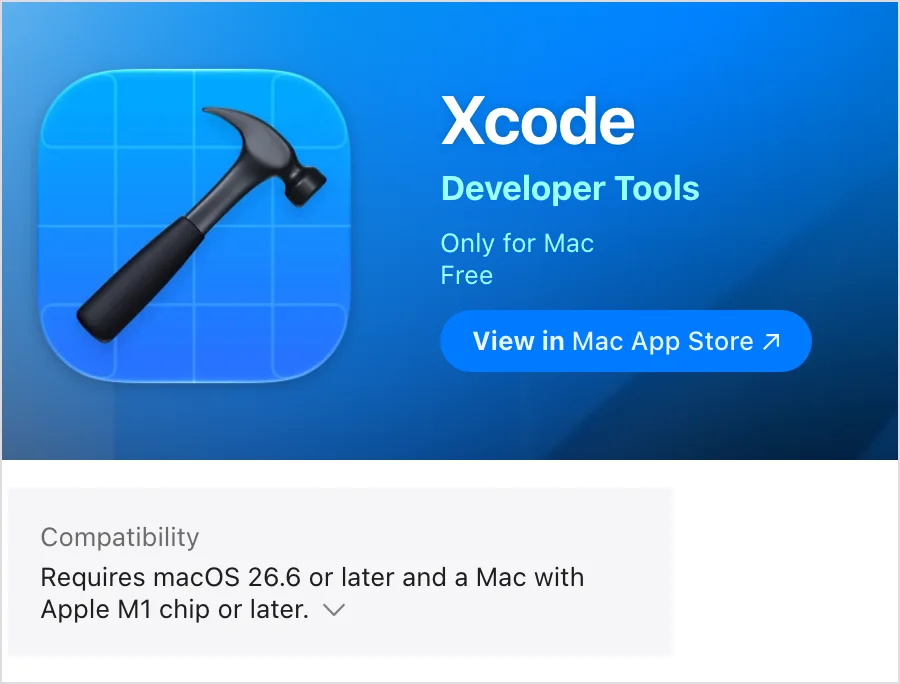
Apple's Xcode license says the same thing. It allows Xcode and its iOS tools only on Apple computers running macOS.
To make an iPhone app, Xcode does four jobs. Whatever you use on Windows has to cover all four:
- Build. It turns your code into an app with Apple's iOS SDK, which comes with Xcode.
- Sign. It signs the app with your Apple certificate. An iPhone won't open an app that isn't signed.
- Simulate. It runs the app in the iOS Simulator, an iPhone on your Mac's screen.
- Submit. It uploads the build to App Store Connect, where Apple reviews it.
From a Windows PC, every option below that reaches the App Store does these jobs on a Mac somewhere. What changes is whose Mac it is, and how much code you write.
Xcode alternatives for Windows, compared
Here they are side by side. We checked each price on the vendor's own page on November 11, 2026.
| Option | Price | App Store from Windows? |
|---|---|---|
| Vibecode, no code | First app build free on a new account. App Store submission from $20/mo | Yes, Vibecode submits it |
| Expo, you write JavaScript | Free plan with up to 15 iOS builds a month. Starter $19/mo plus usage | Yes, with Expo Submit |
| Codemagic, you write the code | 500 free Mac minutes a month, then $0.095 a minute | Yes, it can submit for you |
| MacinCloud, you code in Xcode | From $1 an hour, prepaid from 25 hours. Managed Macs from $25/mo | Yes, from Xcode on the rented Mac |
| AWS EC2 Mac, you code in Xcode | From $0.65 an hour for an M1 Mac, with a 24-hour minimum | Yes, from Xcode on the rented Mac |
| macOS in a VM or a Hackintosh | Free, but outside Apple's license | Not with today's Xcode |
| Swift on Windows, you write Swift | Free | No |
On top of any of these, Apple's Developer Program costs $99 a year. You need it to publish.
Describe your app and Vibecode builds itAI app builder
You describe the app in plain English. Vibecode writes a native Swift app, builds it on cloud Macs and runs it in a live iOS Simulator in your browser. When you're ready, it signs the app and submits it to the App Store with your Apple Developer account.
No Mac needed, and there's nothing to install on your PC. You steer with words, though. A detailed prompt gets you much closer on the first try.
Do you code too? Pro and Max plans let you download the full Xcode project. On any plan, you can work on the app from Claude Code, Cursor and other AI coding tools through the Vibecode MCP.
Expo and other cross-platform tools
With Expo, you write a React Native app in JavaScript on Windows. Expo's cloud build service, EAS, makes the iPhone version on Expo's own Macs. Then Expo Submit uploads it to Apple.
If you already code in JavaScript, start here. The free plan's build limits reset each month.
You can write Flutter apps on Windows too. But Flutter's iOS setup needs Xcode on a Mac. So pair Flutter with a cloud build service.
Cloud build services
Codemagic builds Swift, Flutter and React Native apps on its own Macs. It can also submit them to the App Store. It's made for developers who already have the code.
Apple has its own, Xcode Cloud, with 25 compute hours a month included in the Developer Program. But you set it up from Xcode, so you need a Mac to start.
Rent a Mac in the cloud
Renting is the closest you'll get to Xcode on Windows. MacinCloud rents real Macs with Xcode, and you connect over Remote Desktop.
Pay as you go starts at $1 an hour, but you prepay at least 25 hours. For an M2 Mac mini, that came to $31.25 up front when we checked. Managed Macs start at $25 a month.
AWS EC2 Mac starts at $0.65 an hour for an M1 Mac mini in US East. It bills by the second, but you pay for at least 24 hours, about $15.60. Those 24 hours run back to back, while MacinCloud's prepaid hours can be spread out.
Either way, you're learning Swift and Xcode through a remote screen, which can feel slow.
macOS in a virtual machine, or a Hackintosh
You'll find guides to running macOS in VMware or VirtualBox on a PC. A Hackintosh goes further and runs macOS on PC hardware. We'd skip both.
Apple's macOS license allows macOS only on Apple-branded computers, and virtual machines only on a Mac you own or control. Neither trick can run today's Xcode anyway. It needs an Apple M1 chip or later, and PCs use Intel, AMD or Qualcomm chips.
Swift on Windows
Swift itself runs on Windows. Swift.org has an official installer, at version 6.4.2 in November 2026, and it's a fine way to learn the language. But it has no iOS tools, so it can't make an iPhone app by itself.
xtool is a free, open-source tool that builds Swift apps for iPhone from WSL, the Linux layer in Windows. Its feature list covers installing apps on your own iPhone, not App Store submission. It also pulls Apple's iOS tools out of the Xcode download, which Apple's Xcode license allows only on Macs.
Have an iPad? Apple's Swift Playground app can build a SwiftUI app on the iPad and upload it to App Store Connect.
What's the cheapest way to build an iOS app on Windows?
As of November 2026, the cheapest route costs $99, Apple's yearly fee to publish. That's if you code and stay on a free cloud build plan. If you don't code, Vibecode submits your app to the App Store from $119. That's $20 for a month of Plus and $99 for Apple.
Here's the cheapest path for each kind of builder:
- If you don't code, use Vibecode. Your first app build is free, and Plus at $20 a month adds App Store submission. Our test app, Glowscope, used $9.30 of credits on a Max plan. That fits in the $20 of credits Plus includes each month.
- If you write JavaScript, use Expo's free plan. If your builds fit in it, you pay only Apple's fee.
- If you write Swift or Flutter, use Codemagic's 500 free Mac minutes a month. That also leaves just Apple's fee.
- If you need real Xcode for a short project, MacinCloud's smallest prepaid block is 25 hours.
Nonprofits, schools and government groups that don't charge for their apps or sell digital goods in them can ask Apple to waive the fee.
Is there an iOS emulator for Windows?
Not a real one. Apple's iOS Simulator comes with Xcode, so it only runs on a Mac. Apps that call themselves iOS emulators for Windows don't run Apple's simulator.
These do work from a Windows PC:
- A simulator streamed to your browser. Vibecode runs a real iOS Simulator on a cloud Mac and streams it to Edge or Chrome. You click to tap and drag to swipe.
- Expo's EAS Simulator. Expo announced a cloud simulator on September 14, 2026. It's a limited preview, opened in batches from a waitlist.
- Appetize. Appetize streams app builds you upload, so a Mac or a cloud build still has to make them. Its free plan includes 30 minutes a month.
- Your own iPhone. In Vibecode, Install on iPhone puts a test build on your phone from a QR code. It needs a paid plan and Apple's Developer Program. TestFlight, Apple's beta app, needs the program too.
A real iPhone app, built on Windows without Xcode
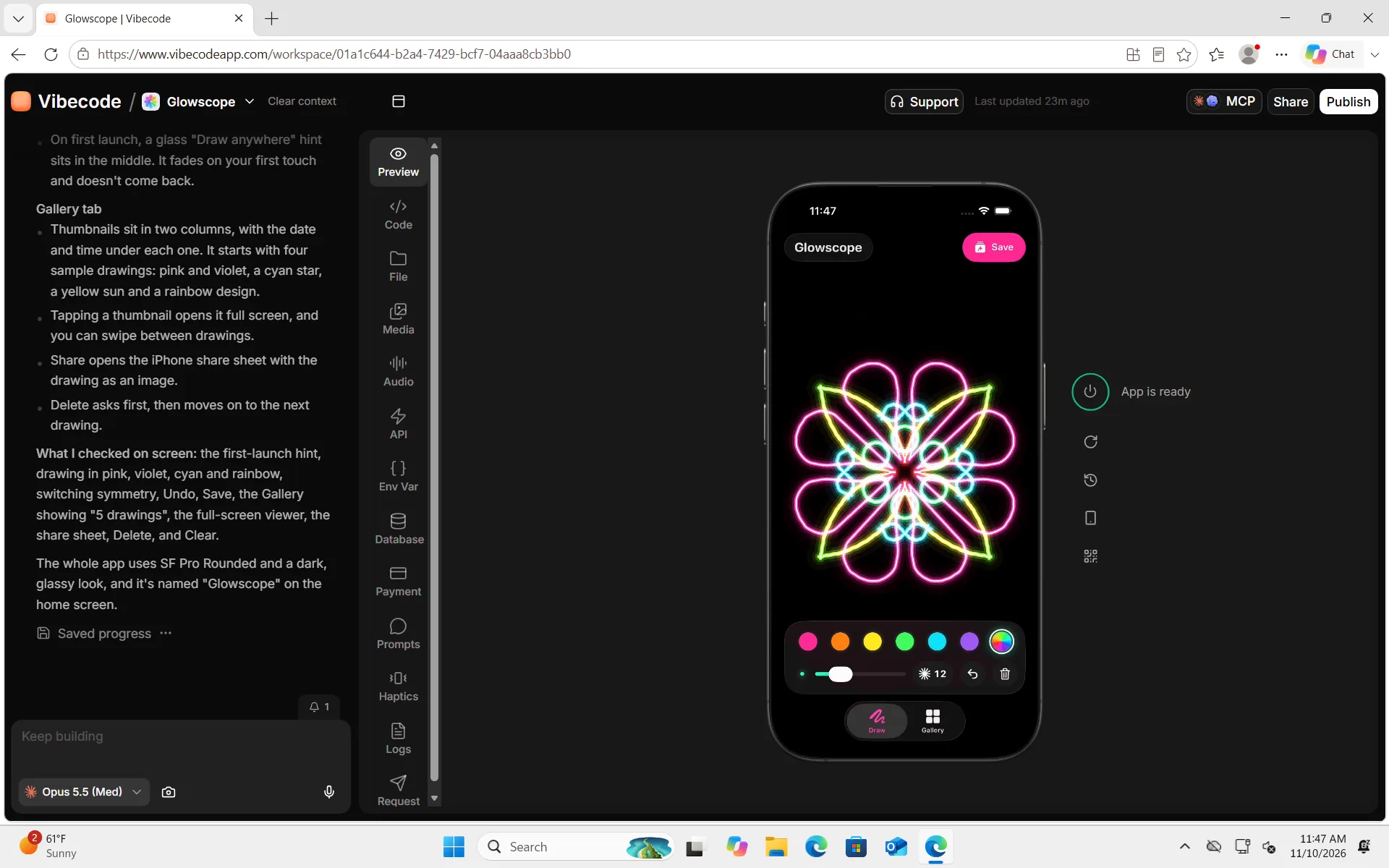
On November 10, 2026, we built Glowscope, a neon kaleidoscope drawing app, in Microsoft Edge on Windows 11. Our PC was a Windows 11 cloud PC on Microsoft Azure. We didn't install Xcode or any Apple tools on it.
Here's the short version. The step-by-step guide has every screen and the full first prompt, ready to copy.
We opened Vibecode, picked iOS app and described the app in 180 words. We asked for a black canvas that mirrors each line into 8 neon slices. We also asked for a glass toolbar with six colors, and a gallery with four sample drawings.
The agent wrote the Swift code, built it on a cloud Mac and tested it in the simulator. It drew lines, saved a drawing and opened the gallery. The first version was ready in 10 minutes and 43 seconds, for $3.70 of AI credits.
We built it on a paid plan with Claude Opus 5.5. A new account's free first build always runs on GPT-6.1 Sol, so yours won't match ours. On a free build, start with the main screen. Adding the rest takes more messages on a paid plan.

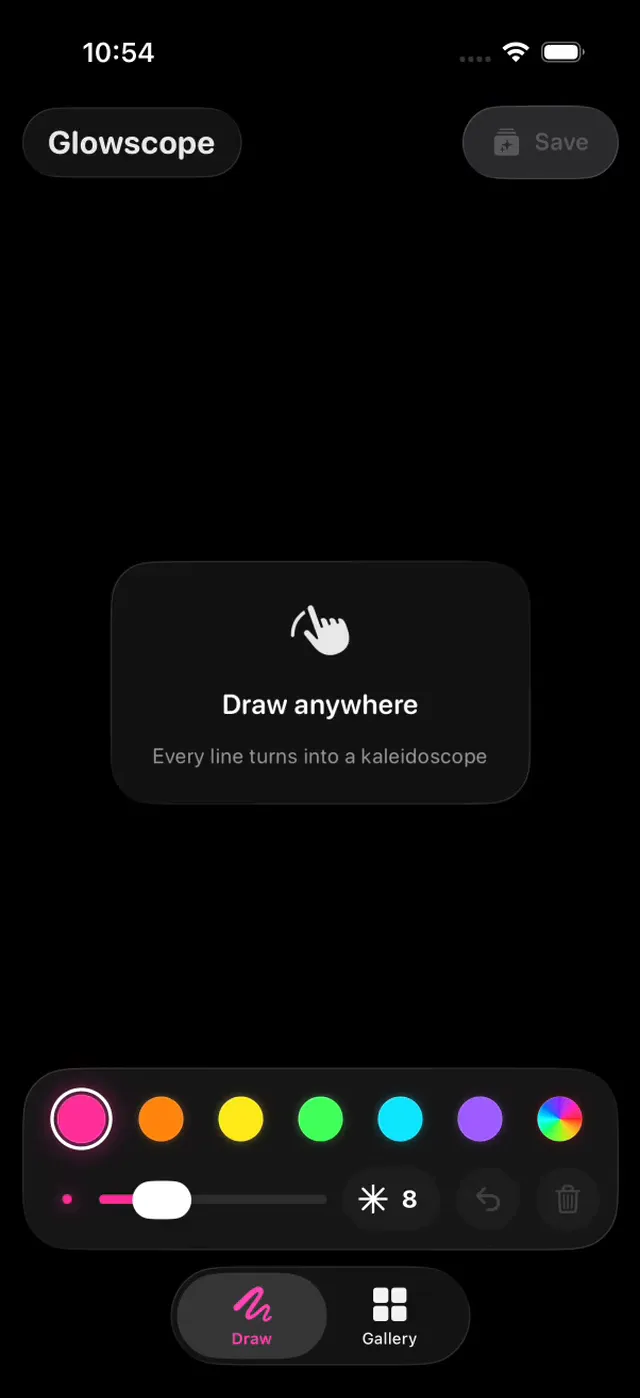
To change an app, you type what you want in the chat. Our second message added a Replay button:
Message 2: a Replay button · 33 words
Add a Replay button to the full-screen view of a drawing. It redraws the drawing line by line, like a time-lapse, in about 5 seconds, and then the finished drawing stays on screen.
That took 3 minutes and 16 seconds and $2.29 of AI credits. Both messages, plus our time in the simulator and the builds, came to $9.30 of credits.
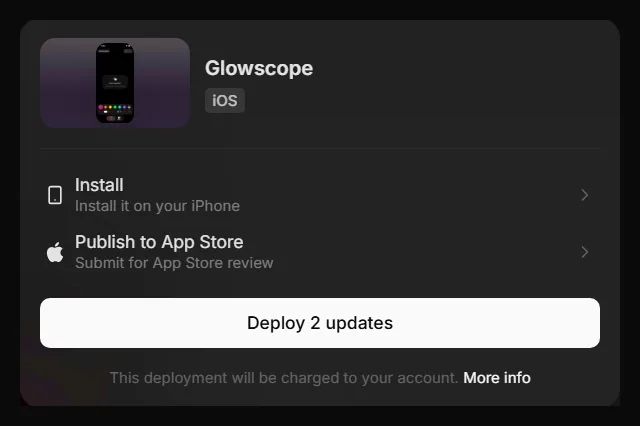
To publish, you click Publish, then Publish to App Store. Vibecode builds the app, signs it, uploads it and submits it to Apple for review. We stopped before sending Glowscope, since it's a demo.
Start building
You can't install Xcode on Windows, and you don't have to. Open Vibecode in Edge or Chrome and describe your app. Then test it in the simulator and publish it to the App Store.
For each publishing step, read our docs on publishing an app without a Mac. To see everything the builder makes, visit the iOS app builder. Only have an Android phone? Read how to make an iPhone app on Android.
Describe your app and Vibecode builds itFrequently asked questions
Is Xcode free?
Yes. Xcode is free on the Mac App Store, but it only runs on a Mac. Publishing is what costs money. Apple's Developer Program is $99 a year.
Can I install Xcode on Windows 11?
No. Apple makes Xcode only for macOS, so it won't install on Windows 11, 10 or 7. Use a cloud Mac, a cloud build service or an AI app builder instead.
Where can I download Xcode?
From the Mac App Store, or from Apple's developer site. Both downloads are for Macs only. Apple doesn't publish Xcode on GitHub, and a download that claims to be Xcode for Windows isn't from Apple.
Can I run Xcode in a virtual machine on Windows?
Not today's Xcode. Version 27.2 needs a Mac with an Apple M1 chip or later, and a PC doesn't have one. Apple's licenses also allow macOS and Xcode only on Apple computers. Rent a real Mac in the cloud instead.
Can I use Xcode online?
Not in a browser tab. Apple has no web version of Xcode. You can use real Xcode on a Mac you rent online, like MacinCloud, over Remote Desktop. Apple's Xcode Cloud builds apps on Apple's servers, but you set it up from Xcode on a Mac.
Do I need Xcode to publish to the App Store?
Not on your PC. From Windows, Xcode on a Mac still has to build your app, but it can be someone else's Mac. Since April 28, 2026, Apple only accepts apps built with Xcode 26 or later. Vibecode, Expo and Codemagic run Xcode on their own Macs and send the build to Apple for you.
Is there a free Xcode alternative for Windows?
To learn Swift, yes. Swift has a free official installer for Windows. For iPhone apps, start on a free plan. Expo's includes up to 15 iOS builds a month, Codemagic's has 500 free Mac minutes a month, and Vibecode's first app build is free on a new account.
About the editorial team
Vishal is a product engineer at Vibecode. Before Vibecode he did product engineering at EarnIn and co-founded Ivella (YC S21), a banking app for couples. He studied computer science at Duke.

More from the Vibecode blog
Tutorial
How to make an iPhone app on Android (no Mac needed)
Yes, you can make an iPhone app on Android. We built a first version in Chrome in 6 minutes. To publish, you pay Apple $99 a year, plus Vibecode Plus at $20/mo.
Tutorial
How to make an iPhone app on Windows (no Mac needed)
Yes, you can make an iPhone app on Windows. We built one in Edge in 11 minutes. To publish, you pay Apple $99 a year, plus Vibecode Plus at $20 a month.
New to AI app building? Read what vibe coding means or compare the best AI mobile app builders. Have an idea? See if you can vibe code it.