Changelog

New features in the Vibecode iPhone app and on the web, newest first. Updated .

Start building
  1. Buy credits once

    LaunchBillingWeb

    Buy any amount of credits from $20 to $500 on the web, on any plan.

    • Buy credits once, without changing your plan: any amount from $20 to $500, on any plan including Free.
    • In Plan & billing, click Buy next to Buy credits, or click your credit balance in a project and choose Buy more. See Plans and credits.
    Open update
  2. Copies get their own app identity

    iOSWebFix

    A copy or remix of a native iOS app no longer shares the original's App Store and RevenueCat setup.

    • Duplicate a native iOS app and the copy now gets its own bundle ID, with no App Store or RevenueCat setup carried over from the original. Remixes get a fresh bundle ID too.
    • Videos attach to a prompt the same way images do, and attachments stay on queued prompts and after a page reload.
    Open update
  3. Your AI tools can deploy and do more

    LaunchWebBilling

    Vibecode's agent and connected coding tools can deploy, run longer commands, and work on your live app's server on paid plans.

    • Deploy from chat: on a paid plan, ask Vibecode's agent, Claude Code, Codex, Cursor or another connected AI tool to deploy your app. If the deploy would start a charge, a Deploy card shows the price first and one tap deploys. With no card saved, the card form opens in place. After the deploy, the agent checks your live app. Free accounts get a link to plans.
    • Commands on the Free plan: coding tools connected to Vibecode can run up to 50 commands a week in your app, reset every Monday. Plus, Pro and Max have no weekly limit.
    • Long commands: on paid plans, a command can keep running for up to 20 minutes, and your AI tool checks back for the output.
    • Live server commands: on paid plans, coding tools and Vibecode's agent can run commands on your deployed app's server. Vibecode tries to back up the database first, or reuses a backup from the last 15 minutes.
    • Commands can be up to 20,000 characters, and a deploy from an AI tool saves your latest work first.
    • See Connect Vibecode to your AI tool
    Open update
  4. Clearer auto-reload and credit history

    BillingWebFix

    A failed auto-reload now says why, and credit history names flat-rate charges.

    • Auto-reload: if an automatic top-up fails, Settings and the out-of-credits dialog show why and which card was charged, with Use a different card and Try again.
    • Credit history now names flat-rate charges, such as "Email sent". See Plans and credits
    • Environment variables whose names contain digits now reach the agent
    Open update
  5. Pick your default model

    WebModels

    Choose the model new apps start with, and each app keeps its model on every device.

    • Default model: in Settings → Agent, pick the model new apps start with, or leave it on Automatic.
    • The model, reasoning level and fast mode you pick inside an app are saved with that app, so it opens the same way on every device. Picking a model in one app doesn't change your default.
    Open update
  6. Smoother App Store review

    iOS

    First releases settle the App Review login, and approved versions go live on their own.

    • On a first App Store release, the agent now decides whether App Review needs a demo login, so apps with sign-in aren't rejected for a missing one. A login you added yourself in App Store Connect is kept on later updates.
    • Approved versions now release automatically by default instead of waiting for a manual release. See Deploy to the App Store
    Open update
  7. Web app templates

    LaunchWeb

    The templates page now has 11 web apps you can remix.

    • Web app templates: the first 11 web app templates are on Templates, including a booking page, an online shop and an admin console. Each one is a real Vibecode project you can remix.
    Open update
  8. Everything the agent needs, in one bar

    LaunchWeb

    A bar above the chat box collects every step the agent needs you to do.

    • Requests bar: on the web, a bar above the chat box holds everything the agent needs from you: Apple sign-in, the sandbox test account, installing the newest build, registering your iPhone, connecting RevenueCat and accepting Apple's agreements. Each button makes a fresh link when you tap it, so links never expire, and passwords are never shown in the chat.
    • The website plays a soft chime when the agent adds something to the bar, even in a background tab
    Open update
  9. Stop works sooner, and iOS fixes

    WebiOSFix

    Stop cancels a prompt while the workspace starts, plus fixes for native iOS builds.

    • Stop now cancels a prompt even while your app's workspace is still starting
    • Apps that need Apple's Family Controls get it requested for you when signing
    • A failed Apple Watch build no longer blocks your iPhone app's preview
    • Your app always uses its saved bundle ID before each build
    • Anyone can read the feedback board without signing in
    Open update
  10. New Settings page

    WebBilling

    Account and billing settings are now one page with four tabs.

    • Settings is now one page with four tabs: Account, Plan & billing, Usage and Invoices
    Open update
  11. Vibecode for iPhone 1.2.26

    LaunchiOS

    The iPhone app adapts to iPhone Duo, groups Live Activities, and adds a model picker and Payment for native apps.

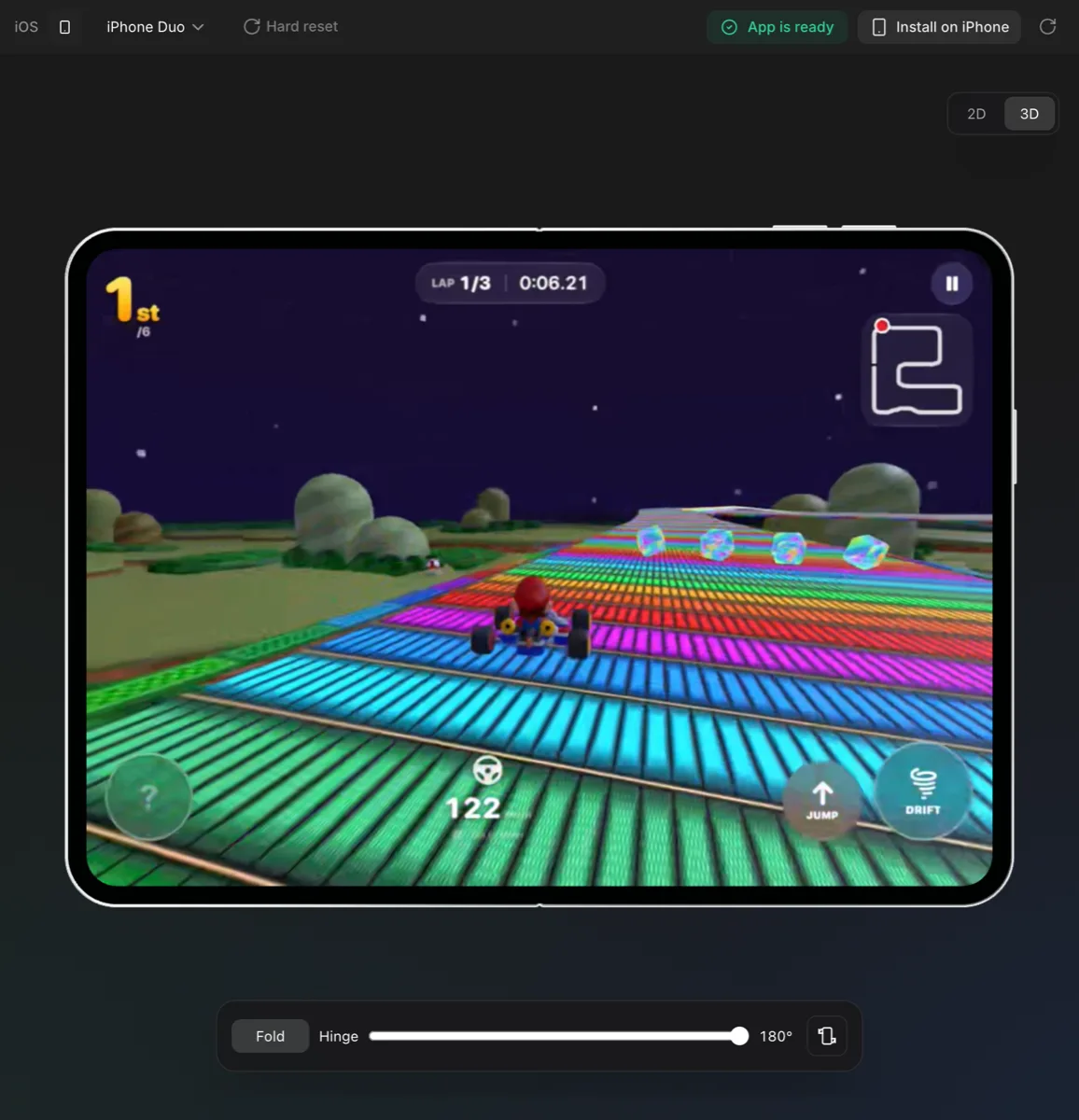
    • iPhone Duo: the Vibecode iPhone app adapts to the foldable iPhone. Unfold it sideways to see your chat and your app side by side. Held upright, it works like any other iPhone.
    • One Live Activity for all your projects that are building. Finished ones show Done until you open them, and the Dynamic Island shows your app's icon and a progress ring.
    • Model picker in the iPhone app
    • Payment for native iOS projects: set up subscriptions and paywalls from the app. See RevenueCat setup
    • Finished agent turns fold up, and older chat history loads smoothly as you scroll
    • Your project list is sorted by your last prompt
    • The simulator preview stays live when you leave the app for a moment or pull down Control Center
    Open update
  12. Signing certificate fixes

    iOSWebFix

    Publishing works for Apple teams that already have a certificate, and you can remove one yourself.

    • Publishing now works for Apple teams that already have a distribution certificate from Xcode or Expo. Under Settings → Apple Developer, on the web and in the iPhone app, see your team's certificates and remove one if the team is full.
    • The Database tab link keeps working: a fresh link is made after an hour
    Open update
  13. Android app opens share links

    Android

    Share links now open in the Vibecode Android app.

    • Share links now open in the Vibecode Android app. Your own app opens in the editor, and someone else's opens in a viewer where you can try it.
    • Shared mobile apps run with their images and fonts. See Sharing your app
    Open update
  14. Faster checkout

    WebBillingiOSFix

    Checkout leads with Apple Pay and Google Pay and no longer asks for a phone number.

    • Checkout shows Apple Pay and Google Pay first, puts the amount on the pay button, and no longer asks for a phone number to pay by card
    • Imported native iOS projects can now install on your iPhone and get their app icon
    Open update
  15. Deploy from your AI tool

    LaunchWebModelsFix

    Every account's connected AI tools can now check and deploy apps.

    • Deploy from your AI tool: Claude, Claude Code, Codex, Cursor and other AI tools connected to Vibecode can check your deployment, deploy your app and set its address. They can also set a password on your web app (not in ChatGPT). See Deploying
    • Nano Banana Pro in your apps moves to Google's stable model, so it keeps working after the preview is retired
    • When Apple's text code fails during Apple ID sign-in, the error now tells you where to fix it
    Open update
  16. GPT Image 2.5 by default

    ModelsWebiOS

    Images in your apps and in the builder now use GPT Image 2.5 by default.

    • GPT Image 2.5 is now the default image model, in the builder and when the agent adds images to your app. See Image generation
    • Your project list is sorted by your last prompt, and Updated shows when you last prompted
    • A web app's first build can deploy when you ask it to
    • Apple commands run on the Apple team you connected, and errors name the team when your Apple ID isn't on it
    Open update
  17. Vibecode in any AI tool

    LaunchWeb

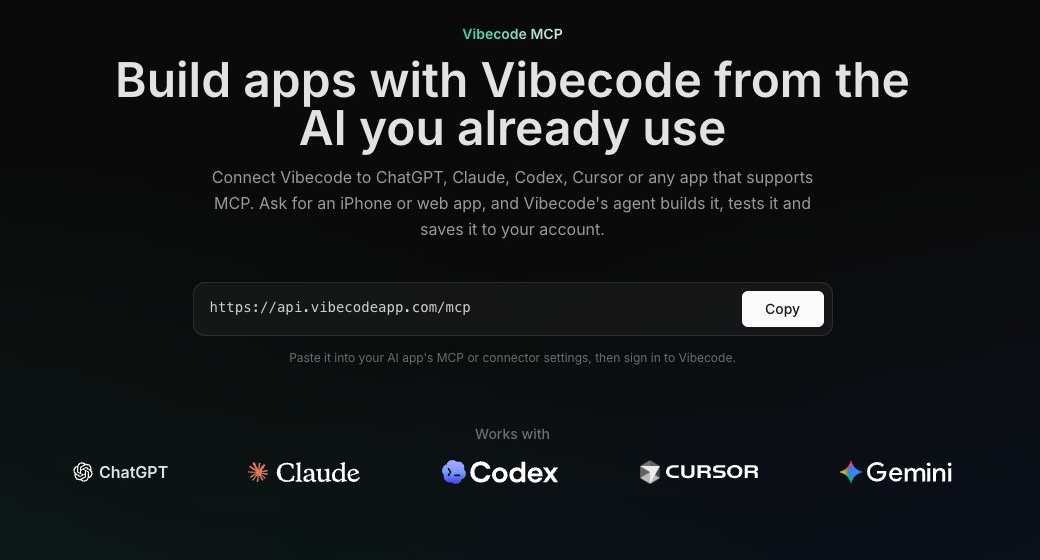
    Connect Vibecode to Claude Code, Codex, Cursor, VS Code or any app that supports MCP.

    The Vibecode MCP page with the server address to paste into your AI tool
    • Any AI tool: connect Vibecode to Claude Code, Codex, Cursor, VS Code, Gemini CLI, Windsurf, Zed, Goose or any app that supports MCP, then build and change your apps from there. See Connect Vibecode to your AI tool
    • Every connected AI tool gets the full set of Vibecode tools
    • Your AI tool can list up to 50 of your projects
    • New MCP page with connect steps for each app, linked from the top menu
    • Guides: Codex, Cursor, Gemini CLI, Claude Code
    Open update
  18. GPT-6.1 Terra and Apple sign-in fixes

    ModelsiOSFix

    GPT-6.1 Terra joins the picker, and Apple settings move into the workspace.

    • GPT-6.1 Terra replaces GPT-5.6 Terra in the model picker, and is in the APIs tab for your apps
    • Apple Developer settings are now also in the workspace settings. Renewal links pick the Apple team you connected.
    • Apple ID sign-in works with email aliases, and gives clear steps for expired memberships and agreements you still need to accept. See Apple Developer account
    Open update
  19. Kimi K3.1 Pro

    ModelsWeb

    Kimi K3.1 Pro joins the model picker, and pages load faster.

    • Kimi K3.1 Pro is in the model picker
    • The website loads faster on your first visit
    Open update
  20. Subscriptions for native iOS apps

    LaunchiOSWeb

    Every user can now add subscriptions and paywalls to native iOS apps.

    • Subscriptions and paywalls for native iOS apps are open to everyone. Ask the agent, or use the Payment tab in the workspace. See RevenueCat setup
    • App Store publishing fixes: age rating questions, category checks, and your new-territories setting is kept
    • Getting started on the web is quicker, with fewer questions before you build
    Open update
  21. Every API ready to use

    LaunchiOSWeb

    The agent can use every built-in API without setup, and new iOS apps get their own icon.

    • Built-in APIs, no setup: the agent can use every built-in API, such as AI models, images and sound, without you turning it on in the APIs tab first. See Integrations
    • Every new native iOS app gets its own icon while its first build runs
    • The Vibecode iPhone app now has its own iPhone simulator, so it no longer switches when the website previews iPhone Duo or Apple Watch
    • A new account's first native iOS remix counts as its free first build
    • Resuming an App Store publish that stopped midway now fills in the remaining settings
    Open update
  22. Simpler App Store updates

    iOSWeb

    An App Store update needs only the new build and release notes.

    • App Store updates need only the new build and release notes, and the agent can keep building an app that's already published. See Deploy to the App Store
    • When a publish needs something from you, the agent picks it up and helps you finish
    • A bundle ID you confirm is written into your app's code
    • A publish that's stuck waiting now stops with Try again
    • New templates: Tinder, ChatGPT, Snapchat and Candy Crush clones on Templates
    Open update
  23. Apple capabilities set up for you

    iOS

    Signing now creates the Apple portal setup your app needs.

    • When your native iOS app uses App Groups, iCloud, Apple Pay, Wallet or WeatherKit, Vibecode sets them up in Apple's developer portal for you when it signs the app
    Open update
  24. Card and publish fixes

    BillingiOSFix

    Switch cards when Add credits is declined, and builds no longer start a publish.

    • When Add credits is declined, choose Use a different card
    • A plain iOS build no longer starts an App Store publish, and TestFlight publishes send TestFlight notifications. See TestFlight
    Open update
  25. Resubmit rejected apps

    iOSFix

    A version Apple rejected can now take a new build and go back to review.

    • A version Apple rejected can now take a new build and be resubmitted
    • Queued prompts start after a prompt that ended in an error
    Open update
  26. Light mode

    LaunchWebModels

    The website has a light theme, and Meta Muse Wonder joins the picker.

    • Light mode: choose Light, Dark or System in Settings › Account › Appearance, or from the site footer. Dark stays the default.
    • Meta Muse Wonder is in the model picker and the APIs tab
    • Apps with sign-in now get email and password sign-in by default. See Backend and auth
    • The "your app is ready" email shows a picture of your app, in a browser window for web apps
    • Paying accounts get a new, clearer plans dialog
    • TestFlight publishes finish even when a step after the upload is refused
    Open update
  27. Gemini 4 Argon and new onboarding

    ModelsWeb

    Gemini 4 Argon joins the picker, and new visitors start with their idea.

    • Gemini 4 Argon is in the model picker and the APIs tab
    • New onboarding on the web: type your idea, answer a few questions, then sign in and watch your app start building
    • The Deployments page shows each app's real state, and its status filter and paging work
    Open update
  28. Templates

    LaunchWebModels

    Templates are in the top menu, starting with 8 phone apps you can remix.

    • Templates are in the top menu, with 8 phone apps to remix as a starting point. See Templates
    • Gemini 3.8 Flash is in the model picker
    • Remixed apps can build and deploy
    Open update
  29. Native iOS for everyone

    LaunchiOSWeb

    iOS is now a choice for every new project, and native iOS apps can be shared and remixed on the web.

    • iOS shows for everyone when you start a project. React Native mobile apps move under Legacy. See Native iOS apps
    • Share and remix native iOS apps on the web
    • Gemini Flash in the APIs tab now runs on Gemini 3.8 Flash
    Open update
  30. Auto-reload and prompt fixes

    BillingWebFix

    The auto-reload switch saves, and long prompts get a clear message.

    • The auto-reload switch now saves, and shows the reason when setup fails
    • A prompt too big to send now says so
    • Duplicate works on projects with a long history
    Open update
  31. Fast mode and sound in previews

    ModelsWebiOS

    Fast mode, a reasoning slider, Claude Haiku 5.5, and sound in iOS previews.

    • Fast mode for GPT and Opus models on the web
    • A reasoning slider in the web model picker sets how hard the agent thinks
    • Claude Haiku 5.5 replaces Claude Haiku 4.5 in the model picker
    • Sound in iOS previews: native iOS and React Native previews play your app's sound, and apps that record can hear your microphone (rolled out Oct 6–8)
    • If your free first build finishes while you're away, we email you that your app is ready
    Open update
  32. Google sign-in from social apps

    WebFix

    Google sign-in now works when you open Vibecode from a social app.

    • Opening Vibecode from a social app's built-in browser now sends Google sign-in to your real browser, so it works
    • Platform notices stay visible instead of folding away with finished turns
    Open update
  33. Free first build

    LaunchWeb

    New accounts get their first app build free.

    • Free first build: new accounts that sign up with Google or Apple get their first app build free. Describe your app and watch it build before you pick a plan. See Plans and credits
    Open update
  34. See the agent think

    Web

    The chat shows the agent's thinking and folds finished turns.

    • The chat shows what the agent is thinking while it works, and folds finished turns so long chats stay easy to read
    Open update
  35. Agent testing for everyone

    LaunchWebiOSModels

    The agent now opens your app after each change, clicks through what it built and fixes what it finds.

    • Agent testing is on for every web app and mobile app project. You can watch it live in the preview under Agent is testing your app. See Agent Testing.
    • In the Vibecode iPhone app, your preview stays on screen and usable while the agent works
    • Native iOS apps can now be previewed on iPhone Duo, the foldable iPhone. On the web, use the device switch in the preview toolbar, then fold and unfold to test both displays.
    • If you leave a native iOS preview idle for an hour, the simulator pauses and asks Are you still here? Tap I'm still here or send a prompt to pick up where you left off.
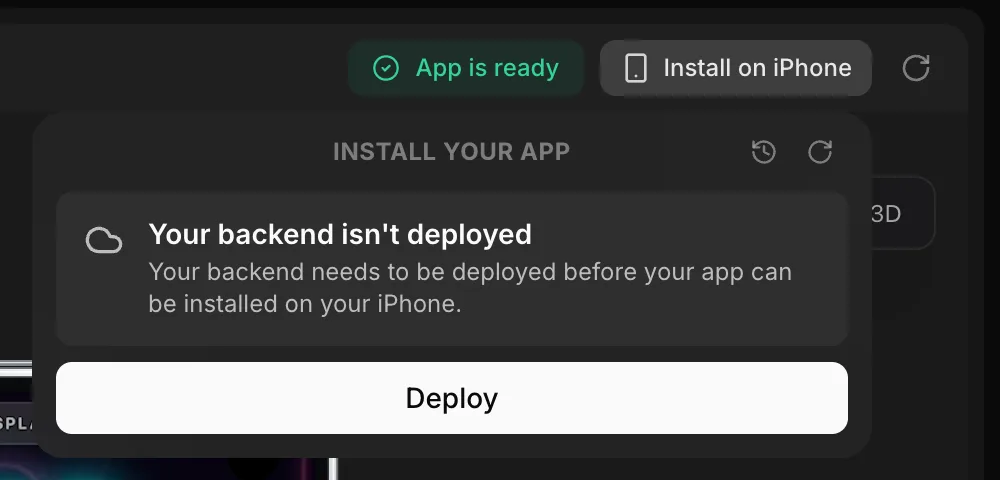
    • Installing a native iOS app now checks your backend first. If it was never deployed, deploy it before you install. If it has changes you haven't deployed, choose Deploy backend or Install anyway.
    • Connect Apple for native iOS apps by signing in with your Apple ID, and Vibecode creates the App Store Connect API key for you. On the web, manage it under Apple Developer in Settings.
    • Hard reset on a native iOS preview no longer waits for a full rebuild when your app is already built
    • GPT-6.1 Sol replaces GPT-6 Sol in the model picker and is the default for follow-up prompts. It's also in the APIs tab for your apps.
    Open update
  36. Built on iPhone

    LaunchiOSModels

    Describe an app in the Vibecode iPhone app and the agent writes the Swift, builds it and tests it in a cloud simulator.

    • When your app is ready, install it on your home screen. No Mac or Xcode needed.
    • Claude Sonnet 5.5 replaces Claude Sonnet 5 in the model picker, and is in the APIs tab for your apps
    • New referral rewards: you and your friend each get $1 when they sign up with your link (for your first 5 referrals), plus a one-time bonus for both of you when they first subscribe. See Referral Program.
    • On the web, queued prompts are saved with your project, so they keep running if you refresh or close the tab
    • After your first prompt on the web, Vibecode offers to turn on browser notifications so you know when your app is ready
    Open update
  37. Claude Opus 5.5 and GPT-6

    ModelsiOS

    New default model for new apps, and the GPT-6 family in the model picker.

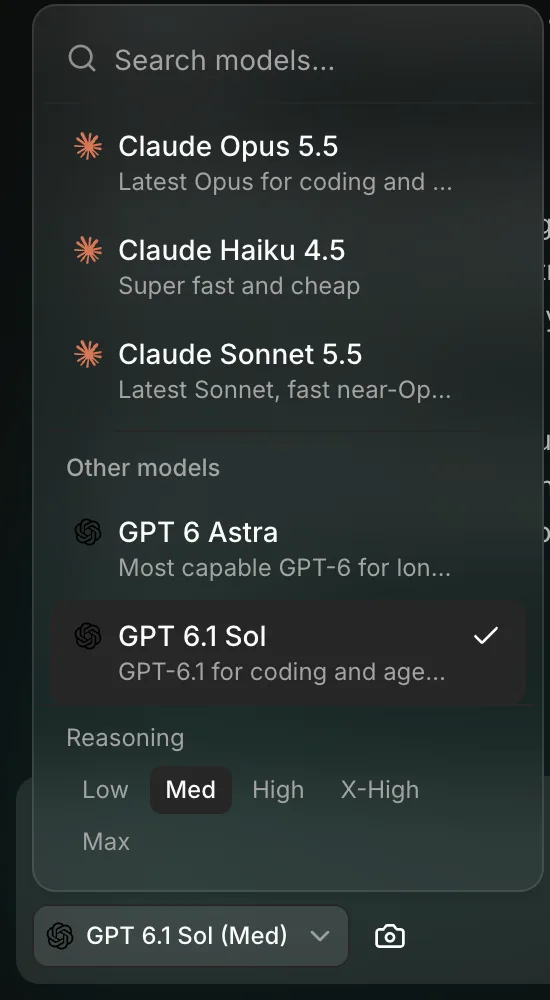
    The model picker in Vibecode
    • Claude Opus 5.5 replaces Claude Opus 5 and is now the default model for new apps
    • GPT-6 Sol and GPT-6 Luna replace GPT-5.6 Sol and Luna in the model picker. GPT-6 Sol is the default for follow-up prompts.
    • The APIs tab adds GPT-6 Astra, GPT-6 Sol, GPT-6 Luna, Claude Opus 5.5 and Grok 4.7 for your apps. See Integrations.
    • Native iOS apps: browse your past builds and install any of them again, on the web and in the iPhone app
    Open update
  38. Install on iPhone from the web

    iOSModels

    Build a native iOS app on the web, then scan a QR code to put it on your iPhone.

    The install panel for a native iOS app on the web
    • Install native iOS apps on your iPhone from the web: register your iPhone, click Build and install, then scan the QR code
    • Publish native iOS apps to the App Store from the new App Store panel on the web
    • GLM 5.3 and GLM 5.3 Flash are in the model picker. Kimi has been removed.
    • If a payment fails, a banner on the web lets you update your payment method before your deployed apps go offline
    Open update
  39. Video in the Media tab

    LaunchModels

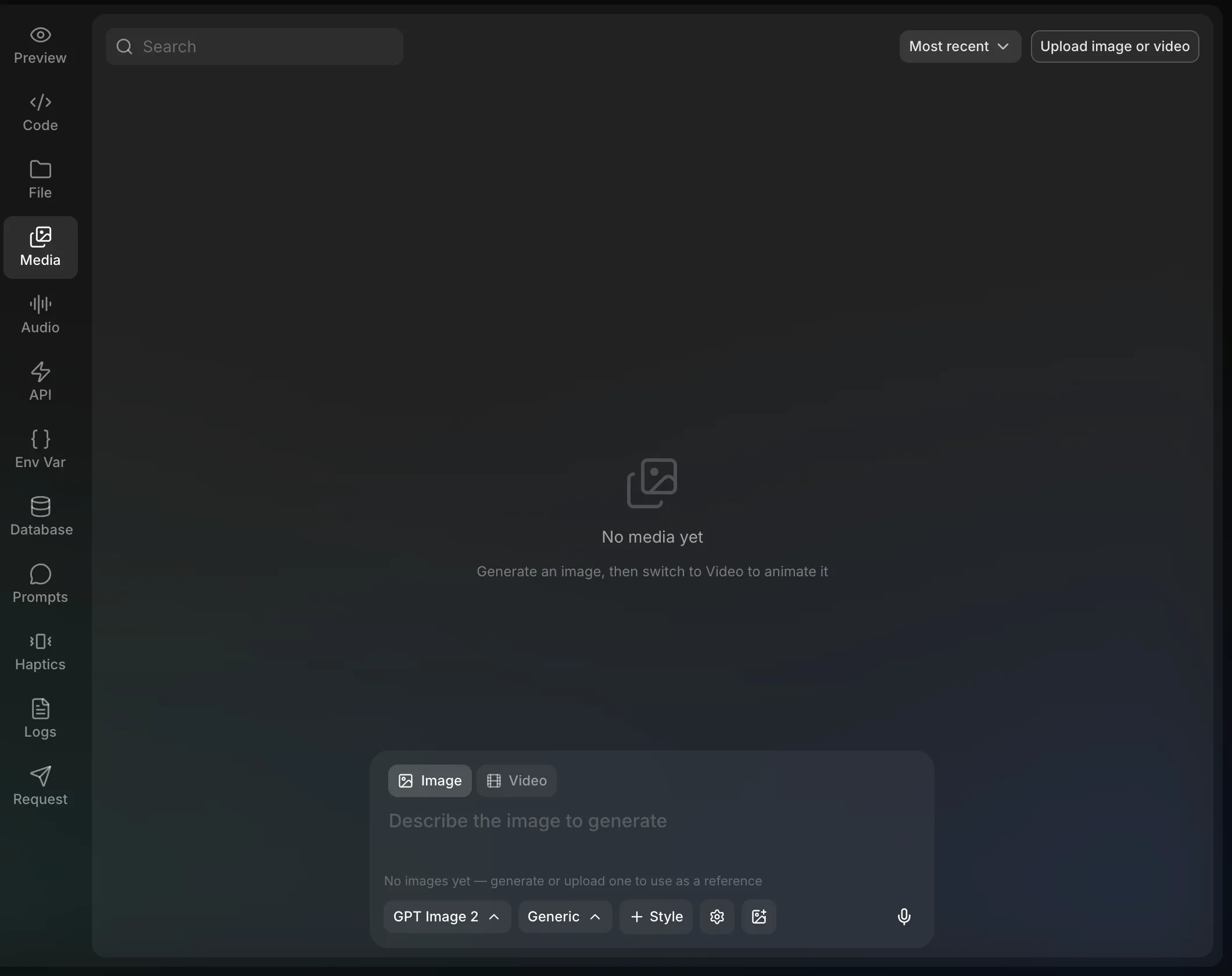
    The Image tab is now Media. Generate an image, then animate it into a short clip.

    The Media tab on the web, with Image and Video modes
    • The Image tab on the web is now Media. Generate images, or switch to Video to animate an image into a short clip.
    • GPT-6 Astra is in the model picker for everyone
    • Claude Fable 5.1 replaces Claude Fable 5
    • The APIs tab adds Seedance 2.0 and 2.5 video models and Claude Fable 5.1 for your apps
    • Send us feature ideas and feedback from the new Feedback page in the web sidebar
    Open update
  40. Native iOS apps

    LaunchiOS

    Native Swift apps for iPhone and iPad are available to everyone.

    A native Swift game running in the cloud iOS Simulator
    • Pick iOS app when you create a project to build a SwiftUI app for iPhone and iPad
    • Apps run in a cloud iOS Simulator streamed live to your browser or phone, so you don't need a Mac or Xcode
    • Install your app on your own iPhone, or publish it to the App Store, directly from Vibecode
    • Read the Native iOS Apps guide
    Open update
  41. GPT-5.6 for everyone

    Models

    GPT-5.6 is the new default, and image generation moves to new models.

    • GPT-5.6 Sol, Terra and Luna, plus Kimi K3, are in the model picker for everyone. GPT-5.6 Sol is the new default.
    • Image generation now uses GPT Image 2, Nano Banana 2 and Nano Banana 2 Lite. See Image Generation.
    Open update
  42. Usage tab and API updates

    Web

    See what you've spent, by model and by app.

    • New Usage tab in Settings on the web: see what you've spent by model and by app, with request and token counts
    • The APIs tab adds Grok 4.6 (replacing Grok 4.5), Gemini 3.5 Flash and Channel3 Product Search
    • Chat on the web shows what the agent's subagents are doing while they work
    Open update
  43. Vibecode on the App Store

    LaunchiOS

    Version 1.0 of the Vibecode app launched on the App Store.

    • Reached #2 on the US App Store for Developer Tools, and the top 10 in more than 50 countries on launch day
    • More than 25,000 installs
    Open update