
Credits
Credits are used when you send prompts in Vibecode. You need credits to build and iterate on your apps. The one exception is the first app build on a new account that signs up with Google or Apple: it’s free, and it doesn’t use or add credits. Credits roll over each billing cycle and never expire.Plans
Free — $0
- Your first app build is free (new accounts that sign up with Google or Apple on the web or iPhone app). No credits are added. To keep building after it, you’ll need credits: subscribe to a paid plan, buy credits, turn on auto-reload, or redeem a promo code.
- Access to Premium AI models
- Build AI apps with just prompts — no API keys required
- Connect Claude Code, Cursor and other AI tools (Vibecode MCP), with 50 commands a week in your app’s workspace
The Free plan does not include image/sound generation, database/auth, App Store submission, code download, commands on your live server, or priority support.
Plus — $20/mo
- $20 in credits per month
- Access to Premium AI models
- Build AI apps with just prompts — no API keys required
- Generate custom image and sound assets
- Connect database and authentication (Vibecode Cloud)
- App Store submission
- Connect Claude Code, Cursor and other AI tools (Vibecode MCP), with no weekly limit on commands in your app’s workspace, commands that run up to 20 minutes, and commands on your live server
- Human support via Intercom chat
Pro — $50/mo (Most Popular)
- $55 in credits per month
- Everything in Plus, and:
- Download source code
- Priority technical support
Max — $200/mo
- $220 in credits per month
- Everything in Pro, and:
- 24/7 priority support (1-minute response time)
- 1 live coding session
Plan Comparison
Important Notice
Our pricing tiers are experimental and may evolve. We may change tier limits at any time as defined in the terms of service.Getting More Credits
Referral Program
Share your referral link. When a friend creates an account with it, you both get $1 in credits right away. The $1 signup bonus applies to your first 5 referrals. When your friend subscribes to a paid plan for the first time, you both also get a one-time bonus based on their plan:
After your first 5 referrals, you still get the plan bonus when a friend subscribes.
To find your link:
- Web: click Copy referral link in the Refer friends card at the bottom of the sidebar, or open Settings > Referral history
- iPhone: in Profile or Settings, tap your link in the Refer a friend card to share it
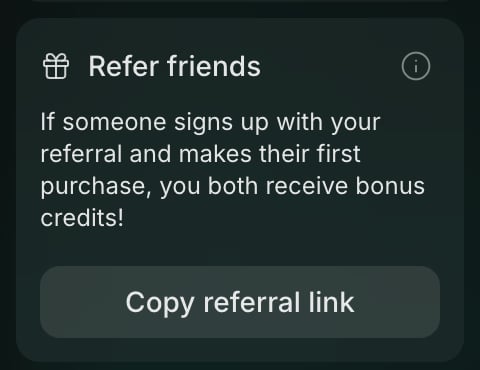
The Refer friends card in the web sidebar
Free Credits via Social Media
Post about what you’re building on X, Instagram, YouTube, TikTok, LinkedIn, Facebook, Reddit, or Threads. Then submit your post on the web:- Open a project and click your credit balance in the top-right corner
- Click Get more credits
- Paste the link to your post and click Submit for Review
Buy Credits
You can buy credits once, any amount from $20 to $500, up to $500 a day. It works on any plan, including Free. In the web app, open vibecodeapp.com/account/subscription and click Buy next to Buy credits, or click your credit balance and choose Buy more.Auto-Reload
You can always get more credits by upgrading your plan, buying credits, or enabling auto-reload. Auto-reload automatically purchases additional credits when your balance gets low, so you can keep building without interruptions. It works on any plan, including Free, and needs a saved card. The smallest reload is $20. Set up auto-reload in the web app at vibecodeapp.com/account/subscription.Upgrade Your Plan
Upgrading gives you more credits per month plus access to additional features.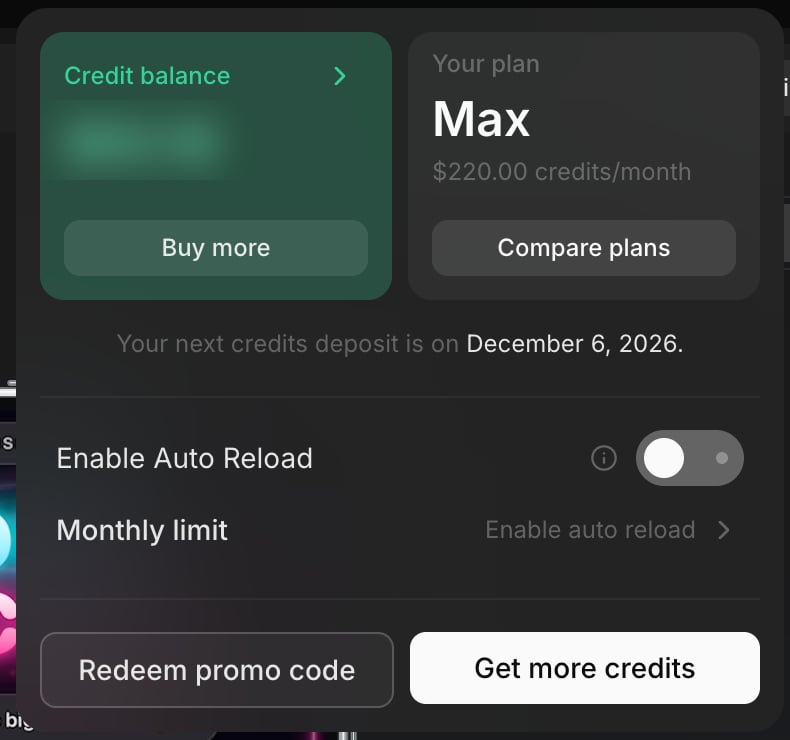
Click your credit balance to buy credits, compare plans, redeem a promo code, or turn on auto reload
Billing FAQ
How can I upgrade my subscription?
How can I upgrade my subscription?
Web: Open a project, click your credit balance at the top, then click Compare plans.iPhone: Click the Profile or Settings button and scroll down to “Upgrade Subscription.”
How can I downgrade my subscription?
How can I downgrade my subscription?
Web: Open a project, click your credit balance at the top, then click Compare plans and select a different plan.iPhone: Follow the Apple subscription management instructions.
How can I cancel my subscription?
How can I cancel my subscription?
Web (card payment): Go to vibecodeapp.com/account/subscription, sign in, and click “Cancel plan.” Your plan stays active until the end of the period you paid for. To undo it before then, click “Resume plan.”iOS (App Store): Open Settings, tap your name, tap Subscriptions, choose Vibecode, and tap Cancel. See Apple’s instructions.Your projects stay in your account after you cancel.
How can I change my billing information?
How can I change my billing information?
Go to vibecodeapp.com/account and click “Manage Subscription.”
Can I buy a top-up of credits?
Can I buy a top-up of credits?
Yes. In the web app, open vibecodeapp.com/account/subscription and click Buy next to Buy credits. You can buy $20 to $500 at a time, up to $500 a day. To refill credits automatically when your balance gets low, turn on auto-reload.
How does auto-reload work?
How does auto-reload work?
Auto-reload automatically purchases additional credits when your balance gets low.Set it up in the web app at vibecodeapp.com/account/subscription.On that page, you can enable auto-reload, manage the payment method used for auto-reload, review your subscription settings, and turn auto-reload off at any time.If you mainly use Vibecode on iPhone or iPad, you should still use the web app to configure auto-reload.
How do I download my invoices?
How do I download my invoices?
Log into Stripe or Apple (depending on where you subscribed) to download invoices.
When does my credit limit reset?
When does my credit limit reset?
On the date of your billing cycle each month.
How do I see my remaining credits?
How do I see my remaining credits?
Web: At the top of any project, or in Settings > Credits balance.Mobile: Profile or Settings section.
Approximate Credit Usage
Here are rough estimates to help you plan your credit usage:
Costs vary based on complexity and the AI model used. These are rough estimates — actual usage depends on prompt length and output size.
Native iOS builds are charged differently: each build (to install on your iPhone or for an App Store release) uses credits per minute of cloud build time, including builds that fail.
Next Steps
Create Your First App
Start building with Vibecode
Browse Integrations
See what you can add to your app