
Table of contents
- How to create a social media app in 6 steps
- Knead, message by message
- Features every social media app needs
- How to make an app like Instagram
- Other types of social media apps you can build
- Which app builder is best for a social media app?
- What it costs to make a social media app
- How to make money from a social media app
- How to get your first users
- The parts that are still hard
- Native app or web app?
- Your next step
- Frequently asked questions
TL;DR
- You can build a working social app without code: sign-up, profiles, a feed, likes, comments and messages.
- Our example, Knead, took 3 messages and 55 minutes in Vibecode and used $40.06 of credits.
- For an Instagram clone, remix our free template or copy the 134-word prompt that built one in 38 minutes.
- Apple requires report, block, a content filter and a way to contact you before a social app can go on the App Store.
- Moderation and your first 100 users take longer than the build.
To create a social media app, pick one group of people and one thing they share. Describe that app in plain English to an AI app builder and test what it builds. Then add sign-up and a cloud database so everyone sees the same feed. Before anyone else joins, add report, block and a word filter, which Apple requires for any app where people post.
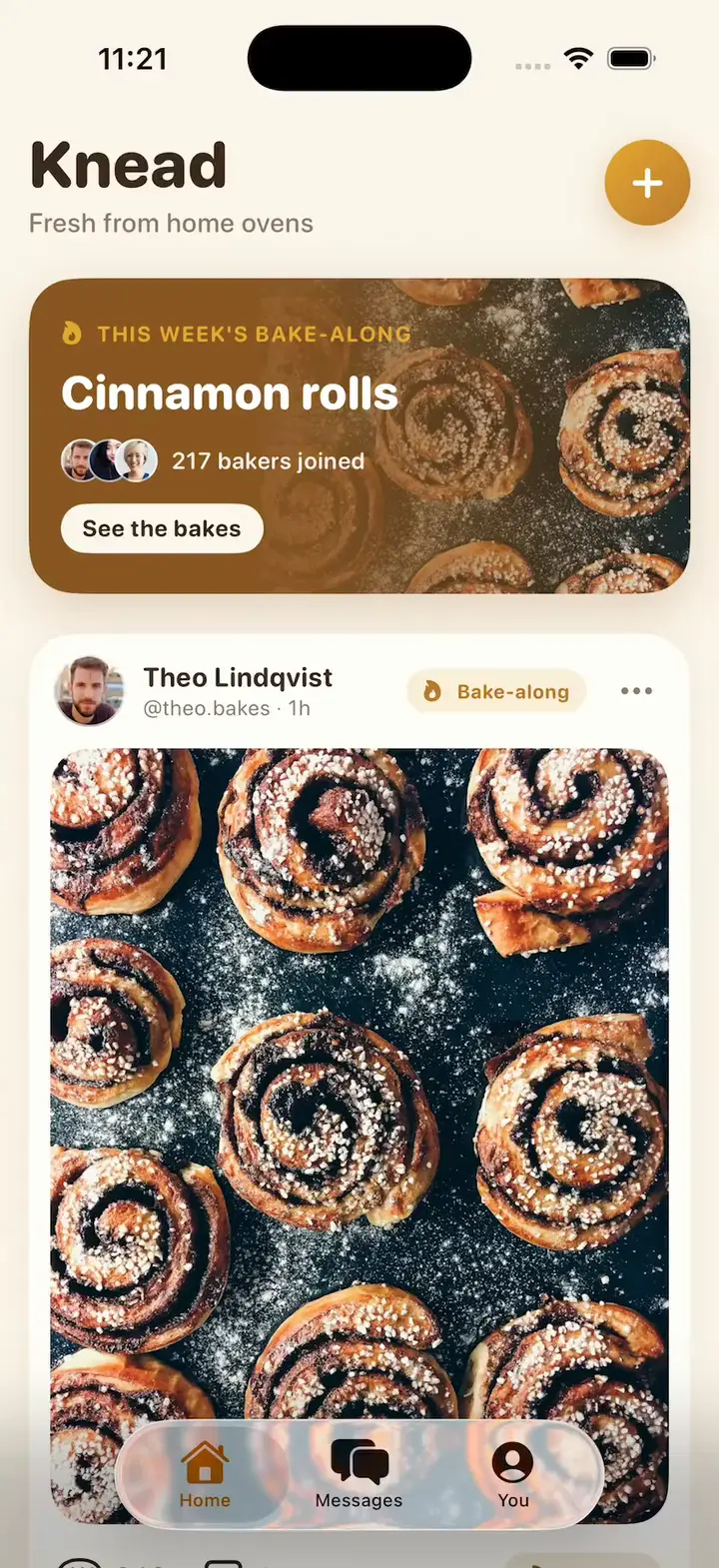
To show how to create a social media app, we followed those steps in Vibecode on October 22, 2026. We built Knead, a native iPhone app where home bakers share what they baked, in three messages. Below are the demo, real screenshots, every prompt we sent, and how long each message took and what it cost.
Want an Instagram clone? Jump to it. Ready to build your own app? Start at step 1, or watch Knead first.

How to create a social media app in 6 steps
1. Pick one group and one thing they share
Every social app runs on one loop. Someone posts, other people see it, and they react. On Instagram people share photos, on TikTok short videos, and on Discord they chat. Pick one of those for your first version.
Then pick who it's for. A feed for home bakers, a chat for your running club or a photo app for your school gives people a reason to join that a giant app can't.
Before you build, ask five people in that group what they would post and how often. We picked home bakers and a photo feed. Then we added a weekly bake-along, one recipe everyone bakes that week, so people always have something to post.
What you get: a one-line idea. Ours was "a social app where home bakers share what they baked." To see how the big apps work first, read the Instagram, TikTok and Discord clone guides.
2. Write your first prompt
Say who the app is for, what the main screen shows, what each tap does and how it should look. Ask for sample people and posts, so the feed looks real from the first build instead of empty.
Our first prompt is about 240 words. It names every screen we wanted: the feed, comments, profiles, messages and a way to post. Copy it, then swap in your own group, names and colors:
Message 1: the first build · 244 words
Build an iPhone app called Knead, a social app where home bakers share what they baked.

The Home tab is a feed of bakes. At the top, a banner shows this week's bake-along, Cinnamon rolls, with how many bakers joined. Tap it to see only those posts. Each post shows the baker's round photo and name, a big photo of the bake, its name (like "Rye sourdough"), how long it took and a short caption. Under the photo is a Rise button with a little loaf icon that works like a like: tap it and it fills golden with a small bounce, and the count goes up. Double-tap the photo to rise it too. The comment button opens a sheet where I can read the comments and add my own.

Tap a baker's name or photo to open their profile: their photo, a short bio, how many bakes and followers they have, a Follow button and a 3-column grid of their bakes.

Add a Messages tab with chats with a few bakers. I can open a chat and send a message.

A + button lets me post a bake: pick one of 8 sample photos, add a name and a caption, and my post appears at the top of the feed.

Start with 8 sample bakers and 12 posts with real photos of bread, cakes and pastries, and check that every photo loads. Use a warm cream background, golden-brown buttons and a rounded font.
If this is your free first build, it runs on GPT-6.1 Sol and builds a first version with up to 3 features, not every screen in a long prompt. Start with the feed and posting, then add the rest one message at a time.
What you get: the agent starts right away, and the chat shows what it's doing.
3. Build it and test it in the simulator
The agent writes the code, builds the app and opens it in a live iPhone simulator in your browser. Then it tests its own work. For Knead, it tapped Rise and watched the count go from 342 to 343. It also posted a comment, filtered the feed to the bake-along, followed a baker, sent a chat message and posted a new bake.
It found a bug along the way. The keyboard's send key added a new line instead of sending a comment, so the agent fixed it. It also added things we didn't ask for, like a You tab with your own profile and a Message button on each baker's page.
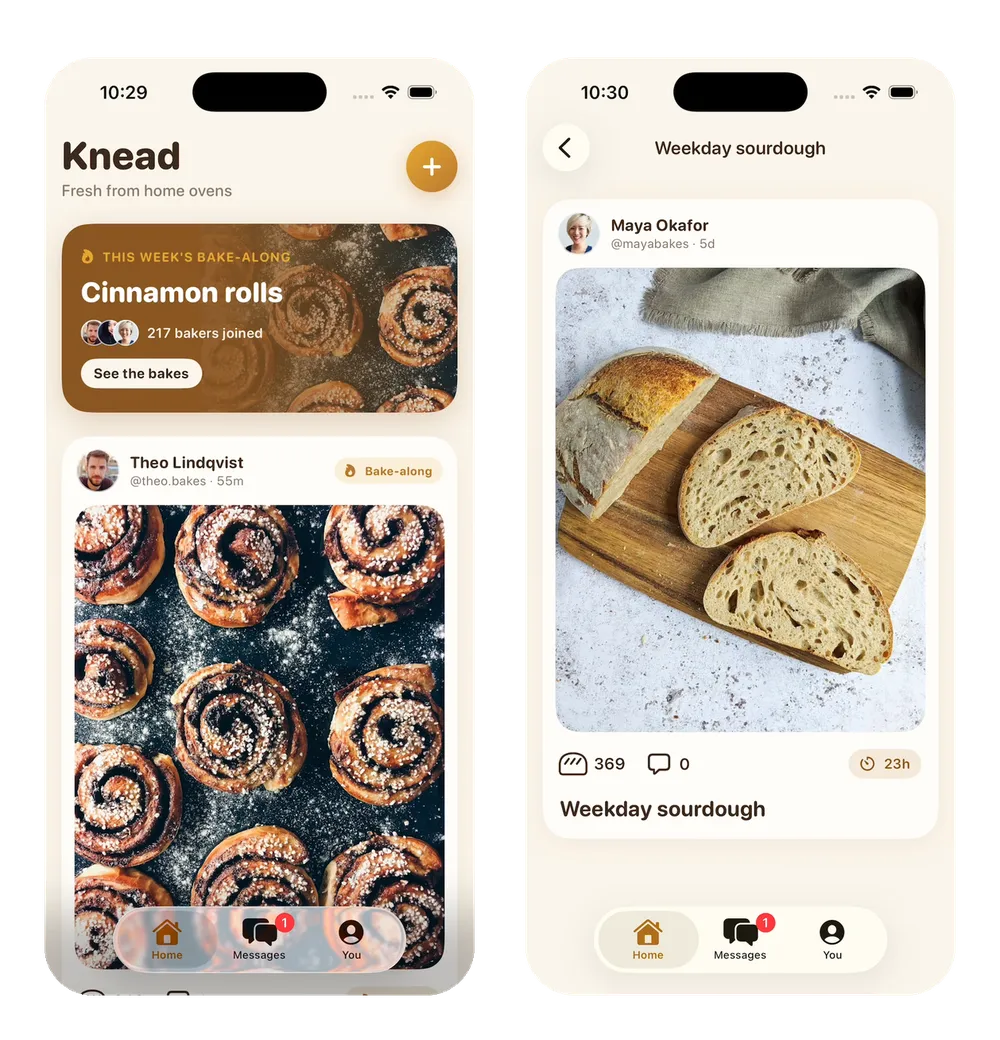
What you get: a first version you can tap. Knead's was ready 17 minutes and 48 seconds after we pressed send. It ran on sample data. The agent said nothing was saved yet, so posts and messages would vanish when the app restarted.
4. Add accounts and a real backend
So far, every post lives on one phone. For people to sign up and see each other's posts, the app needs a backend: a server with a database, sign-in and photo storage.
In Vibecode, that takes one message. Vibecode Cloud adds a database, sign-in and file storage, and it comes with the Plus plan and up. You can also open the Database tab and click Enable database, which writes the setup request into your prompt box, ready to send. Already use Supabase or Firebase? Add their keys in the Env Var tab and ask the agent to use them instead. The backend and auth guide compares all three.
Message 2: accounts and a real backend · 79 words
Make Knead a real social app with Vibecode Cloud. People sign up with their email, then pick a username and a profile photo. Save posts, rises, comments, follows and messages in the cloud, so everyone sees the same feed and chats work between real accounts. When I post a bake, let me pick a photo from my phone and upload it. Keep the sample bakers and their posts in the database so the feed isn't empty on day one.
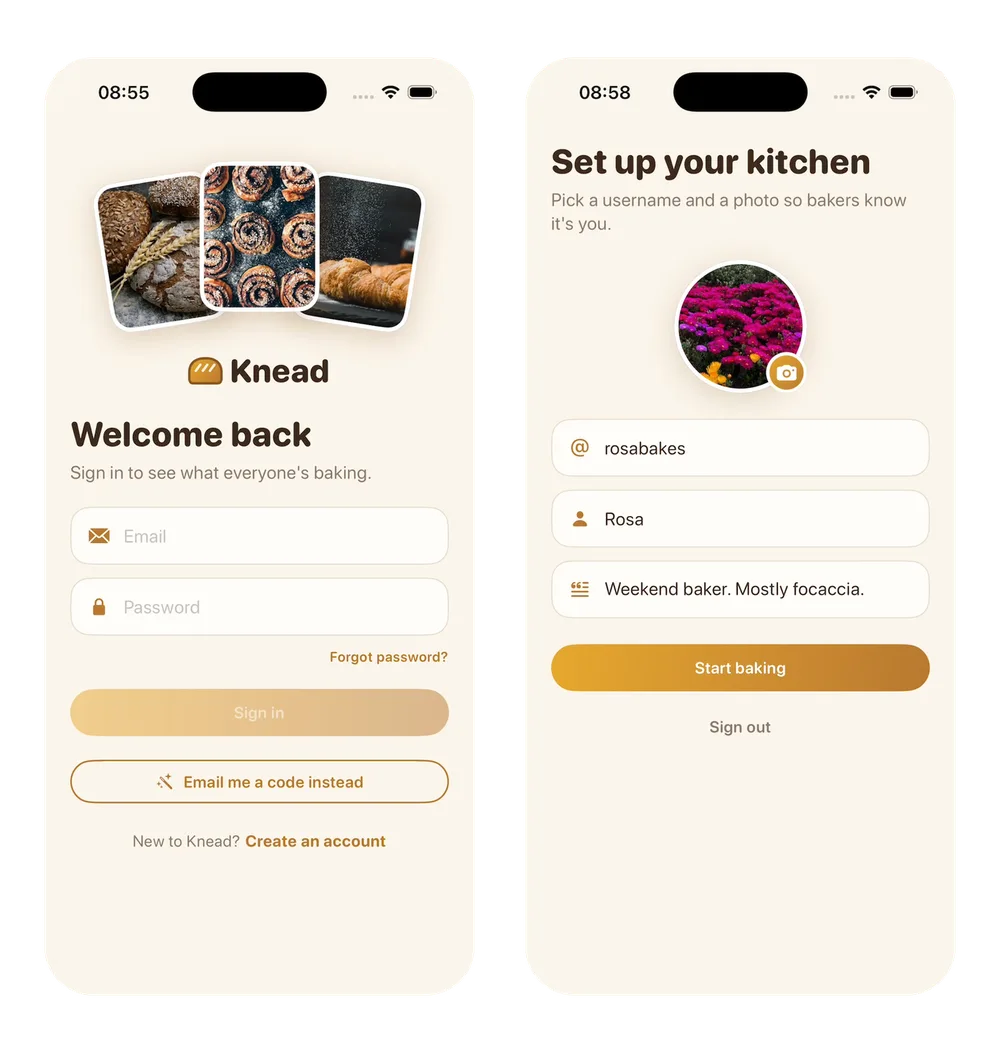
What you get: a working social app. People sign up with their email and a password, then pick a username and a profile photo. The feed loads from the cloud, and rises, comments, follows and chats are saved there, so everyone sees the same thing. The agent tested it with two accounts it made itself. A message sent from one showed up in the other's Messages. Message 2 took 23 minutes and 18 seconds.
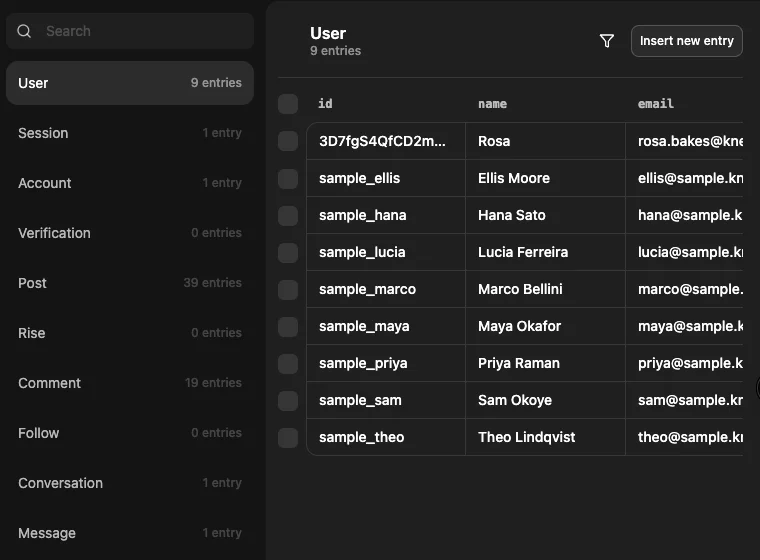
To see your app's data, open the Database tab. Knead's has a table for each thing people save: users, posts, rises, comments, follows, conversations and messages.
5. Add the safety tools Apple requires
Apple's App Review Guideline 1.2 covers every app where people post, social media apps included. It says these apps must have:
- a way to filter objectionable material before it's posted
- a way to report offensive content, with timely responses
- a way to block abusive users
- published contact information, so people can reach you
Apple also says an app that lets people create an account must let them delete it inside the app. Add all five before your first users arrive, not after a rejection.
Message 3: report, block and a word filter · 115 words
Before real people join, add the safety tools Apple requires for apps where people post. Put a ••• menu on every post and comment with Report and Block. Report asks why (spam, rude or hateful, nudity, something else), hides the post for me right away and saves the report in the database so I can review it. Block hides that baker's posts and comments everywhere and stops them from messaging me. Check new posts and comments against a list of offensive words and stop them before they go up. Add a Settings screen with my blocked bakers (with Unblock), a Contact us form that saves the message in the database for me, and Delete account.
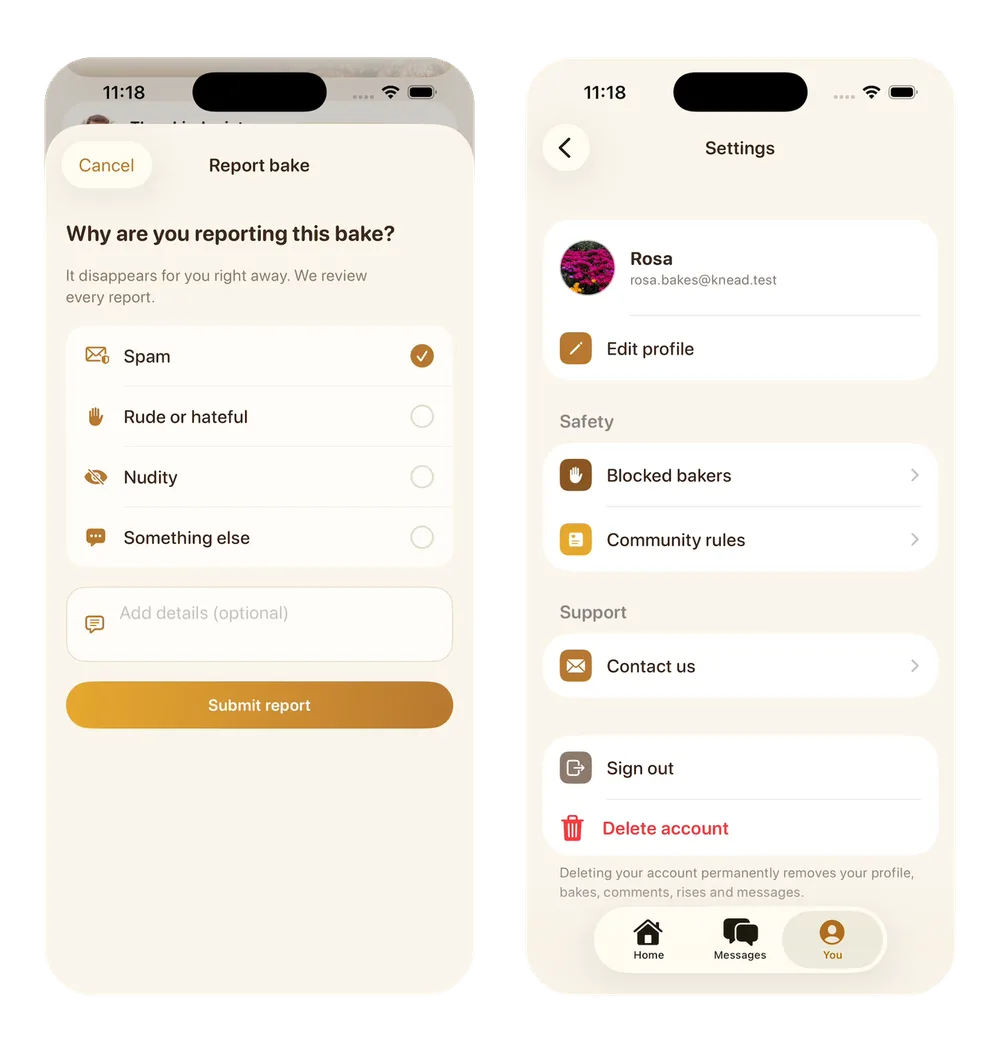
What you get: a ••• menu on every post and comment, with Report and Block. Report asks for a reason and hides the post for you right away. Block works both ways. Neither person sees the other's posts or comments, and they can't message each other. The word filter stopped a test comment with a swear word and showed "Let's keep Knead kind. Please remove the offensive language and try again." Settings now has your blocked bakers with Unblock, a Contact us form and Delete account. The agent also added a Community rules page and a line on the sign-up screens saying people agree to it. Message 3 took 14 minutes and 3 seconds.
Reports and contact messages land in the Report and ContactMessage tables. The workspace's Database tab shows only your test data. Once the backend is live, real users' reports go to the live database, which you open from Deployments in the sidebar, then your app's Database tab. Nothing alerts you when a new one arrives, so check every day once people join. The word filter checks text only, and a report hides a post only for the person who sent it, so delete bad posts yourself from the Post table.
6. Publish it
For an iPhone app, click Publish, then Publish to App Store. Vibecode builds the app, signs it with your Apple Developer account, uploads it and submits it for Apple's review. App Store submission comes with the Plus plan and up, and Apple's Developer Program costs $99 a year.
A social app has a backend, so deploy it first. Then the app on people's phones has a live server to talk to. A live backend uses one of your plan's included deployments: Plus has 1, Pro has 3 and Max has 5.
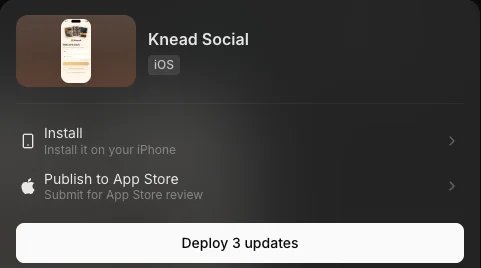
For Android, click New app, open Legacy and pick Mobile app (Legacy). It builds a React Native app that runs on iPhone and Android. To put it on Google Play, download the code on Pro and up and publish it with your own Google Play Console account, which has a one-time $25 fee. Plan for at least two extra weeks if your Play account is new and personal. Google requires a closed test with at least 12 testers for 14 days before you can publish.
Apple also requires a privacy policy. When you publish, Vibecode writes and hosts a privacy policy and a support page, adds both links to your App Store listing and links the privacy policy inside your app. The App Store publishing guide has every step.
What you get: an app waiting for Apple's review. We didn't submit Knead, because it's a demo for this guide. Vibecode's docs put App Store setup at 15 to 30 minutes, plus Apple's review. Before you submit, read the App Store rejections checklist.
Knead, message by message
Here is the whole build in one place. You pick the model for each message. By default a new app's first build uses Claude Opus 5.5 and later changes use GPT-6.1 Sol. We ran all three messages on Claude Opus 5.5. We built Knead on a Max plan, but nothing in it needs more than Plus. Each time runs from pressing send to the agent's last message.
| Message | Time | AI credits |
|---|---|---|
| 1. First version | 17 min 48 s | $5.66 |
| 2. Accounts and a backend | 23 min 18 s | $14.70 |
| 3. Report, block and a word filter | 14 min 3 s | $12.27 |
| Total | 55 min 9 s | $32.63 |
What Knead cost. The three messages used $32.63 of credits for the AI agent. The cloud iPhone simulator and the app builds used another $7.43, including the time we spent filming, for $40.06 in all. That's about twice the $20 of credits that come with Plus each month. On Plus, you'd add credits partway through or pick Pro, which comes with $55.
Four things are worth knowing before you build your own:
- The agent says what it couldn't test. After message 2, it told us it couldn't check the "Email me a code" sign-in, because the simulator can't receive email. Try that on your own phone before launch.
- The sample bakers stay until you remove them. They're rows in the database, they answer messages on their own, and every new account gets a welcome note from Theo. That's handy for testing. Remove them, or clearly mark them as samples, before launch.
- Long chats cost more per step. Message 3 made fewer calls than message 2 but cost almost as much, because the agent rereads the whole conversation at every step. By message 3 it reread almost four times as much per step as in message 1. If your next change doesn't need the earlier chat, the Clear context button at the top of the chat starts the agent fresh.
- The word filter isn't perfect. The agent said so itself. New spellings can slip through, and an innocent word can get caught. Reports cover what it misses.
Features every social media app needs
Most social apps share the same building blocks. Here is the checklist, and the message that built each one in Knead.
| Feature | What it does | In Knead |
|---|---|---|
| Sign-up and profiles | An account, a username, a photo and a short bio | Message 2 |
| A feed | Everyone's posts, with big photos | Message 1 |
| Posting | Pick a photo, add a caption and upload it | Messages 1 and 2 |
| Likes and comments | The reactions that bring people back | Message 1 |
| Follows | Follower counts on every profile | Message 1 |
| Direct messages | Private chats between two people | Messages 1 and 2 |
| Report, block, a word filter and Contact us | Required by Apple for apps where people post | Message 3 |
| Delete account | Required by Apple once people can sign up | Message 3 |
| Notifications | Alerts for likes, comments and messages | Not built yet |
Start with the first six. Add the two rows Apple requires before anyone else joins, and add notifications once your users ask for them. In a Mobile app (React Native) project, the agent can add them with Expo Push Notifications.
How to make an app like Instagram
An Instagram clone covers what most social apps need: a photo feed, stories, likes, comments, profiles and messages. There are two fast ways to make one in Vibecode.
Remix our Instagram clone
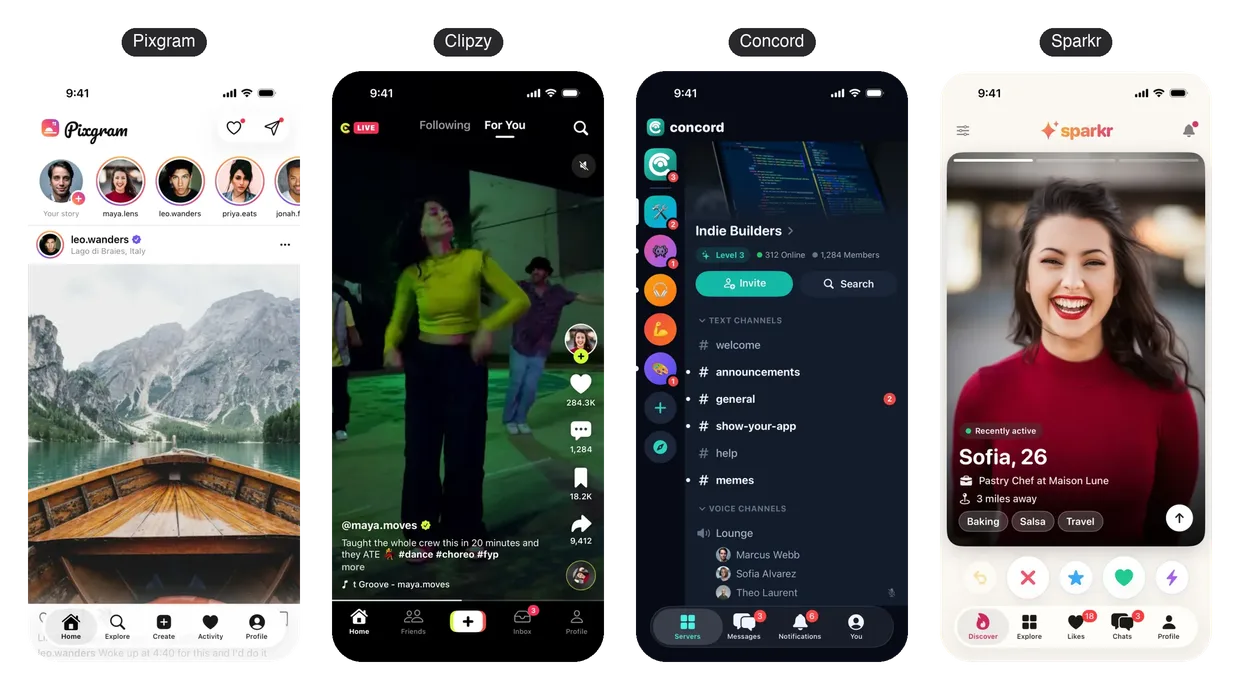
Pixgram is our free Instagram clone template. It has a home feed, stories with progress bars, double-tap likes, comments, an explore grid, posting, activity, profiles and direct messages. It's a native Swift iPhone app on sample data.
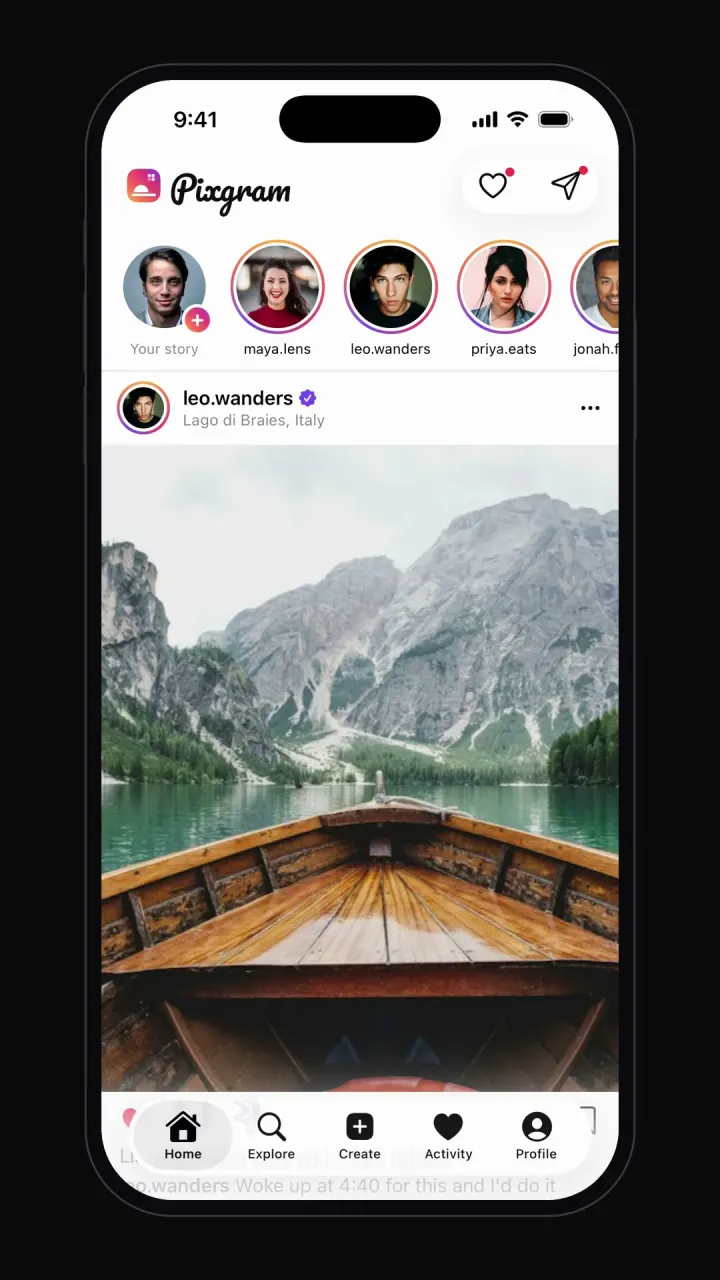
Remix the Instagram clone to copy it into your account, then change it by chatting. For example, "Rename the app to Trailgram, make it a feed for hikers, and add a trail difficulty tag under every post." The Instagram clone guide has the full prompt that built Pixgram, the hard parts and what to add next.
Or build one from a single prompt
This 134-word prompt builds an Instagram clone from nothing. We sent it on October 20, 2026, on Claude Opus 5.5. It took 37 minutes and 32 seconds and $20.67 of AI credits, and it built Pinhole, with its own logo, warm orange colors and all five tabs.
Instagram clone prompt · 134 words
Build a native iPhone photo-sharing app called Pinhole, inspired by Instagram but with its own name, logo and colors. Use five tabs: Home, Explore, Create, Activity and Profile. Home has a stories row and a feed of photo posts. Double-tap a photo to like it with a heart animation, and open comments in a bottom sheet. Stories open full screen with progress bars. Explore is a photo grid with search. Create lets you pick a sample photo, add a caption and post it to the top of the feed. Activity lists likes, comments and new followers. Profile shows post, follower and following counts, a bio and a 3-column grid. Add direct messages with a chat list and threads. Use realistic sample data and real Unsplash photos, and make every button work. No login yet.
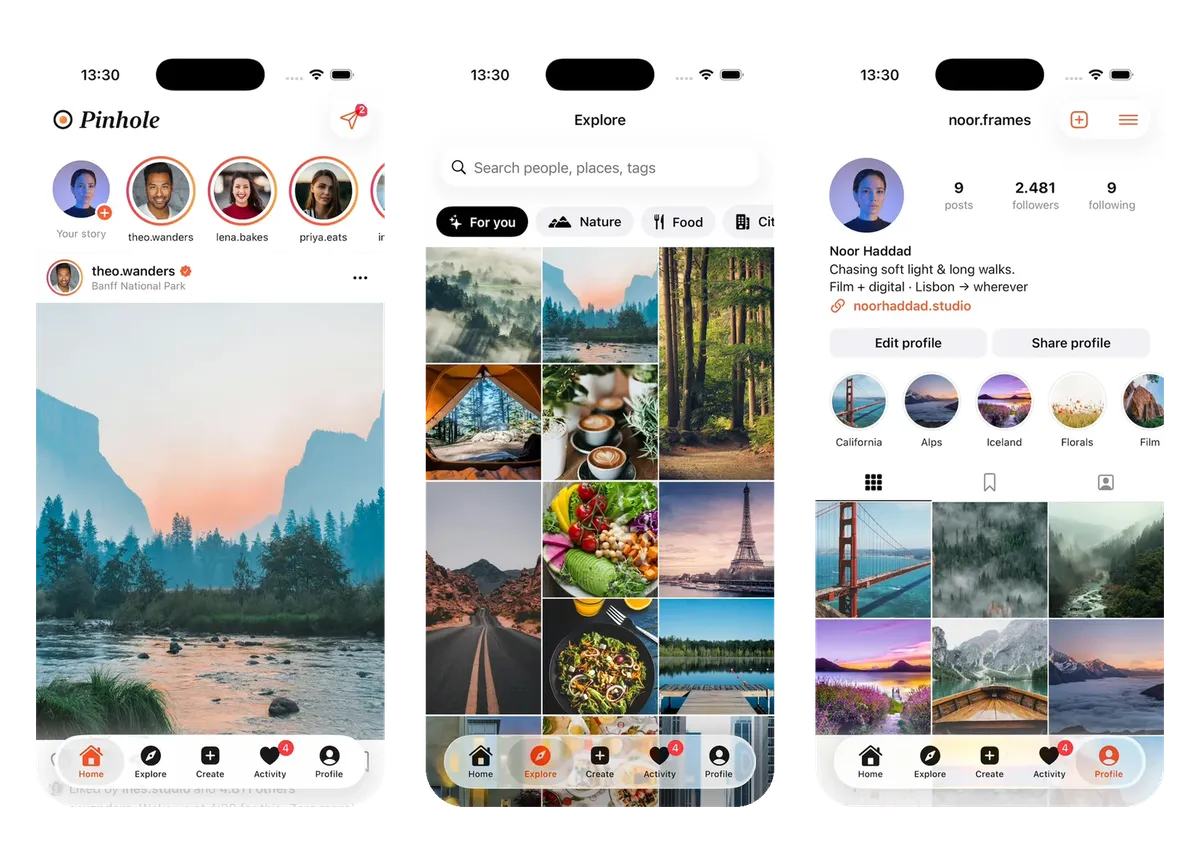
Either way, your clone runs on sample data. To turn it into a real app, send your own versions of messages 2 and 3 from step 4 and step 5. Put your app's name where they say Knead, likes where they say rises and people where they say bakers. They ask for sign-up and a cloud database, then report, block and a word filter.
Remix the Instagram cloneOther types of social media apps you can build
A photo feed is one kind of social app. Each kind below has a working template you can remix. It also has a short starter prompt if you'd rather start fresh. The templates are tested builds, but we haven't run these starter prompts.
Short posts, like X
X Glass, our X clone, is a dark-mode profile and feed with Apple's new Liquid Glass tab bar, which shrinks as you scroll. Remix X Glass.
Starter prompt: a short-post app · 83 words
Build an iPhone app called [name], a short-post app for [who it's for]. The Home tab is a feed of short text posts, each with the person's photo, name, handle, the time and like, reply and repost counts. Tap like to fill the heart, and tap reply to open the replies. A + button opens a composer with a 280-character limit. Tap a person to open their profile with a Follow button and their posts. Start with 8 sample people and 20 posts.
Short video, like TikTok
Clipzy, our TikTok clone, has a swipeable full-screen feed, likes, comments, a share sheet and profiles. Remix Clipzy or read the TikTok clone guide.
Starter prompt: a short-video app · 84 words
Build an iPhone app called [name], a short-video app for [who it's for]. The Home tab is a full-screen vertical feed. Swipe up for the next video, double-tap to like it, and tap the comment button to open comments. Each video shows the creator's name, a caption and like and comment counts. Tap a creator to open their profile with a Follow button and a grid of their videos. Start with 10 sample videos from free stock clips, and check that every video plays.
Community chat, like Discord
Concord, our Discord clone, has servers, channels, reactions, member roles, a voice room and messages. Remix Concord or read the Discord clone guide.
Starter prompt: a community chat app · 67 words
Build an iPhone app called [name], a community chat app for [who it's for]. Show a list of groups. Each group has text channels like #general and #introductions. Tap a channel to open its chat, where I can send a message, reply to a message and add an emoji reaction. Show who's online in each group. Start with 3 sample groups, 6 channels and realistic sample messages.
Dating, like Tinder
Sparkr, our Tinder clone, has a swipe deck, a match screen, chat and a profile editor. Remix Sparkr or read the Tinder clone guide.
Starter prompt: a dating app · 74 words
Build an iPhone app called [name], a dating app for [who it's for]. The main screen is a deck of profile cards with a big photo, a name, an age and a short bio. Swipe right to like and left to pass. When two people like each other, show a match screen and open a chat. Add a profile editor with photos, a bio and what I'm looking for. Start with 15 sample profiles.
The templates gallery has more social apps, like a Snapchat clone. On a new account that signs up with Google or Apple, your first remix counts as your free first build. Vibecode builds the copy, and you get 2 minutes to try it in the simulator. Changing it after that takes credits.
Which app builder is best for a social media app?
It depends on where your people will find the app. Most social apps live on people's phones, so an App Store listing matters. Here is how three AI app builders compare when you build a social media app, checked on their own pages on October 22, 2026.
| Vibecode | Lovable | Replit | |
|---|---|---|---|
| Builds | Native iPhone, iPhone and Android, or web apps | Web apps | Web apps or Expo mobile apps |
| App Store | Submits for review for you | Not built in | Uploads it, you submit |
| Backend | Plus and up | Built in | Built in |
| Starts at | Free first build, then $20/mo | Free tier, then $25/mo | Free tier, then $20/mo |
Lovable's docs say it builds web apps and has no built-in way to submit to the App Store or Google Play. You can make the app installable from the browser or wrap it with Capacitor yourself. Replit builds Expo apps and uploads them to App Store Connect, where you finish the listing and submit for review. All three include sign-in, a database and file storage. Lovable's free tier gives 5 credits a day, and Replit's free Starter plan includes one published app.
Sources: Lovable's publishing docs, Lovable's built-in backend docs, Lovable pricing, Replit's iOS publishing docs, Replit's storage and database docs, Replit Auth, Replit's Starter plan and Replit pricing.
Pick Lovable if your social app can live in a browser, like a community website. Pick Replit if you want to read and edit the code yourself in a full editor. Pick Vibecode if your people should download the app from the App Store. Of the three, it's the one that writes a native Swift app and submits it to Apple for review for you. More detail is in Vibecode vs Lovable and Vibecode vs Replit.
What it costs to make a social media app
An agency charges $10,000 to $200,000 or more for a social app. With an AI app builder, a first version can cost less than a monthly plan. Here is how four ways to build compare, with each price taken from its source on October 22, 2026.
| Way to build | What it costs | What you get |
|---|---|---|
| Agency | $10,000 to $49,999 for most app projects on Clutch, $50,000 to $200,000 for a social app from SolveIt | A custom app, built for you |
| Freelancer | $18 to $39 an hour on Upwork | Custom code you manage |
| No-code builder | $65 a month on Adalo, $59 a month billed yearly on Bubble | A visual editor with AI help |
| Vibecode | First build free, then $20, $50 or $200 a month | A native Swift iPhone app you change by chatting |
Clutch says app projects usually take about 11 months, and its average project costs $90,780. SolveIt is an agency that builds social apps, and Upwork's figure is the typical hourly range for mobile app developers there. The no-code prices are Adalo's Builder plan and Bubble's Starter plan. Both publish to the App Store and Google Play, and both now offer AI building: Adalo's Builder plan includes it, and Bubble has an AI app builder that drafts an app from a prompt.
In Vibecode, the first build is free for new accounts that sign up with Google or Apple. Plus is $20 a month with $20 of credits, Pro is $50 with $55 and Max is $200 with $220. Unused credits roll over while your plan is active. Knead used $40.06 of credits in all, $32.63 of it for the AI, over 55 minutes of build time.
Two store fees apply whichever way you build:
- Apple charges $99 a year for its Developer Program, which you need to publish to the App Store.
- Google Play charges a one-time $25 fee to register.
A social app also costs money to run. In Vibecode, each live backend past your plan's included deployments is $20 a month. See pricing for the plans.
Describe your social app and Vibecode builds itHow to make money from a social media app
Most social apps don't earn much until lots of people use them every day. Get people posting first, and add money once they come back on their own. These are the usual ways:
- Subscriptions. Charge for extras, like more uploads or a members-only feed. In an iPhone app, Apple requires its own in-app purchase for them (Guideline 3.1.1). In an iOS app (Swift) project like Knead, ask the agent to add a subscription and a paywall. It sends you a link to connect RevenueCat, then sets up the products in App Store Connect, builds the paywall and tests a purchase in the simulator.
- Tips. Fans can tip creators without in-app purchase only if the tip is optional and all of the money goes to the creator (Guideline 3.2.1).
- Ads. Ads pay per view, so they only add up once you have many daily users.
- Sponsors. A niche community can sell a featured post or a weekly sponsor slot to a brand its members already buy from, like a flour brand for home bakers.
- Real things. Apple makes you charge for in-person classes, events and merch outside in-app purchase (Guideline 3.1.3(e)). Vibecode's Stripe setup is for web apps, so sell them on a web page with Stripe and link to it from your app.
How to get your first users
An empty feed sends people away. As one reply in a Reddit thread about building a social media app puts it, the hard part is user acquisition. Five things help:
- Start with one group you already know. A club, a class, a local scene or your own followers. Invite people one by one.
- Fill the feed before you invite anyone. Post the first week yourself, so the first visitor has something to react to.
- Give people a weekly reason to post. Knead's bake-along picks one recipe a week, so everyone has something to share.
- Test with a small group first. Before the App Store launch, invite 10 to 20 people from your group through TestFlight, Apple's free beta app. Ask the agent to "upload this build to TestFlight." Apple checks the first build before people outside your App Store Connect team can install it.
- Ask your first users what's missing. Then change the app by chatting, one message at a time.
The parts that are still hard
Building the screens is the fast part now. These take work once people join:
- Moderation and spam. Report and block are only the start. Someone has to read the reports and remove what breaks your rules, and Apple asks for timely responses. Write short community rules before launch, like the page Knead's agent added, and decide who checks reports each day.
- Feed order. A feed that ranks posts needs data you don't have yet, so start with the newest posts first.
- Photo and video storage. Every photo costs storage and data. Shrink photos before upload, for example to 1080 pixels wide. Video takes far more space, so keep clips short if you add them.
Native app or web app?
Pick by where your people are and how they'll find the app:
- A native iPhone app. Pick iOS app in Vibecode. You get a Swift app that works like the iPhone's own apps and goes to the App Store from inside Vibecode. It runs on iPhone and iPad.
- An app for iPhone and Android. Open Legacy and pick Mobile app (Legacy). You get one React Native project for both phones. On Pro and up, you download its code and publish it to Google Play yourself.
- A web app. Pick Web app. It runs in any browser at a yourapp.vibecode.run address or your own domain, with no app store review. People won't find it in the App Store, though.
Swift vs React Native compares the first two in more detail. Building for iPhone? Start at the iOS app builder.
If you code, the same steps work by hand. Build in Swift with SwiftUI in Xcode, or in React Native with Expo, and connect a backend like Supabase or Firebase. On Vibecode's Pro plan and up, you can also download any project's code and keep working in your own editor.
Your next step
Pick one group you know well and one thing they'd share. Copy this starter prompt, fill in the brackets, and send it:
Your first prompt · 86 words
Build an iPhone app called [name], a social app where [who it's for] share [what they post]. The Home tab is a feed of posts with each person's photo and name, a big photo, a short caption, a like button and comments. Tap a person to open their profile with a Follow button and a grid of their posts. Add a Messages tab and a + button to post. Start with 8 sample people and 12 posts, and use [colors] and a [rounded or classic] font.
Prefer to start from a working app? Browse templates. New to building with AI? Start with how to vibe code, or check your idea with Can I vibe code it?
Frequently asked questions
Can I make a social media app for free?
You can start for free. Vibecode makes your first app build free for new accounts that sign up with Google or Apple. That free build is a first version on sample data. In Vibecode, sign-up and a shared database come with Vibecode Cloud, which starts on the Plus plan at $20 a month. Publishing to the App Store also needs Apple's Developer Program, which costs $99 a year.
How much does it cost to make a social media app?
With an agency, expect $10,000 to $200,000 or more. Most app projects on Clutch cost $10,000 to $49,999, and SolveIt, an agency, puts a social app at $50,000 to $200,000. Knead, our example, used $40.06 of Vibecode credits over three messages, simulator time included. One month of Pro, $50 with $55 of credits, covers that. Add Apple's $99 a year to publish.
How long does it take to make a social media app?
An agency takes months. Clutch says app projects usually take about 11 months. Knead took 55 minutes of build time over three messages, from the first prompt to sign-up, a cloud database, and report and block. Finding your first users takes longer than the build.
Can I build an app like Instagram without coding?
Yes. Remix Pixgram, our free Instagram clone, or send the 134-word prompt in this guide, which built one called Pinhole in 38 minutes. Then add sign-up and a cloud database with one message, and report and block with another.
What features does a social media app need?
Profiles, a feed, a way to post, likes and comments, and follows. Most also have direct messages. Apple also requires a content filter, report and block, and a way to contact you for any app where people post, and in-app account deletion for any app with sign-up.
How do social media apps make money?
Mostly with subscriptions, ads and sponsors, once many people use them every day. In an iPhone app, subscriptions and other paid extras must use Apple's in-app purchase. In-person classes, events and merch must not, so sell them on a web page with Stripe and link to it from the app.
Do I need a backend for a social media app?
Yes, once more than one person uses it. Without a backend, posts live on one phone, so nobody sees anyone else's. In Vibecode, one message adds Vibecode Cloud: sign-in, a database and photo storage, from the Plus plan. You can use Supabase or Firebase instead.
Do I need an LLC to publish a social media app?
No. Apple lets individuals and sole proprietors join its Developer Program, and your name shows as the seller on the App Store. To publish under a company's name, Apple needs a legal entity and a D-U-N-S Number. This isn't legal advice, so ask a lawyer about your own situation.
About the editorial team
Vishal is a product engineer at Vibecode. Before Vibecode he did product engineering at EarnIn and co-founded Ivella (YC S21), a banking app for couples. He studied computer science at Duke.

More from the Vibecode blog
Tips
Can I vibe code? What you need, what you can build and what it costs
Yes, you can vibe code without knowing how to code. What you need, what you can build today, what's still hard, what it costs, and a real test from a one-line idea.
Tutorial
How to vibe code
Six steps from an idea to an app on your phone, shown on one real build: every prompt ready to copy, a demo video, screenshots and what each message cost.
New to AI app building? Read what vibe coding means or compare the best AI mobile app builders. Have an idea? See if you can vibe code it.