

Table of contents
TL;DR
How do you build a Zillow clone?
This article will go through the exact steps of building a Zillow clone. You can follow along, or scroll to the bottom and remix the version we already made you. It's $0 on a new account!
Sangvish sells a Zillow clone script from $499. Its iPhone app is a web view, a website inside an app. SolGuruz, an agency, puts a first version at $25,000 to $50,000. Ours is a native iPhone app, $0 to remix on a new account.
Zillow has:
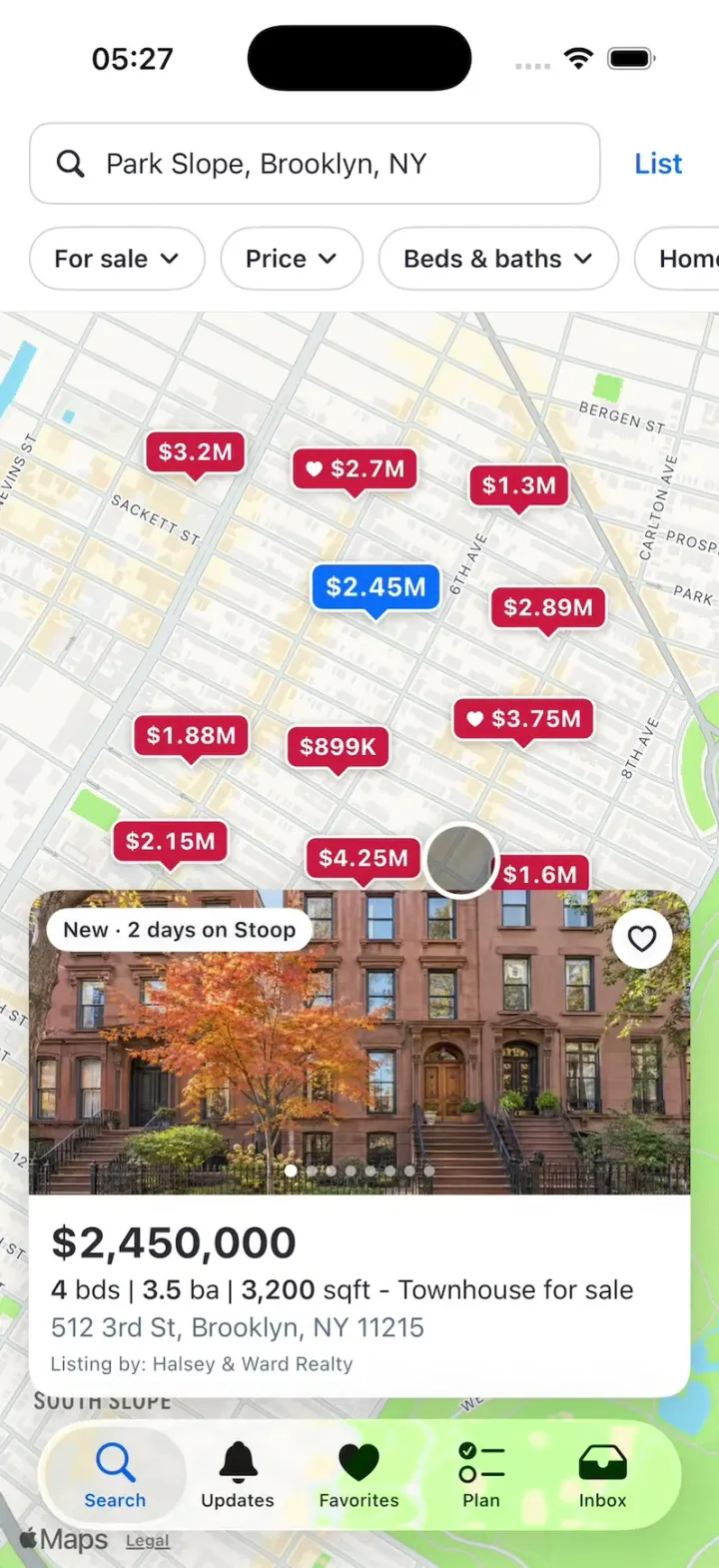
- A map of homes with price pins
- Filters for price and beds
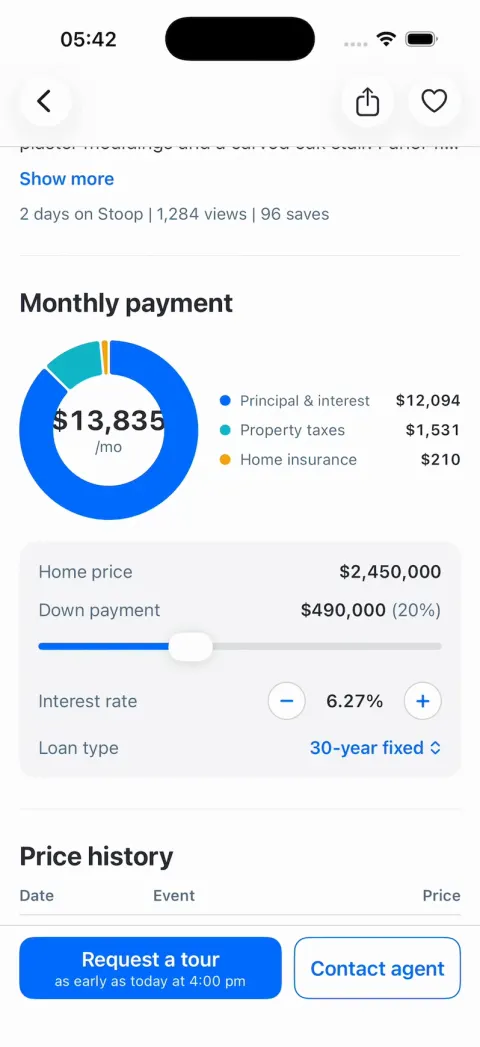
- Listing pages with a payment calculator
- Saved homes
- Tour requests
Our Zillow Clone has all of them. It's the app home buyers use, and every home, photo and agent in it is sample data. Inside, it goes by its own name: Stoop.
A real Zillow also needs two more parts. One is a licensed listings feed from your local MLS, the shared list of homes brokers use. The other is an agent side that answers tour requests.
Below, we load a demo feed and send tour requests to an agent's CRM.
- Vibecode template$0to remix on a new account
- Clone script$499and up, at Sangvish
- Agency build$25,000+per SolGuruz, first version
See it running
Template
Zillow CloneiOS
Zillow clone · Swift and SwiftUI
A map of price pins, filters, listing pages with a payment calculator, saved homes and tour requests.
Remix copies the working Swift app into your Vibecode account, and a new account's first remix is free. Or open a new iOS app with the prompt below to build a fresh copy.
Open the template pageThe prompt we used
We built Zillow Clone in one message on Claude Opus 5.5. It took 24 minutes and $14.61 of credits for the agent.
The prompt below is that message, word for word. Its photos come ready-made in a zip, so the agent makes no pictures.
Paste it into a new iOS app project to build your own copy, or change the details first.
Prompt · 3,091 words
Build Stoop, an original home-search app for iPhone in SwiftUI, in the genre of Zillow: a white search header with filter chips over a full map of homes for sale with red price pins, a listing card that slides up from a tapped pin, a List view, listing pages with a photo gallery, the Stoop Estimate, a monthly payment calculator, price history and Request a tour, plus Favorites, Updates, Plan and Inbox tabs. Its own name, logo and words, all below. The user is Maya Chen, house hunting in Park Slope, Brooklyn. Today is Tuesday, November 17, 2026.

ASSETS
curl -L once and unzip flat: https://vibecode-stoop-media.beacon.host/media.zip (stoop-icon.png: the app icon; home-01.jpg … home-18.jpg: each listing's exterior, its first photo; int-living, int-kitchen, int-dining, int-bedroom, int-bath, int-garden, int-loft, int-condo .jpg: interiors; agent-1, agent-2, agent-3 .jpg: agent headshots). Add them to the asset catalog. No image generation is needed.

BRAND
Name "Stoop" (wordmark: SF Pro heavy, #006AFF). StoopMark, a Shape in a unit square: a roof from (0.08, 0.48) up to (0.5, 0.10) down to (0.92, 0.48); walls from (0.20, 0.38) down to (0.20, 0.92) and (0.80, 0.38) to (0.80, 0.92); a bottom line (0.20, 0.92)-(0.80, 0.92); a doorway (x 0.40-0.60, y 0.56-0.80); outline stroked at 0.08 of the box, round caps and joins; three filled steps under the door: x 0.36-0.64 y 0.80-0.84, x 0.32-0.68 y 0.84-0.88, x 0.28-0.72 y 0.88-0.92. The mark + wordmark sit in the Plan header.

LOOK
iOS 26, light mode only. White, SF Pro, text #2A2A33, secondary #596B82, brand #006AFF, light brand #EBF3FF, pin red #DA2D3F, page grey #F6F6F8, hairlines #D1D1D5. Native TabView (iOS 26 draws the floating Liquid Glass tab bar), tint #006AFF: Search (magnifyingglass), Updates (bell), Favorites (heart), Plan (checklist), Inbox (tray). Opens on Search; no splash, onboarding, permission prompts or sign-in. Status bar visible (dark) on every screen. Springs under 450 ms, light haptics, pressed states 0.97.

MONEY (Money/: the seam a remix uses)
- Money: one formatter, Locale(identifier: "en_US"): full "$2,450,000"; compact for pins "$2.45M", "$3.2M", "$899K" (M with up to 2 decimals, trailing zeros dropped; K whole); monthly "$13,835/mo". Dates: Locale "en_US_POSIX" ("Sat, Nov 21", "11/15/2026"). The simulator's region is not en_US: never use the device locale.
- PriceLens (id, label: String?, apply: (Int) -> Int) and PriceLensRegistry (id → lens) with one lens, "today" (identity, no label). AppState.lensId (default "today") is injected as an environment value.
- PriceText(amount, style: .pin / .card / .header / .row / .compact, index: Int = 0) is the ONLY view that draws a price anywhere: it applies the current lens, formats with Money, and rolls digits on change (.contentTransition(.numericText()), .animation(.snappy(duration: 0.6).delay(Double(index) * 0.025), value: lensId)). In .card and .header styles a non-nil lens label shows right after the price (13 pt semibold #006AFF, fading in). Map pins pass their index in top-to-bottom order so they roll one after another.
- The payment calculator, Stoop Estimate, price history and Updates rows compute from lens-applied prices, so a new lens changes every money figure at once. A new lens is one registry entry.

FIXTURES (18 listings, Brooklyn NY; the price in dollars; then bds/ba/sqft, built, lat, lon, photos after the exterior, tag)
l01 512 3rd St, 11215 · Townhouse · 2,450,000 · 4/3.5/3,200 · 1899 · 40.6767, -73.9786 · int-living, int-kitchen, int-dining, int-bedroom, int-bath, int-garden, home-14 · "New · 2 days on Stoop" (the HERO)
l02 271 Garfield Pl · Townhouse · 3,195,000 · 5/4/3,600 · 1901 · 40.6792, -73.9829 · int-living, int-dining, int-bedroom · "Open: Sat 12-2pm"
l03 145 7th Ave #4B · Condo · 1,295,000 · 2/2/1,180 · 2019 · 40.6786, -73.9752 · int-condo, int-kitchen, int-bath · "3D tour"
l04 54 Berkeley Pl · House · 1,875,000 · 3/2/1,900 · 1910 · 40.6741, -73.9830 · int-living, int-bedroom · "Price cut: $50K"
l05 128 Sterling Pl · Townhouse · 2,890,000 · 5/3.5/3,400 · 1885 · 40.6764, -73.9745 · int-dining, int-kitchen, int-garden
l06 470 6th Ave #3A · Co-op · 899,000 · 2/1/950 · 1928 · 40.6739, -73.9795 · int-condo, int-bath · "New · 5 hours ago"
l07 23 Prospect Park W · Townhouse · 3,750,000 · 6/4.5/4,100 · 1892 · 40.6744, -73.9751 · int-living, int-bedroom, int-garden · "Open: Sun 1-3pm"
l08 219 15th St · New construction · 2,150,000 · 3/2.5/2,250 · 2025 · 40.6722, -73.9835 · int-kitchen, int-condo
l09 802 Carroll St · Townhouse · 4,250,000 · 5/4/4,400 · 1888 · 40.6719, -73.9789 · int-dining, int-living, int-bedroom, int-garden · "Showcase"
l10 316 11th St · House · 1,595,000 · 3/2/1,650 · 1905 · 40.6716, -73.9747 · int-bedroom, int-bath
l11 88 Prospect Park W · Townhouse · 7,950,000 · 7/6/6,800 · 1899 · 40.6697, -73.9752 · int-living, int-dining, int-garden
l12 360 Union St #2F · Condo · 1,150,000 · 1/1.5/1,020 · 1915 · 40.6700, -73.9827 · int-loft, int-kitchen
l13 455 13th St · Multi-family · 1,725,000 · 5/3/2,600 · 1931 · 40.6694, -73.9792 · int-kitchen
l14 67 6th Ave · Townhouse · 2,695,000 · 4/3/3,000 · 1880 · 40.6789, -73.9791 · int-living, int-garden
l15 612 16th St · House · 1,395,000 · 3/1.5/1,500 · 1915 · 40.6676, -73.9831 · int-bedroom
l16 381 17th St #2 · Condo · 749,000 · 1/1/720 · 2008 · 40.6673, -73.9749 · int-condo
l17 205 Prospect Ave · House · 1,995,000 · 4/2.5/2,300 · 1899 · 40.6653, -73.9829 · int-kitchen, int-bath
l18 418 19th St · Townhouse · 2,250,000 · 4/3/2,700 · 1910 · 40.6650, -73.9790 · int-living, int-garden
Agents: Dana Ortiz (agent-1, Halsey & Ward Realty, ★ 4.9, 127 reviews: l01, l03, l06, l10, l14, l18), Marcus Bell (agent-2, Slope Realty Group, ★ 4.8, 88 reviews: l02, l05, l08, l11, l13, l16), Priya Raman (agent-3, Halsey & Ward Realty, ★ 5.0, 64 reviews: the rest).
Hero extras: Stoop Estimate $2,512,300 (range $2.39M-$2.64M), Rent Stoop Estimate $9,800/mo, lot 2,000 sqft, $766/sqft, no HOA, taxes $18,375/yr, 1,284 views, 96 saves. Highlights "Original details", "Parlor floor", "South-facing garden", "Skylight". Description: "Sun-filled 1899 brownstone on one of Park Slope's prettiest blocks. Marble mantels, pocket doors, plaster mouldings and a carved oak stair. Parlor floor with 12-ft ceilings, a renovated kitchen opening to a south-facing garden, four bedrooms and a skylit top floor." Price history: 11/15/2026 Listed for sale $2,450,000; 06/14/2011 Sold $1,180,000; 03/02/1998 Sold $395,000; 08/19/1985 Sold $186,000. Every other listing: estimate = price × 1.02, taxes = price × 0.0075, a short two-line description, "Listed for sale" on a November 2026 date and one older "Sold" row at about half the price.
Favorites start with l07 and l14.

SCREENS
1. Search (Map mode):
 a. White header under the status bar: a 46 pt search field (12 pt corners, 1 pt #D1D1D5 border, magnifyingglass, "Park Slope, Brooklyn, NY" 16 pt) and at its right a "List" text button (16 pt semibold #006AFF; becomes "Map"). Under it the ChipRow (Data/ChipCatalog.swift: ONE [FilterChip] list, id + title + icon + kind, drawn by one ChipRow, so a new chip is one entry): horizontally scrolling 36 pt capsules, white, 1 pt #D1D1D5 border, 14 pt semibold + chevron.down: "For sale", "Price", "Beds & baths", "Home type", "More", then "Save search" filled #006AFF with white text (toast "Search saved"). An active chip: #006AFF border and text on #EBF3FF. A hairline under the header.
 b. The map fills the rest (under the floating tab bar): MapKit, .standard(pointsOfInterest: .excludingAll), flat, no pitch. Launch camera = the hook camera: centre 40.6710, -73.9790, 1,300 m wide. Pre-warm the map at launch so its tiles are loaded: the map is never beige on its first frame.
 c. PricePin (a SwiftUI Annotation per listing): a rounded rectangle (6 pt corners) with a 6 pt pointer at the bottom centre, padding 7×4, PriceText .pin (13 pt bold white), fill #DA2D3F, 1.5 pt white border, shadow (black 25%, radius 3, y 1). Selected: fill #006AFF, scale 1.12, drawn on top. Saved: heart.fill (9 pt white) before the price. Pressed: scale 0.92. Tap: select it and show the ListingCard.
 d. ListingCard over the map: 16 pt side margins, 12 pt above the tab bar, 16 pt corners, white, shadow (black 18%, radius 12). A PhotoPager 170 pt tall (horizontal paging following the finger, white page dots), the tag top-left (white capsule, 12 pt semibold), a 34 pt white heart circle top-right (heart outline #2A2A33; saved: heart.fill #DA2D3F, pops 1.0 → 1.3 → 1.0 in a 0.35 s spring, toast "Saved to Favorites"). Under it (12 pt padding): PriceText .card (24 pt bold), "4 bds | 3.5 ba | 3,200 sqft - Townhouse for sale" (15 pt, numbers bold), the address "512 3rd St, Brooklyn, NY 11215" (15 pt #596B82), "Listing by: Halsey & Ward Realty" (11 pt #596B82). It slides up from below the screen in a 0.30 s spring, already filled (photo decoded), never fading; tap the map: it slides down; another pin: its content swaps. Tap the card body: push the listing page.
 e. A glass location button at the bottom right (recentres on the launch camera), hidden while the card shows.
2. Search (List mode): the header stays; the map cross-fades to a list: "18 homes · Sort: Homes for You" (13 pt #596B82), then ListingCardLarge per listing (PhotoPager 230 pt with dots, tag, heart, then the same text block). Filters apply in both modes (pins scale out / rows collapse). Sheets (.medium, an "Apply" #006AFF button): For sale | For rent | Sold; Price (min/max menus + a range slider over a small bar histogram); Beds & baths (Any 1+ 2+ 3+ 4+ 5+ segments); Home type (checkbox rows); More (Max HOA, Square feet, Year built, Days on Stoop).
3. Listing page (push; the tab bar hides): a PhotoPager 320 pt tall from the top of the screen, "1 of 8" (white on black 55%) bottom right; glass circles back (top left), share and heart (top right). A white top bar (status bar area + the buttons + a hairline) fades in once the content scrolls past the photo, so nothing shows under the clock. Content: "● Townhouse for sale" (red dot #DA2D3F, 13 pt); PriceText .header (32 pt bold) with "4 bd | 3.5 ba | 3,200 sqft" (numbers bold) beside it; the address; "Est.: $13,835/mo" + "Get pre-qualified" (#006AFF); a 2-column grid of facts with SF Symbols (Townhouse, Built in 1899, 2,000 sqft lot, $766/sqft, No HOA, Stoop Estimate® with PriceText); "What's special" with highlight capsules (#F6F6F8) and the description (3 lines + "Show more"); "2 days on Stoop | 1,284 views | 96 saves"; PaymentCalculator; PriceHistoryTable (Date | Event | Price); EstimateCard (the estimate, a range bar with a dot, the rent estimate); "Park Slope" with a small non-interactive map and Walk Score 98 / Transit 95 / Bike 92 boxes; AgentCard (56 pt photo, name, brokerage, ★ rating, "Contact agent"). A fixed bottom bar: "Request a tour" (#006AFF, 52 pt, 12 pt corners, 17 pt semibold white, with "as early as today at 4:00 pm" 12 pt under it) beside "Contact agent" (white, 1 pt #006AFF border, blue text).
4. PaymentCalculator: a Swift Charts donut (SectorMark, inner radius 0.62, 2 pt gaps) with the monthly total in its middle (28 pt bold, rolling digits) over "/mo"; legend rows with colour dots: Principal & interest #006AFF, Property taxes #12B5CB, Home insurance #F6A10D, Mortgage insurance #7BD08C (only under 20% down), HOA fees #A855F7 (only if any). Inputs: Home price (PriceText), Down payment slider 3-50% (default 20%, "$490,000 (20%)"), Interest rate 6.27% with − / + (0.125 steps), Loan type menu 30-year fixed / 20-year fixed / 15-year fixed. P&I = loan × r(1+r)^n / ((1+r)^n − 1) with r = rate/12, n = years × 12; taxes = price × 0.0075 / 12; insurance $210; mortgage insurance = loan × 0.005 / 12 under 20% down. Segments animate on every change (0.35 s).
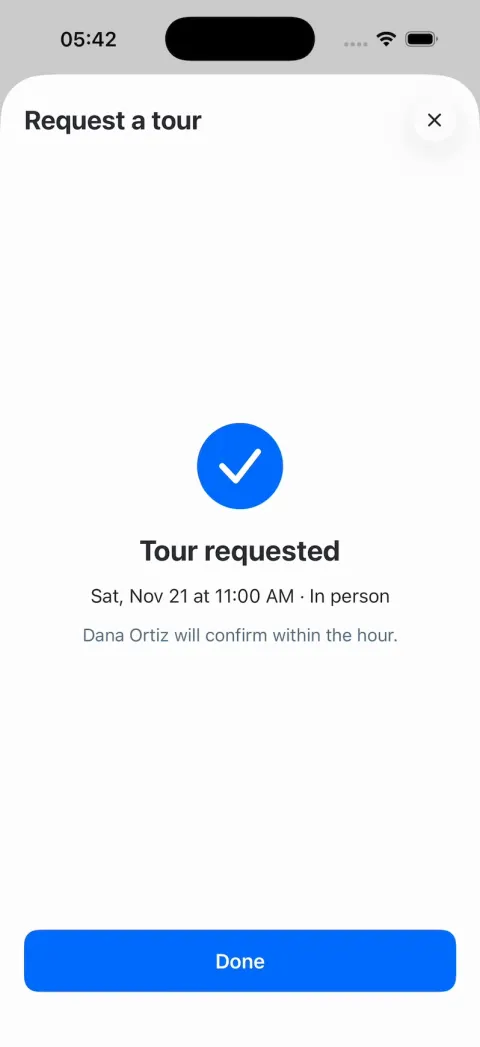
5. Request a tour (.large sheet): "Request a tour" + an xmark glass circle; a segmented "In person" | "Video chat"; a row of 7 date cards (Tue 17 … Mon 23; 72×88 pt, 12 pt corners, day / number / month; selected: 2 pt #006AFF border on #EBF3FF; default Sat 21); time capsules in 3 columns, 9:00 am … 5:00 pm hourly (selected: #006AFF fill, white text); "Request this time" (#006AFF, disabled until a time is picked). Sent: the content cross-fades to a success state: a 72 pt #006AFF circle whose white checkmark draws itself (trim, 0.35 s) and pops, "Tour requested" (24 pt bold), "Sat, Nov 21 at 11:00 AM · In person", "Dana Ortiz will confirm within the hour.", "Done". The listing page then shows a green capsule "Tour requested · Sat, Nov 21, 11:00 AM" under the price.
6. Favorites: large title "Favorites"; segmented Homes | Searches; Homes = ListingCardLarge of saved homes (unsaving collapses the row with a spring); Searches = one card "Park Slope, Brooklyn · For sale · 3+ bd" with "4 new listings".
7. Updates: large title "Updates"; rows with a 64 pt rounded thumbnail, title, subtitle, time: "Price cut: $50K (2.6%)" 54 Berkeley Pl, now $1,875,000, 5d; "New listing" 470 6th Ave #3A, $899,000, 5h; "Open house Saturday" 271 Garfield Pl, 12-2 pm, 1d; "Back on market" 316 11th St, $1,595,000, 2d; "Just sold nearby" 802 Carroll St, $4,250,000, 3d. Tap: the listing page.
8. Plan: the StoopMark + "Stoop" header; large title "Plan"; segmented Overview | Buying; a budget card (16 pt corners, shadow): "Your Stoop Budget", $1,850,000 target home price, $2,300,000 max, $12,400/mo target payment, 6.27% est. rate, "Get pre-qualified" (#006AFF) and "View your details" (outline); then rows with icon tiles: "Find the home", "Make an offer", "Close your purchase" (title, one-line subtitle, chevron).
9. Inbox: large title "Inbox"; threads: Dana Ortiz "Happy to show you 512 3rd St on Saturday!" 9:14 AM; Marcus Bell "The sellers at 271 Garfield are open to offers." Mon. A thread: bubbles (outgoing #006AFF white text, incoming #F6F6F8) and a composer that sends.

TOUCH
- TouchFeed (@Observable: location in screen points, isDown): published by a passive window-level touch observer (a UIGestureRecognizer subclass on the key window, cancelsTouchesInView = false, delaysTouchesBegan = false, never recognizes), so it never blocks taps, drags or the map.
- TouchDot (HOOK MODE's finger): 44 pt, black 35% fill, a 3 pt white ring, a soft shadow, drawn in a top overlay window above everything; scales in 0.6 → 1.0 (0.15 s); 0.85 while pressed; glides between points (easeInOut). Every dot move and press writes TouchFeed; scripted presses, drags and releases call the same actions as real touches (a scripted drag on the PhotoPager pages it like a finger).

HOOK (the video's first 3 seconds)
- HOOK MODE: tapping an invisible 24x60 pt strip at the RIGHT edge (x 378-402, y 400-460 pt), drawn in its own window above every sheet, card, toast and the tab bar (a tap there closes whatever is open), resets everything and plays DemoScript's steps through the real pin, card, pager, heart and TouchFeed code, identical every time (seconds from the tap):
 0.00 with no animation: Search tab in Map mode at the launch camera, all 18 pins drawn at full size (no pop-in), no card, sheets and toasts closed, filters cleared, favorites back to fixtures, lens "today"; the TouchDot shown at rest at (300, 640).
 0.00-0.45 hold exactly that.
 0.45 the dot glides to the l01 pin ("$2.45M"; its screen point from the MapProxy) in 0.20 s.
 0.65 dot down: the pin pressed. 0.75 dot up = the pin's tap: it turns selected and the card slides up (0.30 s).
 1.20 the dot glides to (290, the card photo's centre) in 0.15 s; 1.35 down; 1.35-1.60 it drags 200 pt left and the pager follows; 1.60 up: settles on photo 2.
 1.85 the dot glides to the card's heart (0.15 s); 2.05 down; 2.15 up = save.
 2.40 the dot fades out. Then hold (real taps work again).
- DemoScript holds the steps as (absolute time from the tap, action): dotShow(point), dotMove(target, duration), press, release, drag(by, duration), dotHide. Targets are named and resolved to screen points when the step runs: pin:<listingId>, chip:<chipId>, card.photo, card.heart. One HookPlayer runs them on the main actor against the tap time (absolute, no drift), never the app's normal delays.
- What the eye must see: frame 0 fully drawn (tiles, pins, header, the dot; no fade-in); the card slides up filled, never pops or blinks; prices roll digit by digit and text never jumps; no flash longer than 0.1 s.

RULES
- Native SwiftUI, iOS 26 (keep the template's target), iPhone portrait; MapKit for maps; Swift Charts for the donut.
- Deterministic fixtures. No backend, login, location permission, notifications, analytics or network calls at runtime. No persistence: delete the SwiftData starter, no UserDefaults or files.
- Preload and decode every image off the main thread at launch. Files under 300 lines, big bodies split into subviews, no long chained expressions; every animation smooth at 60 fps (the simulator streams video).
- Keep every file inside /home/user/workspace (/tmp is denied).

REMIX-READY
Theme/Theme.swift (colours, fonts, metrics; no colour literals elsewhere), Theme/Brand.swift (name, StoopMark, a Copy enum with every word), Data/Fixtures.swift, Data/ChipCatalog.swift, Data/DemoScript.swift; Money/ (Money, PriceLens, PriceLensRegistry, PriceText). Codable models with String ids: Listing (address, kind, tag, price, beds, baths, sqft, yearBuilt, coordinate, photos, highlights, description, priceHistory, estimate, agentId), Agent, PriceEvent, SavedSearch, UpdateItem, ChatThread; behind one HomesDataSource protocol (FixtureHomesSource) feeding @Observable stores (SearchStore: filters, mode, selection, camera; FavoritesStore; TourStore; InboxStore); views never read Fixtures. Components/: PriceMap, PricePin, ListingCard, ListingCardLarge, PhotoPager, ChipRow, PaymentCalculator, PriceHistoryTable, EstimateCard, AgentCard, TourPicker, TouchDot, Toast, GlassCircleButton. Features/<Tab>/. README.md under 80 lines: the file map; how to rename, recolour, swap the logo, change the city and listings, add a filter chip and add a price lens; 3 one-prompt remixes (rentals with a roommate rent split; vacation homes with nightly prices; office space priced per desk). "Read README.md first." atop CLAUDE.md and ios/AGENTS.md; replace ios/CLAUDE.md's structure block with this app's files. No scratch folders.

FILMING
Long-press the search field for 1 s to reset everything to launch.

BUILD
Theme, Brand, Money and Fixtures, then the TabView shell and the Search map with pins (launch and look first), then the ListingCard with PhotoPager and hearts, TouchFeed, TouchDot and HOOK MODE, then the listing page with the PaymentCalculator and price history, then Request a tour, then List mode and the filter sheets, then Favorites, Updates, Plan and Inbox; a one-line status per screen; launch in the simulator every two or three files. Fetch media.zip as soon as the shell runs; check the files exist, never view them. Walk each flow once and fix what breaks; no pixel measuring or debug modes. Deliver the whole app, not a plan. Do not publish.
Zillow clone features
What Zillow Clone includes today, and what you add next. Everything in the template runs on sample data, with no login and no backend, so it works the moment you open it.
In the template
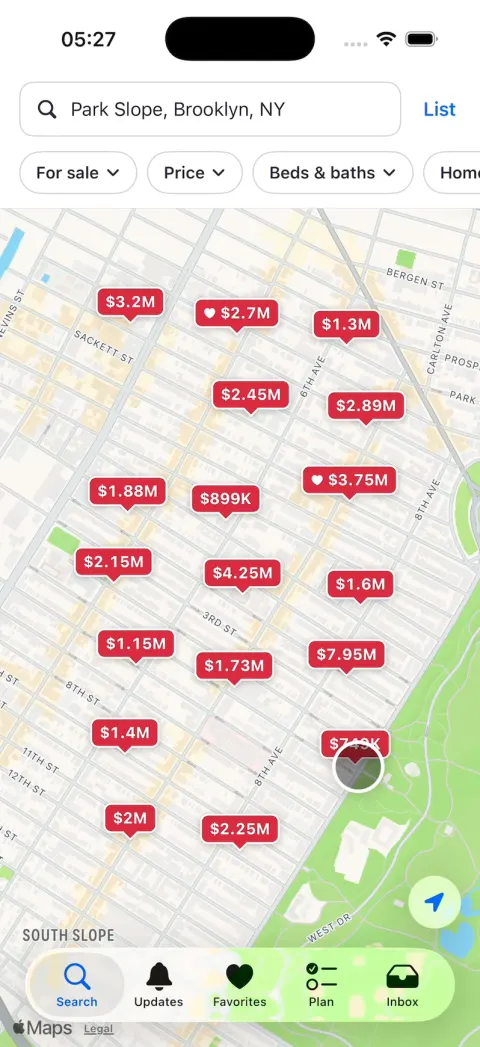
Map search
A map of Park Slope, Brooklyn with 18 red price pins. Tap one and it turns blue as its card slides up.
Filters
For sale, Price, Beds & baths, Home type and More, each with its own sheet. Price has a slider over a small chart of prices.
Listing cards
Swipe through a home's photos right on the map, and tap the heart to save it.
List view
The same homes as big photo cards, with your filters still on.
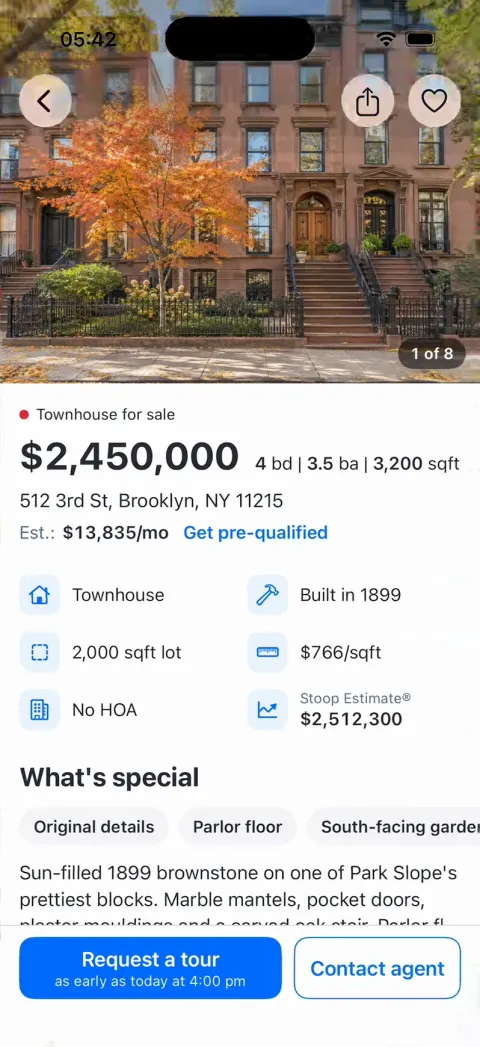
Listing pages
Price, beds, baths and square feet, the Stoop Estimate, price history, walk and transit scores, and the agent.
Payment calculator
A donut of principal and interest, taxes and insurance that moves with the down payment, the rate and the loan type.
Request a tour
In person or by video, 7 days to pick from, times from 9 am to 5 pm, and a checkmark that draws itself.
Favorites, Updates, Plan and Inbox
Saved homes and searches, price cuts and open houses, a budget card, and chats with agents.
Add with a prompt
Real listings
Homes from your local MLS, through a broker's IDX feed. We loaded a demo feed below.
Tours that reach an agent
Each request lands where an agent can call back. We sent them to a CRM below.
Listings you can edit
Your homes in a database, and a screen to change prices. We built one below.
Accounts
Sign-in, so saved homes and searches follow a buyer to a new phone.
Alerts
A notification when a saved search gets a new home or a price cut.
Mortgage pre-approval
A real lender behind the Get pre-qualified button.
A real home value
On most homes, the Stoop Estimate is the list price plus 2%. A real one needs recent sales and a pricing model.
How to build a Zillow clone with Vibecode
- 1
Remix the template
Open the Zillow Clone share page and press Remix. Vibecode copies the whole Swift project into your account, so you start from a working app instead of an empty screen. A new account's first remix is free.
- 2
Make it yours by chatting
Tell the agent what to change, in plain English. For example: "Rename the app to Halsey & Ward, make the brand color deep green, and show only Dana's and Priya's homes." Each change rebuilds the app and runs it in Vibecode's cloud iOS simulator, right in your browser.
- 3
Publish to the App Store
Click Publish, choose Publish to App Store and sign in with your Apple ID. Vibecode builds, signs and uploads the app to Apple, with no Mac and no Xcode. You need an Apple Developer account ($99/year) and the Plus plan or higher.
The hard parts of a real Zillow clone
Screens are the quick part. These are what take the time once real people use it.
Listings you're allowed to show
Zillow's homes aren't yours to copy. Its terms of use forbid scraping the site.
Real listings come from your local MLS as an IDX feed: the listings brokers share so they can show each other's homes. It's for brokers who are members, so you work through a broker.
The feed has rules. Refresh the homes at least every 12 hours, and name the brokerage behind each one.
Sources: Zillow terms of useNAR's IDX rules (Handbook on Multiple Listing Policy)
Map search over thousands of homes
The template draws 18 pins. A city has thousands of homes for sale.
So a real app asks the server only for the homes inside the map on screen. It groups nearby pins as you zoom out, and loads photos as you scroll.
Tours that reach the right agent
A tour request is a lead, and it wants an answer fast. It has to reach the agent for that home, at a time that's really free.
Our CRM run turned up two catches. The CRM showed times in the demo team's Phoenix time zone. And our CRM's preview had gone to sleep, so the first request failed until we woke it.
Brokers, agents and housing ads
An app that shows other brokers' homes through IDX has to be under a broker's control. So most apps like this belong to a brokerage, or to agents who work for one.
Ads for homes have rules too. In the US, Google and Meta won't let housing ads target by age, gender or ZIP code.
Sources: NAR's IDX rules (Handbook on Multiple Listing Policy)Google Ads: housing ad targeting rulesMeta: housing ad targeting rules
Take it from template to real app
We sent each prompt to its own fresh remix. Steps 3 and 4 go together: one message to a CRM, then one to the app.
- 1
Make it one brokerage's own app
A brokerage can have its own Zillow, with only its listings. One message turned a fresh remix into Halsey & Ward's app, in 6 minutes for $2.86 of credits.
We picked Claude Opus 5.5 for every message we ran. Changes default to GPT-6.1 Sol, so your minutes and credits may differ.
The map now shows only the brokerage's 12 homes, and blue became deep green. Plan became Sell, with a "What's your home worth?" form for sellers.
The agent added a Done key, since the phone keypad hid the form's button. The simulator can't place calls, so the Call the office button is untested.
Prompt
Make this the app for one brokerage, Halsey & Ward Realty, with only its own listings. Rename the app to Halsey & Ward everywhere, the home screen name included. Replace the house mark with an HW monogram in a circle, and use it for the app icon too. The brand color becomes deep green (#1F5C4A) in place of blue. Keep the 12 homes Dana Ortiz and Priya Raman list, and remove Marcus Bell, his 6 homes and his chat. Each listing says "Listed by Halsey & Ward" with the agent's name. Replace the Plan tab with Sell: a "What's your home worth?" form (address, beds, baths, condition, name, phone) that ends on "Dana will call you within a day with a price." Add a "Call the office" button with (718) 555-0186 to every listing page. Keep every screen, animation and HOOK MODE timing.
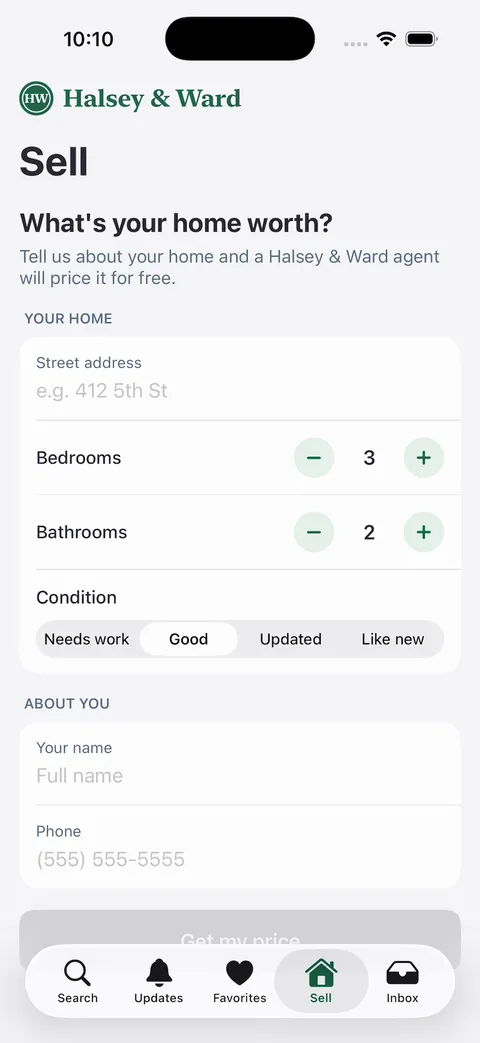
Halsey & Ward after one message: the HW monogram, a Sell tab and a What's your home worth? form with beds, baths and condition - 2
Turn it into rentals near a campus
This message moved the map to Clinton Hill, by Pratt Institute in Brooklyn. It took 7 minutes and $3.19 of credits.
All 18 homes became apartments for rent, from $2,400 to $7,800 a month. A Per person chip turns every price into one roommate's share.
The listing page now splits rent and $180 of utilities between 1 and 5 roommates. The walk times to campus are straight-line estimates, not real walking routes.
Prompt
Turn this into a rentals app for students at Pratt Institute in Clinton Hill, Brooklyn. Move the map to Clinton Hill, centered near the campus at 200 Willoughby Ave, and spread the 18 homes over the blocks around it with new street addresses there. Every home becomes an apartment for rent, with a monthly rent from $2,400 to $7,800 and 1 to 5 bedrooms, and "For sale" becomes "For rent". Add a price lens, perRoommate (rent divided by bedrooms, label "per person"), and a "Per person" chip that turns it on, so every pin and card shows one roommate's share. On the listing page, replace the mortgage calculator with a roommate split: a donut of each roommate's share of rent and $180 of utilities, with minus and plus for 1 to 5 roommates. Show the walk to campus on every listing ("8 min walk to Pratt"). Keep every screen, animation and HOOK MODE timing.
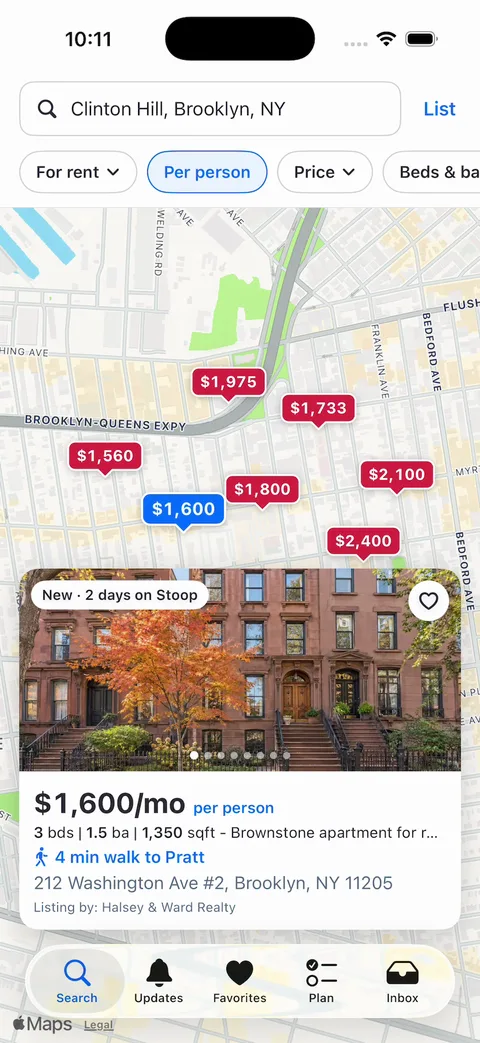
Pratt rentals after one message: Per person turned on, and a card for 212 Washington Ave at $1,600 a month per person, a 4 min walk to Pratt - 3
Get the agent side ready
Tour requests need to reach an agent. Porchlight CRM, our real estate CRM template, already turns showing requests from its listing pages into leads.
We sent this message to a remix of Porchlight. In 2 minutes and $1.31 of credits, it added a web address where the app can send tour requests.
The agent sent a test request, and it showed up under New leads. Its reply opened with the web address to use in the next step.
Prompt
Let our iPhone home-search app, Stoop, send tour requests into this CRM. Add POST /api/public/tour-requests, public like the listing page routes (no sign-in, the same honeypot and rate limit). It takes JSON: address, cityLine, price, day (YYYY-MM-DD), time (HH:MM), tourType ("in_person" or "video"), name, phone, and optional email and message. Save it the way a listing page showing request is saved: the contact with the source "Stoop app: <address>", the form activity, a requested 30-minute showing and a Call back task due in 5 minutes, so it shows under New leads on Today and on Showings. These homes are in Brooklyn and aren't CRM listings, so add each home as an outside listing the first time it's requested, and keep it off the public pages. Then send one test request yourself and reply with the full URL the app should call.
- 4
Send tour requests to your CRM
Then this message went to a fresh remix of the Zillow clone. Put the web address from step 3 where it says your-crm-address.
It took 9 minutes and $1.52 of credits, about half of it waiting for the CRM's preview to wake up. The tour sheet now asks for a name and phone, and its days start from today.
We booked a Saturday tour in the simulator. The first try hit the sleeping CRM and showed an error. We woke the CRM's preview, and Try again went through.
It landed in Porchlight as a new lead, with a Call back task. Set the CRM's Timezone in Settings first, since ours was still on the demo team's Phoenix time.
Before real buyers use it, deploy the CRM, since our preview went to sleep. And ask the agent to leave the name and phone empty, since the prompt fills in Maya Chen, the template's sample buyer.
Prompt
Send every tour request to my Porchlight CRM at https://your-crm-address/api/public/tour-requests. In the Request a tour sheet, ask for the buyer's name and phone before "Request this time", filled in with Maya Chen and (718) 555-0142. Then POST it as JSON with address, cityLine, price, day (yyyy-MM-dd), time (HH:mm, 24-hour), tourType ("in_person" or "video"), name and phone. Show "Tour requested" only once the CRM answers OK. If it fails, show the CRM's error message with a Try again button. The 7 date cards start from the real today, so a request is never in the past. Keep every other screen, the fixtures and HOOK MODE as they are.
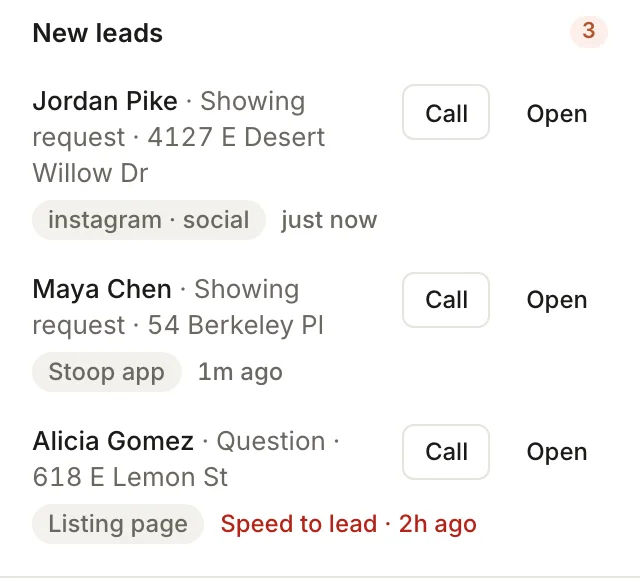
Porchlight CRM's New leads after a tour request from the app: Maya Chen, Showing request, 54 Berkeley Pl, tagged Stoop app, between two of the CRM's sample leads - 5
Put your own listings in a database
A brokerage or landlord with its own homes needs to change them without a new app version. This message moved all 18 homes and 3 agents into Vibecode Cloud, in 13 minutes for $4.45.
Long-press the house mark on Plan, and a Manage listings screen opens. The agent locked it with a 6-digit owner code.
We changed 54 Berkeley Pl to $1,800,000 and Pending. Its pin turned grey and read Pending.
A new home needs a real address for its pin, and its photo comes from the app's 18. For other phones to see changes, publish the backend and ship the new app version.
Prompt
Add Vibecode Cloud and move the 18 listings and 3 agents into the database, so I can change homes without a new app version. Load them at launch through a new HomesDataSource, and keep the fixtures as the fallback when the phone is offline. Add a Manage listings screen for the owner, opened by long-pressing the house mark on Plan: add a home, change its price, and mark it Pending or Sold. Changes save to the database and show on every phone the next time the app opens. A Pending or Sold home keeps its pin, with a grey "Pending" or "Sold" label. Keep every other screen, animation and HOOK MODE timing.
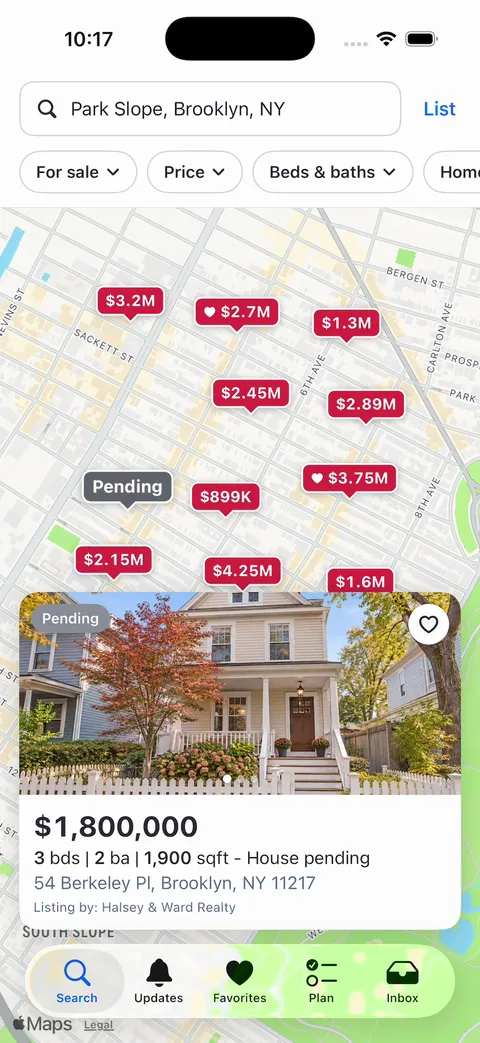
After the database step: 54 Berkeley Pl, changed to $1,800,000 and Pending in Manage listings, shows a grey Pending pin and card on the map - 6
Show homes from a listings feed
Real homes come from your broker's IDX feed. SimplyRETS turns one into an API, from $49 a month plus a one-time $99 to connect each feed. Its demo keys are public, so we used them.
This message took 11 minutes and $4.20 of credits. The backend fetches the feed, so a real key never ships inside the app. It refreshes the homes every hour.
The map moved to 42 demo homes around Houston. If the feed fails, the app shows the sample homes instead.
The demo homes are made up, like a 722 sqft townhouse for $9.2 million. For your own feed, put your SimplyRETS keys where the demo keys are.
Then ask for two more changes. The app makes up an estimate, views and saves the feed doesn't have, so remove them. And name the listing brokerage on each home, not just the agent, since the feed rules require it.
Prompt
Load the homes from a real estate listings feed instead of the fixtures. Add Vibecode Cloud, and have the backend fetch SimplyRETS's demo feed (GET https://api.simplyrets.com/properties?status=Active&limit=50 with basic auth simplyrets / simplyrets, their public demo keys), so a real feed's keys stay off the phone. Cache it on the backend and refresh it every hour. Map each home to Listing: address, city line, price, beds, baths (full plus half), square feet, year built, coordinates, the photo URLs and the remarks as the description. Center the map on the homes it returns. Show "Listing courtesy of" and the listing agent's name on every card and listing page. If the feed fails, show the fixtures. Keep every screen and animation, and HOOK MODE taps the first home.
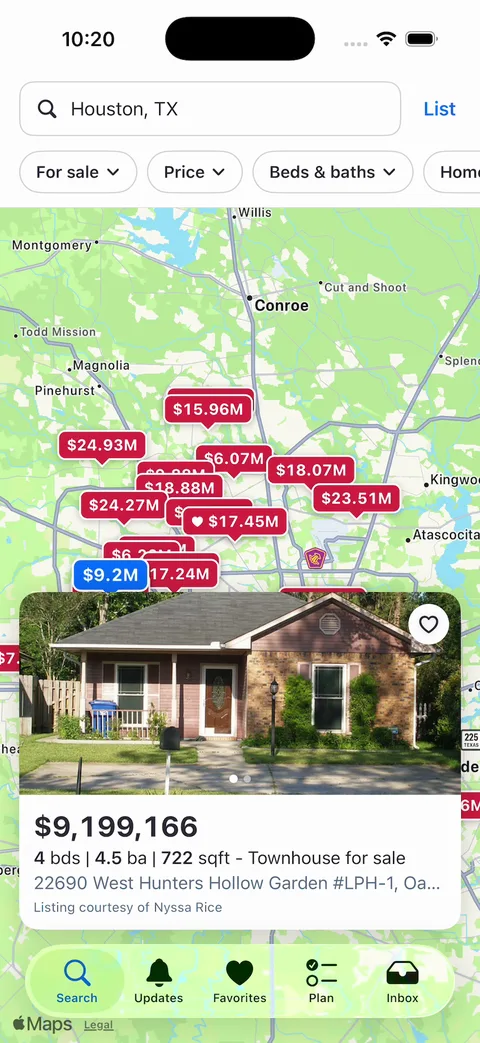
After the feed step: SimplyRETS demo homes around Houston, and a card for a $9,199,166 townhouse with Listing courtesy of Nyssa Rice
What a Zillow clone costs
The Vibecode template is the only option here you can start for $0. A new account's first remix is free. Changes after that use credits.
The other ways in are a clone script or an agency. Sangvish's script comes with web view apps for iPhone and Android. Nascenture, an agency, shows no price, only a quote form.
Real listings are a separate cost. Purrweb, an agency, puts MLS and IDX data licensing and setup at $15,000 to $30,000. SimplyRETS's feed API starts at $49 a month.
Ours is only the buyer's app, on sample homes. So start here to see your own version running first. Buy a script if you want a website and admin panel now and can live with web view apps. Hire an agency if you need every part built to order.
We checked each price below on the company's own page on November 19, 2026.
| Option | Upfront cost | What you own | First version | Still on you |
|---|---|---|---|---|
| Clone script | $499 (Startup) or $799 (Corporate), one time, at Sangvish | Source code, licensed for 1 domain | Sangvish installs it for free. | Listings, store accounts, and custom changes after the 3 months of support. The phone apps are web views. |
| Development agency | $25,000 to $50,000 for a first version (SolGuruz). $120,000 to $220,000 for iOS, Android and a web admin (Purrweb). | What your contract says | 2 to 3 months for a first version (SolGuruz) | Listings data, which Purrweb prices at $15,000 to $30,000 more, and paying for each change after launch |
| Vibecode templateThis template | $0 to remix on a new account. Plans from $20 a month. | The app and its code. Download it on Pro ($50 a month). | Under a minute to remix. 6 minutes for our brokerage version, on sample homes. | Real listings through a broker, sign-in, alerts, publishing, and the agent side (steps 3 and 4) |
Sources: Sangvish Zillow clone script and pricingNascenture Zillow cloneSolGuruz: how to build an app like ZillowPurrweb: real estate app development costSimplyRETS plans and pricingVibecode pricingVibecode terms (who owns your app)
Frequently asked questions
Is it legal to build a Zillow clone?
Yes. A map of homes, listing pages and a payment calculator are common patterns. Lots of real estate apps use them.
Zillow's name and logo belong to Zillow. Our template already has its own name, Stoop, with its own house mark and words.
What you can't take is Zillow's listings. Its terms forbid scraping the site, so real homes come from an MLS feed through a broker.
Sources: Zillow terms of useNAR's IDX rules (Handbook on Multiple Listing Policy)
Can I publish a Zillow clone to the App Store?
Yes, as your own service.
Apple doesn't allow another developer's name or icon in your app's name or icon without their OK (4.1(c)). It also rejects apps that copy a popular app with only small changes (4.1(a)). So give yours its own market, like one brokerage, one city or student rentals.
Apple asks for final apps, with placeholder content removed (2.1). So swap the sample homes for real ones, and give the app your own name and icon, since every remix starts as Stoop. Also ask the agent to remove the hidden demo button on the right edge of the screen.
Vibecode publishes to the App Store on the Plus plan and up, with your Apple Developer account.
Sources: App Review Guideline 4.1App Review Guideline 2.1How to publish to the App Store with Vibecode
Does the Zillow clone work on Android?
No. Zillow Clone is a native iPhone app written in Swift, so it runs on iPhone only.
For Android, start a new app in Vibecode and choose Legacy, then Mobile app (Legacy). It builds React Native apps for iPhone and Android. Paste the prompt from this page there and ask for React Native instead of SwiftUI.
You submit the Android app to Google Play yourself.
Can I add a real backend to the Zillow clone?
Yes. Zillow Clone runs on sample data, so it works the moment you remix it.
When you need real users, Vibecode Cloud adds a database, sign-in and file storage with one prompt. That's enough for listings, saved homes and tour requests. It's on the Plus plan and up.
You can also connect Supabase, Firebase or your own API.
Can I show real listings in my Zillow clone?
Yes, through your local MLS. Its IDX feed lets a broker who's a member show other brokers' homes, on a website or in an app the broker runs.
Two of its rules shape the app. Refresh the homes at least every 12 hours, and name the brokerage behind each one.
A service like SimplyRETS turns the feed into an API, from $49 a month. Step 6 above loads its demo feed into a remix. Don't scrape Zillow for homes. Its terms forbid it.
Sources: NAR's IDX rules (Handbook on Multiple Listing Policy)SimplyRETS plans and pricingZillow terms of use
Can I use it for just my brokerage?
Yes. One message turned a remix into Halsey & Ward's own app in 6 minutes. It shows only the brokerage's 12 homes, and has a Sell tab for sellers.
To change your homes without a new app version, step 5 moves them into a database. Then you edit prices and mark homes Pending from the phone.
Does it work for rentals?
Yes. One message turned a remix into rentals for Pratt Institute students in 7 minutes. Every price can show one roommate's share, and each listing splits the rent.
For vacation homes rented by the night, start from our Airbnb clone instead.
Source: Airbnb clone guide
Does the Zillow clone include an app for agents?
No. The template is the buyer's app, and its agents are sample data.
For the agent side, Porchlight CRM is our real estate CRM template. Steps 3 and 4 above send tour requests from the iPhone app into it, as new leads.
They stay two projects. They work together through that one web address.
How long does it take to make an app like Zillow?
Remixing this template gives you a working app in under a minute. Our brokerage version took one message and 6 minutes.
Sending tour requests to a CRM took two messages, about 11 minutes in all. Moving the homes into a database took 13 minutes.
A real service with a listings feed, accounts and agents takes longer. SolGuruz, an agency, puts a first version at 2 to 3 months.
Sources: SolGuruz: how to build an app like ZillowCan I vibe code Zillow? Our verdictHow to make an app
What does a Zillow clone app cost to run?
On Vibecode, plans start at $20 a month with $20 of credits. Each change you ask for uses credits.
The changes we ran for this guide used $1.31 to $4.45 of credits each, plus simulator and build time.
Once the app has a backend for real users, that backend needs a deployment. Plus includes 1, and each extra one is $20 a month.
Apple charges $99 a year to publish. A listings feed from SimplyRETS starts at $49 a month, and your MLS sets its own fees.
Sources: Vibecode pricingVibecode deploymentsApple Developer ProgramSimplyRETS plans and pricingPurrweb: real estate app development cost
How is this different from a Zillow clone script?
A script is ready-made code for a website, phone apps and an admin panel. Sangvish's starts at $499, and its iPhone and Android apps are web views.
Our template is a native SwiftUI iPhone app, and only the buyer's side, on sample homes. But it's $0 to remix on a new account, you own the app, and you change it by chatting.
Neither one comes with real listings. Those need an MLS feed through a broker.
Sources: Sangvish Zillow clone script and pricingVibecode terms (who owns your app)
Is there a Zillow clone on GitHub?
Yes, over 200, and none is big. The most-starred had under 50 stars when we checked. Most are web projects you set up and host yourself.
Sangvish's GitHub page is a sales page with no code in it.
Remix ours and it runs in your browser in under a minute, as a native iPhone app. You can download its code on Pro and up.
Sources: Zillow clones on GitHub, by starsSangvish's Zillow clone page on GitHubVibecode pricing
Can I build a Redfin, Realtor.com or Trulia clone with it?
Yes. Apps like Redfin, Realtor.com and Trulia work the same way as Zillow: a map of homes, listing pages and tour requests.
Give it your own name, colors and market, and the same template becomes your app. Step 1 shows a full rebrand in one message.
The listings question is the same too. Real homes come from an MLS feed.
Is the Zillow Clone template free?
A new account's first remix is free. It counts as that account's free first build. You get your own copy of the Swift project, with 2 free minutes in the simulator.
After that, remixing and running an app need credits. Every change you ask the agent for uses credits too.
Publishing to the App Store needs a paid plan (Plus and up) and an Apple Developer account ($99/year). Downloading the source code is on the Pro and Max plans. See the pricing page for current plans.
More templates
All templates- View template
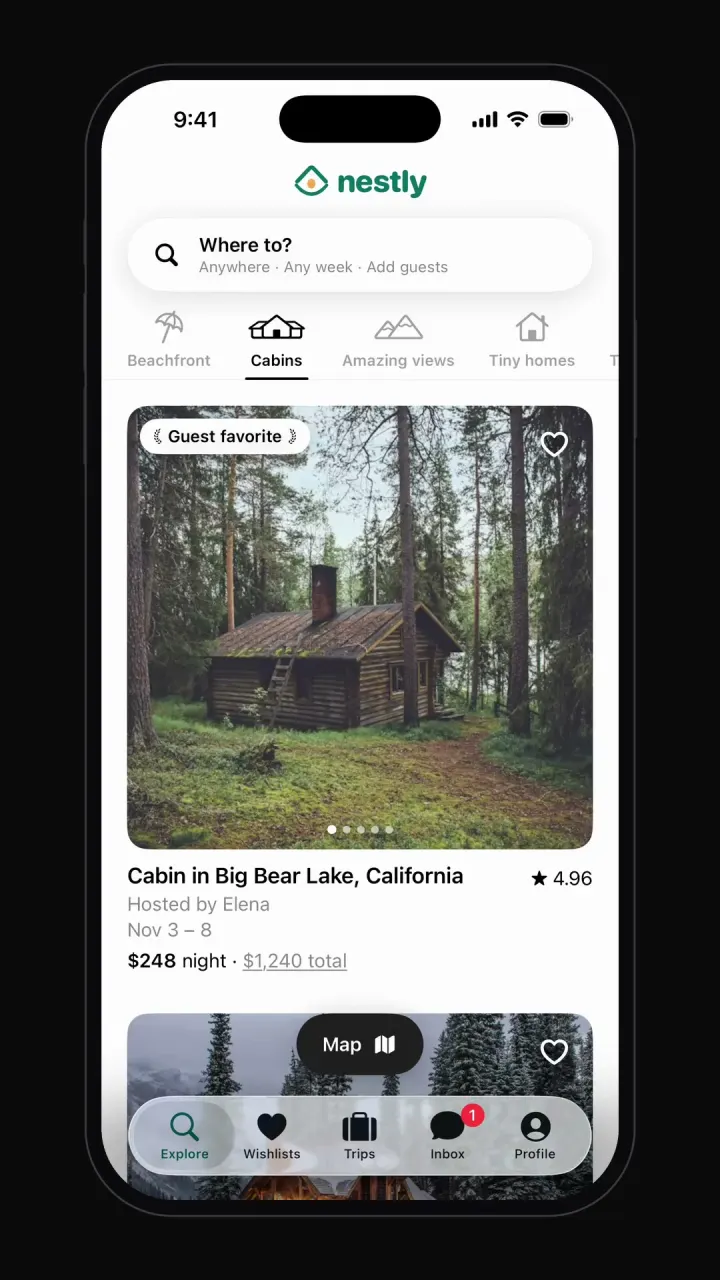
Airbnb clone
iOSCategory browsing, map view, date and guest search, listing pages, checkout, wishlists and trips.
- View template
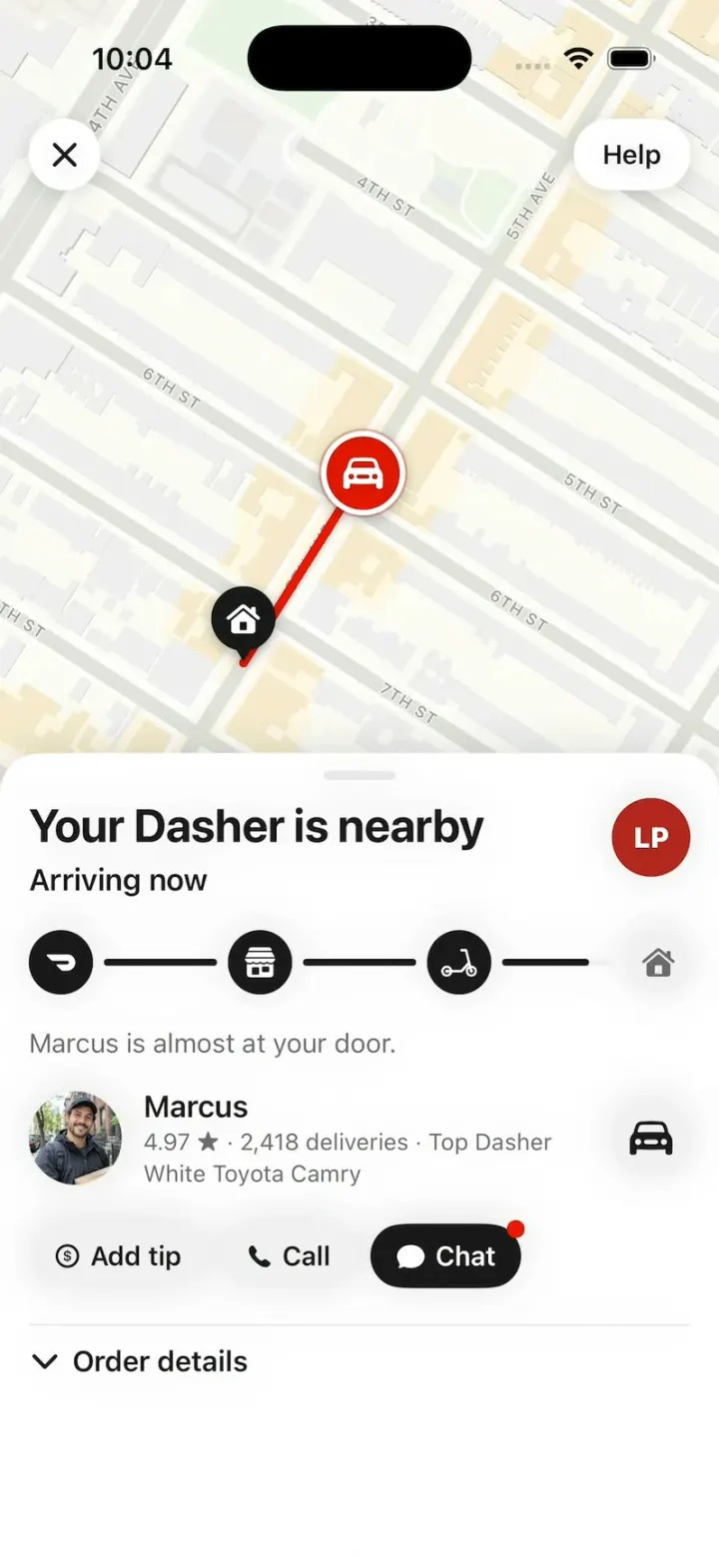
DoorDash Clone
iOSDoorDash's live tracking: the red Dasher dot, the four-step tracker, drop-off photos, menus and checkout.
- View template
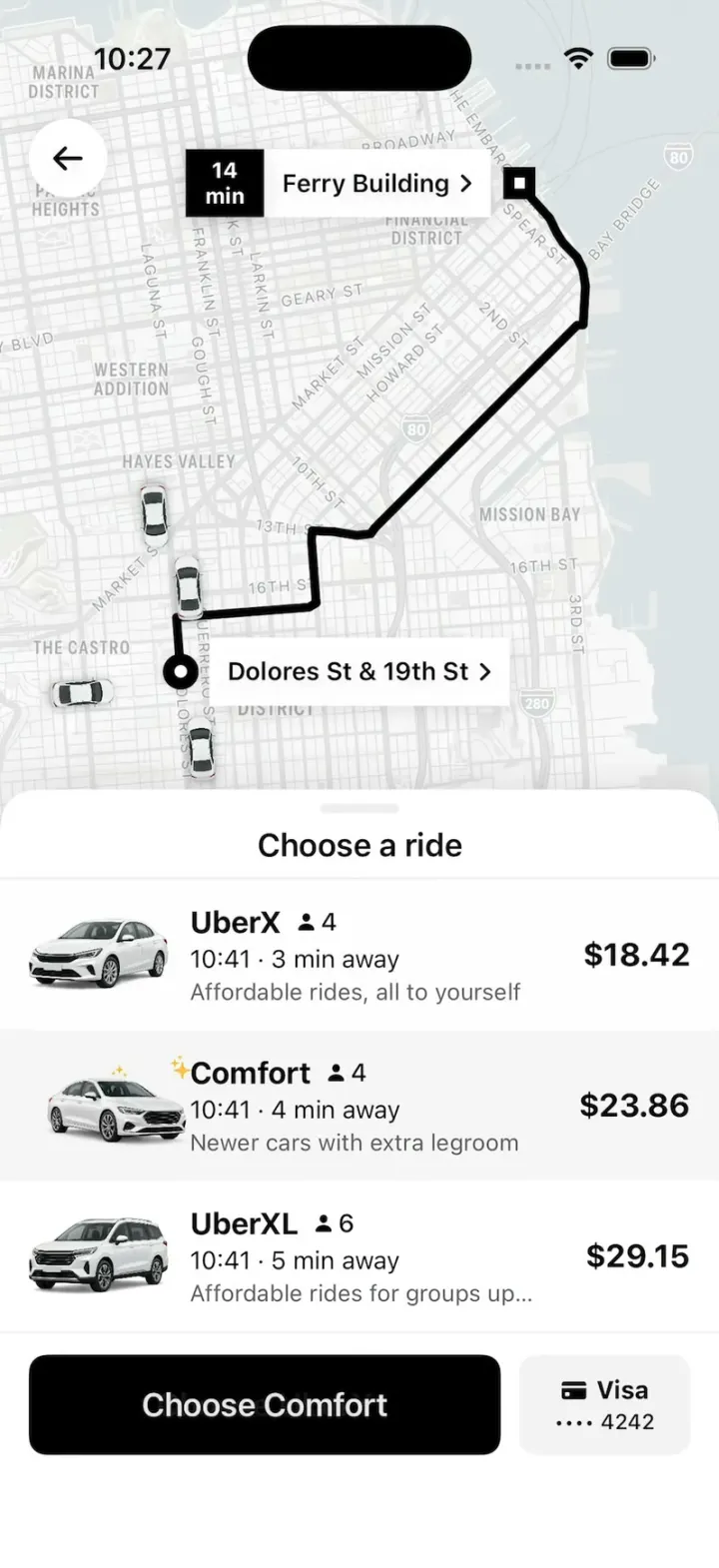
Uber Clone
iOSUber's real look: pick a ride at an upfront price, watch your driver drive up on the map, then rate and tip.



Browse all app templates. Each one is a native Swift app made with Vibecode's iOS app builder.
Have an idea of your own? The free Can I vibe code it? checker tells you what it takes and writes your first prompt.
Choosing a builder? Read the best AI mobile app builders guide or compare Vibecode with other app builders.
About the editorial team
Vishal is a product engineer at Vibecode. Before Vibecode he did product engineering at EarnIn and co-founded Ivella (YC S21), a banking app for couples. He studied computer science at Duke.