
Table of contents
TL;DR
How do you build an Amazon clone?
This article will go through the exact steps of building an Amazon clone. You can follow along, or scroll to the bottom and remix the version we already made you. It's $0 on a new account!
Appysa sells an Amazon clone script for $299, with phone apps and a seller side. Ambsan Digital, an agency, puts an Amazon-style marketplace at $60,000 to $300,000, depending on the team.
Ours is a native iPhone app, $0 to remix on a new account. Every product, price and order in it is sample data.
Amazon has:
- Search with suggestions
- Today's Deals with countdowns
- Product pages with photos and reviews
- A cart and checkout
- Package tracking
Our Amazon Clone has all of them. Inside, it goes by its own name: Orinoco.
A real Amazon also needs products you own, payments, shipping, and a seller side if other stores sell there.
Below, we turn it into one brand's store, catch fake deals, move products and orders into a database, and take a test card payment.
- Vibecode template$0to remix on a new account
- Clone script$299at Appysa, with phone apps
- Agency build$60,000+per Ambsan Digital, for a marketplace
See it running
Template
Amazon CloneiOS
Amazon clone · Swift and SwiftUI
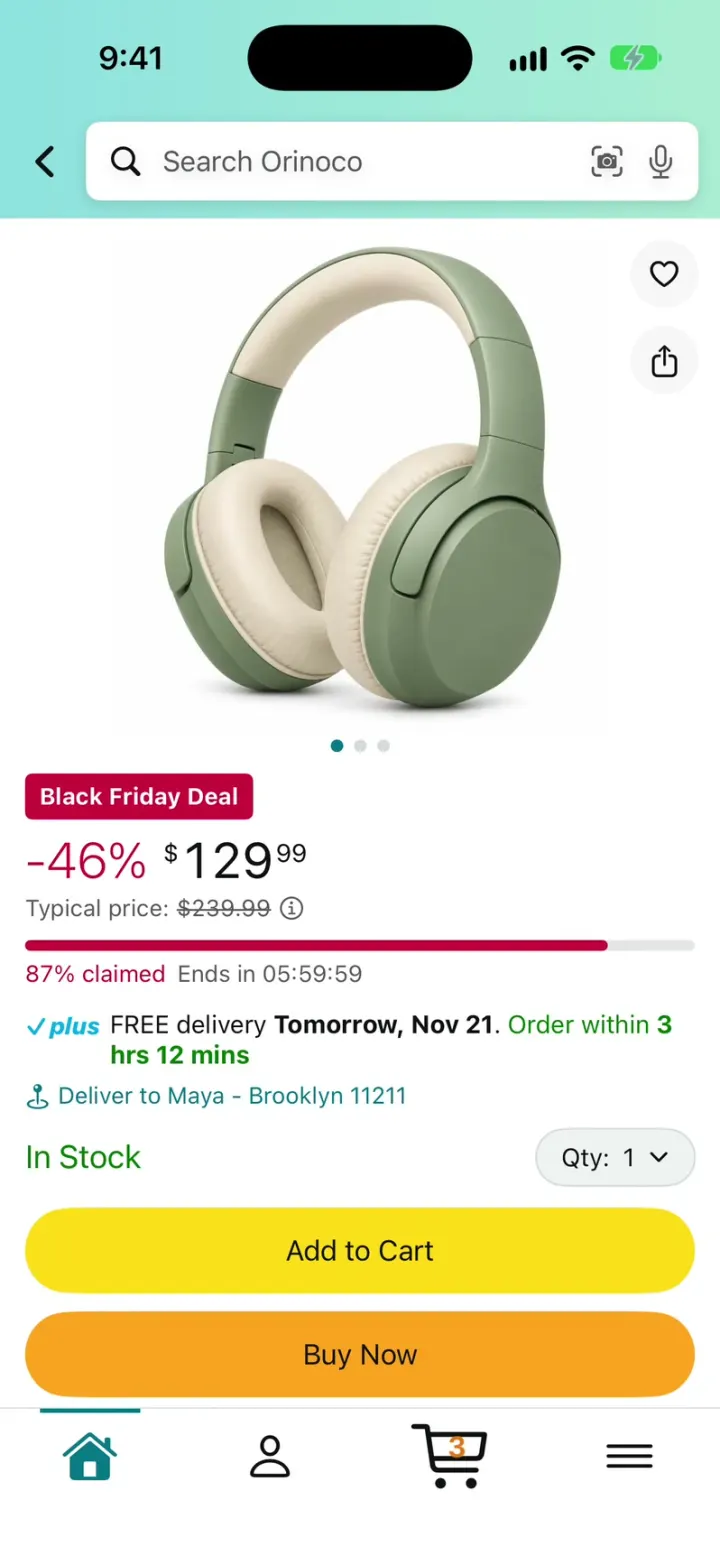
Black Friday deals, search, product pages, a cart and checkout, and package tracking, on sample products.
Remix copies the working Swift app into your Vibecode account, and a new account's first remix is free. Or open a new iOS app with the prompt below to build a fresh copy.
Open the template pageThe prompt we used
We built Amazon Clone in one message on Claude Opus 5.5. It took 22 minutes and $9.48 of credits for the agent, plus $1.65 of simulator time.
The prompt below is that message, word for word. Its product photos come ready-made in a zip, so the agent makes no pictures.
Paste it into a new iOS app project to build your own copy, or change the details first.
Prompt · 3,402 words
Build Orinoco, an original shopping app for iPhone in SwiftUI, in the genre of Amazon: a teal-to-mint header with a white search bar and "Deliver to Maya - Brooklyn 11211", a Black Friday Week home page, Today's Deals with red deal badges and claimed bars, search results, product pages with the yellow Add to Cart and orange Buy Now, add-to-cart that flies into the cart, a cart, checkout ending in "Order placed, thanks!", and order tracking that ends on the doorstep delivery photo. Its own name, logo and words, all below. The shopper is Maya Chen. Today is Friday, November 20, 2026, day 2 of Black Friday Week (deals end November 30).

ASSETS
curl -L once and unzip flat: https://vibecode-orinoco-media.beacon.host/media.zip (orinoco-icon.png: the app icon; p-*.jpg: 800x800 product photos on white, named in FIXTURES; delivered.jpg: 800x1200, a box on a Brooklyn stoop). Put every image in the asset catalog under its file name. No image generation is needed.

BRAND
Name "Orinoco". OrinocoMark (Brand.swift), a Shape in a unit square: a parcel box = a rounded rectangle from (0.18, 0.24) to (0.82, 0.80), corner 0.09, fill #FFA41C; the lid seam, a line from (0.18, 0.38) to (0.82, 0.38), 0.028 wide, #D98400; tape, a rectangle from (0.44, 0.24) to (0.56, 0.38), #FFD88A; a white wave stroke 0.06 wide with round caps: M 0.28,0.60 C 0.36,0.51 0.43,0.51 0.50,0.60 C 0.57,0.69 0.64,0.69 0.72,0.60. The wordmark is "orinoco" in SF Pro Rounded heavy, lowercase. The membership is Orinoco Plus; PlusBadge = checkmark (11 pt bold) + "plus" (13 pt heavy italic), both #00A8E1.

LOOK
Light mode only. Header: a left-to-right gradient #87DAE0 → #A5E6D3 that runs up under the status bar. Page background #E3E6E6 with white cards (no corners on full-width cards, 8 pt elsewhere). Text #0F1111, secondary #565959, links teal #007185, hairlines #D5D9D9. Deal red #CC0C39; In Stock green #007600; success green #067D62; stars #FFA41C; Add to Cart yellow #FFD814; Buy Now orange #FFA41C; Plus blue #00A8E1. SF Pro everywhere, numbers .monospacedDigit(). Prices in the store's style: "$" and the cents small and raised beside big whole dollars ("$129" + "99"), from one PriceText view. Pills are capsules; pressed states darken and scale 0.97; springs under 350 ms; light haptics. The status bar is visible (dark) on every screen.
Tab bar (custom, flat, not the floating glass bar): white, a hairline on top, 4 icon-only items (26 pt, #0F1111): Home (house), You (person), Cart (cart, with the item count drawn INSIDE the basket, 13 pt bold #E47911), Menu (line.3.horizontal). The selected item is teal #007185 with a 3 pt teal bar along the tab bar's top edge above it. Opens on Home; no splash, onboarding, sign-in or permission prompts.

FORMAT (Format/)
One Money formatter, Locale(identifier: "en_US") ("$1,299.99"); counts "(12,408)"; dates "Nov 21" and "November 12, 2026". The simulator's region is not en_US: never use the device locale.

FIXTURES (Data/ProductCatalog.swift: ONE [Product] list; a new product is one entry)
Product: id (= photo name), title, store, price, typicalPrice, rating, reviewCount, bought ("10K+ bought in past month"), category, deal (.blackFriday: a "Black Friday Deal" badge; .limited(claimed%): a "Limited time deal" badge + claimed bar), history, photos, about (bullets), reviews.
history makes priceHistory: one price per day, Jul 23 → Nov 20, 2026 (121 values). "raised <date>" = the deal price until that date, the typical price from it through Nov 18, the deal price from Nov 19. "steady" = the typical price through Nov 18, the deal price from Nov 19. The app shows only "Typical price"; priceHistory is there for remixes.
1. p-headphones · "Sonora Max Wireless Noise Cancelling Headphones, 60H Battery, Sage" · Sonora · $129.99 · typical $239.99 · 4.6 (12,408) · 10K+ · Electronics · .blackFriday · raised Nov 1 · photos p-headphones, p-headphones-2, p-headphones-3 · about: "Adaptive noise cancelling that tunes itself to the room", "60 hours of battery; 10 minutes of charging gives 5 hours", "Memory-foam ear cushions in sage and cream", "Multipoint: switch between phone and laptop", "Folds flat into the hard-shell case" · reviews: Jasmine R. ★★★★★ "Quiet on the subway, finally" "Wore them on the L train and heard nothing. Comfy for hours."; Marcus T. ★★★★☆ "Great sound, case is big" "Bass is rich, calls are clear. The case is bulky."; Elena V. ★★★★★ "Bought a second pair as a gift" "The sage color is even prettier in person."
2. p-airfryer · "Crispwell 6 Qt Air Fryer, 8-in-1, Dishwasher Safe Basket" · Crispwell · $59.99 · $99.99 · 4.7 (48,210) · 20K+ · Kitchen · .blackFriday · steady
3. p-tv · "Lumio 65-inch 4K UHD Smart TV, HDR10+, Built-in Apps" · Lumio · $379.99 · $649.99 · 4.5 (8,902) · 5K+ · Electronics · .blackFriday · raised Oct 26
4. p-robovac · "Tidyo S8 Robot Vacuum, LiDAR Mapping, 4000Pa" · Tidyo · $179.99 · $299.99 · 4.4 (6,117) · 4K+ · Home · .limited(72) · steady
5. p-mixer · "Bakehaus 5.5 Qt Tilt-Head Stand Mixer, Cherry Red" · Bakehaus · $199.99 · $329.99 · 4.8 (21,330) · 3K+ · Kitchen · .blackFriday · raised Nov 5
6. p-earbuds · "Sonora Buds Pro, Active Noise Cancelling Earbuds" · Sonora · $49.99 · $99.99 · 4.4 (31,775) · 30K+ · Electronics · .blackFriday · raised Nov 3
7. p-ereader · "Pagewise 7-inch E-Reader, Glare-Free, Warm Light" · Pagewise · $89.99 · $139.99 · 4.7 (15,880) · 10K+ · Electronics · .blackFriday · steady
8. p-projector · "Beamo Mini Projector, 1080p, Built-in Apps" · Beamo · $69.99 · $139.99 · 4.3 (4,215) · 3K+ · Electronics · .limited(91) · raised Oct 30
9. p-tumbler · "Hydra 40 oz Tumbler with Handle, Blush" · Hydra · $24.99 · $35.00 · 4.8 (61,004) · 50K+ · Kitchen · .limited(64) · steady
10. p-toothbrush · "Brightly Sonic Electric Toothbrush, 5 Modes" · Brightly · $39.99 · $69.99 · 4.6 (9,420) · 8K+ · Beauty · .limited(58) · steady
11. p-blanket · "Loomly Chunky Knit Throw Blanket, 50x60, Oatmeal" · Loomly · $34.99 · $59.99 · 4.7 (5,302) · 3K+ · Home · .blackFriday · raised Nov 2
12. p-coffeemaker · "Brewbit Single-Serve Coffee Maker, 12 oz" · Brewbit · $49.99 · $89.99 · 4.5 (22,184) · 10K+ · Kitchen · .blackFriday · steady
13. p-skillet · "Forgeline 12-inch Cast Iron Skillet, Pre-Seasoned" · Forgeline · $19.99 · $34.99 · 4.8 (77,410) · 20K+ · Kitchen · .limited(81) · steady
14. p-puffer · "Northline Women's Glossy Puffer Jacket, Black" · Northline · $69.99 · $129.99 · 4.5 (3,880) · 2K+ · Fashion · .blackFriday · raised Nov 4
15. p-sneakers · "Stride Knit Running Shoes, Cloud White" · Stride · $54.99 · $89.99 · 4.6 (12,045) · 5K+ · Fashion · .limited(47) · steady
16. p-slippers · "Cozyfeet Sherpa Slippers, Cream" · Cozyfeet · $19.99 · $34.99 · 4.7 (18,662) · 10K+ · Fashion · .blackFriday · steady
17. p-massagegun · "Kneadly Pro Massage Gun, 6 Heads" · Kneadly · $59.99 · $119.99 · 4.6 (10,330) · 6K+ · Sports · .blackFriday · steady
18. p-dutchoven · "Hearthware 5.5 Qt Enameled Dutch Oven, Flame" · Hearthware · $59.99 · $99.99 · 4.8 (14,009) · 4K+ · Kitchen · .limited(69) · steady
19. p-charger · "Volta 3-in-1 Wireless Charging Stand, White" · Volta · $29.99 · $49.99 · 4.5 (9,876) · 7K+ · Electronics · .blackFriday · raised Nov 6
20. p-candles · "Emberlane Amber Jar Candles, Set of 3" · Emberlane · $24.99 · $39.99 · 4.6 (2,940) · 2K+ · Home · .limited(52) · steady
Write 4 fitting about bullets and 3 fitting reviews (first name + initial, stars, a bold headline, text, a date in Nov 2026) for every other product. Discount = round((typical − price) / typical × 100), shown "-46%".
Launch cart: p-tumbler, p-candles, p-slippers (1 each; count 3, subtotal $69.97). Orders: o1 "Arriving today by 10 PM" (p-airfryer, ordered Nov 18, shipped Nov 19, out for delivery), o2 "Delivered Nov 17" (p-skillet), o3 "Delivered Nov 12" (p-candles, p-blanket). Address: Maya Chen, 214 Bedford Ave, Apt 3R, Brooklyn, NY 11211. Card: Visa •••• 4242. Tax 8.875%.

SCREENS
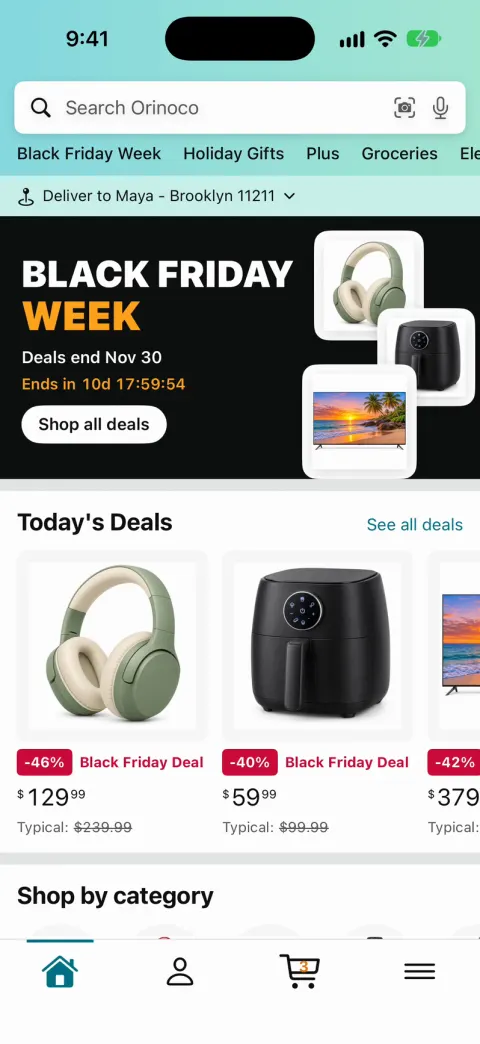
1. Home: the header (search bar: white, 44 pt, 8 pt corners, soft shadow: magnifyingglass, "Search Orinoco" #565959, camera.viewfinder and mic at the right; under it a scrolling row of links on the gradient: "Black Friday Week", "Holiday Gifts", "Plus", "Groceries", "Electronics", "Home", "Fashion" (14 pt); then the deliver row (34 pt, #C8F0EC): mappin.and.ellipse + "Deliver to Maya - Brooklyn 11211" + chevron.down). Scroll:
 a. Black Friday Week hero (220 pt, #0F1111): "BLACK FRIDAY" (34 pt black, white) over "WEEK" (34 pt black, #FFA41C), "Deals end Nov 30", a ticking "Ends in 10d 17:59:59", a white "Shop all deals" capsule; at the right three product photos on white 12 pt rounded squares, staggered (headphones, air fryer, TV). Tap: Today's Deals.
 b. "Today's Deals" card + "See all deals" (teal): a horizontal row of DealTile (160 pt): photo on #F7F7F7 (8 pt corners), DealBadge, PriceText, "Typical: $239.99" struck, the claimed bar for limited deals. Order: headphones, air fryer, TV, robot vacuum, mixer, earbuds, e-reader, projector.
 c. "Shop by category": 72 pt round photos + names: Electronics (p-tv), Kitchen (p-mixer), Home (p-blanket), Fashion (p-puffer), Beauty (p-toothbrush), Sports (p-massagegun). Tap: results for that category.
 d. "Keep shopping for": a 2x2 card (earbuds, e-reader, projector, sneakers) with names.
 e. "Buy again": tumbler, skillet, candles, coffee maker, each with a small yellow "Add to cart".
 f. "Deals for you": a 2-column grid of DealTile, every product.
2. Today's Deals (push): filter chips "All", "Black Friday", "Electronics", "Kitchen", "Home", "Fashion"; the 2-column DealTile grid; limited deals show "Ends in 05:59:59" ticking.
3. Search (push from the search bar): the field focused, "Recent searches" with a clock icon ("air fryer", "headphones", "robot vacuum"); typing shows suggestions (titles containing the text, the typed part bold); return or a suggestion: Results.
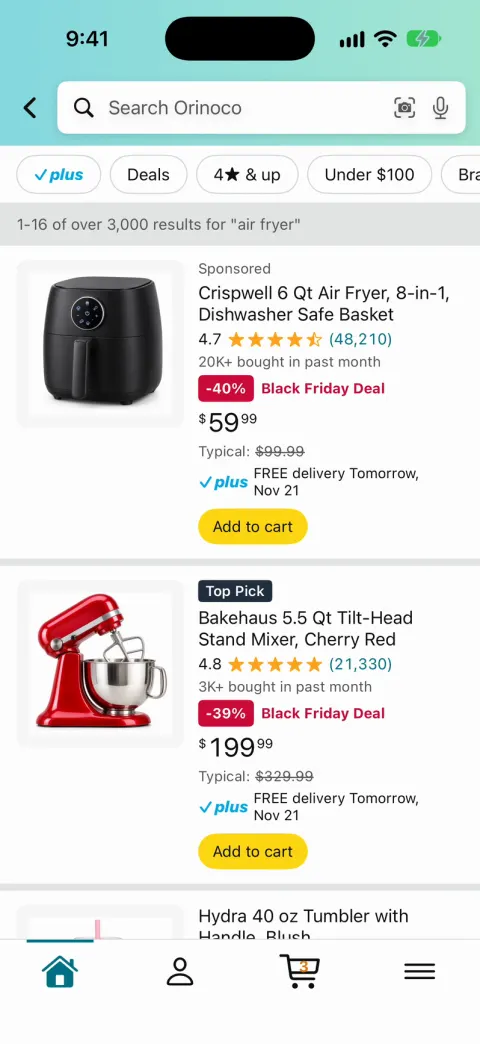
4. Results: "1-16 of over 3,000 results for "headphones"", chips "Plus", "Deals", "4★ & up", "Under $100", "Brand ▾"; rows: photo 140 pt on #F7F7F7; "Sponsored" (12 pt #565959) on the first row; a "Top Pick" tag (#232F3E, white 12 pt) on the best-rated row; title (3 lines, 15 pt); "4.6 ★★★★★ (12,408)"; "10K+ bought in past month"; DealBadge; PriceText; "Typical: $239.99" struck; PlusBadge + "FREE delivery Tomorrow, Nov 21"; a small yellow "Add to cart" (fly-to-cart). Tap a row: the product page.
5. Product page (push; the header with a back chevron and the search bar). ProductPage renders ONE ordered list of sections (ProductPageLayout.sections; a new section is one entry plus one view):
 storeRating: "Visit the Sonora Store" (teal 14 pt) and "4.6 ★★★★★ (12,408)" at the right.
 title: the title (15 pt, 2 lines) + "10K+ bought in past month" (13 pt #565959).
 gallery: a 300 pt pager of the photos on white, teal page dots, heart and square.and.arrow.up circles top right.
 deal: DealBadge, large ("Black Friday Deal" white 13 pt bold on #CC0C39, 4 pt corners).
 price: "-46%" (28 pt light #CC0C39) + PriceText ("$129" 28 pt, "$" and "99" 14 pt raised); the right side of this row stays empty.
 typical: "Typical price: $239.99" (13 pt #565959, the amount struck) + info.circle.
 claimed (limited deals and the headphones): a 6 pt bar (track #E3E6E6, fill #CC0C39) at 87% + "87% claimed" (13 pt #CC0C39) + "Ends in 05:59:59" (#565959), ticking from one shared Clock.
 delivery: PlusBadge + "FREE delivery **Tomorrow, Nov 21**. Order within **3 hrs 12 mins**" (14 pt; "Order within" #007600); mappin + "Deliver to Maya - Brooklyn 11211" (teal 13 pt).
 stock: "In Stock" (18 pt #007600) and at the right "Qty: 1 ⌄" (a #F0F2F2 capsule, 1 pt #D5D9D9 border).
 buttons: "Add to Cart" (48 pt #FFD814 capsule, 16 pt #0F1111) and 10 pt under it "Buy Now" (48 pt #FFA41C).
 shipsFrom: "Ships from Orinoco · Sold by Orinoco", "Returnable until Jan 31, 2027" (13 pt).
 about: "About this item" + bullets.
 reviews: "Customer reviews", "4.6 out of 5", five bars ("5 star 72%"... #FFA41C fills), the 3 reviews (initials circle, name, stars, bold headline, "Reviewed in the United States on November 12, 2026", "Verified Purchase" #C45500, text).
6. FlyToCart (Components/, one overlay used everywhere): a 64 pt copy of the product photo (8 pt corners, soft shadow) lifts from the product's photo (the gallery centre on the product page, the tile's photo elsewhere) and arcs to the Cart tab icon (a quadratic curve bowing up, scale 1 → 0.3, always visible, never fades early; 0.5 s, 0.45 s in HOOK MODE); as it lands the cart count pops (1 → 1.35 → 1, 0.25 s) and rolls up one; the tapped button shows checkmark + "Added" (#067D62) for 1.2 s; AddedBanner slides up above the tab bar (white card, 12 pt corners, shadow): checkmark.circle.fill #067D62, "Added to cart" (16 pt bold), "Cart subtotal (4 items): $199.96" (13 pt), a small yellow "Go to Cart"; holds 1.6 s, slides down.
7. Cart (tab): the header; "Subtotal $199.96" (PriceText 28 pt); "✓ Your order qualifies for FREE Shipping" (#067D62); "Proceed to checkout (4 items)" (48 pt yellow); rows: photo 120 pt, title (2 lines), PriceText, DealBadge (small), "In Stock" (#007600), PlusBadge + "FREE delivery Tomorrow"; a capsule stepper with a 2 pt #FFD814 border (trash at 1, −, the count rolling, +); white buttons with #D5D9D9 borders "Delete", "Save for later", "Share". Swipe to delete. Empty: "Your Orinoco Cart is empty".
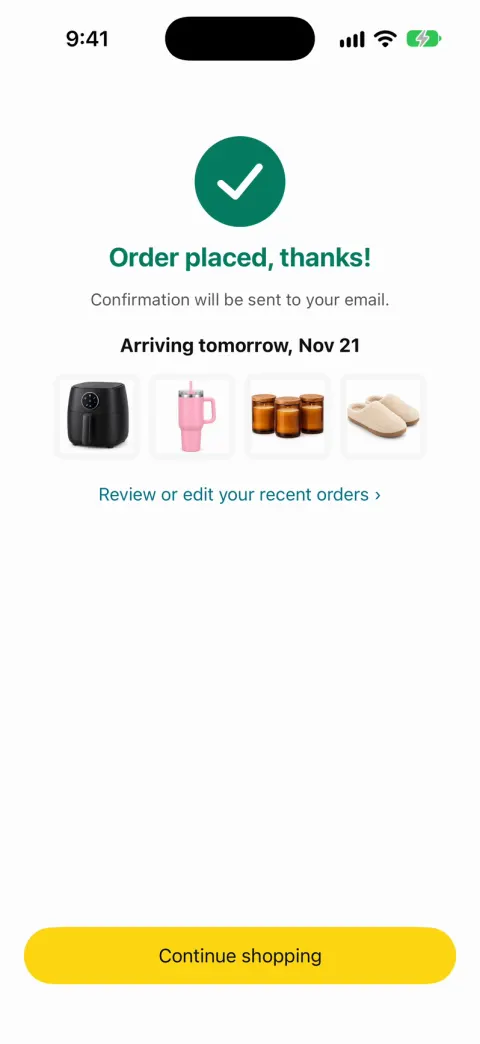
8. Checkout ("Proceed to checkout", or "Buy Now" with just that product): a pushed "Place your order" page: "Deliver to Maya Chen" + the address, "Pay with Visa •••• 4242", "Arriving Nov 21 · FREE Plus delivery" (#007600), thumbnails, Items / Shipping $0.00 / Estimated tax / "Order total" (bold red #B12704), "Place your order" (48 pt yellow). Place: a 0.8 s spinner in the button, then Order placed (full screen, white): checkmark.circle.fill #067D62 72 pt drawing in (trim 0 → 1, 0.4 s), "Order placed, thanks!" (22 pt bold #067D62), "Confirmation will be sent to your email.", "Arriving tomorrow, Nov 21" (bold), thumbnails, "Review or edit your recent orders ›" (teal), "Continue shopping" (yellow). The cart empties (count 0, rolling) and the order joins Your Orders as "Arriving tomorrow".
9. You (tab): "Hello, Maya" (22 pt bold) and an "MC" teal avatar on the gradient; a 2x2 of white capsule buttons "Your Orders", "Buy Again", "Your Account", "Your Lists"; "Your Orders" thumbnails; "Your Lists": "Wish List (6)", "Holiday Gifts (4)"; "Keep shopping for".
10. Your Orders (push): order cards (status line bold, green when arriving, the thumbnails, "Track package" yellow, "View order details").
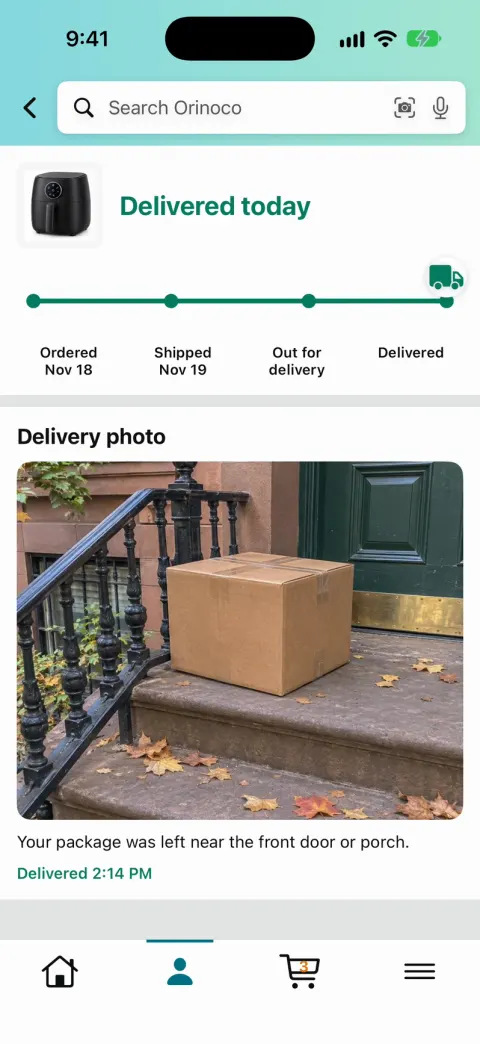
11. Track package (push, o1): the photo + "Arriving today by 10 PM" (22 pt bold #067D62); a 4-step tracker (Ordered Nov 18 · Shipped Nov 19 · Out for delivery · Delivered) with a box.truck.fill marker at "Out for delivery". Every time it opens: 1.0 s later the truck slides to Delivered (0.8 s), the line fills #067D62, the title rolls to "Delivered today", and the Delivery photo card rises in (delivered.jpg, 12 pt corners, "Your package was left near the front door or porch.", "Delivered 2:14 PM"); success haptic.
12. Menu (tab): a 2-column grid of white tiles with a photo and a label ("Today's Deals", "Black Friday Week", "Your Orders", "Buy Again", "Your Lists", "Orinoco Plus", "Gift Cards", "Customer Service"), then "Shop by Department" rows (Electronics, Home & Kitchen, Fashion, Beauty, Sports & Outdoors).

COMPONENT RULES
- DealBadge is ONE view for every deal mark in the app (badge, "-46%", "Typical price" line, claimed bar), in three sizes (large, tile, small), reading the product and one @Observable DealStore from the environment. It draws an optional stamp (DealStamp?, nil by default, per product id) on top of itself, so a remix can stamp any deal everywhere at once.
- RollingNumber: every price, percent, count and countdown digit rolls (the old digit slides up and out, the new one in), never blinks.
- One shared Clock (one tick per second) drives every countdown.

TOUCH
- TouchFeed (@Observable: location in screen points, isDown): published by a passive window-level touch observer (a UIGestureRecognizer subclass on the key window, cancelsTouchesInView = false, delaysTouchesBegan = false, never recognizes), so it never blocks taps, drags or scrolling.
- TouchDot (HOOK MODE's finger): 44 pt, black 35% fill, a 3 pt white ring, a soft shadow, drawn in a top overlay window above everything; scales in 0.6 → 1.0 (0.15 s); 0.85 while pressed; glides between points (easeInOut). Scripted presses and releases call the same handlers as real touches.

HOOK (the video's first 3 seconds)
- HOOK MODE: tapping an invisible 24x60 pt strip at the LEFT edge (x 0-24, y 400-460 pt), drawn in its own window above every sheet, banner, cover and the tab bar (a tap there closes whatever is open), resets everything and plays DemoScript's steps, identical every time (seconds from the tap):
 0.00 with no animation: Home tab, the product page of p-headphones pushed, gallery on photo 1, cart count 3 (the launch cart), the countdown at "Ends in 05:59:59" (ticking normally from there), every sheet and banner closed, the page scrolled so the gallery's top edge sits right under the header and the gallery, deal badge, price, typical price, claimed bar, delivery lines and both pills are all on screen above the tab bar (shrink the gallery if they don't fit; never cut Buy Now). Every photo already decoded.
 0.00-0.40 hold exactly that.
 0.40 the TouchDot appears over "Add to Cart"; 0.50 press; 0.58 release = Add to Cart through the real code (the 0.45 s flight).
 1.03 the count pops 3 → 4, "Added" on the button, AddedBanner up.
 1.30 the dot fades. Hold.
- DemoScript holds the steps as (absolute time from the tap, action): dotShow(target), dotMove(target, duration), press, release, dotHide, and call(AppAction) for app actions (openProduct(id), addToCart(id), setScroll(section), selectTab(tab), setStamp(productId, DealStamp?)). Targets are named and resolved to screen points when the step runs: product.addToCart, product.buyNow, product.section:<id>, tile:<productId>, tab:<id>. One HookPlayer runs them on the main actor against the tap time (absolute, no drift), never the app's normal delays.
- What the eye must see: frame 0 fully drawn (no fade-in, no grey placeholder); the flying photo visible for the whole arc; counts pop and roll; banners hold ≥1.2 s; flashes ≤0.12 s at ≤35%.

RULES
- Native SwiftUI, iOS 26 (keep the template's target), iPhone portrait. Swift Charts is available.
- Deterministic fixtures. No backend, login, permissions, analytics or network calls at runtime (all photos are bundled). No persistence: delete the SwiftData starter, no UserDefaults or files.
- Preload and decode every image off the main thread at launch; warm up haptics. Files under 300 lines, big bodies split into subviews, no long chained expressions; every animation smooth at 60 fps (the simulator streams video).
- Keep every file inside /home/user/workspace (/tmp is denied).

REMIX-READY
Theme/Theme.swift (colours, fonts, metrics; no colour literals elsewhere), Theme/Brand.swift (name, OrinocoMark, PlusBadge, a Copy enum with every word), Data/ProductCatalog.swift, Data/Fixtures.swift (cart, orders, address, card), Data/DemoScript.swift, Format/. Codable models with String ids (Product, Deal, PricePoint, Review, CartItem, Order, DealStamp) behind one CatalogDataSource protocol (FixtureCatalogSource) feeding @Observable stores (CatalogStore, CartStore, DealStore, OrderStore); views never read the catalogs. Components/: SearchHeader, DeliverRow, PriceText, RollingNumber, DealBadge, ClaimedBar, DealTile, ResultRow, Stars, PlusBadge, FlyToCart, AddedBanner, CartTabIcon, OrinocoTabBar, TouchDot. Features/<Screen>/. README.md under 80 lines: the file map; how to rename, recolour, swap the logo, add a product (photo + one catalog entry), add a product-page section, use DealStore stamps and priceHistory; 3 one-prompt remixes (an Orinoco for your own brand's products with your logo; a campus marketplace where students sell to each other; a grocery app with delivery slots). "Read README.md first." atop CLAUDE.md and ios/AGENTS.md; replace ios/CLAUDE.md's structure block with this app's files. No scratch folders.

FILMING
Long-press the Home tab icon for 1 s to reset everything to launch (cart, orders, stamps, scroll positions, tab).

BUILD
Theme, Brand, Format and the catalog, then the tab bar shell and Home with the header (launch and look first), then the product page with DealBadge, PriceText and RollingNumber, then FlyToCart and AddedBanner, then TouchFeed, TouchDot and HOOK MODE, then the cart, checkout and Order placed, then Search and Results, Today's Deals, You, Your Orders with Track package, and Menu; a one-line status per screen; launch in the simulator every two or three files. Fetch media.zip as soon as the shell runs; check the files exist, never view them. Walk each flow once and fix what breaks; no pixel measuring or debug modes. Deliver the whole app, not a plan. Do not publish.
Amazon clone features
What Amazon Clone includes today, and what you add next. Everything in the template runs on sample data, with no login and no backend, so it works the moment you open it.
In the template
Home and Black Friday deals
A Black Friday Week hero with a ticking countdown, and Today's Deals with red deal badges and claimed bars.
Search
Recent searches, suggestions as you type, and results with ratings, deal badges and a small Add to cart.
Product pages
A photo gallery, the deal price with the typical price struck through, delivery, stock and reviews.
Add to cart
The photo flies into the cart, the count pops, and an Added to cart banner slides up.
Cart
A stepper for each item, Delete and Save for later, swipe to delete, and the subtotal.
Checkout
A sample shopper's address and Visa card, the total with tax, then "Order placed, thanks!"
Package tracking
Track package drives the truck to Delivered and shows a photo of the box at the door.
You and Menu
Your Orders, Buy Again, two lists, shortcut tiles and a list of departments.
Add with a prompt
Products you can edit
Your products in a database, with prices and stock you change from your phone. We built it below.
Orders on a server
Every order saved for you, with a Mark shipped button. We built it below.
Card payments
A real checkout. We added Stripe in test mode below.
Accounts
Sign-in, so a shopper's orders and address follow them to a new phone.
Shipping and returns
Labels, tracking numbers from a carrier, and returns.
Sellers
Other stores listing products and getting paid, if you want a marketplace.
Sales tax by address
A tax rate that follows the shipping address.
How to build an Amazon clone with Vibecode
- 1
Remix the template
Open the Amazon Clone share page and press Remix. Vibecode copies the whole Swift project into your account, so you start from a working app instead of an empty screen. A new account's first remix is free.
- 2
Make it yours by chatting
Tell the agent what to change, in plain English. For example: "Rename the app to Bedford Sole, make the header black with orange links, and sell 10 sneakers of our own." Each change rebuilds the app and runs it in Vibecode's cloud iOS simulator, right in your browser.
- 3
Publish to the App Store
Click Publish, choose Publish to App Store and sign in with your Apple ID. Vibecode builds, signs and uploads the app to Apple, with no Mac and no Xcode. You need an Apple Developer account ($99/year) and the Plus plan or higher.
The hard parts of a real Amazon clone
Screens are the quick part. These are what take the time once real people use it.
Products, stock and orders on a server
The template keeps all 20 products and every order on the phone. Close the app, and new orders are gone.
A real store keeps them in a database, so every phone sees the same prices and stock. The database step below moved them into Vibecode Cloud in one message.
Stock is the tricky part. Two people shouldn't be able to buy the last one at the same time.
Payments, refunds and sales tax
A shopping app sells physical goods. So Apple requires a way to pay outside in-app purchase, like a card or Apple Pay.
Stripe charges 2.9% + 30¢ for each US card payment. The Stripe step below connected its payment page in test mode.
Refunds and sales tax are on you too. The template charges New York City's 8.875% on every order, wherever it ships.
Sources: App Review Guideline 3.1.3(e)Stripe pricingStripe Checkout, its hosted payment page
A seller side, if it's a marketplace
Amazon is also a marketplace. Other stores sell there and get paid. The template is one store's app.
A marketplace adds seller sign-up, listings, each seller's orders and payouts. Stripe Connect is one way to split each payment between sellers.
Source: Stripe Connect for marketplaces
Shipping and returns
The "Order placed" screen is the easy part. Then someone packs the box, buys a label and hands it to a carrier.
The template's tracking is an animation. The truck always reaches Delivered. Real tracking comes from the carrier, and returns need their own flow.
Search across a big catalog
The template searches 20 products on the phone. A store with thousands of products needs search on a server.
It also has to forgive typos, and sort and filter by price, rating and brand.
Take it from template to real app
We sent steps 1 to 3 to their own fresh remixes. Step 4 went to the same remix as step 3, since payments use its database.
- 1
Make it one brand's own store
A brand can have its own Amazon, with only its products. One message turned a fresh remix into Bedford Sole, a Brooklyn sneaker shop. It took 6 minutes and $3.65 of credits.
We picked Claude Opus 5.5 for every message we ran. You pick the model for each message, so your minutes and credits may differ.
The agent made 10 sneakers from $95 to $210, with 12 new product photos. The photos cost 86 cents of the $3.65. Black Friday Week became Drop Week, with the same countdown.
It left two things for a follow-up message. One shoe's typical price is $265, above the range, and the Plus badge stayed blue.
Prompt
Make this the store app for one brand, Bedford Sole, a sneaker shop on Bedford Ave in Brooklyn that sells only its own sneakers. Rename the app to Bedford Sole everywhere, the home screen name and the search bar included. Replace the parcel mark with a simple sneaker mark, and use it for the app icon too. The header becomes black (#111111) with white text, and the teal links and accents become orange (#FF6B2C). Replace the 20 products with 10 sneakers of its own, from $95 to $210, each with a new product photo on white from image generation. Black Friday Week becomes Drop Week: the hero says DROP WEEK with the same countdown, and every deal badge reads "Drop deal". Shop by category becomes Running, Court, Trail and Kids. Move the launch cart, the orders, the reviews and HOOK MODE onto the new sneakers. Keep every screen, animation and HOOK MODE timing.
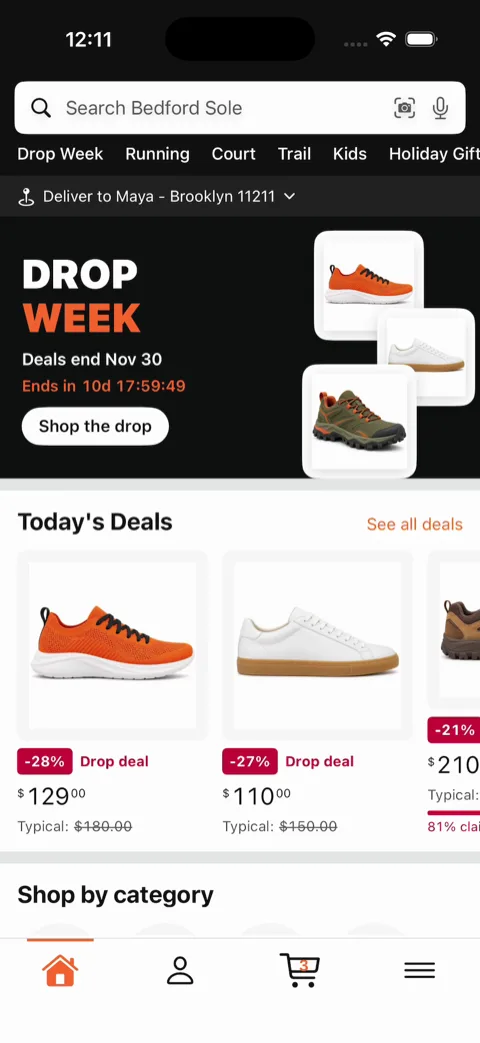
Bedford Sole after one message: a black header, a DROP WEEK hero with its countdown, and Drop deal sneakers at $129 and $110 - 2
Catch fake deals with price history
Every product in the template carries 120 days of price history. The app doesn't show it, so it's ready for a prompt like this one.
It took 5 minutes and $1.62 of credits. Each product page got a price chart, with a one-line reason under it.
The detector called 8 of the 20 deals fake. Their typical price went up in late October or early November, just before the sale.
Every deal badge got a green "Real deal" or red "Fake deal" stamp, on Home, Today's Deals, search results and the cart. A "Real deals only" chip filters Today's Deals.
On real products, it needs your own price history. Ask the agent to save each day's prices in your database.
Prompt
Add a fake-deal detector. Every product already has 120 days of priceHistory. On each product page, add a Price history card under the typical price: a Swift Charts line of those 120 days, a dot on today's price, and the lowest price in that time. Then judge every deal. If the product sold at today's price or lower on any day in the 60 days before November 19, its typical price was raised just before Black Friday, so it's a fake deal. Otherwise it's a real deal. Show the verdict with DealStore stamps, so it appears on every deal badge at once (home tiles, Today's Deals, search results and the cart): a green "Real deal" stamp or a red "Fake deal" stamp. Under the chart, say why in one line, like "Sold for $129.99 until Nov 1". Add a "Real deals only" chip to Today's Deals. Keep every screen, animation and HOOK MODE timing.
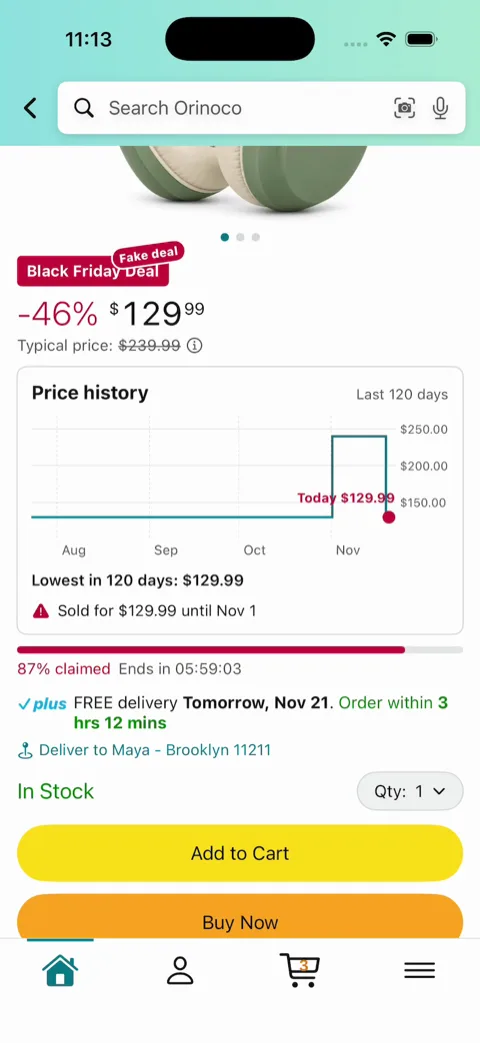
The headphones with a Fake deal stamp on their badge, a chart that jumps from $129.99 to $239.99 in November, and Sold for $129.99 until Nov 1 - 3
Put products and orders in a database
A store needs to change prices without a new app version. This message moved all 20 products into Vibecode Cloud and saved every order there. It took 12 minutes and $5.91 of credits.
Hold the Menu tab for a second, and Manage store asks for a 6-digit owner code. The agent's reply gives you the code, and the server checks it, not the app.
A shared code is only for testing, though. Manage store shows every shopper's address, so before launch, ask the agent for an owner account with its own sign-in.
The agent tested it in the simulator. It changed the air fryer to $54.99, and the new price showed after a restart. A TV marked out of stock turned its buttons off.
A test order saved as #1001 with its items, total and address. "Mark shipped" worked too. For other phones to see changes, deploy the backend and ship the new app version.
Prompt
Add Vibecode Cloud and move the 20 products into the database, so I can change products and prices without a new app version. Load them at launch through a new CatalogDataSource beside FixtureCatalogSource, and keep the fixtures as the fallback when the phone is offline. Save every order placed at checkout to the database too, with its items, total and shipping address. Add a Manage store screen for the owner, opened by long-pressing the Menu tab icon for 1 second and locked with a 6-digit owner code. It has two tabs. Products: add a product (name, price, typical price and one of the existing photos), change a price, and mark it out of stock. Orders: every order, newest first, with a Mark shipped button. An out-of-stock product shows "Currently unavailable" in red in place of In Stock, with Add to Cart and Buy Now turned off. Changes show on every phone the next time the app opens. Keep every other screen, animation and HOOK MODE timing.
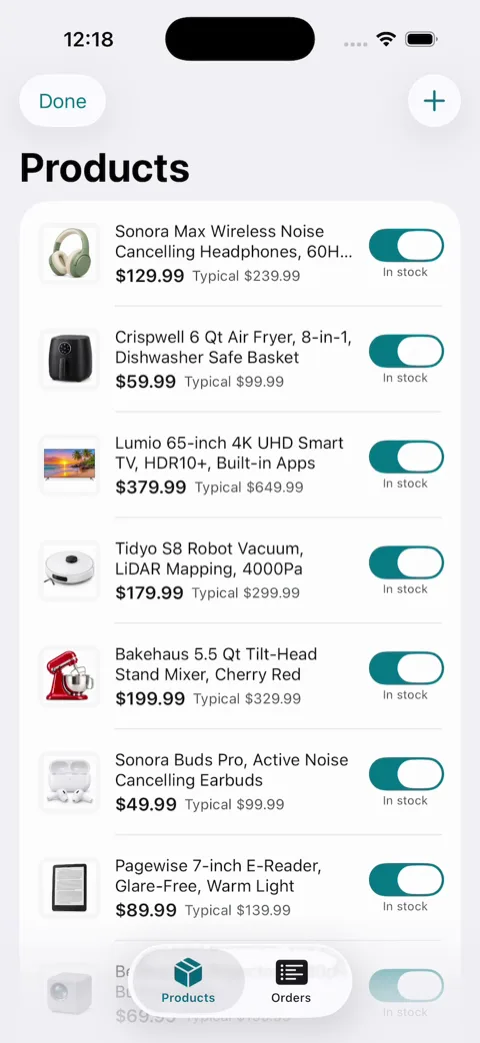
Manage store's Products tab: each product with its price, its typical price and an In stock switch, under Done and a plus button for a new product - 4
Take card payments with Stripe, in test mode
Apple says physical goods are paid for outside in-app purchase, by card or Apple Pay. Vibecode's built-in Stripe setup is for web apps, so we asked the agent.
First we added a Stripe test secret key under Env Var, as STRIPE_SECRET_KEY. Then this message went to the remix from step 3. It took 6 minutes and $5.74 of credits.
Tapping "Place your order" now opens Stripe's payment page in a sheet inside the app. The backend sets the amount from its own prices, not from the phone.
We closed the sheet once. Nothing was charged and the cart stayed. Then the agent paid with Stripe's test card, and the order turned Paid in Manage store.
We only ran test mode, and we didn't test a connection that drops mid-payment. Stripe says to confirm every payment with its webhook, since a shopper can pay and then lose their connection.
So before real shoppers pay, ask the agent to mark orders Paid from that webhook on the server. Ask it to stop a second payment on a paid order too. Then switch to your live Stripe key, deploy the backend and ship the new app version.
Prompt
Take card payments at checkout with Stripe, in test mode. My Stripe test secret key is in the backend's Env Var as STRIPE_SECRET_KEY. Physical goods can't be sold through Apple's in-app purchase, so pay with Stripe Checkout instead. When the shopper taps Place your order, the backend creates a Checkout Session for the cart (each item's name, price and quantity, plus the tax) and the app opens Stripe's payment page in a sheet inside the app. When the payment succeeds, close the sheet, mark the order Paid in the database and show Order placed. If the shopper closes the sheet, go back to checkout with nothing charged and the cart kept. Show Paid or Unpaid on each order in Manage store. Test it once in the simulator with Stripe's test card 4242 4242 4242 4242. Keep every other screen, animation and HOOK MODE timing.
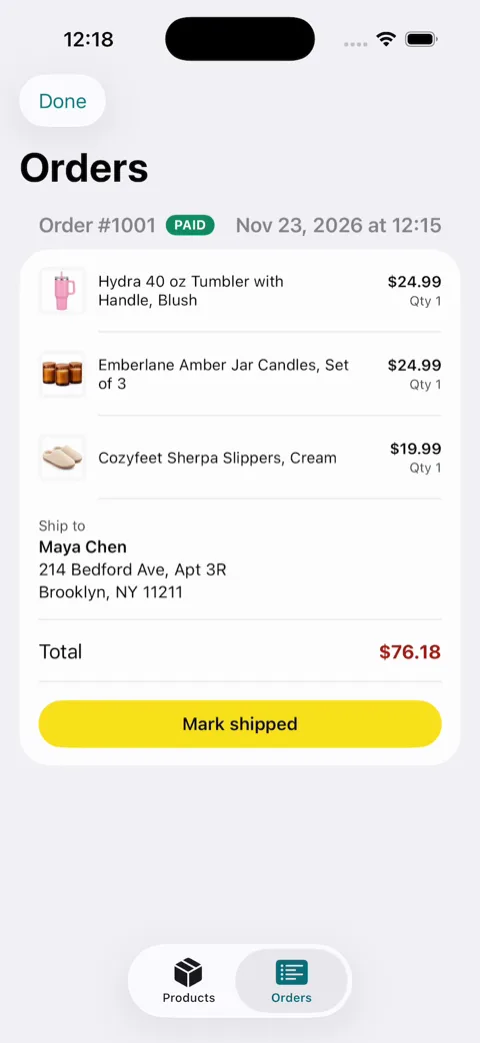
Manage store's Orders tab after the test payment: Order #1001 with a green PAID badge, three items, Maya Chen's Brooklyn address, a $76.18 total and Mark shipped
What an Amazon clone costs
Our template is $0 to remix on a new account. Changes after that use credits.
Clone scripts are the cheap way to get code, with a seller side for other stores. Appysa sells a website, admin panel and phone apps for $299, one time.
Zipprr's is $490 for the website, or $890 with phone apps. Both build the apps with Flutter, one codebase for iPhone and Android.
Shipturtle is marketplace software. It turns a Shopify store into a marketplace from $49 a month, after a 14-day free trial. Shoppers buy on your Shopify site, and its pages show no phone app.
An agency builds to order. Ambsan Digital puts a basic store app at $15,000 to $60,000, and an Amazon-style marketplace at $60,000 to $300,000. Both depend on the team.
Ours is only the shopper's app, on sample products. Start here to see your store running before you pay for the rest.
Buy a script if you want a website, an admin panel and other sellers now. Pick Shipturtle if you already sell on Shopify. Hire an agency if you need every part built to order.
We checked each price below on the company's own page on November 23, 2026.
| Option | Upfront cost | What you own | First version | Still on you |
|---|---|---|---|---|
| Clone script | $299 at Appysa, with Flutter apps. $490 at Zipprr for the website, or $890 with apps. All one time. | Source code. Appysa calls its license lifetime and royalty-free. | Both install it on your server. Appysa says under 48 hours. | Hosting, your products, your payment account, shipping, and changes after support ends (6 months at Appysa, 90 days at Zipprr) |
| Marketplace software | From $49 a month at Shipturtle after a 14-day free trial, plus your Shopify plan | A subscription, on Shopify | Shipturtle says you launch from day 14 | A phone app for shoppers (its pages show none), finding your sellers, and Shopify's own fees |
| Development agency | $15,000 to $60,000 for a basic store app. $60,000 to $300,000 for a marketplace like Amazon. Both depend on the team (Ambsan Digital). | What your contract says | 2 to 4 months for a basic store app, 8 to 14 for a marketplace (Ambsan Digital) | Upkeep of 15 to 25% of the build cost a year (Ambsan Digital) |
| Vibecode templateThis template | $0 to remix on a new account. Plans from $20 a month. | The app and its code. Download it on Pro ($50 a month). | Under a minute to remix. 6 minutes for our sneaker store, on sample products. | Real products, payments, shipping, accounts, publishing and a seller side (the database and Stripe steps above start the first two) |
Sources: Appysa Amazon clone script and priceZipprr Amazon clone script and pricingShipturtle plans on the Shopify App StoreShipturtle: Amazon clone marketplace on ShopifyAmbsan Digital: ecommerce app development costVibecode pricingVibecode terms (who owns your app)
Frequently asked questions
Is it legal to build an Amazon clone?
Yes. Search, deal badges, a cart and checkout are common patterns. Lots of stores use them.
Amazon's name and logo belong to Amazon. Our template already has its own name, Orinoco, with its own parcel logo and words.
What you can't take is Amazon's content. Its terms forbid collecting its product listings, descriptions or prices.
Source: Amazon conditions of use
Can I publish an Amazon clone to the App Store?
Yes, as your own store.
Apple doesn't allow another developer's name or icon in your app's name or icon without their OK (4.1(c)). It also rejects apps that copy a popular app with only small changes (4.1(a)). So sell your own products, under your own name, icon and colors.
Apple asks for final apps, with placeholder content removed (2.1). So swap the sample products for real ones. Also ask the agent to remove the hidden demo strip on the left edge of the screen.
Vibecode publishes to the App Store on the Plus plan and up, with your Apple Developer account.
Sources: App Review Guideline 4.1App Review Guideline 2.1How to publish to the App Store with Vibecode
Does the Amazon clone work on Android?
No. Amazon Clone is a native iPhone app written in Swift, so it runs on iPhone only.
For Android, start a new app in Vibecode and choose Legacy, then Mobile app (Legacy). It builds React Native apps for iPhone and Android. Paste the prompt from this page there and ask for React Native instead of SwiftUI.
You submit the Android app to Google Play yourself.
Can I add a real backend to the Amazon clone?
Yes. Amazon Clone runs on sample data, so it works the moment you remix it.
When you need real users, Vibecode Cloud adds a database, sign-in and file storage with one prompt. That's enough for products, orders and shoppers' accounts. It's on the Plus plan and up.
You can also connect Supabase, Firebase or your own API.
Can I take real payments in my Amazon clone?
Yes, by card or Apple Pay, not in-app purchase. Apple requires other payment methods for physical goods (3.1.3(e)).
The Stripe step above connected Stripe's payment page in test mode, in one message. A test card went through, and the order turned Paid. Before real money, have the server confirm each payment with Stripe's webhook.
Vibecode's built-in Stripe setup is for web apps. In an iPhone app, you ask the agent, as we did.
Sources: App Review Guideline 3.1.3(e)Stripe Checkout, its hosted payment pageStripe: fulfill every order with a webhookVibecode docs: taking payments
Can other sellers list products, like on Amazon?
Not in the template. It's one store's app, with one owner.
Sellers need their own sign-up, listings and orders, and you pay each one their share. Stripe Connect can split a payment between sellers.
It's a bigger build than one store. Start with your own products, and add sellers once people buy.
If you need other sellers on day one, Appysa's and Zipprr's scripts come with a seller side.
Sources: Stripe Connect for marketplacesAppysa Amazon clone script and priceZipprr Amazon clone script and pricing
Can I connect my Shopify store?
We didn't try it for this guide.
Shopify's Storefront API is how custom apps show a store's products and carts. Its Checkout Kit opens Shopify's own checkout inside an iPhone app.
That way your products, orders and payments stay in Shopify. Ask the agent to connect them to your store.
Sources: Shopify Storefront APIShopify Checkout Kit for mobile apps
How long does it take to make an app like Amazon?
Remixing this template gives you a working shopping app in under a minute. Our sneaker store took one message and 6 minutes.
Products and orders in a database took 12 minutes more. Stripe payments took 6.
A real store with your products, payments and shipping takes longer. Ambsan Digital, an agency, puts a basic store app at 2 to 4 months, and a marketplace at 8 to 14.
Sources: Ambsan Digital: ecommerce app development costCan I vibe code Amazon? Our verdictHow to make an app
What does an Amazon clone app cost to run?
On Vibecode, plans start at $20 a month with $20 of credits. Each change you ask for uses credits.
The changes we ran for this guide used $1.62 to $5.91 of credits each, plus simulator and build time.
Once the app has a backend for real shoppers, that backend needs a deployment. Plus includes 1, and each extra one is $20 a month.
Apple charges $99 a year to publish. Stripe takes 2.9% + 30¢ of each US card payment.
Sources: Vibecode pricingVibecode deploymentsApple Developer ProgramStripe pricing
How is this different from an Amazon clone script?
A script is ready-made code for a website, an admin panel, a seller side and phone apps. Appysa's is $299, and Zipprr's with apps is $890. Both build their phone apps with Flutter.
Our template is a native SwiftUI iPhone app, and only the shopper's side, on sample products. But it's $0 to remix on a new account, you own the app, and you change it by chatting.
Either way, you bring your own products, payment account and shipping.
Sources: Appysa Amazon clone script and priceZipprr Amazon clone script and pricingVibecode terms (who owns your app)
Is there an Amazon clone on GitHub?
Yes, over 370 projects under GitHub's amazon-clone topic. The most-starred had about 200 stars when we checked.
Nearly all of them are web projects that you set up and host yourself. None is written in Swift.
Remix ours and it runs in your browser in under a minute, as a native iPhone app. You can download its code on Pro and up.
Sources: GitHub's amazon-clone topic, by starsVibecode pricing
Can I make an Amazon clone website instead?
Yes. Vibecode builds web apps too. Start a new web app and describe your store, or paste the prompt above and ask for a web app instead of SwiftUI.
We didn't run a web version for this guide. On a web app, Vibecode's built-in Stripe setup does the payments.
Can I build a Walmart, eBay or Temu clone with it?
Partly. The template is one store selling its own products. A store like that is a rename, new colors and new products, as the Bedford Sole step does.
Walmart, eBay and Etsy have other sellers selling there. So a full clone of them needs the seller side above too.
For a Temu-style deals app, start from our Temu clone template instead. For restaurant delivery, our DoorDash clone guide is the better start.
Sources: Walmart Marketplace, for outside sellersTemu Clone, our deals app templateDoorDash clone guide
Is the Amazon Clone template free?
A new account's first remix is free. It counts as that account's free first build. You get your own copy of the Swift project, with 2 free minutes in the simulator.
After that, remixing and running an app need credits. Every change you ask the agent for uses credits too.
Publishing to the App Store needs a paid plan (Plus and up) and an Apple Developer account ($99/year). Downloading the source code is on the Pro and Max plans. See the pricing page for current plans.
More templates
All templates- View template
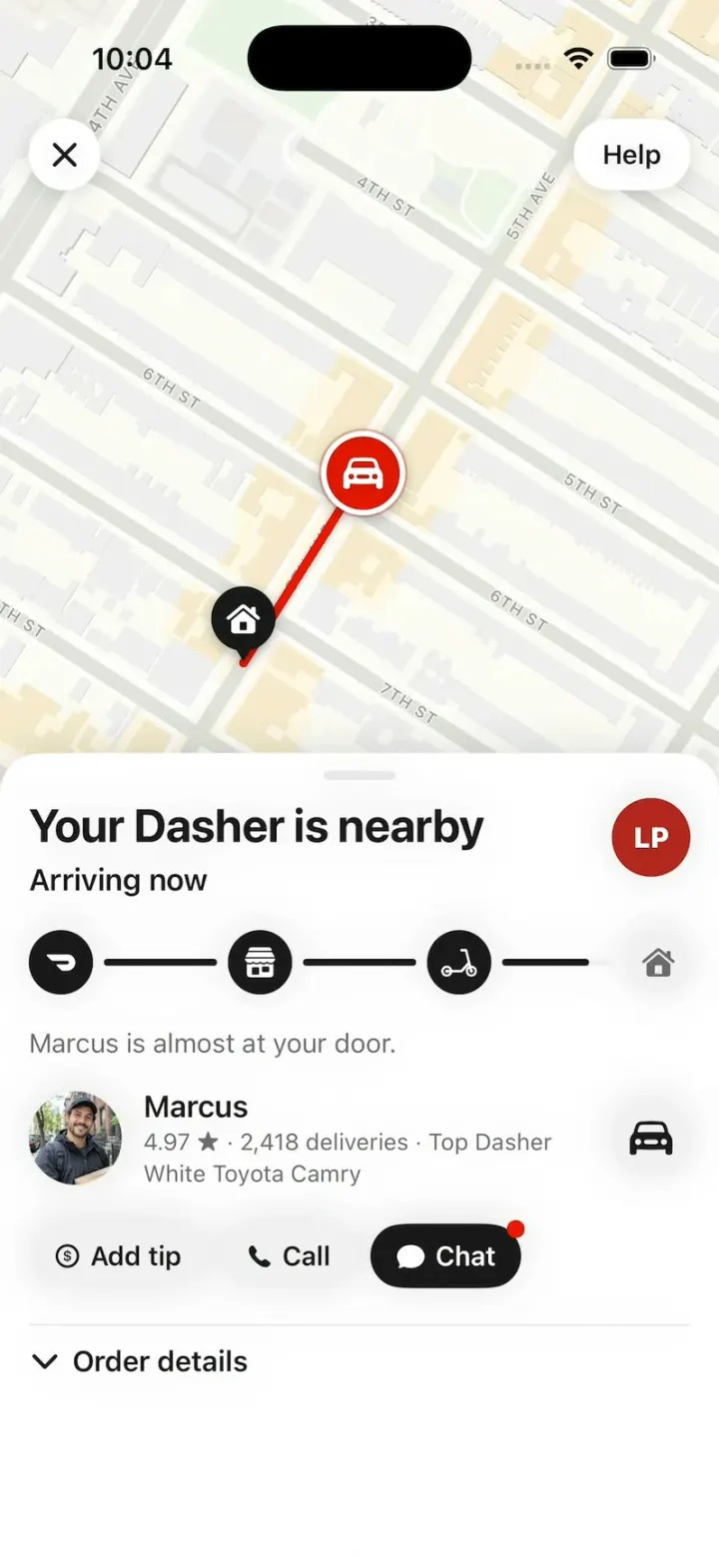
DoorDash Clone
iOSDoorDash's live tracking: the red Dasher dot, the four-step tracker, drop-off photos, menus and checkout.
- View template
Zillow Clone
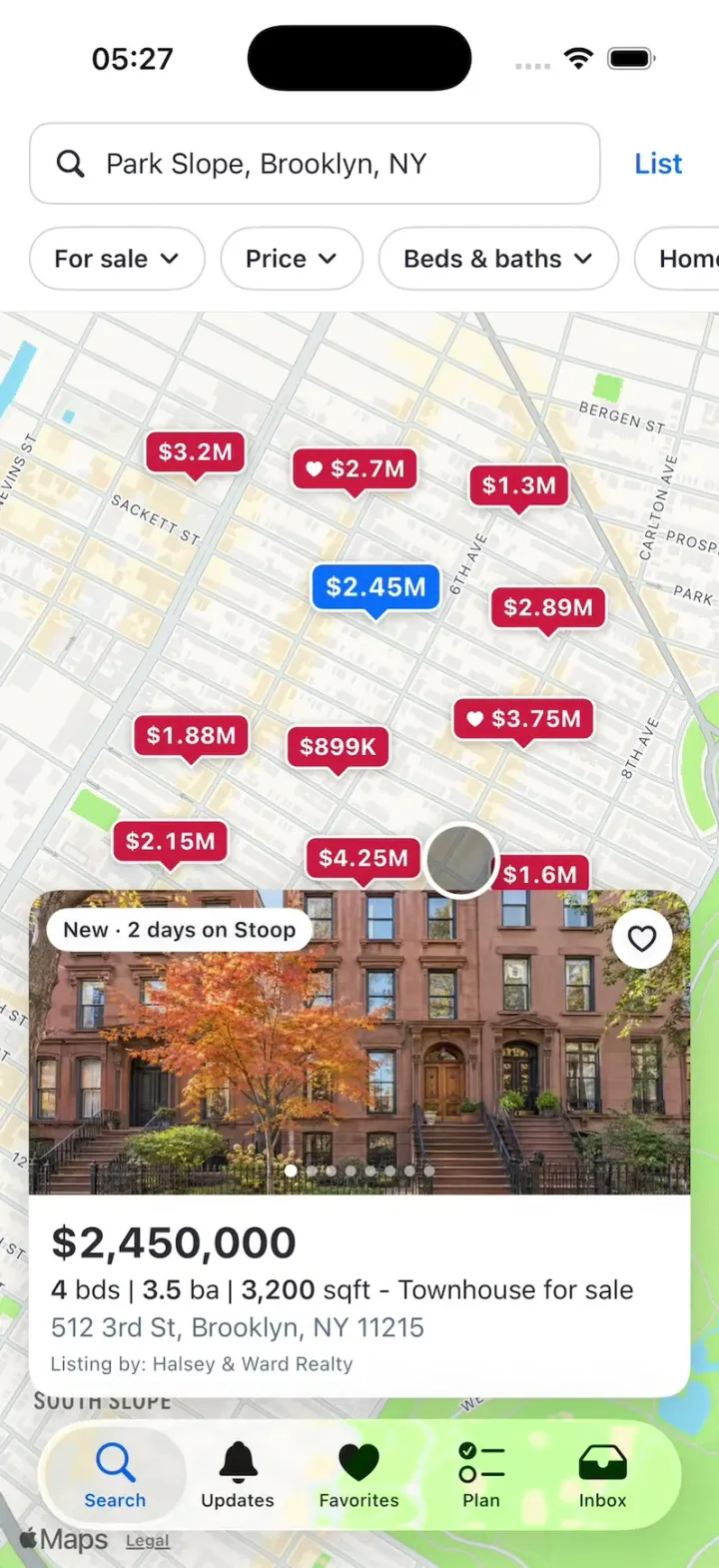
iOSA Zillow-style home search: a map of price pins, listing pages, a mortgage calculator and tour requests.
- View template
Airbnb clone
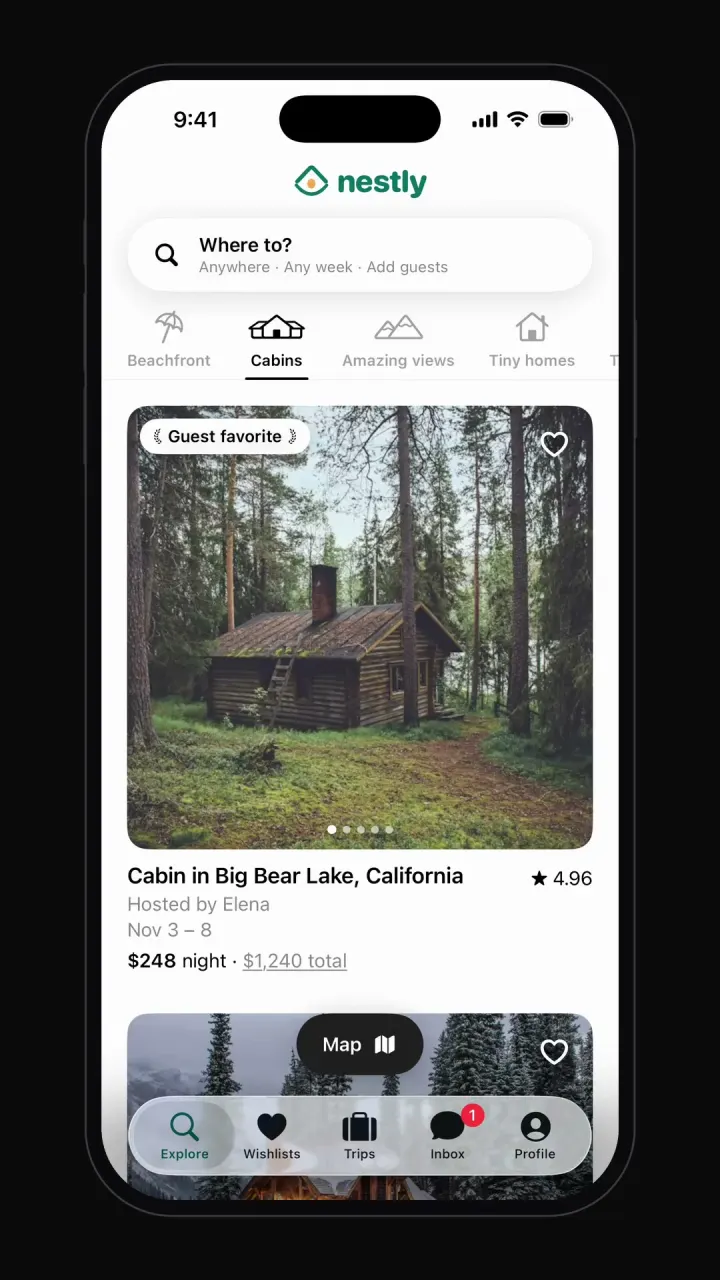
iOSCategory browsing, map view, date and guest search, listing pages, checkout, wishlists and trips.


Browse all app templates. Each one is a native Swift app made with Vibecode's iOS app builder.
Have an idea of your own? The free Can I vibe code it? checker tells you what it takes and writes your first prompt.
Choosing a builder? Read the best AI mobile app builders guide or compare Vibecode with other app builders.
About the editorial team
Vishal is a product engineer at Vibecode. Before Vibecode he did product engineering at EarnIn and co-founded Ivella (YC S21), a banking app for couples. He studied computer science at Duke.