
Table of contents
TL;DR
What is the best alternative to Glide?
Want your app in the App Store? As of November 2026, Vibecode is the best of the Glide alternatives for that. You describe the app, and its AI builds a native Swift iPhone app and submits it for review. Your first build is free, and Plus is $20 a month.
Glide can't do that. Its apps are web apps, and its help center says they can't go in the App Store or Google Play.
Other Glide alternatives: Adalo and Thunkable for both app stores, Bubble for complex apps, Softr for portals and AppSheet for Google Workspace teams.
- Vibecode: a native iPhone app from a chat, submitted to the App Store for you
- Adalo: simple database apps on the App Store and Google Play
- Bubble: complex web apps, plus mobile apps, built in a visual editor
- Thunkable: AI plus drag-and-drop blocks, for beginners
- Softr: client portals and internal tools on your data
- Google AppSheet: staff apps for teams already paying for Google Workspace
The longer answer
The Glide app builder turns a spreadsheet into an app for your team. It's quick, and it's great for staff tools. But every Glide app is a web app. You share a link, and people add it to their home screen.
So if you want an app your customers download from the App Store, you need something else. Vibecode is the fastest way there. You describe the app, and its AI writes it in Swift, Apple's own language.
It also costs less than half of Glide's public plan. Your first build is $0 on a new account, and Plus is $20 a month with App Store submission. Glide Plus starts at $50 a month and still can't reach the stores.
Want to stay close to Glide? Softr and AppSheet build staff apps from your data too. Adalo and Thunkable publish one app to both stores. And Bubble is the pick for a big, complex web app.
Quick comparison
Prices are each product's published USD list price, checked on .
| Tool | How you build | Output | App Store | Google Play | Paid from |
|---|---|---|---|---|---|
| 1. Vibecode | Chat | Swift, React Native or web | Submits for you | You upload it (Pro) | $20/mo, first build free |
| 2. Adalo | Chat, then a canvas | iOS, Android and web | Signs the build; you submit | Builds the bundle | $65/mo |
| 3. Bubble | Visual editor and AI | Web, iOS and Android | You submit | You submit | $32/mo web, $42/mo mobile, yearly |
| 4. Thunkable | Chat, then blocks | iOS, Android and web | Uploads; you finish | Yes | $59/mo, $37/mo yearly |
| 5. Softr | AI and blocks | Web apps | No | No | $25/mo, $19/mo yearly |
| 6. Google AppSheet | Editor, AI on Workspace | AppSheet app or browser | Branded app; you submit | Branded app; you upload | $5/user/mo |
A real example: a coffee shop app with a staff screen
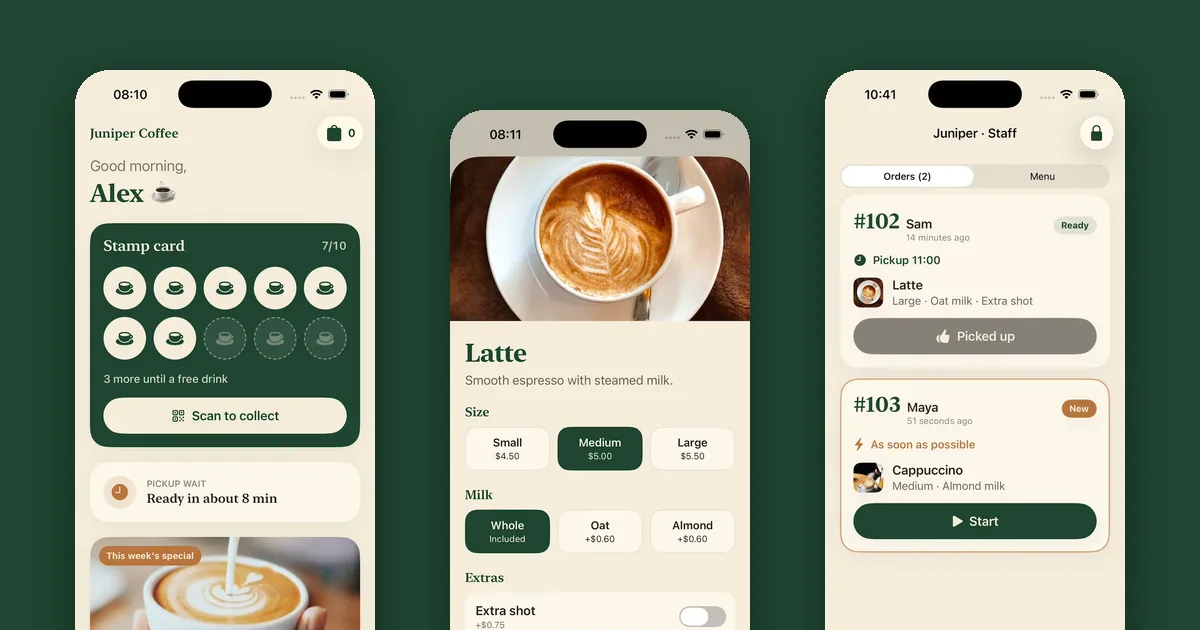
We built Juniper in Vibecode on October 27, 2026. It's a native iPhone app for a coffee shop, with a menu, order-ahead and a 10-stamp card.
The next message added what people use Glide for: customer accounts, a cloud database and a staff screen. Baristas tap each order from Received to Making it to Ready.
Three messages took 45 minutes of build time. Unlike a Glide app, Juniper is a native iPhone app that can go to the App Store.
How we picked
Vibecode makes this guide, and Vibecode is pick number one. We think it's the best way to get from Glide to your own app in the App Store. But we're not neutral, so check the facts yourself.
On November 25, 2026, we read each product's own pricing page and docs. We noted how you build, what it makes, how it reaches the App Store and Google Play, and the price in USD.
No product paid to be here. After Vibecode come the Glide competitors that publish to both stores, then the staff-app builders.
The 6 tools, in detail
Best for: A native iPhone app your customers download, built from a chat and submitted to the App Store for you
You describe the app in a chat. An AI agent writes it in Swift and SwiftUI and runs it in a live iOS Simulator in your browser. You don't need a Mac.
After each change, the agent taps through what it built. When you're ready, Publish to App Store builds, signs, uploads and submits it for review. You need Apple's $99-a-year developer account.
For data, Vibecode Cloud gives you a database, sign-in and file storage on paid plans. Or connect Supabase, Firebase and other APIs. Pro, at $50 a month, adds a download of the full Xcode, Expo or web project.
- What it builds
- Native Swift/SwiftUI iPhone and iPad apps, React Native (Expo) apps for iOS and Android, and web apps. You pick per project.
- Pricing
- Free first build; paid plans Plus $20/mo, Pro $50/mo, Max $200/mo
Strengths
- Your app goes in the App Store under your name. Glide can't publish there at all.
- Your first build is free, and it's a working app you can tap, not a mockup.
- Plus is $20 a month, App Store submission included.
Watch out for
- No built-in Google Play step. You download the Expo project on Pro, at $50 a month, and publish it yourself.
- It doesn't sync with a Google Sheet the way Glide does. Your data moves to a database.
Best for: Simple database apps, like bookings or a directory, on both app stores
Adalo is the closest thing to Glide that reaches the app stores. Its AI, Ada, builds the screens, database and logic from your description. Then you tweak any screen on a canvas.
Every project gets a hosted database, and it connects to Google Sheets. Adalo signs your builds for both stores under your own accounts.
- What it builds
- Native iOS, Android and web apps from one project, built by its AI, Ada, and edited on a canvas
- Pricing
- Free (no publishing); Builder $65/mo ($52/mo yearly); Business $200/mo ($160/mo yearly)
Strengths
- Both app stores and the web from one project.
- A built-in database, or bring your Google Sheet.
- No per-seat pricing.
Watch out for
- Publishing starts at $65 a month, and Builder covers two published apps.
- No code download. Business lets you view the code Ada writes.
Sources: AdaloAdalo pricing
Vibecode vs Adalo, side by sideBest for: Complex web apps with accounts and payments, plus mobile apps, built visually
Bubble is the pick when your Glide app has outgrown simple lists and forms. You get a visual editor, a built-in database and step-by-step workflows. Its AI Agent can draft the first version.
Its mobile apps run on React Native. Mobile Starter includes 5 build submissions a month, and you take each build through App Store and Google Play review yourself.
- What it builds
- Web apps, plus native iOS and Android apps that run on React Native
- Pricing
- Free (no live app); Web Starter $32/mo, Mobile Starter $42/mo, billed yearly
Strengths
- Handles complex logic, accounts and payments.
- Web and mobile apps share one database.
- Over-the-air updates on mobile plans.
Watch out for
- A steep learning curve next to Glide.
- No code download. Its manual says an AI agent can recreate your app in code through its MCP.
Sources: Bubble pricingBubble mobile publishingExporting a Bubble app
Vibecode vs Bubble, side by sideBest for: Beginners who like drag-and-drop blocks, with AI to start the app
Thunkable starts with AI. You describe the app, and it makes the screens and logic. Then you change things with AI, the editor or drag-and-drop logic blocks.
It publishes to the App Store, Google Play and the web. Thunkable uploads your iPhone build to App Store Connect, and you finish the submission there.
- What it builds
- iOS, Android and web apps, built with AI, a visual editor and logic blocks
- Pricing
- Free (3 public projects, 5 screens each); Builder $59/mo ($37/mo yearly) for 1 live app
Strengths
- Friendly for beginners, with blocks instead of code.
- Both app stores and the web from one project.
- Builder is $37 a month if you pay yearly.
Watch out for
- Published apps go offline if your subscription ends.
- Builder allows 1 live app. More need Advanced, at $189 a month.
Best for: Client portals, internal tools and CRMs on your own data
Softr is the Glide competitor for client portals. Its AI app builder makes the first version, and you adjust it with ready-made blocks, user roles and permissions.
Softr has its own databases and workflows. Like Glide, it runs in the browser, and the installable phone version needs Business, at $395 a month. There's no App Store or Google Play route.
- What it builds
- Business web apps such as portals, internal tools and CRMs; an installable PWA on Business
- Pricing
- Free (5 app users); Basic $25/mo ($19/mo yearly); Pro $119/mo; Business $395/mo
Strengths
- Strong user roles for client portals.
- Unlimited apps on every plan.
- Basic is $19 a month, paid yearly.
Watch out for
- No App Store or Google Play.
- Basic covers 5 team and 5 client users.
Source: Softr pricing
Best for: Staff apps for teams already on Google Workspace
AppSheet is Google's tool for turning a spreadsheet into a staff app, so it works a lot like Glide. AppSheet Core comes with most paid Google Workspace plans. You can test free with up to 10 users, for as long as you like.
Your team opens the app inside Google's AppSheet app. A branded store app is possible on Core for every user (10 licenses at least), or Publisher Pro for apps without sign-in, and you submit it yourself.
- What it builds
- Business apps on spreadsheets and databases, used in the AppSheet app or a browser
- Pricing
- Free to test with up to 10 users; Starter $5, Core $10, Enterprise Plus $20 per user/mo
Strengths
- Often already paid for in Google Workspace.
- Free testing with no time limit.
- Starter is $5 per user a month.
Watch out for
- Staff use your app inside Google's AppSheet app.
- Per-user pricing adds up. Public apps with no sign-in are $50 a month each.
Can Glide apps go in the App Store?
No. Glide's current builder, GlideOS, makes web apps, also called PWAs. Glide's help center says they can't be published to the App Store or Google Play. People open your app from a link or a QR code and add it to their home screen.
That's fine for a team tool. For a customer app, it's a wall: nobody can find you in the App Store. Here's what Glide charges today:
| Plan | Price | Published apps | Team members | Public apps |
|---|---|---|---|---|
| Free | $0 | None | 2 | No |
| Basic | $25/mo | 2 | 2, plus guests | No |
| Plus | From $50/mo | 5 | 3 | Yes |
| Pro | From $125/mo | Unlimited | From 5, $10 per extra | Yes |
Glide has announced an iPhone app for building and running your Glide apps. That's Glide's app in the App Store, not yours.
Vibecode puts your own app in the App Store, with your name and icon. Plus is $20 a month, and your first build is free. Try it with your own idea!
Sources: Glide: is Glide able to push to the App Store?Glide publishing and sharingGlide pricingGlide for iPhone
When Glide is still the better pick
Glide is great at one job: staff apps on a spreadsheet.
- Your app is for staff, not customers. Stock counts, delivery routes and job tracking don't need an app store.
- Your data lives in a spreadsheet, and it should stay there. Glide keeps the sheet as the source, so the back office sees changes right away.
- You want changes live the moment you publish, with no App Store review.
If that's you, stay on Glide or try AppSheet or Softr. If you want customers downloading your app from the App Store, try Vibecode free.
Source: Glide
Moving a Glide app to Vibecode
There's no import button. You rebuild the app by describing it, which is quick. Juniper, our example above, took three messages.
- Your screens. Describe each one in your first message, and add screenshots of your Glide app as reference images.
- Your data. Describe your sheet's columns, and the agent sets up matching tables in Vibecode Cloud. Or connect Supabase or Firebase.
- Your users. Ask for sign-up and accounts, the way Juniper's customers sign in to keep their stamps.
Start with the screen people use most, or remix one of our templates. Add one feature per message, then publish to the App Store.
Questions people ask
Is there a free version of Glide?
Yes. Glide's free plan lets you build up to 10 projects with 2 team members, but it can't publish an app. Publishing starts on Basic, at $25 a month. Vibecode's first build is free, and it's a working iPhone app.
How much does a Glide app cost?
As of November 2026, Glide's Basic plan is $25 a month for 2 published team apps. Public apps start on Plus at $50 a month. Pro starts at $125 a month with 5 team members. Vibecode Plus is $20 a month and submits your iPhone app to the App Store.
Can I publish a Glide app to the App Store or Google Play?
No. Glide's help center says its apps are PWAs and can't go in the App Store or Google Play. Vibecode builds a native iPhone app and submits it to the App Store for you, from $20 a month. Adalo, Thunkable and Bubble reach both app stores.
Is Glide worth it?
For a staff app on a spreadsheet, yes. For a customer app, no. Glide's public plan starts at $50 a month and still can't reach the App Store. Vibecode Plus is $20 a month and submits your iPhone app for you.
Glide vs Adalo: which is better?
Pick Adalo if you want your app in the App Store and Google Play. Builder is $65 a month for 2 published apps. Pick Glide for a staff app on a spreadsheet, shared by link.
Glide vs Softr: which is better?
Both build business web apps from your data, and neither reaches the app stores. Softr is stronger for client portals with user roles. Glide is better when your data already lives in a spreadsheet.
Glide vs AppSheet: which is better?
Pick AppSheet if your company already pays for Google Workspace, since Core is included in most paid plans. Pick Glide for a more polished app your team opens from a link.
Does Vibecode build native apps?
Yes. Pick iOS app and Vibecode writes native Swift and SwiftUI, not a web app. For iPhone and Android from one project, pick React Native. It can build web apps too.
About the editorial team
Vishal is a product engineer at Vibecode. Before Vibecode he did product engineering at EarnIn and co-founded Ivella (YC S21), a banking app for couples. He studied computer science at Duke.