
Table of contents
TL;DR
What is the best alternative to Adalo?
As of November 2026, Vibecode is the best Adalo alternative for an iPhone app. Describe your app, and Vibecode builds it in native Swift. It tests the app in a live iOS Simulator and submits it for App Store review.
Your first build is free! App Store publishing is $20 a month on Vibecode Plus, compared to $65 on Adalo Builder.
Other apps like Adalo: FlutterFlow Studio or Draftbit for code export, Bubble for web apps, Rork for native Android or Thunkable for blocks.
- Vibecode: native Swift iPhone apps, built by AI and submitted to the App Store, from $20 a month
- FlutterFlow: a visual builder, with code download in Studio, on both app stores
- Bubble: web apps first, with a native mobile app on the same database
- Thunkable: AI plus drag-and-drop blocks, the closest to Adalo
- Rork: Swift for iPhone and a native Kotlin app for Android
- Draftbit: React Native with code export from $15 a month
The longer answer
Adalo gets expensive fast once you want to publish. Its Builder plan costs $65 a month, you can't download your code, and some features are outside what its AI can build.
Vibecode skips the canvas. You describe your app, and our AI agent writes it in Swift and SwiftUI, Apple's own language. It runs in a live iOS Simulator in your browser, so you don't need a Mac.
Shipping to the App Store costs far less, too. Your first build is free, and Vibecode Plus is $20 a month with App Store submission built in. We build, sign, upload and submit your app for review.
Want to download your code? Vibecode Pro exports the full project at $50 a month, Draftbit starts at $15 and FlutterFlow Studio at $39. Pick Bubble for complex web apps, Rork for native Android, or Thunkable for blocks.
Quick comparison
Prices are each product's published USD list price, checked on .
| Tool | How you build | Output | App Store | Google Play | Code export | Paid from |
|---|---|---|---|---|---|---|
| 1. Vibecode | Chat | Swift, React Native or web | Submits for you | You upload it | Pro, $50/mo | $20/mo, first build free |
| 2. FlutterFlow | Chat or visual editor | Flutter | Uploads; you submit | First upload by hand | Studio, from $39/mo | $39/mo |
| 3. Bubble | Visual editor and AI | Web and React Native | You submit | You submit | No export | $32/mo, yearly |
| 4. Thunkable | Chat, then blocks | iOS, Android and web | Tries to submit for you | Yes | None listed | $59/mo |
| 5. Rork | Chat | Swift and Kotlin | You finish the listing | Releases from chat | GitHub, paid plans | $20/mo |
| 6. Draftbit | Editor and AI agents | React Native and web | Uploads on $15 plan; you submit | Uploads to testing; you release | From $15/mo | $15/mo |
How Vibecode built Mochi in under 17 minutes
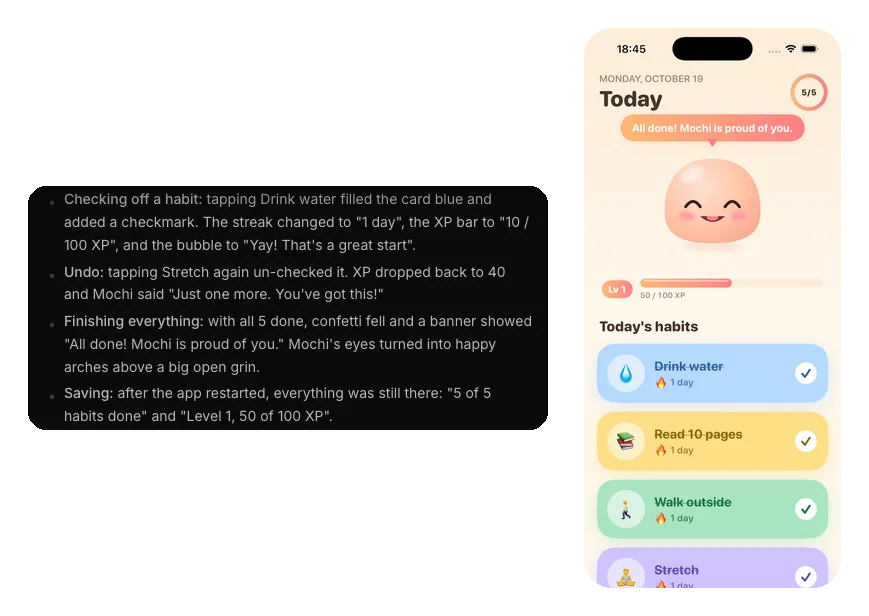
On October 19, 2026, we built Mochi in Vibecode from a plain-English description, with no canvas or components. It's a habit tracker with a little pet that hops when you check off a habit.
The first version was ready 16 minutes and 50 seconds after we pressed send. Then the agent tested it on its own. It checked off habits, undid one and restarted the app to make sure nothing was lost.
Four messages made the finished app, using $21.06 of credits. That's a full native Swift app for well under Adalo's $65 monthly plan.
How we picked
Vibecode makes this guide, and Vibecode is pick number one. We think it's the best way from an idea to an App Store app, but we're not neutral. Check the facts yourself.
On November 25, 2026, we read each product's own pricing page and docs. We checked how you build, what it makes and how it publishes to the App Store and Google Play. We also checked code export and USD pricing.
We started from the Adalo competitors Google's AI Overview names. No product paid to be here.
The 6 tools, in detail
Best for: A native Swift iPhone app, built from a description and submitted to the App Store for you
Describe your app in a chat, and our AI agent writes it in Swift and SwiftUI, Apple's own language. You skip the canvas and change the app by asking.
It runs in a live iOS Simulator in your browser, so you don't need a Mac. After each change, the agent taps through the app to test its work.
Your first build is free. On Plus at $20 a month, Publish to App Store builds, signs, uploads and submits it for review for you.
Want to own the source code? Pro is $50 a month and lets you download the full Xcode, Expo or web project.
- What it builds
- Native Swift/SwiftUI iPhone and iPad apps, React Native (Expo) apps for iOS and Android, and web apps. You pick per project.
- Pricing
- Free first build; paid plans Plus $20/mo, Pro $50/mo, Max $200/mo
Strengths
- Publishing to the App Store starts at $20 a month. Adalo starts at $65.
- Vibecode submits your app for App Store review. With Adalo, you finish that step in App Store Connect.
- The agent writes the code, so AI chat, custom animations or a game are one more message.
Watch out for
- No built-in Google Play step. You download the Expo project on Pro, at $50 a month, and publish it yourself.
- No visual canvas. Every change is a message.
- Plans include AI credits, so a busy month can cost more than Adalo's flat price.
Best for: A visual builder with code you can download, on both app stores
FlutterFlow is the main visual-builder upgrade from Adalo. One plan now covers two products: an AI builder you describe the app to, and FlutterFlow Studio, the visual editor.
The big difference from Adalo is code. Studio lets you download your Flutter code from Basic, at $39 a month, and push it to GitHub from Pro.
Uploads to the App Store and Google Play also start on Basic. The trade-off is time. Studio has more to learn than Adalo's canvas.
- What it builds
- Flutter apps for iOS, Android and web, from an AI builder or the FlutterFlow Studio visual editor
- Pricing
- Free; Basic $39/mo ($29/mo yearly); Pro $80/mo; Max $150/mo
Strengths
- Code download from $39 a month. Adalo has no download on any plan.
- Both app stores and the web from one project, like Adalo.
- Fine control over every screen, state and action.
Watch out for
- Studio takes longer to learn than Adalo or a chat.
- Flutter apps are written in Dart, not Apple's Swift.
- AI use is capped by plan, with refills on Pro and Max.
Sources: FlutterFlow pricingFlutterFlow or Studio?
Vibecode vs FlutterFlow, side by sideBest for: A web app first, with a native mobile app on the same database
Bubble is the pick when your product is really a web app, like a marketplace or a dashboard. It now builds native mobile apps too, on React Native, in the same editor.
The web app and the phone app share one database and the same workflows. Bubble makes the builds and uploads them to App Store Connect and Google Play Console. You submit them for review.
Pricing runs on workload units, so busy apps cost more. Bubble's manual says you can't export its code.
- What it builds
- Web apps and native mobile apps (React Native) in one editor, sharing one database
- Pricing
- Free to build; web plans from $32/mo billed yearly; a paid plan to publish to the stores
Strengths
- The most flexible no-code tool for complex web apps.
- One database and one set of workflows for web and mobile.
- Unlimited over-the-air updates on every plan.
Watch out for
- No code export. Your app lives on Bubble.
- Usage is billed in workload units, which makes costs harder to predict.
- A steeper learning curve than Adalo.
Sources: Bubble pricingBubble manual
Vibecode vs Bubble, side by sideBest for: Beginners who like drag-and-drop blocks, with AI to start the app
Thunkable is the closest thing to Adalo on this list. You describe the app to its AI, then change it with a visual editor and logic blocks.
One project goes to the App Store and Google Play. Its AI writes most of the store listing and checks the app. Click publish, and it builds, uploads and tries to submit it for review. You fill in items like age rating and app privacy in App Store Connect.
Builder is $37 a month paid yearly, which is cheaper than Adalo's $52. But it covers one live app, not two.
- What it builds
- iOS, Android and web apps, built with AI, a visual editor and logic blocks
- Pricing
- Free (3 public projects); Builder $59/mo ($37/mo yearly); Advanced $189/mo ($99/mo yearly)
Strengths
- Logic blocks make it friendly for first-time builders.
- Both app stores from one project.
- Builder is $37 a month on yearly billing.
Watch out for
- Published apps go offline if your plan ends.
- Builder covers 1 live app. Unlimited needs Advanced, at $189 a month.
- Free projects are public, with up to 5 screens each.
Sources: Thunkable pricingThunkable iOS publishingThunkable store listing
Rork
Best for: Native apps on both phones: Swift for iPhone and Kotlin for Android
Rork is an AI builder like Vibecode. Its agent writes Swift for iPhone, and it can add a separate Kotlin app for Android.
Rork builds the iPhone app on its own machines and uploads it. You finish the listing in App Store Connect. For Android, it sends signed builds to Google Play and can release them from the chat.
The free plan only designs screens. Building a working app starts on Rork Max, from $20 a month.
- What it builds
- Native Swift iPhone apps, native Kotlin Android apps and React web apps
- Pricing
- Free (design mode only); Rork Max from $20/mo (100 credits)
Strengths
- Native apps on both phones, in Swift for iPhone and Kotlin for Android.
- Google Play builds sent from the chat.
- Two-way GitHub sync on paid plans.
Watch out for
- The free plan can't build a working app.
- You finish the App Store listing yourself.
- $20 buys 100 credits. Bigger apps need more.
Sources: Rork plansRork publishingRork code export
Vibecode vs Rork, side by sideBest for: React Native apps with a visual editor, AI agents and code export from $15 a month
Draftbit mixes a visual editor with AI agents, Claude Code and Codex. Apps are Expo, so one codebase runs on iPhone, Android and the web.
It's the cheapest way here to own your code. Standard, at $15 a month, adds code export, GitHub and one-click uploads to both stores.
Pro adds over-the-air updates and help with App Store submission. It's a better fit if you, or someone on your team, can read code.
- What it builds
- React Native (Expo) apps for iOS and Android, plus web apps
- Pricing
- Free (no store publishing); Standard $15/mo ($12/mo yearly); Pro $30/mo ($24/mo yearly)
Strengths
- Code export and GitHub from $15 a month.
- A visual editor and AI agents in one tool.
- Over-the-air updates on Pro, like Adalo's instant updates.
Watch out for
- React Native, not Apple's Swift.
- Free can't publish to the stores or export code.
- More technical than Adalo.
Source: Draftbit pricing
Why people leave Adalo
Adalo is good at what it does. But here's what sends people looking, from Adalo's own pricing page and docs.
- Publishing costs $65 a month. Adalo's Free plan lets you build and test, but the App Store and Google Play start on Builder. Yearly billing brings it to $52 a month.
- Builder caps you at two apps. Publishing a third moves you to Business, at $200 a month.
- You can't download your code. Builder shows a sample of the code Ada writes, and Business shows all of it. A full export comes from Adalo's team on request, as a separate service.
- Some apps don't fit. Adalo says video calls, games with physics and Bluetooth hardware are outside Ada's current scope.
- You still press submit. Adalo uploads the iPhone build, and you submit it for review in App Store Connect.
Those limits don't hurt a simple directory or booking app. They hurt as soon as you want custom features, code you own, or App Store publishing without the $65 monthly bill.
Adalo vs Vibecode: what it costs to publish
Here's the cheapest plan on each that gets your app into the App Store, as of November 25, 2026.
| Product | Plan | Price | App Store review | Code download |
|---|---|---|---|---|
| Adalo | Builder, 2 apps | $65/mo, or $52/mo yearly | You submit | On request, separate service |
| Vibecode | Plus | $20/mo, first build free | Submits for you | Pro, $50/mo |
Vibecode Plus includes $20 of AI credits a month, and unused credits roll over while your plan is active.
Adalo also covers Google Play and the web in that price. Vibecode has no built-in Google Play step. Both need Apple's $99-a-year developer account.
Source: Adalo pricing
When to stay on Adalo
Stay if your app is a simple database app, like a directory, a booking app or a member list. Adalo's components fit those well.
Stay if you want one project on the App Store, Google Play and the web. Few tools here do all three with this little setup.
And stay if you like dragging things on a canvas. Vibecode has no canvas. You make every change by asking.
Source: Adalo overview
Moving an Adalo app to Vibecode
There's no import button. You rebuild the app by describing it, and the agent writes the code. Mochi, our example above, had a working first version in under 17 minutes.
What you can bring:
- Your screens. Describe each one in your first message, and add screenshots of your Adalo app as reference images.
- Your data. Adalo exports collections as CSV. Vibecode can connect to Supabase or Firebase, or start fresh with Vibecode Cloud.
- Your Apple developer account. Vibecode publishes under your own account, so the app stays yours. Keep the same bundle ID so it ships as an update to your current listing.
Start with your most important screen, then add one feature per message. When it works, publish it to the App Store.
Questions people ask
Is there a free Adalo alternative?
Vibecode's first build is free, and it's a working Swift app you can tap in your browser. FlutterFlow, Bubble, Thunkable and Draftbit have free plans too. Rork's free plan only designs screens. To publish, Vibecode Plus is $20 a month vs Adalo's $65, plus Apple's $99-a-year account.
Which Adalo alternative lets me export my code?
Draftbit exports React Native code from $15 a month, and FlutterFlow Studio exports Flutter code from $39. Rork syncs to GitHub on paid plans. Vibecode's $50 Pro plan downloads the full Xcode, Expo or web project. Bubble and Thunkable don't list a code export, and Adalo provides it on request, as a separate service.
Is Adalo native?
Adalo compiles native iOS and Android builds that install from the stores, not websites in a wrapper. You still don't get a Swift project you can open in Xcode. If you want Swift and SwiftUI, pick Vibecode or Rork.
Adalo vs FlutterFlow: which is better?
Adalo is easier to start, with Ada and a simple canvas. FlutterFlow gives you more control, and FlutterFlow Studio lets you download your code from $39 a month. If you'd rather not learn an editor, Vibecode writes the app from a description. More picks: the best FlutterFlow alternatives.
Adalo vs Bubble: which is better?
Pick Bubble for complex web apps, like marketplaces and dashboards. It now builds native mobile apps on React Native too. Pick Adalo for a simpler phone app on both stores at a flat price. Neither lets you download your code.
Does Vibecode build Android apps like Adalo?
Yes, through React Native. When you start a new app in the web workspace, open Legacy and pick Mobile app (Legacy), and the same code runs on iPhone and Android. Google Play isn't built in yet, so you download the Expo project on Pro and publish it yourself. Adalo builds the Android file for you.
Can AI build my Adalo app idea for me?
Yes. Adalo's own AI, Ada, builds from a description, within Adalo's components. Vibecode's agent writes the code itself, so features outside a component library, like AI chat or a custom animation, are one more message. Start with one screen, and add one feature at a time.
About the editorial team
Vishal is a product engineer at Vibecode. Before Vibecode he did product engineering at EarnIn and co-founded Ivella (YC S21), a banking app for couples. He studied computer science at Duke.