
Table of contents
TL;DR
What are the best AppsGeyser alternatives?
As of November 2026, choose Vibecode for a mobile app from a prompt, Rork for a Kotlin app with Google Play upload, or FlutterFlow for a Flutter app with visual editing. Thunkable and Adalo suit visual workflows, and Bolt suits teams that want to work on an Expo project. AppsGeyser itself offers a website template and Android APK and AAB downloads.
The longer answer
If you want users to do more than browse your site, start by naming the first action they need on a phone. It might be scanning a membership card, recording an inspection, or placing a repeat order. Choose a builder that can create and test that action in an app.
For a custom iPhone app, Vibecode builds in Swift and can submit the app through your Apple Developer account. For Android and iPhone from one project, choose React Native. With Vibecode, you export that Expo project on Pro or higher and take the Android build to Google Play yourself.
Quick comparison
Prices are each product's published USD list price, checked on .
| Tool | Best for | What it builds | Google Play | Pricing |
|---|---|---|---|---|
| 1. Vibecode | One React Native app for Android and iPhone, free to try | React Native (Expo) apps for Android and iPhone, plus native Swift iPhone apps and web apps | You run Expo's build and submit commands after the Pro code download. Some terminal work | Free first build; paid plans Plus $20/mo, Pro $50/mo, Max $200/mo. Google Play needs the code download on Pro. |
| 2. Rork | A native Kotlin Android app that it ships to Google Play for you | Native Kotlin Android apps, native Swift iPhone apps and web apps | Uploads to internal testing and moves releases to production from chat. No code | Free (design mode only); Rork Pro $20/mo; Rork Max from $200/mo |
| 3. FlutterFlow | A Flutter app with Google Play releases from the builder | Flutter (Dart) apps for Android, iPhone and web | You upload the first build, then it sends new ones. No code | Free (2 projects); Basic $39/mo ($29/mo yearly); Pro $80/mo; Max $150/mo |
| 4. Thunkable | Simple Android and iPhone apps from a prompt or a visual editor | Native Android and iPhone apps from one project | You release the first build, then it sends new ones. No code | Free (2,000 AI tokens, once); Accelerator $19/mo; Builder $59/mo; Advanced $189/mo |
| 5. Adalo | Database apps like bookings, directories and member apps | Android (.aab) and iPhone builds plus a web app, from one project | Builds and signs the .aab, and its help center has you upload it. No code | Free (no publishing); Builder $65/mo ($52/mo yearly); Business $200/mo ($160/mo yearly) |
| 6. Bolt | Developers happy to run Expo's tools themselves | Web apps, and mobile apps through Expo (React Native) | You build it with Expo's tools and upload it in Play Console. Some terminal work | Free (300K tokens a day, 1M a month); Pro $25/mo ($18/mo yearly); Teams $30 per member/mo |
A real build: Liftbook on Android
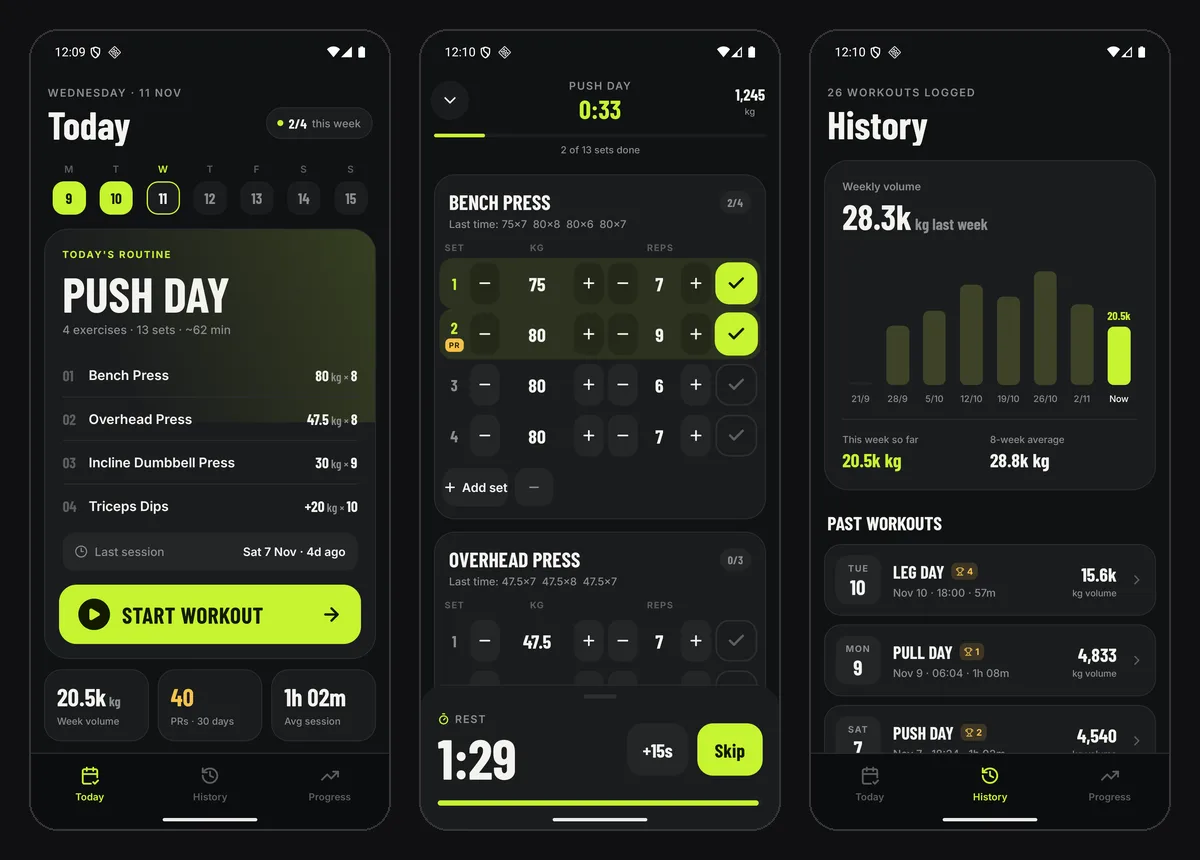
On November 11, 2026, we built Liftbook, a workout log, as a React Native app. One 206-word prompt asked for a rest timer, PR badges and progress charts. The agent built and tested it in 10 minutes 43 seconds on Claude Opus 5.5, for $3.26 of credits. A new account's free first build runs on GPT-6.1 Sol instead.
Then we opened the Code tab and clicked Download Code, and the Expo project arrived in about a second. We set the app's name and an Android package name in app.json, the only change we made. We then made a local test build on a Mac with Expo's run command. It ran on Android 16 in Google's Android Emulator.
On Android, the rest timer, the PR badge and both charts worked. The build already targets Android 16 (API level 36), as Google Play requires. We stopped short of Expo's cloud build and Google Play. Those need an Expo account, a Play Console account and, on a new personal account, a 14-day test.
How we picked
We make Vibecode and list it first. The comparisons use the vendor documentation linked under each pick, including how the tools reach Google Play. The Liftbook example comes from our Android builder test.
The 6 tools, in detail
Best for: One React Native app for Android and iPhone, free to try
Vibecode builds Android apps as React Native (Expo) projects, so the same app runs on iPhone. You describe the app in a chat, and an AI agent writes the code and tests it. Google Play isn't built in. You download the Expo project on Pro and publish it with Expo's free tools, as the steps below show.
- What it builds
- React Native (Expo) apps for Android and iPhone, plus native Swift iPhone apps and web apps
- Pricing
- Free first build; paid plans Plus $20/mo, Pro $50/mo, Max $200/mo. Google Play needs the code download on Pro.
- Google Play
- You run Expo's build and submit commands after the Pro code download. Some terminal work
Strengths
- Your first build is free when you sign up on the web with Google or Apple, so you see the app working before you pay.
- One project runs on Android and iPhone, and App Store publishing is built in.
- Expo's docs say its submit command works even for your first Google Play upload.
Watch out for
- No Google Play button. You download the code on Pro ($50/mo) and run Expo's commands yourself.
- No Android emulator in the browser. You test the Android version on your own phone, in the Vibecode app.
Sources: Vibecode pricingVibecode docs: download your codeVibecode docs: Swift vs React NativeExpo: submit to Google Play
Rork
Best for: A native Kotlin Android app that it ships to Google Play for you
Rork writes a native Android app in Kotlin next to a native Swift iPhone app. On any paid plan it builds the app and uploads it to your internal testing track. Rork's agent can then move a release to closed testing, production or a staged rollout. You create the first store listing in Play Console yourself.
- What it builds
- Native Kotlin Android apps, native Swift iPhone apps and web apps
- Pricing
- Free (design mode only); Rork Pro $20/mo; Rork Max from $200/mo
- Google Play
- Uploads to internal testing and moves releases to production from chat. No code
Strengths
- The most Google Play help here, from internal testing through production and staged rollouts, all from chat.
- A native Android app written in Kotlin, not a cross-platform one.
- Two-way GitHub sync on paid plans.
Watch out for
- The free plan only designs apps. Android builds need a paid plan.
- You still send each release for review in Play Console.
- iPhone and Android are two separate codebases.
Sources: Rork pricingRork docs: Swift, Kotlin and web projectsRork docs: Android appsRork docs: publishingRork docs: code export
Vibecode vs Rork, side by sideBest for: A Flutter app with Google Play releases from the builder
FlutterFlow now starts from a prompt. You ask for a change, and its agent builds it. FlutterFlow Studio, the visual builder, is still there for hands-on work, and both make Flutter apps for Android and iPhone. From Basic, FlutterFlow deploys to Google Play once you upload the first build to internal testing yourself.
- What it builds
- Flutter (Dart) apps for Android, iPhone and web
- Pricing
- Free (2 projects); Basic $39/mo ($29/mo yearly); Pro $80/mo; Max $150/mo
- Google Play
- You upload the first build, then it sends new ones. No code
Strengths
- After that first upload, FlutterFlow sends builds to Google's closed test and can submit them for review.
- The closed test is the track Google's 12-tester rule asks for.
- Download the Android .apk and .aab from Basic ($39/mo).
Watch out for
- The first Google Play upload is yours, and you start the first rollout in Play Console.
- You can't download the source code of an app made in the new prompt builder, or send it to GitHub. Studio projects can.
- The new builder has no in-app purchases through Google Play.
Sources: FlutterFlow pricingFlutterFlow docs: for developersFlutterFlow docs: add to Play ConsoleFlutterFlow docs: send to testersFlutterFlow docs: what's not availableFlutterFlow Studio docs: Google Play
Vibecode vs FlutterFlow, side by sideBest for: Simple Android and iPhone apps from a prompt or a visual editor
Describe the app in plain words, and Thunkable makes it for Android and iPhone. Then you adjust it in a visual editor. With a Google Play service account linked, Thunkable sends your .aab to Google Play for you. The first release of a new app is still yours to roll out by hand.
- What it builds
- Native Android and iPhone apps from one project
- Pricing
- Free (2,000 AI tokens, once); Accelerator $19/mo; Builder $59/mo; Advanced $189/mo
- Google Play
- You release the first build, then it sends new ones. No code
Strengths
- Automatic Google Play uploads once your first release is out.
- AI building, a visual editor and a code editor in one tool.
- Thunkable's docs say plans from Accelerator, at $19 a month, publish to Google Play.
Watch out for
- The pricing page lists a live published app only from Builder, at $59 a month. Check which plan you need.
- Thunkable says published apps stop working for your users if your plan expires.
- The free plan's 2,000 AI tokens are a one-time balance that doesn't refill.
Sources: Thunkable home pageThunkable pricingThunkable docs: publishingThunkable docs: Android publishingThunkable docs: store listing
Best for: Database apps like bookings, directories and member apps
Adalo's AI, Ada, builds an app's screens, database and logic from a description. You can also adjust them on a drag-and-drop canvas. From the $65 Builder plan, Adalo builds and signs the Android App Bundle. The home page says Adalo submits to Google Play Console, but the help center still has you upload the file.
- What it builds
- Android (.aab) and iPhone builds plus a web app, from one project
- Pricing
- Free (no publishing); Builder $65/mo ($52/mo yearly); Business $200/mo ($160/mo yearly)
- Google Play
- Builds and signs the .aab, and its help center has you upload it. No code
Strengths
- One project publishes to the App Store, Google Play and the web.
- Builder's first month is $30 on monthly billing.
- Adalo builds and signs the Android App Bundle for you.
Watch out for
- Builder covers 2 published apps. More need Business, at $200 a month.
- Adalo's pages disagree on code. The home page offers source export, but its overview for AI tools says the team sends the code on request, as a separate service.
Sources: Adalo pricingAdalo home pageAdalo overview for AI tools (llms-full.txt)Adalo help: get your build fileAdalo help: upload to Google Play
Vibecode vs Adalo, side by sideBolt
Best for: Developers happy to run Expo's tools themselves
Bolt works from a chat in your browser, for apps and websites. For phones it makes Expo (React Native) apps, like Vibecode. Bolt's Expo guide has you download the code, build the app with Expo's command-line tool and upload the file in Play Console.
- What it builds
- Web apps, and mobile apps through Expo (React Native)
- Pricing
- Free (300K tokens a day, 1M a month); Pro $25/mo ($18/mo yearly); Teams $30 per member/mo
- Google Play
- You build it with Expo's tools and upload it in Play Console. Some terminal work
Strengths
- A free tier with 300K tokens a day.
- Download the whole project as a zip file.
- Expo's tools can make an .apk for testing or an .aab for Google Play.
Watch out for
- No Google Play step. You need Node.js, Git and Expo's tools on your computer.
- Bolt's guide has you upload each build by hand in Play Console, but Expo's submit command works for Bolt apps too.
Sources: Bolt home pageBolt pricingBolt docs: ExpoBolt docs: project files
Vibecode vs Bolt, side by sideWhat can you take from AppsGeyser?
AppsGeyser offers APK and AAB downloads for Android. For a rebuild, collect the website URL, images you own, screenshots, the important taps, and the details of any backend the new app needs. Use those as the brief for building your new app.
If the app already has a Google Play listing, check its package name and signing setup before you build a replacement. Confirm you can sign the next upload for the existing listing. That step matters even if the new screens look identical.
Sources: AppsGeyser: website templateAppsGeyser: download an APK or AABGoogle Play: app signing
Rebuild one screen in Vibecode
Start with the screen customers open most, such as a café menu. Attach a screenshot and ask Vibecode to build the menu and item details with sample data. Specify what happens when someone picks a size, how prices update, and what a completed order looks like.
Run that flow in the preview. If the new app needs live menus or customer records, connect the existing API and verify one change using a test account. Keep private keys on your server.
Get an Android file you can install
Use an APK to install the test build on an Android device. Use a signed Android App Bundle, or AAB, for a new listing on Google Play. For an Expo project from Vibecode, download the code on Pro or higher and build both artifacts with Expo.
Source: Expo: build APKs for Android
Questions people ask
Which AppsGeyser alternative can build for iPhone and Android?
Vibecode, FlutterFlow, Thunkable, Adalo, and Bolt can create projects that target both platforms. Vibecode uses React Native and Expo for a shared codebase. Its iOS project type builds separately in Swift.
Can I import an AppsGeyser APK into Vibecode?
Start a new Vibecode project from your screenshots, assets, and API. The APK is the installable Android package. Use the existing app to document the screens and actions you need before you rebuild.
Can I keep my existing Google Play listing?
Check that you can use the existing app's package name and signing setup. Google Play also needs a higher version code for the update. Verify these in Play Console before you upload.
Do I need Android Studio to build an APK?
An Expo cloud build can create the APK without Android Studio on your machine. If you choose to compile an Android build locally, install the Android SDK and the development tools Expo calls for.
Which AppsGeyser alternative handles Google Play upload?
Rork can upload its Android build to Google Play after you set up the listing. FlutterFlow and Thunkable can help after the first upload. For Vibecode, you download your Expo project on Pro or higher and handle the Play release yourself.
About the editorial team
Vishal is a product engineer at Vibecode. Before Vibecode he did product engineering at EarnIn and co-founded Ivella (YC S21), a banking app for couples. He studied computer science at Duke.