
Table of contents
TL;DR
What is the best AI app builder for Android apps?
Rork is the best AI Android app builder for hands-off Google Play publishing. FlutterFlow and Thunkable upload builds after your first one. Vibecode makes one app for Android and iPhone, free to try, and Google Play needs Pro ($50/mo) plus Expo's tools. As of November 2026, Google charges $25 once, and new personal accounts need 12 testers for 14 days.
The longer answer
If you want Google Play handled for you, choose Rork. It builds a native Kotlin app and moves it from testing to production from chat. FlutterFlow and Thunkable also send builds to Google Play, once you upload the first one yourself.
Choose Vibecode for one React Native app on Android and iPhone. The first build is free when you sign up on the web with Google or Apple. Google Play isn't built in. You download the code on Pro ($50/mo) and publish with Expo's free tools.
Appy Pie's team can submit your app for you, though its pages differ on which plan. Adalo suits database apps. Bolt makes Expo apps you publish yourself, like Vibecode, and Lovable makes web apps only.
Quick comparison
Prices are each product's published USD list price, checked on .
| Tool | Best for | What it builds | Google Play | Pricing |
|---|---|---|---|---|
| 1. Vibecode | One React Native app for Android and iPhone, free to try | React Native (Expo) apps for Android and iPhone, plus native Swift iPhone apps and web apps | You run Expo's build and submit commands after the Pro code download. Some terminal work | Free first build; paid plans Plus $20/mo, Pro $50/mo, Max $200/mo. Google Play needs the code download on Pro. |
| 2. Rork | A native Kotlin Android app that it ships to Google Play for you | Native Kotlin Android apps, native Swift iPhone apps and web apps | Uploads to internal testing and moves releases to production from chat. No code | Free (design mode only); Rork Pro $20/mo; Rork Max from $200/mo |
| 3. FlutterFlow | A Flutter app with Google Play releases from the builder | Flutter (Dart) apps for Android, iPhone and web | You upload the first build, then it sends new ones. No code | Free (2 projects); Basic $39/mo ($29/mo yearly); Pro $80/mo; Max $150/mo |
| 4. Thunkable | Simple Android and iPhone apps from a prompt or a visual editor | Native Android and iPhone apps from one project | You release the first build, then it sends new ones. No code | Free (2,000 AI tokens, once); Accelerator $19/mo; Builder $59/mo; Advanced $189/mo |
| 5. Appy Pie | Simple small-business apps, with help submitting to Google Play | Android and iPhone apps in a native shell, with some screens shown as web content | The Appy Pie team can submit for you, or you upload it. Its pages differ on the plan. No code | Free (100 credits, once); Basic from $16 per app a month; Platinum $60 per app a month |
| 6. Adalo | Database apps like bookings, directories and member apps | Android (.aab) and iPhone builds plus a web app, from one project | Builds and signs the .aab, and its help center has you upload it. No code | Free (no publishing); Builder $65/mo ($52/mo yearly); Business $200/mo ($160/mo yearly) |
| 7. Bolt | Developers happy to run Expo's tools themselves | Web apps, and mobile apps through Expo (React Native) | You build it with Expo's tools and upload it in Play Console. Some terminal work | Free (300K tokens a day, 1M a month); Pro $25/mo ($18/mo yearly); Teams $30 per member/mo |
| 8. Lovable | Web apps that don't need Google Play | Web apps and websites only | Not supported. Wrapping the web app with Capacitor takes code | Free (5 credits a day, up to 30 a month); Pro $25/mo; Business $50/mo |
A real build: Liftbook on Android
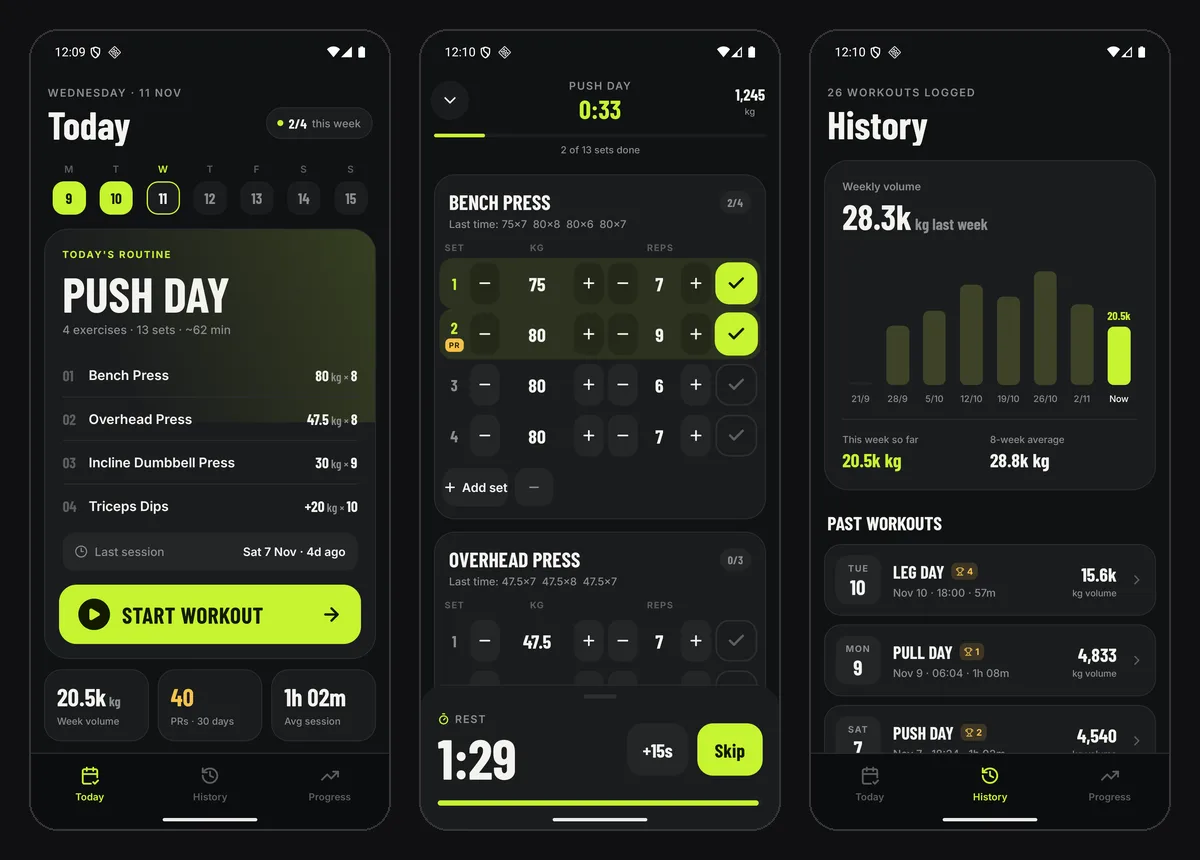
On November 11, 2026, we built Liftbook, a workout log, as a React Native app. One 206-word prompt asked for a rest timer, PR badges and progress charts. The agent built and tested it in 10 minutes 43 seconds on Claude Opus 5.5, for $3.26 of credits. A new account's free first build runs on GPT-6.1 Sol instead.
Then we opened the Code tab and clicked Download Code, and the Expo project arrived in about a second. We set the app's name and an Android package name in app.json, the only change we made. We then made a local test build on a Mac with Expo's run command. It ran on Android 16 in Google's Android Emulator.
On Android, the rest timer, the PR badge and both charts worked. The build already targets Android 16 (API level 36), as Google Play requires. We stopped short of Expo's cloud build and Google Play. Those need an Expo account, a Play Console account and, on a new personal account, a 14-day test.
How we picked
Vibecode makes this guide and is listed first, so we aren't neutral. On November 11, 2026, we read each tool's pricing page and Google Play docs, and ran a Vibecode app on Android. The rest are ranked by how much of the Google Play upload they do for you. No one paid to be listed.
The 8 tools, in detail
Best for: One React Native app for Android and iPhone, free to try
Vibecode builds Android apps as React Native (Expo) projects, so the same app runs on iPhone. You describe the app in a chat, and an AI agent writes the code and tests it. Google Play isn't built in. You download the Expo project on Pro and publish it with Expo's free tools, as the steps below show.
- What it builds
- React Native (Expo) apps for Android and iPhone, plus native Swift iPhone apps and web apps
- Pricing
- Free first build; paid plans Plus $20/mo, Pro $50/mo, Max $200/mo. Google Play needs the code download on Pro.
- Google Play
- You run Expo's build and submit commands after the Pro code download. Some terminal work
Strengths
- Your first build is free when you sign up on the web with Google or Apple, so you see the app working before you pay.
- One project runs on Android and iPhone, and App Store publishing is built in.
- Expo's docs say its submit command works even for your first Google Play upload.
Watch out for
- No Google Play button. You download the code on Pro ($50/mo) and run Expo's commands yourself.
- No Android emulator in the browser. You test the Android version on your own phone, in the Vibecode app.
Sources: Vibecode pricingVibecode docs: download your codeVibecode docs: Swift vs React NativeExpo: submit to Google Play
Rork
Best for: A native Kotlin Android app that it ships to Google Play for you
Rork writes a native Android app in Kotlin next to a native Swift iPhone app. On any paid plan it builds the app and uploads it to your internal testing track. Rork's agent can then move a release to closed testing, production or a staged rollout. You create the first store listing in Play Console yourself.
- What it builds
- Native Kotlin Android apps, native Swift iPhone apps and web apps
- Pricing
- Free (design mode only); Rork Pro $20/mo; Rork Max from $200/mo
- Google Play
- Uploads to internal testing and moves releases to production from chat. No code
Strengths
- The most Google Play help here, from internal testing through production and staged rollouts, all from chat.
- A native Android app written in Kotlin, not a cross-platform one.
- Two-way GitHub sync on paid plans.
Watch out for
- The free plan only designs apps. Android builds need a paid plan.
- You still send each release for review in Play Console.
- iPhone and Android are two separate codebases.
Sources: Rork pricingRork docs: Swift, Kotlin and web projectsRork docs: Android appsRork docs: publishingRork docs: code export
Vibecode vs Rork, side by sideBest for: A Flutter app with Google Play releases from the builder
FlutterFlow now starts from a prompt. You ask for a change, and its agent builds it. FlutterFlow Studio, the visual builder, is still there for hands-on work, and both make Flutter apps for Android and iPhone. From Basic, FlutterFlow deploys to Google Play once you upload the first build to internal testing yourself.
- What it builds
- Flutter (Dart) apps for Android, iPhone and web
- Pricing
- Free (2 projects); Basic $39/mo ($29/mo yearly); Pro $80/mo; Max $150/mo
- Google Play
- You upload the first build, then it sends new ones. No code
Strengths
- After that first upload, FlutterFlow sends builds to Google's closed test and can submit them for review.
- The closed test is the track Google's 12-tester rule asks for.
- Download the Android .apk and .aab from Basic ($39/mo).
Watch out for
- The first Google Play upload is yours, and you start the first rollout in Play Console.
- You can't download the source code of an app made in the new prompt builder, or send it to GitHub. Studio projects can.
- The new builder has no in-app purchases through Google Play.
Sources: FlutterFlow pricingFlutterFlow docs: for developersFlutterFlow docs: add to Play ConsoleFlutterFlow docs: send to testersFlutterFlow docs: what's not availableFlutterFlow Studio docs: Google Play
Vibecode vs FlutterFlow, side by sideBest for: Simple Android and iPhone apps from a prompt or a visual editor
Describe the app in plain words, and Thunkable makes it for Android and iPhone. Then you adjust it in a visual editor. With a Google Play service account linked, Thunkable sends your .aab to Google Play for you. The first release of a new app is still yours to roll out by hand.
- What it builds
- Native Android and iPhone apps from one project
- Pricing
- Free (2,000 AI tokens, once); Accelerator $19/mo; Builder $59/mo; Advanced $189/mo
- Google Play
- You release the first build, then it sends new ones. No code
Strengths
- Automatic Google Play uploads once your first release is out.
- AI building, a visual editor and a code editor in one tool.
- Thunkable's docs say plans from Accelerator, at $19 a month, publish to Google Play.
Watch out for
- The pricing page lists a live published app only from Builder, at $59 a month. Check which plan you need.
- Thunkable says published apps stop working for your users if your plan expires.
- The free plan's 2,000 AI tokens are a one-time balance that doesn't refill.
Sources: Thunkable home pageThunkable pricingThunkable docs: publishingThunkable docs: Android publishingThunkable docs: store listing
Best for: Simple small-business apps, with help submitting to Google Play
You chat with Appy Pie's AI to make the app and to change it later. The apps run in a native shell, with some screens shown as web content. Basic ($16 per app a month) includes the .apk and .aab.
- What it builds
- Android and iPhone apps in a native shell, with some screens shown as web content
- Pricing
- Free (100 credits, once); Basic from $16 per app a month; Platinum $60 per app a month
- Google Play
- The Appy Pie team can submit for you, or you upload it. Its pages differ on the plan. No code
Strengths
- Appy Pie's pricing page says your first app submission is free. Later ones cost extra.
- Android builds start at $16 per app a month, marked down from $32.
- You can copy the code to GitHub on Basic or Platinum.
Watch out for
- Each app needs its own plan, and Appy Pie says a cancelled app gets locked.
- Appy Pie signs the build with its own key. The Android page mentions using your own key only for an app already on Google Play.
- The Android page offers Publish with Appy Pie on Basic, but the home page says you upload on Basic and the team helps on Platinum.
Sources: Appy Pie Android app builderAppy Pie pricingAppy Pie home page
Best for: Database apps like bookings, directories and member apps
Adalo's AI, Ada, builds an app's screens, database and logic from a description. You can also adjust them on a drag-and-drop canvas. From the $65 Builder plan, Adalo builds and signs the Android App Bundle. The home page says Adalo submits to Google Play Console, but the help center still has you upload the file.
- What it builds
- Android (.aab) and iPhone builds plus a web app, from one project
- Pricing
- Free (no publishing); Builder $65/mo ($52/mo yearly); Business $200/mo ($160/mo yearly)
- Google Play
- Builds and signs the .aab, and its help center has you upload it. No code
Strengths
- One project publishes to the App Store, Google Play and the web.
- Builder's first month is $30 on monthly billing.
- Adalo builds and signs the Android App Bundle for you.
Watch out for
- Builder covers 2 published apps. More need Business, at $200 a month.
- Adalo's pages disagree on code. The home page offers source export, but its overview for AI tools says the team sends the code on request, as a separate service.
Sources: Adalo pricingAdalo home pageAdalo overview for AI tools (llms-full.txt)Adalo help: get your build fileAdalo help: upload to Google Play
Vibecode vs Adalo, side by sideBolt
Best for: Developers happy to run Expo's tools themselves
Bolt works from a chat in your browser, for apps and websites. For phones it makes Expo (React Native) apps, like Vibecode. Bolt's Expo guide has you download the code, build the app with Expo's command-line tool and upload the file in Play Console.
- What it builds
- Web apps, and mobile apps through Expo (React Native)
- Pricing
- Free (300K tokens a day, 1M a month); Pro $25/mo ($18/mo yearly); Teams $30 per member/mo
- Google Play
- You build it with Expo's tools and upload it in Play Console. Some terminal work
Strengths
- A free tier with 300K tokens a day.
- Download the whole project as a zip file.
- Expo's tools can make an .apk for testing or an .aab for Google Play.
Watch out for
- No Google Play step. You need Node.js, Git and Expo's tools on your computer.
- Bolt's guide has you upload each build by hand in Play Console, but Expo's submit command works for Bolt apps too.
Sources: Bolt home pageBolt pricingBolt docs: ExpoBolt docs: project files
Vibecode vs Bolt, side by sideBest for: Web apps that don't need Google Play
Lovable is here for comparison, since it builds web apps, not Android apps. Lovable's docs say there's no built-in way to package a project or submit it to Google Play. They suggest an installable web app, or a Capacitor wrapper you build outside Lovable.
- What it builds
- Web apps and websites only
- Pricing
- Free (5 credits a day, up to 30 a month); Pro $25/mo; Business $50/mo
- Google Play
- Not supported. Wrapping the web app with Capacitor takes code
Strengths
- GitHub sync on every plan, Free included.
- A free tier with 5 credits a day, up to 30 a month.
- Download the code from Pro.
Watch out for
- No Android app. Getting into Google Play means wrapping the web app yourself.
Sources: Lovable pricingLovable docs: publishLovable docs: FAQLovable docs: plansLovable docs: GitHub
Vibecode vs Lovable, side by sideCan an AI app builder publish to Google Play for me?
Some Android app makers can, after a first setup. Rork uploads your app to internal testing and moves it toward production from chat. FlutterFlow and Thunkable send new builds for you once you upload the first one. Appy Pie's team can submit it too, though Appy Pie's pages differ on which plan.
Others hand you the file. Adalo builds and signs the .aab, and its help center has you upload it. Vibecode and Bolt make Expo projects that you publish with Expo's tools. Lovable makes web apps only.
No builder skips Google's part. You pay $25 once for a Play Console account and verify your identity. On a personal account, you also confirm you can use an Android phone, through the Play Console app.
New personal accounts have one more step. If yours was made after November 13, 2023, run a closed test with at least 12 testers. They have to stay opted in for 14 days in a row before you can apply for production.
An organization account skips that test, but it needs a D-U-N-S number, which Dun & Bradstreet gives out for free. Google Play takes Android App Bundles (.aab), not .apk files. Since August 31, 2026, new apps must target Android 16 (API level 36).
Sources: Google: testing rules for new personal accountsGoogle: get started with Play ConsoleGoogle: choose an account typeAndroid: target API levelExpo: submit to Google Play
How to get your Vibecode app on Google Play
1. Start an Android project. On vibecodeapp.com, click New app and pick Android. Then describe your app in the chat.
2. Try it on your Android phone. Install the Vibecode app from Google Play and open your project there. Ask the agent for changes until the app works the way you want.
3. Download the code. On Pro or Max, open the project on the web, click the Code tab (</>) and choose Download Code. The link comes by email too.
4. Put the backend online, if your app has one. Liftbook keeps its data on the phone, so we skipped this. If your app uses its backend for sign-in or shared data, deploy it from Vibecode first. Then put its address in mobile/.env under all three names: BACKEND_URL, EXPO_PUBLIC_BACKEND_URL and EXPO_PUBLIC_VIBECODE_BACKEND_URL.
5. Set up your computer. Install Node.js, Git and Bun. Unzip the download, open its mobile folder in a terminal and run bun install. Then run npm install -g eas-cli and eas login with a free Expo account.
6. Name the app. Before your first build, change name and slug in mobile/app.json from vibecode to your app's name, like liftbook. Add an Android package such as com.yourname.liftbook, then run eas build:configure.
7. Build the app bundle. Run eas build --platform android, and let Expo set up Git if it asks. Expo builds a signed .aab on its servers and can create and keep your signing key.
8. Set up Google Play. Pay the fee, verify your identity and create the app in Play Console. On a personal account, also confirm your Android phone in the Play Console app. Then add a Google service account key to Expo, so Expo can upload for you.
9. Submit. Run eas submit --platform android, and your first upload goes to the internal testing track. Then finish the store listing and Google's setup tasks in Play Console. The app stays a draft until you do.
10. Run the closed test. On a new personal account, promote the build from internal testing to a closed test in Play Console. Keep 12 or more testers opted in for 14 days in a row. Then click Apply for production and answer Google's questions.
11. Launch. Once Google grants production access, promote the release to Production and send it for review. Accounts the testing rule doesn't cover can do this right after step 9.
Sources: The Vibecode app on Google PlayVibecode docs: download your codeVibecode docs: deploymentExpo: create your first buildExpo: how projects are uploadedExpo: using BunExpo: submit to Google PlayGoogle: testing rules for new personal accounts
What it costs to launch an Android app
Google's fee is the same for everyone, $25 once. Apple's $99 a year only applies if you also publish to the App Store.
The builder costs more. As of November 2026, Appy Pie Basic starts at $16 per app a month, and Rork Pro is $20. Thunkable's docs put Google Play on its $19 plan, but its pricing page lists a published app only from $59. FlutterFlow Basic is $39, and Adalo Builder $65, or $52 billed yearly.
With Vibecode, Google Play needs the code download on Pro, at $50 a month. Expo's free plan includes 15 Android builds and the upload to Google Play, and Bolt apps can use it too.
Then there's AI usage, which each builder counts differently. Liftbook's first build used $3.26 of the $55 in credits that come with Pro each month. The fair test is to build the same small app in two tools and compare what's left.
Source: Expo pricing
Questions people ask
Can AI build a working app I can submit to Google Play without coding?
Yes. Rork, FlutterFlow, Thunkable, Adalo and Vibecode all build a working Android app from a description. Rork uploads it to Google Play, FlutterFlow and Thunkable do after your first manual release, and with Vibecode you run Expo's commands. Google's steps are still yours, from the $25 account to the store listing and a 14-day test on new personal accounts.
Which AI app builder can publish to Google Play for me if I don't know Android Studio?
Rork uploads to Google Play and moves releases to production from chat. FlutterFlow and Thunkable send new builds for you after your first upload, and Appy Pie's team can submit for you. None of them needs Android Studio. Vibecode doesn't publish to Google Play for you, so you run Expo's commands in a terminal instead.
Does Vibecode publish apps to Google Play?
No. Vibecode builds Android apps as React Native (Expo) projects, but Google Play submission isn't a built-in step. You download the Expo project on Pro ($50/mo) and publish it with Expo's tools, as in the steps above. App Store publishing is built in.
What is Google Play's 12-tester rule?
If you made a personal Play Console account after November 13, 2023, you must run a closed test before launch. At least 12 testers have to stay opted in for 14 days in a row. Then you apply for production access. Organization accounts aren't covered by the rule.
Which AI app builders give you an APK file?
Rork, Thunkable, FlutterFlow (from Basic) and Appy Pie (from Basic) give you an .apk to install and test. Bolt and Vibecode projects use Expo, which can build an .apk too. Google Play only takes the .aab, so the .apk is for testing on your own phone.
Can one app ship to both the App Store and Google Play?
Yes, React Native and Flutter apps run on both from one project. In Vibecode, pick Android when you start, and the app runs on Android and iPhone with App Store publishing built in. Google Play is the part you do yourself. Apple charges $99 a year, and Google $25 once.
How much does it cost to put an Android app on Google Play?
Google charges $25 once, plus the builder's plan. As of November 2026, Appy Pie starts at $16 per app a month, Rork Pro is $20 and FlutterFlow Basic $39. Vibecode Pro is $50, Adalo Builder $65, and Thunkable $19 or $59 depending on the page you read. Expo's free plan covers the build and upload for Vibecode apps.
Is there a free AI Android app builder?
Free tiers exist, but publishing to Google Play usually needs a paid plan. Thunkable's free plan gives 2,000 AI tokens once, and Rork's only designs apps. Vibecode's first build is free when you sign up on the web with Google or Apple, but Google Play needs the code download on Pro ($50/mo). Google's $25 fee applies either way.
Do I need Android Studio to make an Android app with AI?
No. These builders make the app in the cloud, Expo can build the .aab in the cloud, and Play Console runs in your browser. If you code, you can connect Claude Code or Cursor to a Vibecode project through the Vibecode MCP, on every paid plan.
Can I vibe code an Android app?
Yes. Vibe coding means you describe the app and AI writes the code. We vibe coded Liftbook in Vibecode in under 11 minutes, then ran it on Android 16. Rork, FlutterFlow, Thunkable, Adalo and Appy Pie also build Android apps from a description.
About the editorial team
Vishal is a product engineer at Vibecode. Before Vibecode he did product engineering at EarnIn and co-founded Ivella (YC S21), a banking app for couples. He studied computer science at Duke.