
Table of contents
TL;DR
What is the best alternative to FlutterFlow?
As of November 2026, the best FlutterFlow alternative for a real iPhone app is Vibecode. You describe the app, and Vibecode's AI builds it in native Swift, tests it in a live iOS Simulator and submits it for App Store review.
It can build React Native for iPhone and Android too. Your first build is free, and paid plans start at $20 a month. FlutterFlow's start at $39.
Other FlutterFlow alternatives: Rork for native Android with Google Play upload, Adalo for simple database apps on both stores, Thunkable for blocks and Nowa to stay in Flutter.
- Vibecode: native Swift iPhone apps, tested by its AI and submitted to the App Store for you
- Rork: Swift for iPhone plus a native Kotlin Android app, with Google Play built in
- Adalo: simple database apps on the App Store and Google Play
- Thunkable: AI plus drag-and-drop blocks, for beginners
- Draftbit: React Native with a visual editor, and code export from $15 a month
- Nowa: stay in Flutter, with your code on your own computer
- Superapp: Swift apps for iPhone, iPad, Apple Watch and Mac, but no Android
- Lovable: web apps only, if you don't need an app store
The longer answer
FlutterFlow is now two products. FlutterFlow Studio is the visual editor most people know. The new FlutterFlow is an AI builder you describe your app to. Both make Flutter apps, written in Dart.
If you want a real iPhone app without learning an editor, pick Vibecode. Its AI writes Swift and SwiftUI, Apple's own language and UI toolkit. The app runs in a live iOS Simulator in your browser, so you don't need a Mac.
It also costs less to start. Your first build is free, and Plus is $20 a month with App Store submission. FlutterFlow's paid plans start at $39 a month.
Pick something else if you need Android from the same tool. Rork writes a native Kotlin app and sends it to Google Play. Adalo and Thunkable publish one app to both stores. Vibecode does Android only through React Native, and you upload to Google Play yourself.
Want to stay in Flutter? Try Nowa, a visual Flutter builder that keeps your code on your computer. And if a web app is enough, Lovable is the better fit.
Quick comparison
Prices are each product's published USD list price, checked on .
| Tool | How you build | Output | App Store review | Google Play | Code export | Paid from |
|---|---|---|---|---|---|---|
| 1. Vibecode | Chat | Swift, React Native or web | Submits for you | You upload it | Pro, $50/mo | $20/mo, first build free |
| 2. Rork | Chat | Swift and Kotlin | You submit | From the chat | GitHub, paid plans | $20/mo |
| 3. Adalo | Chat, then a canvas | iOS, Android and web | You submit | Yes | No download | $65/mo |
| 4. Thunkable | Chat, then blocks | iOS, Android and web | Tries to submit for you | Yes | None listed | $59/mo to publish |
| 5. Draftbit | Editor and AI agents | React Native and web | You submit | Uploads; you roll out | From $15/mo | $15/mo |
| 6. Nowa | Editor and AI | Flutter | You submit | You upload the file | From $24/mo | $24/mo, yearly |
| 7. Superapp | Chat | Swift, Apple only | Submits for you | No Android | Xcode project | $25/mo |
| 8. Lovable | Chat | Web only | No | No | GitHub, every plan | $25/mo |
A real example: Mochi, a native Swift app
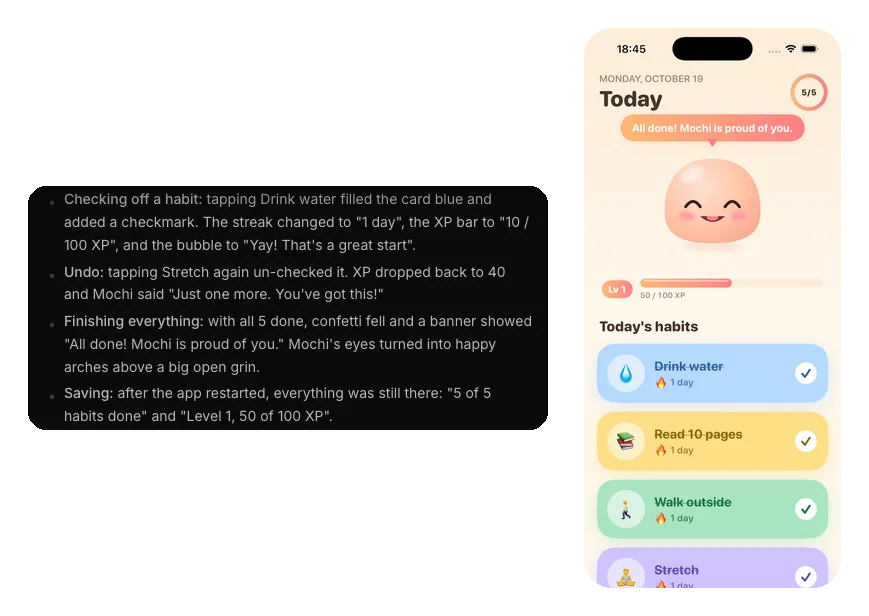
On October 19, 2026, we built Mochi in Vibecode. It's a habit tracker with a little pet that hops when you check off a habit. We picked iOS app, so the agent wrote it in Swift.
The first version was ready 16 minutes and 50 seconds after we pressed send. Then the agent tested it on its own. It checked off habits, undid one and restarted the app to make sure nothing was lost.
Four messages made the finished app. They used $21.06 of credits for the AI, the simulator and the builds, a little more than the $20 that comes with Plus each month.
How we picked
Vibecode makes this guide, and Vibecode is pick number one. We think it's the easiest way to a native iPhone app, but we're not neutral. Check the facts yourself.
On November 11, 2026, we read each product's own pricing page and docs. We noted what it builds, who submits to the App Store, how it handles Google Play, how you get your code and what it costs in USD.
We didn't run speed tests, and no product paid to be here. After Vibecode come the builders you talk to, then the visual editors, then the narrow picks: Apple only and web only.
The 8 tools, in detail
Best for: A native Swift iPhone app, built from a description and submitted to the App Store for you
You describe the app in a chat. An AI agent writes it in Swift and SwiftUI, running Claude Code on the model you pick. The app runs in a live iOS Simulator in your browser, so you don't need a Mac.
After each change, the agent opens the app and taps through what it built. When you're ready, Publish to App Store builds, signs, uploads and submits it for review. You need Apple's $99-a-year developer account.
Need Android too? Pick Android when you start a new app.
- What it builds
- Native Swift/SwiftUI iPhone and iPad apps, React Native (Expo) apps for iOS and Android, and web apps. You pick per project.
- Pricing
- Free first build; paid plans Plus $20/mo, Pro $50/mo, Max $200/mo
Strengths
- Vibecode submits your app for App Store review. Rork, Adalo, Draftbit and Nowa stop at uploading it.
- Your first build is free, and it's a working app you can tap, not a mockup.
- Your Swift app runs on iPhone and iPad.
Watch out for
- No built-in Google Play step. You download the Expo project on Pro, at $50 a month, and publish it yourself.
- Code download starts on Pro at $50 a month. FlutterFlow Studio includes it at $39.
- A big build can use more than the $20 of AI credits in Plus.
Rork
Best for: Swift for iPhone plus a native Kotlin app for Android, with Google Play built in
Rork is the closest match if you also need Android. Its agent writes Swift for iPhone, and it can add a separate Kotlin app for Android in the same project.
Rork builds on its own machines and uploads to App Store Connect. You finish the listing and submit it there. For Android, you create the Play Console listing once, and then the agent can move builds to production from the chat.
- What it builds
- Native Swift iPhone apps, native Kotlin (Jetpack Compose) Android apps and React web apps
- Pricing
- Free (design mode only); Pro $20/mo; Max from $200/mo
Strengths
- A real native app on both phones: Swift for iPhone, Kotlin for Android.
- Google Play releases from the chat, from internal testing to production.
- Two-way GitHub sync on paid plans.
Watch out for
- The free plan only designs. You need Pro, at $20 a month, to build a working app.
- You submit for App Store review yourself, in App Store Connect.
- iPad, Apple Watch and Vision Pro apps need Max, from $200 a month.
Sources: Rork plansRork publishingRork App Store guideRork AndroidRork code exportRork and Expo
Vibecode vs Rork, side by sideBest for: Simple database apps, like bookings or a directory, on both app stores
Adalo's AI, Ada, builds the screens, database and logic from your description. Then you adjust any screen on a canvas that shows them all at once.
One project goes to the App Store, Google Play and the web. Publishing starts on Builder at $65 a month. Adalo sends the iPhone build to App Store Connect and TestFlight, and you submit it for review there.
- What it builds
- iOS, Android and web apps from one project, built by its AI, Ada, and edited on a canvas
- Pricing
- Free (no publishing); Builder $65/mo ($52/mo yearly); Business $200/mo
Strengths
- Both app stores and the web from one project.
- A built-in database, with nothing to set up.
- Flat prices. Extra AI credits are optional.
Watch out for
- No code download on any plan. Business lets you view the code Ada writes.
- Builder covers two published apps. More need Business, at $200 a month.
- Apps are made from Adalo's own parts, so custom designs are harder.
Sources: Adalo pricingAdalo overviewAdalo App Store help
Vibecode vs Adalo, side by sideBest for: Beginners who like drag-and-drop blocks, with AI to start the app
Thunkable now starts with AI. You describe the app, and it makes the screens, layout and logic. Then you change things with AI, the visual editor or code. Its classic builder uses drag-and-drop logic blocks.
It publishes to the App Store, Google Play and the web. Its AI writes most of the store listing, builds the app and tries to submit it for review. You create the app in App Store Connect first, and finish there if Apple needs more.
- What it builds
- iOS, Android and web apps, built with AI, a visual editor and logic blocks
- Pricing
- Free (3 public projects); Builder $59/mo ($37/mo yearly) to publish
Strengths
- Friendly for beginners, with logic blocks instead of code.
- The App Store, Google Play and the web from one project.
- Builder is $37 a month if you pay yearly.
Watch out for
- Published apps go offline if your subscription ends.
- Free projects are public, with up to 5 screens each.
- Builder allows 1 live app. More need Advanced, at $189 a month.
Sources: Thunkable pricingThunkable iOS publishingThunkable store listingWhat is Thunkable?
Best for: React Native apps with a visual editor, AI agents and code you can take with you
Draftbit mixes a visual editor with AI agents. You can run Claude Code or Codex on your own account or on Draftbit's credits. Apps are Expo, so one codebase runs on iPhone, Android and the web.
From $15 a month you get code export and one-click publishing. Draftbit uploads iPhone builds to App Store Connect and Android builds to Google Play's internal testing. You submit for review and roll out yourself.
- What it builds
- React Native (Expo) apps for iOS and Android, plus web apps
- Pricing
- Free (web only); Standard $15/mo ($12/mo yearly); Pro $30/mo
Strengths
- Code export and GitHub from $15 a month.
- A visual editor and AI agents in one tool.
- Over-the-air updates on Pro, so small fixes skip store review.
Watch out for
- Apps are React Native, not native Swift.
- You submit for App Store review yourself.
- The free plan publishes to the web only.
Sources: Draftbit pricingDraftbit publishing
Nowa
Best for: Staying in Flutter, with a visual editor, AI help and your code on your own computer
Nowa is the top pick in the r/FlutterDev thread on FlutterFlow alternatives. It's a visual Flutter builder with AI that designs screens, builds logic and fixes bugs.
You can keep the project on your own computer and edit it in VS Code at the same time. Paid plans add code download and one-click builds. Nowa sends iPhone builds to TestFlight and makes the Google Play file, and you take it from there.
- What it builds
- Flutter apps for iOS, Android, web and desktop
- Pricing
- Free (Starter); Launch from $24/mo yearly; Scale $59/mo ($49/mo yearly)
Strengths
- Your Flutter skills and Dart code carry over.
- Work in Nowa and VS Code side by side, on every plan.
- Daily AI credits, even on the free plan.
Watch out for
- Still Flutter, so custom work means Dart.
- You submit for App Store review yourself.
- Code download and store builds need a paid plan.
Sources: Nowa pricingr/FlutterDev thread
Best for: Swift apps for iPhone, iPad, Apple Watch and Mac, and nothing else
Superapp writes native Swift from a chat, like Vibecode, and it also lists Apple Watch and Mac apps. It submits your app for App Store review with your own Apple account.
It's Apple-only by design, so there's no Android app. Roughly one credit builds one screen, and Pro includes 50 credits a month.
- What it builds
- Native Swift/SwiftUI apps for iPhone, iPad, Apple Watch and Mac. No Android.
- Pricing
- Free credits to start (most countries); Pro $25/mo; Business $50/mo; Max $100/mo
Strengths
- Submits your app for App Store review.
- Covers Apple Watch and Mac too.
- You own the Xcode project and can export it.
Watch out for
- No Android at all.
- 50 credits a month on Pro can go fast on a bigger app.
Sources: Superapp pricingSuperapp FAQSuperapp App Store publishing
Vibecode vs Superapp, side by sideBest for: Web apps that don't need an app store
Pick Lovable only if your product works fine in a browser. It builds web apps from a chat, with a database, sign-in and hosting included.
It doesn't make iPhone or Android apps. Its docs point you to a home-screen web app, or a Capacitor wrapper you build and submit outside Lovable. Your code syncs to GitHub on every plan, the free one included.
- What it builds
- Web apps and websites only
- Pricing
- Free (5 credits a day, up to 30 a month); Pro from $25/mo; Business from $50/mo
Strengths
- A database, sign-in and hosting come built in.
- Two-way GitHub sync on every plan.
- A free plan with daily credits.
Watch out for
- No iPhone or Android app.
- Free credits stop at 30 a month.
Sources: Lovable plansLovable publishingLovable GitHub sync
Vibecode vs Lovable, side by sideIs Rork or FlutterFlow better for an iPhone app?
As of November 2026, Rork is better if native means Swift. It writes Swift for iPhone and a separate Kotlin app for Android. FlutterFlow makes Flutter apps in Dart, which draw their own screens.
FlutterFlow is better if you want App Store review handled for you. Its new AI builder submits the app itself. Rork uploads the build, and you submit it yourself.
| Product | iPhone app | How you build | App Store review | Android | Paid from |
|---|---|---|---|---|---|
| Rork | Swift | Chat | You submit | Separate Kotlin app; you create the Play listing | $20/mo |
| FlutterFlow's AI builder | Flutter, in Dart | Chat | Submits for you | Same app; first Play upload by hand | $39/mo |
| FlutterFlow Studio | Flutter, in Dart | Visual editor | You submit | Same app; first Play upload by hand | $39/mo |
| Vibecode | Swift | Chat | Submits for you | React Native project; you upload | $20/mo |
Pick Rork for a real native app on both phones, with Google Play releases from the chat.
Pick FlutterFlow for one Flutter app on both stores. Its AI builder can't export your code, though. Studio can, from $39 a month, but it's a visual editor you have to learn.
Vibecode sits in between. It writes Swift like Rork and submits for review like FlutterFlow's AI builder. It starts at $20 a month with a free first build, but it has no Google Play step.
Sources: FlutterFlow or Studio?FlutterFlow pricingFlutterFlow submit for reviewStudio App Store deployFlutterFlow Play setupRork App Store guideRork Android
Why people leave FlutterFlow
When people say FlutterFlow, they usually mean FlutterFlow Studio, the visual editor. Here's why they look elsewhere, from FlutterFlow's own pricing and docs and the r/FlutterDev thread on alternatives.
- Studio takes time to learn. You place widgets, wire up actions and manage state yourself. FlutterFlow says Studio is for people who want their hands on the details.
- It's Dart, not Swift. Every FlutterFlow app is a Flutter app written in Dart. Flutter draws its own buttons and lists instead of using Apple's SwiftUI.
- Custom work gets hard. You can add custom code on any plan, but your own Dart classes and config files start on Basic. One r/FlutterDev user says that once things get custom, "you end up fighting it more than building."
- Your code costs extra. Code download starts on Basic at $39 a month, and GitHub on Pro at $80. The person who started that Reddit thread wanted out because export needed a paid plan.
- The plans add up. Paid plans are $39, $80 and $150 a month. Paying yearly saves 25%.
FlutterFlow's answer is its new AI builder, which now has the FlutterFlow name. You describe the app, and it builds it and can send it to both stores for review. But it's still Flutter, it builds for iPhone but not iPad, and you can't download its code.
Sources: FlutterFlow pricingFlutterFlow or Studio?What FlutterFlow can't doHow FlutterFlow releasesr/FlutterDev thread
Moving a FlutterFlow app to Vibecode
There's no import button, and Vibecode doesn't convert Flutter code. You rebuild the app by describing it. Mochi, our example above, had a working first version in under 17 minutes.
What you can bring:
- Your idea and your screens. Describe each screen in your first message, and add screenshots of your FlutterFlow app as reference images.
- Your data. Vibecode can connect to Supabase or Firebase, so the agent can use the backend you already have. Or start fresh with Vibecode Cloud.
- Your Apple developer account. Vibecode publishes with your own account, so the app stays yours.
What you can't bring:
- Your Dart code. The new app is written in Swift, so custom Flutter code gets rebuilt.
- Your Android build, if you pick an iOS app. For Android, pick Android when you start a new app. You publish it to Google Play yourself.
Start with your most important screen, then add one feature per message. When it works, publish it to the App Store.
Questions people ask
Is there a free FlutterFlow alternative?
Yes, with limits. Vibecode's first build is free, and it's a working app. Thunkable, Draftbit, Nowa and Lovable have free plans, and Adalo's free plan builds but doesn't publish. To publish to the App Store, you still need Apple's $99-a-year developer account.
Is FlutterFlow native?
FlutterFlow apps are real installed apps, not websites in a wrapper. But they're Flutter apps written in Dart, and Flutter draws its own screens. If native means Swift and Apple's SwiftUI, look at Vibecode, Rork or Superapp.
Can I export my code from FlutterFlow?
From FlutterFlow Studio, yes. Code download starts on Basic, at $39 a month, and GitHub on its $80 Pro plan. The new AI builder can't export code. Vibecode's $50 Pro plan downloads the Xcode, Expo or web project, and every plan can connect Claude Code or Cursor through the Vibecode MCP.
Which FlutterFlow alternative publishes to the App Store for you?
Vibecode and Superapp submit your app for App Store review, and so does FlutterFlow's new AI builder. Thunkable tries to, and you finish in App Store Connect if Apple needs more. Rork, Adalo, Draftbit and Nowa get the build to Apple, and you submit it there. All of them need Apple's $99-a-year developer account.
Is there a FlutterFlow alternative for React Native?
Yes. Draftbit is the closest match, with a visual editor and AI agents that build Expo apps, which are React Native. Vibecode builds React Native apps for iPhone and Android from a chat. Rork no longer starts new React Native projects and writes Swift and Kotlin instead.
Does Vibecode build React Native or native Swift apps?
Both. Pick iOS app and Vibecode writes native Swift and SwiftUI, not React Native or a web view. For one app on iPhone and Android, pick Android when you start. Some sites still call Vibecode React Native only, which is out of date.
What do people on Reddit use instead of FlutterFlow?
In the r/FlutterDev thread on FlutterFlow alternatives, the top answer is Nowa, a visual Flutter builder. Others suggest Flutterviz, or just learning Flutter. If you'd rather describe your app than build it by hand, try an AI builder like Vibecode or Rork.
Is there an open-source FlutterFlow alternative?
Flutter, the framework under FlutterFlow, is free and open source. With it, you write the Dart code yourself in an editor like VS Code. Nowa can help there, since it works on a local Flutter project side by side with VS Code.
About the editorial team
Vishal is a product engineer at Vibecode. Before Vibecode he did product engineering at EarnIn and co-founded Ivella (YC S21), a banking app for couples. He studied computer science at Duke.