
Table of contents
TL;DR
How can a small business get an app without hiring a developer?
Pick the builder by who the app is for. For a branded iPhone app your customers download from the App Store, such as bookings, a loyalty card, order-ahead or a client portal, Vibecode is the best choice. You describe the app, and it builds, tests and submits it for Apple's review. If you sell on Shopify, your store can be listed free in Shop, Shopify's shopping app. For staff apps built on a spreadsheet, use Glide or Google AppSheet. As of October 2026, Vibecode Plus is $20 a month, and Apple charges $99 a year to publish.
The longer answer
Start with who will use the app. If it's for your customers, you want your own app in the App Store, with your name and icon on their home screen, so regulars can book, order ahead or collect stamps. Vibecode builds that from a plain-English description as a native iPhone app, adds customer accounts and a database with Vibecode Cloud, and submits the app for Apple's review with your developer account. If you'd rather set up each screen yourself, Adalo and GoodBarber are no-code builders that publish to the App Store and Google Play.
If you sell online with Shopify, use what Shopify already gives you before you build anything. Stores that meet Shop's merchant guidelines are listed in Shop, Shopify's free shopping app for iPhone and Android, where customers pay with Shop Pay and track their orders. For an app under your own brand, the Shopify App Store lists about 110 mobile app builders from other companies.
If the app is for your staff, such as stock counts, job tracking or a schedule, skip the app stores. Glide, Google AppSheet and Softr turn a spreadsheet or database you already keep into an app your team opens on their phones, with no store review. Prices below are in USD and were checked on each product's own site on October 29, 2026.
Quick comparison
Prices are each product's published USD list price, checked on .
| Tool | Best for | What it builds | Pricing |
|---|---|---|---|
| 1. Vibecode | A branded iPhone app for your customers: bookings, a loyalty card, order-ahead or a client portal | Native Swift iPhone and iPad apps, React Native (Expo) apps for iOS and Android, and web apps | Free first build; paid plans Plus $20/mo, Pro $50/mo, Max $200/mo |
| 2. Shopify | Online stores already selling on Shopify | A store page in Shop, Shopify's shopping app; branded store apps come from third-party builders in the Shopify App Store | Shop channel free, with no marketplace fees; Shopify plans from $39/mo ($29/mo billed yearly); app builders priced by each developer |
| 3. Adalo | A simple customer app you lay out yourself, for the App Store and Google Play | Native iOS and Android apps and web apps from one visual project | Free (test apps, 500 records per app); Builder $65/mo ($52/mo billed yearly), 2 published apps; Business $200/mo ($160 yearly) |
| 4. GoodBarber | Shop and service apps with ready-made add-ons for loyalty, booking and click and collect | Native iOS and Android apps plus a progressive web app, from one setup | 30-day free trial; content apps from $30/mo, shop apps from $40/mo (billed yearly); App Store and Google Play from Premium ($55 or $70/mo billed yearly) |
| 5. Glide | Staff apps built on a spreadsheet you already keep | Business apps for desktop and phone, built from a spreadsheet or a prompt; they run in the browser | Free (no published apps); Basic $25/mo; Plus $50/mo; Pro $125/mo (from 5 users); Enterprise custom |
| 6. Google AppSheet | Staff apps for businesses on Google Workspace | Business apps on spreadsheets and databases, used in the AppSheet app on phones or in a browser | Free to build and test with up to 10 users; Starter $5, Core $10, Enterprise Plus $20 per user/mo; Core is in most paid Google Workspace plans |
| 7. Softr | Client portals and internal tools on your business data | Business web apps such as client portals, internal tools and CRMs; an installable PWA on upper plans | Free; Basic $25/mo ($19 billed yearly); Pro $119/mo ($99); Business $395/mo ($329); Enterprise custom |
| 8. FlutterFlow | A business with someone ready to learn a pro tool, or an app a developer will take over | Flutter (Dart) apps for iOS, Android, web and desktop from one project | Free (up to 2 projects); Basic $39/mo; Growth $80/mo first seat; Business $150/mo first seat; about 25% off yearly |
| 9. Base44 | A web app for your business with the backend included | Web apps; store apps wrap the published web app in a web view | Free (25 message credits/mo); paid from $16/mo billed annually (Starter); store files from Builder ($40/mo billed annually) |
A real example: a coffee shop app in three messages
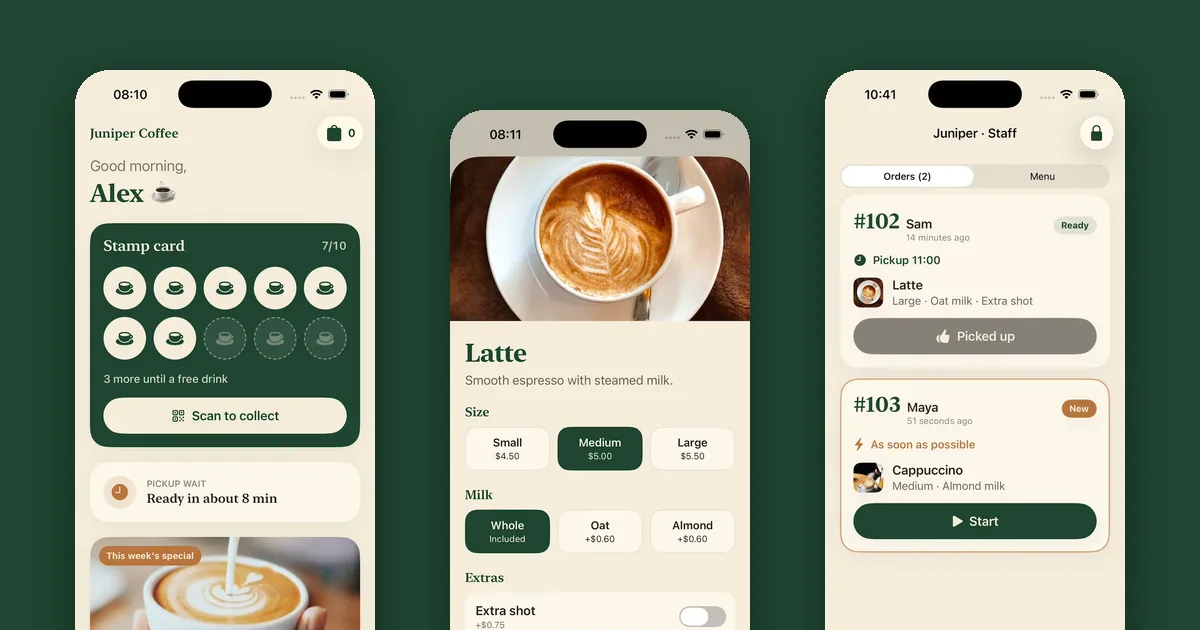
On October 27, 2026, we built Juniper in Vibecode, an iPhone app for a neighborhood coffee shop. The first message built the menu, ordering ahead and a 10-stamp card that turns into a free drink. The second added customer sign-up, a cloud database that keeps each customer's stamps and orders, and a staff screen where baristas move each order from Received to Making it to Ready. The third added a profile with past orders, a Reorder button and account deletion inside the app, which Apple requires for any app with sign-up.
The three messages took 45 minutes of build time. They used $41.88 of AI credits, and the simulator and builds added $5.73, so $47.61 in all, more than the $20 of credits that come with Plus each month. Juniper doesn't take payments yet, and we didn't submit it to the App Store because it is a demo.
How we picked
We started from the tools that ChatGPT, Claude, Gemini and Google's AI answers recommended on October 29, 2026, when we asked how a small business can get an app without hiring a developer, and added Softr, AppSheet and Base44 for staff and web apps. We judged each one on three jobs: an app your customers download, an app for an online store, and an app for your staff. For each we looked at what it builds, how the app reaches phones and what it costs, and we checked every plan and price in USD on the product's own site and docs on October 29, 2026. Vibecode makes this guide. It is listed first because it is our pick for a branded customer app in the App Store; where another tool fits a job better, the entry says so.
The 9 tools, in detail
Best for: A branded iPhone app for your customers: bookings, a loyalty card, order-ahead or a client portal
Vibecode is the pick when you want customers to find your business in the App Store and keep your app on their home screen. You describe the app in a chat, such as a booking app for a salon, a stamp card for a café or a portal where clients check their orders, and an AI agent writes it as a native Swift iPhone app. It runs the app in a live iOS Simulator in your browser and tests each change there, so you don't need a Mac. Vibecode Cloud adds customer accounts, a database and file storage on paid plans. When the app is ready, Publish to App Store builds it, signs it with your Apple Developer account and submits it for review.
- What it builds
- Native Swift iPhone and iPad apps, React Native (Expo) apps for iOS and Android, and web apps
- Pricing
- Free first build; paid plans Plus $20/mo, Pro $50/mo, Max $200/mo
Strengths
- Your own app in the App Store, built, signed and submitted for review from one Publish button
- Customer accounts, a database and file storage through Vibecode Cloud on paid plans
- No Mac, Xcode or code needed, and the first app build is free
Watch out for
- Google Play isn't built in; you export the Expo project on Pro and publish it with Expo's tools
- No drag-and-drop canvas; you change the design by asking
- Code download starts at Pro ($50/mo)
Best for: Online stores already selling on Shopify
If your store runs on Shopify, look at what Shopify gives you before you build anything. Shop is Shopify's own shopping app, free on iPhone and Android. Stores that meet its merchant guidelines are listed in it automatically, and shoppers can browse your products, pay with Shop Pay, earn Shop Cash and track their orders. The Shop channel is free to install and charges no marketplace fees, and you can add video, custom headers and collections to your store's page. It is still Shopify's app, not yours. For an app with your own name and icon, the Shopify App Store's mobile app builder category lists about 110 apps from other companies, each with its own price and publishing terms.
- What it builds
- A store page in Shop, Shopify's shopping app; branded store apps come from third-party builders in the Shopify App Store
- Pricing
- Shop channel free, with no marketplace fees; Shopify plans from $39/mo ($29/mo billed yearly); app builders priced by each developer
Strengths
- Free, with no marketplace fees, if your store already runs on Shopify
- Customers pay with Shop Pay and track orders in an app they may already have
- About 110 mobile app builders in the Shopify App Store for an app under your own brand
Watch out for
- Shop is Shopify's app, so your store sits beside other brands
- A branded app is a second subscription, from a third-party developer
- Only for Shopify stores, in countries where Shopify Payments is supported
Best for: A simple customer app you lay out yourself, for the App Store and Google Play
Adalo is a no-code builder that now starts with AI. You describe the app, its assistant, Ada, builds the screens, the database and the logic, and you keep changing it by asking Ada or editing the canvas. One project becomes an iPhone app, an Android app and a web app, and every project comes with a hosted database. Adalo compiles and signs the store builds and walks you through App Store Connect and Google Play Console with your own developer accounts. Adalo's own site lists small-business apps built with it, such as café pre-ordering with loyalty perks and salon booking. Paid plans have no usage-based charges apart from optional AI credits.
- What it builds
- Native iOS and Android apps and web apps from one visual project
- Pricing
- Free (test apps, 500 records per app); Builder $65/mo ($52/mo billed yearly), 2 published apps; Business $200/mo ($160 yearly)
Strengths
- Ada drafts the app, and you fine-tune it on a visual canvas
- One project for the App Store, Google Play and the web
- Flat plans with no usage-based charges, apart from optional AI credits
Watch out for
- Publishing starts at Builder, $65 a month for two apps
- Analytics, crash monitoring and translations are paid add-ons on Builder
Best for: Shop and service apps with ready-made add-ons for loyalty, booking and click and collect
GoodBarber is a no-code builder that makes three versions of your app from one setup: a native iOS app, a native Android app and a progressive web app. It sells two kinds of app. eCommerce apps are for shops, food stores, restaurants and delivery, with add-ons such as click and collect and a points-based loyalty program. Content apps suit service businesses such as gyms, clinics and law firms, with add-ons such as appointment booking and a stamp-style loyalty card. You set the app up in GoodBarber's back office and preview the native version with its My GoodBarber app. Publishing to the App Store and Google Play needs the Premium plan or higher and your own developer accounts. You can submit yourself or pay GoodBarber's team to do it, at $50 for 5 publications.
- What it builds
- Native iOS and Android apps plus a progressive web app, from one setup
- Pricing
- 30-day free trial; content apps from $30/mo, shop apps from $40/mo (billed yearly); App Store and Google Play from Premium ($55 or $70/mo billed yearly)
Strengths
- Native iOS and Android apps plus a PWA from one setup
- Add-ons for loyalty cards, appointment booking and click and collect
- No commission on your sales, and a 30-day free trial without a card
Watch out for
- App Store and Google Play need Premium, $55 a month billed yearly for content apps or $70 for shops
- Many features are monthly add-ons, such as booking ($15) or a loyalty card ($8) on Premium
Best for: Staff apps built on a spreadsheet you already keep
Glide turns the Excel files and Google Sheets your business already runs on into apps for your team. In GlideOS, its current builder, you drop in a spreadsheet and say what you need, and an AI agent builds a working app for desktop and phone, such as an inventory tracker, a delivery route planner or a simple CRM. The sheet stays the source, so a change logged on a phone in the field shows up in the back office. Glide apps run in the browser, and Glide's help center says they can't be published to the App Store or Google Play, so Glide fits staff and partners better than customers.
- What it builds
- Business apps for desktop and phone, built from a spreadsheet or a prompt; they run in the browser
- Pricing
- Free (no published apps); Basic $25/mo; Plus $50/mo; Pro $125/mo (from 5 users); Enterprise custom
Strengths
- Fastest path from an existing spreadsheet to a working app
- An AI agent builds the first version from your sheet
- Free plan to try it with your own data
Watch out for
- Can't be published to the App Store or Google Play
- The free plan can't publish, and public apps start at Plus ($50/mo)
Best for: Staff apps for businesses on Google Workspace
AppSheet is Google's no-code tool for turning spreadsheets and databases into apps for a team. If your business already pays for Google Workspace, you may have it already, because AppSheet Core is included in most paid Workspace plans, and Workspace users can build with AI. You can build and test for free with up to 10 users for as long as you like. Your team runs the app inside Google's AppSheet app on their phones, or opens it in a browser. A branded app under your own name in the App Store or Google Play is possible, but it needs a Core license for every user, 10 at least, or Publisher Pro for apps without sign-in.
- What it builds
- Business apps on spreadsheets and databases, used in the AppSheet app on phones or in a browser
- Pricing
- Free to build and test with up to 10 users; Starter $5, Core $10, Enterprise Plus $20 per user/mo; Core is in most paid Google Workspace plans
Strengths
- Free to build and test with up to 10 users, with no time limit
- Included in most paid Google Workspace plans
- Barcode scanning and NFC from the Core plan
Watch out for
- Staff open your app inside Google's AppSheet app, not one with your name
- Branded store apps need Core for every user (10 minimum), and iPhone builds still say 'Powered by AppSheet'
- Priced per user, guests included, so the cost grows with your team
Best for: Client portals and internal tools on your business data
Softr builds client portals and internal tools on top of your data. Describe the app and its AI Co-Builder creates the database, pages, user roles and logic, which stay editable with the same visual controls. A client portal is the most common place to start. Clients sign in to see their own projects, files or invoices, and your team works from the same data. Softr has its own database and connects to Airtable, Google Sheets and Notion on every plan. On phones the app installs as a progressive web app on upper plans, and Softr's docs say its apps can't be published to the App Store or Google Play.
- What it builds
- Business web apps such as client portals, internal tools and CRMs; an installable PWA on upper plans
- Pricing
- Free; Basic $25/mo ($19 billed yearly); Pro $119/mo ($99); Business $395/mo ($329); Enterprise custom
Strengths
- AI Co-Builder drafts the database, pages and user roles
- Sign-in, user roles and permissions built in
- Its own database, or Airtable, Google Sheets and Notion on every plan
Watch out for
- No App Store or Google Play apps; mobile is a PWA on upper plans
- Basic covers 5 team and 5 client users; more need Pro ($99/mo billed yearly)
Best for: A business with someone ready to learn a pro tool, or an app a developer will take over
FlutterFlow is the most capable visual builder for mobile apps. You assemble screens from widgets, wire up logic in a visual action editor and connect Firebase or Supabase for data. It generates a Flutter project in Dart, so one app runs on iPhone, Android, the web and desktop. From the $39 Basic plan you can download the source code and deploy to the App Store in one click, then submit for review in App Store Connect. For a small business it makes sense when someone on the team will learn it, or when a developer will take the app over later.
- What it builds
- Flutter (Dart) apps for iOS, Android, web and desktop from one project
- Pricing
- Free (up to 2 projects); Basic $39/mo; Growth $80/mo first seat; Business $150/mo first seat; about 25% off yearly
Strengths
- One project for iOS, Android, web and desktop
- Source code download from Basic ($39/mo)
- Fine-grained control over every widget, layout and action
Watch out for
- A real learning curve; it is closer to a developer tool than a simple builder
- Data lives in Firebase, Supabase or your own API, which you set up
- You add the listing and submit for review in App Store Connect yourself
Best for: A web app for your business with the backend included
Base44 builds web apps from a prompt with the backend and database included, plus a visual editor. It suits internal tools, client portals and simple web apps that customers open from a link. For phones, Base44 wraps your published web app in a native web-view shell, scans it against store guidelines and generates iOS and Android files on the Builder plan and up. You then submit them in your own App Store Connect and Google Play Console accounts. Its docs warn that Apple and Google reject apps that sell digital content through a payment provider such as Stripe, and in-app purchases aren't available yet.
- What it builds
- Web apps; store apps wrap the published web app in a web view
- Pricing
- Free (25 message credits/mo); paid from $16/mo billed annually (Starter); store files from Builder ($40/mo billed annually)
Strengths
- Backend and database included on every plan
- Free plan with 25 message credits a month
- Generates App Store (IPA) and Google Play (AAB) files from the editor
Watch out for
- Store apps are a web view around the web app, which Apple's guideline 4.2 looks at closely
- Store files need Builder ($40/mo billed annually) or higher
What a small-business app costs
Plan for three costs: the builder, Apple and Google. A plan that publishes to the App Store costs $20 a month on Vibecode Plus, $39 on FlutterFlow Basic, $55 to $70 a month billed yearly on GoodBarber Premium, and $65 on Adalo Builder, or $52 billed yearly. Apple's Developer Program is $99 a year. Google Play charges $25 once, and a new personal account must run a closed test with at least 12 testers for 14 days before its app can go public.
Apps for staff skip the stores, so they skip those fees too. Glide Basic is $25 a month, Softr Basic is $19 a month billed yearly, and AppSheet is $5 per user a month, or free while you test with up to 10 people. AppSheet Core is already included in most paid Google Workspace plans.
Any of these costs far less than hiring. Clutch says most app development projects reviewed on its site cost $10,000 to $49,999, and that a mobile app project usually takes about 11 months.
What the App Store asks of a business app
To show your business as the seller, enroll in Apple's Developer Program as an organization. Apple asks for a D-U-N-S Number, a legal entity (not a trade name or DBA) and a public website on your own domain, and it shows your organization's name as the seller on the App Store. The membership is $99 a year either way.
Apple also reviews what the app does. Guideline 4.2 turns away apps that are little more than a repackaged website, and any app that lets people create an account must let them delete it inside the app. Guideline 4.2.6 says apps made with a template or an app generation service must be submitted by the business that provides the content, not by the service. Vibecode, Adalo, GoodBarber, FlutterFlow and Base44 all publish through your own developer account.
If customers pay in the app for a coffee, a haircut or anything else used outside the app, Apple requires a payment method other than in-app purchase, such as Apple Pay or a card. Digital extras that unlock features in the app, such as a subscription, must use Apple's in-app purchase.
Questions people ask
Can I make an app for my small business with no tech background?
Yes. With an AI app builder you describe the app in plain English and change it by asking, so you never see code. Vibecode builds and tests a native iPhone app that way and submits it to the App Store. If you'd rather set up each screen yourself, Adalo and GoodBarber are no-code builders that publish to both app stores. For an app only your staff use, Glide and Google AppSheet start from a spreadsheet you already keep.
How much does it cost to make an app for a small business?
Plan for the builder's plan, Apple's $99 a year and, for Android, Google Play's one-time $25. As of October 2026, App Store publishing starts at $20 a month on Vibecode Plus, $39 on FlutterFlow Basic, $55 to $70 billed yearly on GoodBarber Premium and $65 on Adalo Builder. Staff apps skip the store fees, and AppSheet is free while you test with up to 10 people. Clutch says most agency app projects cost $10,000 to $49,999.
What's the best way to add a mobile app to a small online store?
If your store runs on Shopify, start with Shop, Shopify's free shopping app. Stores that meet its merchant guidelines are listed automatically, and there are no marketplace fees. For an app under your own brand, pick one of the mobile app builders in the Shopify App Store. For a store on another platform, GoodBarber's shop apps start at $40 a month billed yearly, and its Premium plan ($70 billed yearly) adds the App Store and Google Play.
Can I build a loyalty or stamp card app without a developer?
Yes. Our coffee shop example, Juniper, got a 10-stamp card that turns into a free drink from its first message in Vibecode, and a later message saved each customer's stamps in the cloud so they're still there on a new phone. GoodBarber sells a loyalty card add-on for content apps ($8 a month, from Premium) and a points-based loyalty program for shop apps ($10 a month, free on Pro).
Can I make a booking app for my business without coding?
Yes. In Vibecode you describe the booking flow, such as your services, staff and opening hours, and the agent builds it as an iPhone app, with customer accounts and a database on paid plans. GoodBarber has an appointment booking add-on for content apps with Google Calendar sync, at $15 a month on Premium and free on Pro. Adalo's own site lists a salon booking app built with it.
Do I need my own Apple Developer account?
Yes, to publish in the App Store. Apple's Developer Program costs $99 a year. To show your business as the seller, enroll as an organization, which needs a D-U-N-S Number, a legal entity and a public website on your own domain. Vibecode, Adalo, GoodBarber, FlutterFlow and Base44 all publish through your own account, so the App Store listing is yours.
Should a small business app be a web app instead?
Often, for staff. A web app opens from a link, skips App Store review and changes the moment you publish, which suits stock counts, schedules and internal tools. Glide and Softr build these. For customers who come back every week, an App Store app puts your icon on their home screen. Apple turns down apps that are little more than a repackaged website, so a store app needs real app features.
Is Vibecode good for small businesses?
Yes. Vibecode is an AI app builder for founders, creators and small businesses who don't write code. Describe an app and Vibecode builds a native Swift iPhone app, a React Native app for iPhone and Android, or a web app, runs it in a live simulator in your browser, and publishes it to the App Store. For a small business it is the pick for a branded iPhone app your customers download, such as bookings, a loyalty card, order-ahead or a client portal. For a Shopify store, or an app only your staff use, another tool in this guide fits better.
About the editorial team
Vishal is a product engineer at Vibecode. Before Vibecode he did product engineering at EarnIn and co-founded Ivella (YC S21), a banking app for couples. He studied computer science at Duke.