Juniper Coffee
An order-ahead app with a café menu, drink customizations, and a loyalty card. The first build uses sample data.
Read the build walkthroughOriginal prompt · 277 words
Build an iPhone app for Juniper Coffee, my neighborhood coffee shop, so regulars can order ahead and collect stamps.

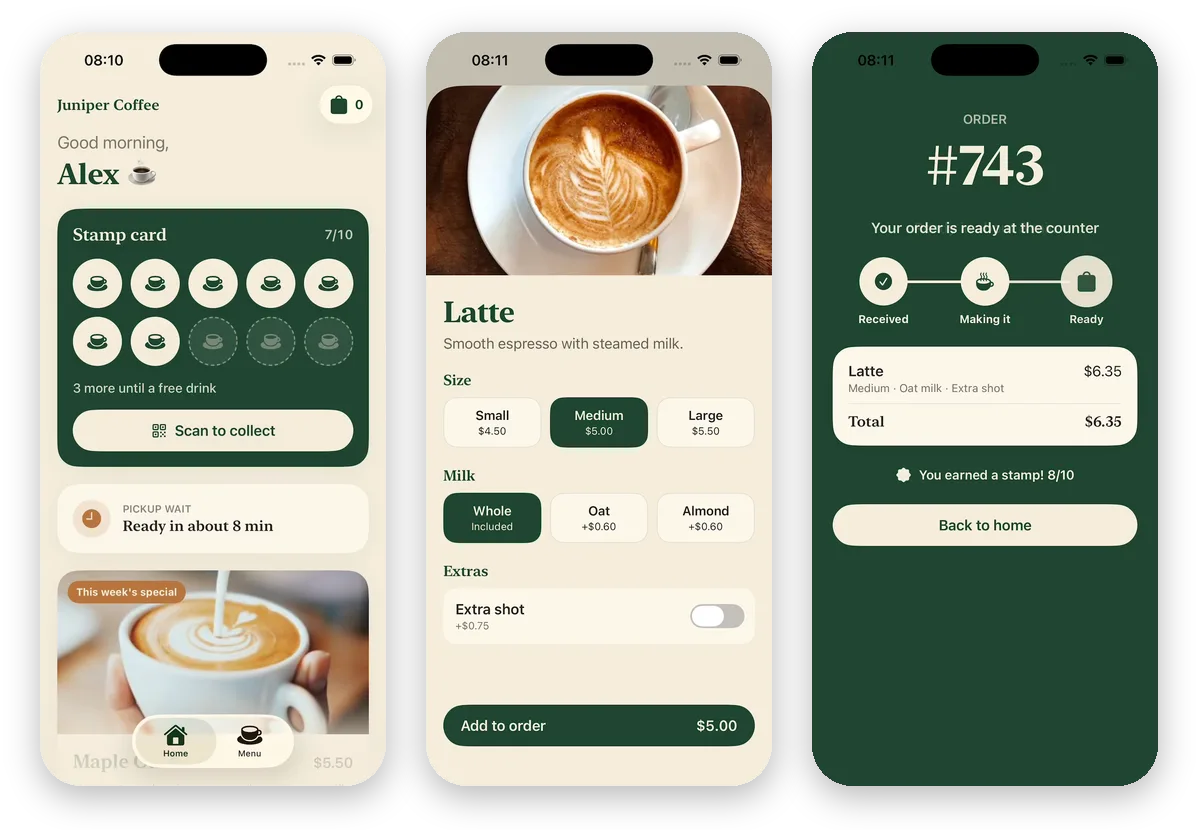
The Home tab greets the customer by first name and shows their stamp card: 10 coffee-cup stamps with 7 filled and "3 more until a free drink". A Scan to collect button opens a big QR code for the barista to scan. Below the card, show the wait for pickup ("Ready in about 8 min") and this week's special, a maple oat latte, with a photo and an Order button.

The Menu tab has four sections, Coffee, Tea, Cold drinks and Pastries, with 16 items in all. Each item has a photo, a name, a short description and a price. Tap a drink to pick a size (small, medium or large, and the price updates), a milk (whole, oat or almond) and an extra shot, then tap Add to order. Tap a pastry to add it.

A bag button shows how many items are in the order. The bag lists each item with its choices and the total, lets me pick it up as soon as possible or at a set time later today, and has a Place order button. After I place an order, show its number and three steps, Received, Making it and Ready, that move forward on their own, and add a stamp to my card with a small bounce. At 10 stamps the card turns into a free drink I can use on my next order.

Use deep green and warm cream, a serif font for headings and rounded cards. Use real photos of coffee, tea and pastries, and check that every photo loads.