
Table of contents
TL;DR
What is the best alternative to Cursor?
As of November 2026, the best Cursor alternative depends on what you want. Want a finished app instead of a code editor? Pick Vibecode.
Describe your app in a chat, test it in a live iPhone simulator and submit it to the App Store. Your first build is free!
If you write code, try Claude Code in your terminal or Devin Desktop, formerly Windsurf, for the closest editor. Both have $20 plans. GitHub Copilot starts at $10, and Zed is free with your own keys. Cursor Premium is $30 plus API fees.
- Vibecode: native iPhone apps from a chat, submitted to the App Store for you, first build free
- Claude Code: Anthropic's coding agent in your terminal, VS Code or JetBrains, from $20 a month
- Devin Desktop: Windsurf's new name, and the closest editor to Cursor, from $20 a month
- GitHub Copilot: AI in the editor you already use, from $10 a month
- OpenAI Codex: OpenAI's coding agent, included with ChatGPT Plus at $20
- Zed: a fast, open-source editor that's free with your own AI keys
- Replit: code and hosting in a browser tab, with Expo phone apps
The longer answer
Cursor is built for people who already write code. If you just wanted an app, you hit files, terminals and build errors before you ever see a working screen.
Vibecode skips all of that. Describe your app in a chat, and Vibecode writes it in native Swift. You test it in a live simulator in your browser and submit it to the App Store, with no Mac or Xcode.
It beats Cursor Premium on price, too. Your first build is free, and Plus is $20 a month with App Store submission and credits that roll over. Cursor's $8 Plus plan only runs Grok, and Premium with Claude and GPT is $30 a month plus API fees.
Prefer to write code? Claude Code runs in your terminal, Devin Desktop feels closest to Cursor and GitHub Copilot starts at $10 a month. Happy in Cursor? Connect the Vibecode MCP and let Vibecode handle the simulator and the App Store.
Quick comparison
Prices are each product's published USD list price, checked on .
| Tool | How you work | Phone apps | Free plan | Paid from |
|---|---|---|---|---|
| 1. Vibecode | Chat | Swift, submitted for review; React Native through Expo Launch | First build free | $20/mo |
| 2. Claude Code | Terminal, IDE or desktop app | You build and submit | No | $20/mo |
| 3. Devin Desktop | AI editor | You build and submit | Yes, light quota | $20/mo |
| 4. GitHub Copilot | Your editor | You build and submit | Yes | $10/mo |
| 5. OpenAI Codex | Desktop app; cloud, CLI and IDE on Plus | You build and submit | Desktop app only | $8/mo |
| 6. Zed | Editor | You build and submit | Yes, your own keys | $10/mo |
| 7. Replit | Chat and a browser editor | Expo; you submit | No | $20/mo |
A real example: Mochi, built without an editor
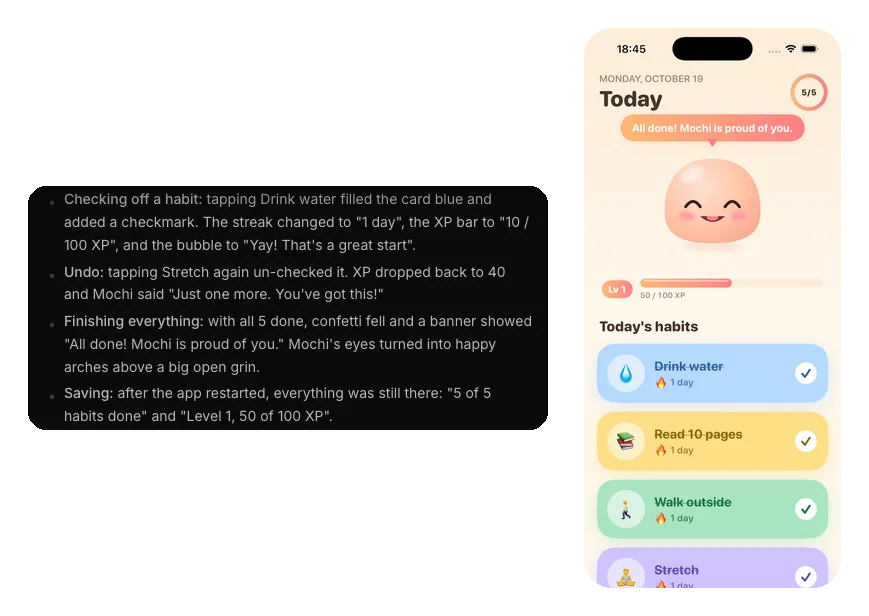
On October 19, 2026, we built Mochi in Vibecode. It's a habit tracker with a little pet that hops when you check off a habit. Nobody opened a code editor.
The first version was ready 16 minutes and 50 seconds after we pressed send. Then the agent tested it on its own. It checked off habits, undid one and restarted the app to make sure nothing was lost.
Four messages made the finished app. They used $21.06 of credits for the AI, the simulator and the builds.
How we picked
Vibecode makes this guide, and Vibecode is pick number one. We think it's the fastest way from an idea to an app, but we're not neutral. Check the facts yourself.
On November 25, 2026, we read each product's own pricing page and docs. We noted how you work in it, what it builds, how phone apps get to the App Store and what it costs in USD.
No product paid to be here. After Vibecode come the coding tools closest to Cursor, then the browser option.
The 7 tools, in detail
Best for: A finished iPhone app from a chat, with no editor, no Mac and no build setup
You describe the app in a chat. An AI agent writes it in Swift and SwiftUI, running Claude Code on the model you pick. The app runs in a live iOS Simulator in your browser, so you don't need a Mac.
After each change, the agent opens the app and taps through what it built. Publish to App Store builds, signs, uploads and submits it for review.
Already love Cursor? Keep it. Connect the Vibecode MCP, and Cursor edits your code while Vibecode handles the simulator and the App Store.
- What it builds
- Native Swift/SwiftUI iPhone and iPad apps, React Native (Expo) apps for iOS and Android, and web apps. You pick per project.
- Pricing
- Free first build; paid plans Plus $20/mo, Pro $50/mo, Max $200/mo
Strengths
- No editor, terminal or Xcode. You talk, and you get an app you can tap.
- App Store submission is built in. Cursor has no App Store step at all.
- Plus is $20 a month, and unused credits roll over.
Watch out for
- Built for apps, not general coding. Standalone backends, libraries and desktop apps belong in Cursor.
- Code download starts on Pro, at $50 a month.
- No built-in Google Play step. You publish the Expo project yourself.
Sources: Vibecode pricingVibecode MCP
Best for: Developers who want a coding agent in the terminal without switching editors
Claude Code is Anthropic's coding agent. It reads your codebase, edits files, runs commands and opens pull requests.
It runs in your terminal, in VS Code and JetBrains, in a desktop app and on the web. It even installs inside Cursor as an extension, so you can try it without leaving.
- What it builds
- Any code, in your own repository
- Pricing
- Not on Claude's free plan; Pro $20/mo ($17/mo yearly); Max $100/mo
Strengths
- Works in the terminal, so any editor is fine.
- Comes with a Claude Pro plan you may already pay for.
- Runs long tasks in the cloud while your laptop is closed.
Watch out for
- No free plan for Claude Code.
- Phone apps still need Xcode, signing and App Store Connect, done by you.
Sources: Claude pricingClaude Code overview
Best for: The closest switch from Cursor, an AI editor with agents built in
Devin Desktop is the new name for Windsurf. It keeps Windsurf's editor and adds a command center for running many agents at once.
Pro is $20 a month. It covers models from OpenAI, Claude, Gemini and SpaceXAI, plus Devin's cloud agents. You can even use your ChatGPT plan.
- What it builds
- Any code, in your own repository
- Pricing
- Free (light quota); Pro $20/mo; Max $200/mo; Teams $80/mo
Strengths
- Feels the most like Cursor, so there's little to relearn.
- Unlimited tab completions, even on the free plan.
- Runs on Mac, Windows and Linux.
Watch out for
- The new name and the agent-first layout take getting used to.
- Phone apps are still yours to build and submit.
Best for: AI inside the editor you already use, from $10 a month
Copilot isn't a new editor. It plugs into VS Code, Visual Studio, Xcode, JetBrains, Neovim, Eclipse and Zed.
Pro is $10 a month, a third of Cursor's Premium. It has unlimited completions and a coding agent you can hand a task to. It opens a pull request when it's done.
- What it builds
- Any code, in your own repository
- Pricing
- Free (2,000 completions a month); Pro $10/mo; Pro+ $39/mo; Max $100/mo
Strengths
- Unlimited completions on Pro.
- Works in Xcode, if you already build iPhone apps.
- A free plan with no card.
Watch out for
- The free plan's chat and agent use is limited.
- Agent mode works in fewer editors than chat does.
Source: Copilot plans
Best for: People already paying for ChatGPT who want a coding agent too
Codex is OpenAI's coding agent, and it comes with ChatGPT. Plus, at $20 a month, gets it on the web, in the CLI, in an IDE extension and on iPhone.
Free and Go get Codex in the ChatGPT desktop app while it rolls out.
- What it builds
- Any code, in your own repository
- Pricing
- In the desktop app on Free and Go ($8/mo); everywhere on Plus $20/mo; Pro from $100/mo
Strengths
- No extra bill if you already have ChatGPT Plus.
- Runs tasks in the cloud and in your terminal.
Watch out for
- Free and Go only get the desktop app.
- Like every coding agent, it won't publish your app for you.
Source: Codex pricing
Zed
Best for: A fast, open-source editor that's free if you bring your own AI keys
Zed is an open-source code editor built for speed. The free plan has no hosted AI, but it works without limits with your own API keys or agents like Claude Code and Codex.
Pro is $10 a month with $5 of tokens and unlimited edit predictions. Use beyond that costs the API price plus 10%.
- What it builds
- Any code, in your own repository
- Pricing
- Free with your own API keys; Pro $10/mo with $5 of tokens; Business $30 per seat/mo
Strengths
- Open source, and free forever with your own keys.
- Runs Claude Code and Codex inside the editor.
Watch out for
- Only $5 of hosted AI on Pro.
- Fewer extensions than VS Code-based editors.
Source: Zed pricing
Best for: Code, a database and hosting in one browser tab, with Expo phone apps
Replit is the middle ground. Its agent builds apps from a chat, and the code editor, database and hosting sit in the same tab. Nothing to install.
Its phone apps are Expo apps. Replit gets the build to App Store Connect, and you submit it for review there.
- What it builds
- Web apps, Expo (React Native) phone apps and code in many languages
- Pricing
- No free plan for new users; Core $20/mo ($18/mo yearly); Pro $100/mo
Strengths
- Nothing to install. Everything runs in the browser.
- Hosting and a database come built in.
Watch out for
- No native Swift. Phone apps are Expo.
- You submit for App Store review yourself.
Sources: Replit pricingReplit mobile appsReplit App Store submission
Vibecode vs Replit, side by sideWhy people leave Cursor
Most people leave Cursor for one of three reasons.
- You wanted an app, not an editor. Cursor writes code. Hosting it and getting it into the App Store are still up to you.
- The price moved. Cursor's $8 Plus plan now runs Grok models only. Claude, GPT and Gemini need Premium at $30 a month, and they bill at API prices on top.
- Usage runs out. Every plan shares one usage pool that refreshes weekly. Hit the limit and you wait or buy more.
If the first one is you, a coding tool won't fix it. Build your app in Vibecode instead. If it's price, Copilot Pro and Zed Pro are $10 a month and Devin Desktop Pro is $20. Cursor Premium is $30.
Source: Cursor pricing
Can Cursor build an iPhone app?
It can write the Swift code. Connected to Xcode 26.3 or later through Xcode's MCP bridge, it can also start builds and run tests.
But Xcode only runs on a Mac, so you need one. Signing the app, App Store Connect and the review submission are still on you.
Vibecode does all of it. It compiles Swift on cloud Macs and streams a live iOS Simulator to your browser. When you're ready, Publish to App Store submits it for review.
| Product | Needs a Mac | Live iPhone preview | App Store review | Paid from |
|---|---|---|---|---|
| Cursor | Yes, for Xcode | Xcode's simulator | You submit | $8/mo; $30 for Claude |
| Replit | No | Expo app | You submit | $20/mo |
| Vibecode | No | Simulator in your browser | Submits for you | $20/mo |
Every option needs Apple's $99-a-year developer account to publish.
Source: Cursor and Xcode
Is Windsurf or Cursor better?
Windsurf is now Devin Desktop. It's the closest thing to Cursor, so the choice comes down to price and models.
- Devin Desktop Pro is $20 a month and covers OpenAI, Claude, Gemini and SpaceXAI models.
- Cursor Premium is $30 a month, and those same outside models bill at API prices on top.
- Both have a free plan and apps for Mac, Windows and Linux. Cursor's cloud agents need Premium.
If you mainly use Claude or GPT, Devin Desktop costs less. If you like Cursor's agents and Grok models, stay put.
Sources: Devin pricingCursor pricing
Use Vibecode with Cursor
You don't have to pick one. Developers keep Cursor and use Vibecode as the phone-app pipeline.
- Connect the Vibecode MCP to Cursor on any plan.
- Cursor's agent reads and changes your Vibecode project, runs commands and follows its builds.
- Vibecode handles the simulator, the backend and the App Store submission.
Pro and Max can also download the full Xcode, Expo or web project.
Questions people ask
Is there a free Cursor alternative?
Yes. Devin Desktop, GitHub Copilot and Zed have free plans. Zed is free forever with your own API keys. If you want an app instead of an editor, Vibecode's first build is free.
What is the best Cursor alternative for non-coders?
Vibecode. Cursor assumes you can read code and set up builds yourself. In Vibecode you describe the app, watch it run in your browser and publish it to the App Store from a menu.
What replaced Windsurf?
Windsurf is now called Devin Desktop. Its makers say only the name and branding changed, and the editor is still there. It added a command center for running many agents at once.
Is Claude Code better than Cursor?
If you live in the terminal, yes. Claude Code works from your terminal, so it fits any editor. Cursor is the better pick if you want the agent inside a full editor. You can also run Claude Code inside Cursor.
Is GitHub Copilot cheaper than Cursor?
Yes. Copilot Pro is $10 a month, and Cursor's cheapest plan with Claude and GPT is $30. Copilot also has a free plan with 2,000 completions a month.
Can I use Vibecode with Cursor?
Yes. Connect the Vibecode MCP to Cursor on any plan. Cursor's agent can then change your Vibecode project and follow its builds, while Vibecode handles the simulator and the App Store.
Can Cursor publish an app to the App Store?
No. Cursor has no App Store step. A Swift app gets built and signed in Xcode on a Mac, and a React Native app can go through Expo's EAS cloud builds instead. For a Swift app, Vibecode builds, signs, uploads and submits it for review for you.
About the editorial team
Vishal is a product engineer at Vibecode. Before Vibecode he did product engineering at EarnIn and co-founded Ivella (YC S21), a banking app for couples. He studied computer science at Duke.