
Table of contents
TL;DR
What is the best alternative to Bolt.new?
As of November 2026, Vibecode is the best Bolt.new alternative for a phone app. Its AI writes native Swift and tests your app in a live iOS Simulator in your browser. Then it submits the app for App Store review.
Paid plans start at $20 a month vs. Bolt Pro at $25, and your first build is free. It builds React Native apps for iPhone and Android too.
Building a web app instead? Pick Lovable, Replit or v0. Pick Rork if you need native Android too, or Cursor if you write code.
- Vibecode: native Swift iPhone apps, submitted to the App Store for you, from $20/mo with your first build free
- Rork: Swift for iPhone plus a native Kotlin Android app, with Google Play built in
- Replit: Bolt's chat-plus-code feel, with a database, hosting and Expo phone apps
- Lovable: the closest swap for web apps, with a free plan
- v0: Next.js front ends with shadcn/ui, deployed to Vercel
- FlutterFlow: one Flutter app on both stores, sent for review from the tool
- Cursor: an AI code editor, if you'd rather own every line
The longer answer
Bolt is great for web apps. You chat, and it writes your code right next to an editor and terminal. It can build phone apps too, using Expo.
The hard part is getting that phone app into the App Store. Bolt has no App Store button. Its guide has you download the code, install Expo's tools and run terminal commands, for every update.
So pick by why you're leaving.
Want a real phone app? Pick Vibecode for native Swift and App Store submission. It's $0 on a new account! Rork adds native Android.
Tokens running out? Vibecode Plus is $20 a month, $5 under Bolt Pro, and unused credits roll over. Lovable shows what each message costs in credits.
Later prompts breaking the app? Vibecode's agent opens the app in the simulator and tests it after it builds.
Want to own every line? Cursor works in your own repository, and Lovable syncs to GitHub on every plan, free included.
Quick comparison
Prices are each product's published USD list price, checked on .
| Tool | Phone apps | App Store review | Google Play | Code export | Free | Paid from |
|---|---|---|---|---|---|---|
| 1. Vibecode | Swift, or React Native | Submits for you | You upload it | Pro, $50/mo | First build | $20/mo |
| 2. Rork | Swift and Kotlin | You submit | From the chat | GitHub, paid plans | Design only | $20/mo |
| 3. Replit | React Native (Expo) | You submit | No | In every project | 3-day trial | $20/mo |
| 4. Lovable | None, web only | No | No | GitHub, every plan | 5 credits a day | $25/mo |
| 5. v0 | None, web only | No | No | GitHub, every plan | 7 messages a day | $30/mo |
| 6. FlutterFlow | Flutter, in Dart | Sends for review | First release by hand | Studio only, from $39/mo | 2 projects, no store | $39/mo |
| 7. Cursor | Whatever you code | You do it all | You do it all | Your own repo | Limited plan | $8/mo |
A real example: Mochi, a native Swift app
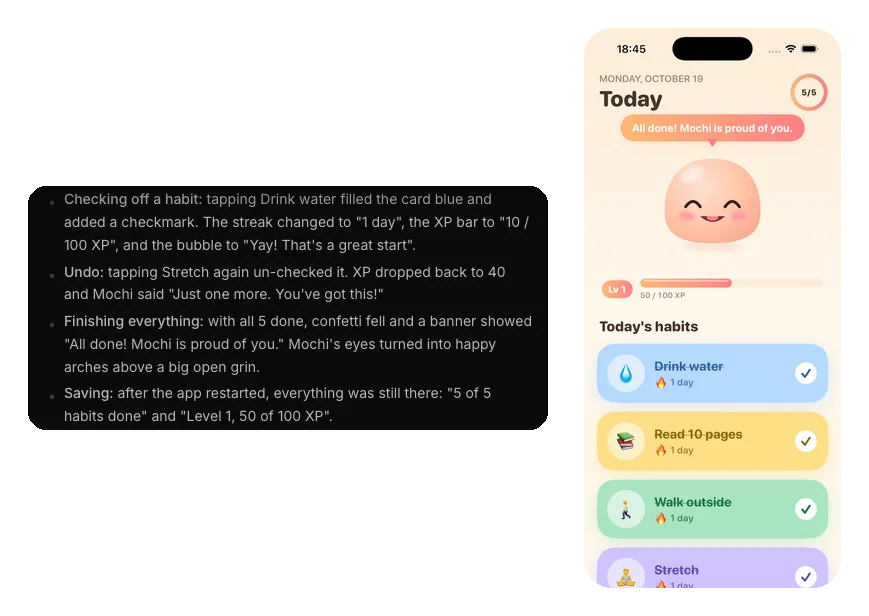
On October 19, 2026, we built Mochi in Vibecode. It's a habit tracker with a little pet that hops when you check off a habit. We picked iOS app, so the agent wrote it in Swift.
The first version was ready 16 minutes and 50 seconds after we pressed send. Then the agent tested it on its own. It checked off habits, undid one and restarted the app to make sure nothing was lost.
Four messages made the finished app, for $21.06 of credits covering the AI, the simulator and the builds.
How we picked
We make Vibecode, and it's our top pick for phone apps. We aren't neutral, so we link every source for you to check.
On November 25, 2026, we read each product's own pricing page and docs. We noted what it builds, who submits to the App Store, how it handles Google Play, how you get your code and what it costs in USD.
No product paid to be here.
The 7 tools, in detail
Best for: A native Swift iPhone app, built from a chat and submitted to the App Store for you
You describe the app in a chat, and an AI agent writes it in native Swift and SwiftUI on the model you pick. Want iPhone and Android? Start a React Native project instead.
Your app runs in a live iOS Simulator in your browser, so you don't need a Mac. After it builds, the agent opens the app in the simulator and tests it.
For a Swift app, one Publish to App Store button builds, signs, uploads and submits it for review. No Expo tools, no terminal.
- What it builds
- Native Swift/SwiftUI iPhone and iPad apps, React Native (Expo) apps for iOS and Android, and web apps. You pick per project.
- Pricing
- Free first build; paid plans Plus $20/mo, Pro $50/mo, Max $200/mo
Strengths
- Submits your app for App Store review. Bolt leaves you running Expo commands in a terminal.
- Native Swift for iPhone, tested in a live iOS Simulator with no Mac needed.
- $0 on a new account. Your first build is free, and it's a working app you can tap.
Watch out for
- No built-in Google Play step. You download the Expo project on Pro, at $50 a month, and publish it yourself.
- Code download starts on Pro. Bolt syncs to GitHub both ways.
- No terminal next to the chat, like Bolt has.
Sources: Vibecode pricingPublishing to the App StoreBolt GitHub sync
Rork
Best for: Native apps on both phones, with Swift for iPhone and Kotlin for Android
Rork is the pick if Android matters as much as iPhone. Its agent writes Swift for iPhone and a separate Kotlin app for Android.
Rork builds on its own machines and uploads to App Store Connect. You finish the listing and submit it there. For Android, you create the Play Console listing once. Then the agent can move builds to production from the chat.
- What it builds
- Native Swift iPhone apps, native Kotlin (Jetpack Compose) Android apps and React web apps
- Pricing
- Free (design mode only); Max from $20/mo
Strengths
- Real native code on both phones.
- Google Play releases from the chat, from internal testing to production.
- Two-way GitHub sync on paid plans.
Watch out for
- The free plan only designs. You need Max, from $20 a month, to build a working app.
- You submit for App Store review yourself, in App Store Connect.
Sources: Rork plansRork App Store guideRork AndroidRork code export
Vibecode vs Rork, side by sideBest for: A web app and its backend in one browser tab, with Expo phone apps on the side
Replit is the most Bolt-like pick if you want chat and code side by side. Its Agent builds the app, and you get an editor, a database and hosting in the same tab.
It makes phone apps with Expo too. Its Launch wizard builds the iPhone app and uploads it to App Store Connect. You submit it for review there. Google Play isn't supported yet.
- What it builds
- Web apps in almost any language, plus Expo (React Native) mobile apps
- Pricing
- 3-day Core trial for new builders; Core $20/mo ($18/mo yearly); Pro from $100/mo
Strengths
- A database, hosting and a code editor in one place.
- A guided upload to App Store Connect, with no terminal.
- Works in almost any language, not only JavaScript.
Watch out for
- New builders get a 3-day trial of Core, not a free plan.
- Phone apps are Expo only, and you submit for review yourself.
- No Google Play publishing.
Sources: Replit pricingReplit plansReplit App Store uploadReplit mobile apps
Vibecode vs Replit, side by sideBest for: Web apps and SaaS, if you don't need an app store
Lovable is the closest swap for web apps. It builds from a chat, with a database, sign-in and hosting included.
It meters by credits, not tokens, so you see what each message costs. Your code syncs to GitHub on every plan, the free one too.
It doesn't make iPhone or Android apps, so it's not the pick for the App Store.
- What it builds
- Web apps and websites only
- Pricing
- Free (5 credits a day, up to 30 a month); Pro from $25/mo; Business from $50/mo
Strengths
- A database, sign-in and hosting come built in.
- Git sync on every plan, free included.
- A free plan with daily credits.
Watch out for
- No iPhone or Android app.
- Free credits stop at 30 a month.
Sources: Lovable plansLovable credits
Vibecode vs Lovable, side by sidev0
Best for: A polished web front end, deployed to Vercel
v0 is Vercel's app builder. It's at its best on the look of a web app: pages, layouts and components.
You can edit visually in Design Mode, sync with GitHub on the free plan and deploy to Vercel in a click. Like Lovable, it doesn't build phone apps.
- What it builds
- Web apps and UI in React and Next.js
- Pricing
- Free ($5 one-time credits, 7 messages a day); Plus $30 per user/mo; Business $100 per user/mo
Strengths
- Next.js with shadcn/ui components, ready for Vercel.
- GitHub sync and Vercel deploys, free plan included.
Watch out for
- No iPhone or Android app.
- The free plan allows 7 messages a day.
Sources: v0 pricingv0 docs
Vibecode vs v0, side by sideBest for: One Flutter app on both app stores, with store review handled from the tool
FlutterFlow is two products now, on one plan. The new FlutterFlow is an AI builder you describe your app to. FlutterFlow Studio is the visual editor most people know.
The AI builder sends your app to Apple and Google for review from its Releases page. Your first Google Play release lands as a draft, and you start the rollout in Play Console.
- What it builds
- Flutter apps for iOS, Android and the web, from an AI builder or the visual FlutterFlow Studio
- Pricing
- Free (2 projects, no store deploys); Basic $39/mo ($29/mo yearly); Pro $80/mo; Max $150/mo
Strengths
- Both app stores from one project.
- The AI builder sends the app for review itself.
- Studio downloads your code from Basic, at $39 a month.
Watch out for
- The AI builder can't export your source code.
- Apps are Flutter, written in Dart, not Swift.
- No store deploys on the free plan.
Sources: FlutterFlow pricingFlutterFlow submit for reviewWhat FlutterFlow can't do
Vibecode vs FlutterFlow, side by sideBest for: Developers who want an AI agent in their own code, on their own computer
Cursor is for people who outgrew Bolt's browser tab and want the code on their own machine. It's a desktop code editor with an agent that edits files and runs commands.
You choose every part of the stack. That also means hosting, the database and the App Store are yours to set up.
- What it builds
- Any code in any language; no hosting or publishing
- Pricing
- Free; Plus $8/mo (Grok models only); Premium $30/mo; Super $100/mo; Ultra $200/mo
Strengths
- Works in any language and any codebase.
- Your code lives in your own repository.
Watch out for
- No hosting, database or App Store publishing.
- Claude, GPT and Gemini models are billed separately, by usage.
- iPhone apps still need a Mac with Xcode.
Source: Cursor pricing
Vibecode vs Cursor, side by sideCan Bolt.new build a mobile app?
Yes. Ask Bolt for a mobile app, and it uses Expo, which is React Native. You preview it on your phone with the Expo Go app.
Say "mobile app" in your first prompt. Bolt's docs say projects started for the web don't switch over to mobile easily.
Publishing is where it gets hard. Bolt has no App Store button. Its guide goes like this:
- Download the code and open it in an editor like VS Code.
- Install Node.js, Git and Expo's EAS tools, and log in to Expo.
- Run the build command, which sends the iPhone app to TestFlight.
- Fill in the listing in App Store Connect and submit it for review.
- For Android, download the build file and upload it in Google Play Console.
Every update repeats it. You download the new code from Bolt, then build and submit again.
| Product | iPhone app | How it reaches Apple | Who submits for review | Paid from |
|---|---|---|---|---|
| Bolt | React Native (Expo) | You download the code and run EAS | You | $25/mo |
| Replit | React Native (Expo) | Launch wizard uploads it | You | $20/mo |
| Rork | Swift | Rork builds and uploads it | You | $20/mo |
| Vibecode | Swift | One Publish button | Vibecode | $20/mo |
Bolt's route works if you're fine in a terminal. If you're not, that's the hard step.
In Vibecode, one button builds the app, signs it with your Apple account, uploads it and submits it for review. You still need Apple's $99-a-year developer account, just like on Bolt.
Sources: Bolt and ExpoExpoReplit App Store uploadRork App Store guide
What Bolt alternatives cost
Every tool meters usage its own way. Bolt counts tokens, the chunks of text the AI reads and writes. Most others count credits or messages.
- Bolt: free with 300K tokens a day, up to 1M a month. Pro is $25 a month and starts at 10M tokens. Unused Pro tokens roll over.
- Vibecode: your first build is free. Plus is $20 a month with $20 of AI credits, and credits roll over while your plan is active.
- Rork: Max starts at $20 a month for 100 credits. The free plan only designs screens.
- Replit: Core is $20 a month, or $18 paid yearly, with $20 toward its stronger models. New builders get a 3-day trial instead of a free plan.
- Lovable: free with 5 credits a day, up to 30 a month. Pro starts at $25 a month for 100 credits.
- v0: free with 7 messages a day. Plus is $30 per user a month with $30 of credits.
- FlutterFlow: Basic is $39 a month, or $29 paid yearly, with one AI allowance shared by both of its builders.
- Cursor: Plus is $8 a month for Grok models only, from a usage pool that refreshes weekly.
For a phone app, Vibecode costs less and ships it for you. Plus is $20 a month and includes App Store submission. Bolt Pro is $25 a month, and you still run the terminal tools yourself.
Sources: Bolt pricingVibecode pricingRork plansReplit pricingLovable plansv0 pricingFlutterFlow pricingCursor pricing
When to stay on Bolt
Bolt is still the better fit for some projects. Stay on Bolt if your app fits one of these:
- Your product is a web app. Bolt hosts it, with a custom domain on Pro.
- You like seeing the code. Bolt puts an editor and terminal next to the chat.
- You want your code in GitHub. Bolt syncs both ways, and commits every working change.
- You're fine running Expo's tools to publish a phone app.
Sources: Bolt pricingBolt GitHub sync
Moving a Bolt project to Vibecode
You don't import Bolt's code into Vibecode. Instead, you describe your app and add screenshots of your Bolt screens, and the agent writes a fresh Swift version. Mochi, our example above, had a working first version in under 17 minutes.
What you can bring:
- Your idea and your screens. Describe each screen in your first message, and add screenshots of your Bolt app as reference images.
- Your data. Vibecode can connect to Supabase or Firebase, so the agent can use the backend you already have. Or start fresh with Vibecode Cloud.
- Your Apple developer account. Vibecode publishes with your own account, so the app stays yours.
You can't bring Bolt's React code. An iOS app in Vibecode is written in Swift, so the screens get rebuilt.
Was your Bolt app an Expo app for both phones? Start a React Native project instead, for iPhone and Android from one app.
Start with your most important screen, then add one feature per message. When it works, publish it to the App Store.
Questions people ask
What is the best Bolt alternative for mobile apps?
Vibecode is the best pick for an iPhone app. It writes native Swift, tests it in a live iOS Simulator and submits it for App Store review. Your first build is free. For native Android too, pick Rork.
Is there a free Bolt alternative?
Yes. Vibecode is $0 on a new account, and your first build is a working app you can tap, not a mockup. For web apps, Lovable and v0 have free plans with daily limits, and Cursor has a free tier.
Is there an open-source Bolt alternative?
Yes. bolt.diy is an open-source fork of Bolt under the MIT license. You run it yourself and plug in the AI model you want, with your own API key. It builds web apps and Expo phone apps, and its team plans no new features.
Is Lovable better than Bolt?
For a web app without a code editor on screen, often yes. Lovable syncs to GitHub on every plan. Bolt is better if you want an editor and terminal. Lovable doesn't build phone apps, and Bolt's need Expo's terminal tools to reach the App Store, so pick Vibecode for an iPhone app.
Which Bolt alternative publishes to the App Store for me?
Vibecode submits your app for App Store review, starting at $20 a month. FlutterFlow's AI builder also sends apps for review from its Releases page, starting at $39 a month. Rork and Replit upload the build to App Store Connect, and you submit it there.
Does Vibecode build React Native or native Swift apps?
Both. Pick iOS app and Vibecode writes native Swift and SwiftUI, not React Native or a web view. For one app on iPhone and Android, start a React Native project. Some sites still call Vibecode React Native only, which is out of date.
About the editorial team
Vishal is a product engineer at Vibecode. Before Vibecode he did product engineering at EarnIn and co-founded Ivella (YC S21), a banking app for couples. He studied computer science at Duke.