
Table of contents
- How to make an iPhone app in 5 steps
- The classic way to make an iOS app: Xcode on a Mac
- Can you make an iPhone app for free?
- Can you make an iPhone app just for yourself?
- Can you make an iPhone app without coding?
- Can you make an iPhone app without a Mac?
- Can one app run on iPhone and Android?
- How long does it take, and what does it cost?
- Frequently asked questions
TL;DR
- This article walks through the exact steps of making an iPhone app. Follow along, or copy our prompt and build your own. It's $0 on a new account!
- We built Sip, a native Swift water tracker, in Vibecode from two prompts for $4.90 of credits. No Mac, no code.
- Publishing to the App Store needs Apple's $99 a year program, and starts on our $20 a month Plus plan.
- Prefer to code it yourself? Xcode on a Mac is free, and the steps are the same.
Here's how to make an iPhone app, or any iOS app, in 2026. There are two ways: describe it to an AI app builder, or write it in Swift with Xcode on a Mac.
Either way, you follow five steps:
- Describe the app. Say what each screen shows and what every tap does.
- Build it and test it. Tap through it in an iPhone simulator.
- Change what you don't like. Ask for it, or edit the code.
- Put it on your iPhone. Try it in your hand.
- Publish it to the App Store, with Apple's $99 a year program.
Most guides stop at a checklist. We timed a real build instead. Sip's first version took one prompt and 4 minutes and 53 seconds, with no Mac and no code.
Describe your app and build it for $0How to make an iPhone app in 5 steps
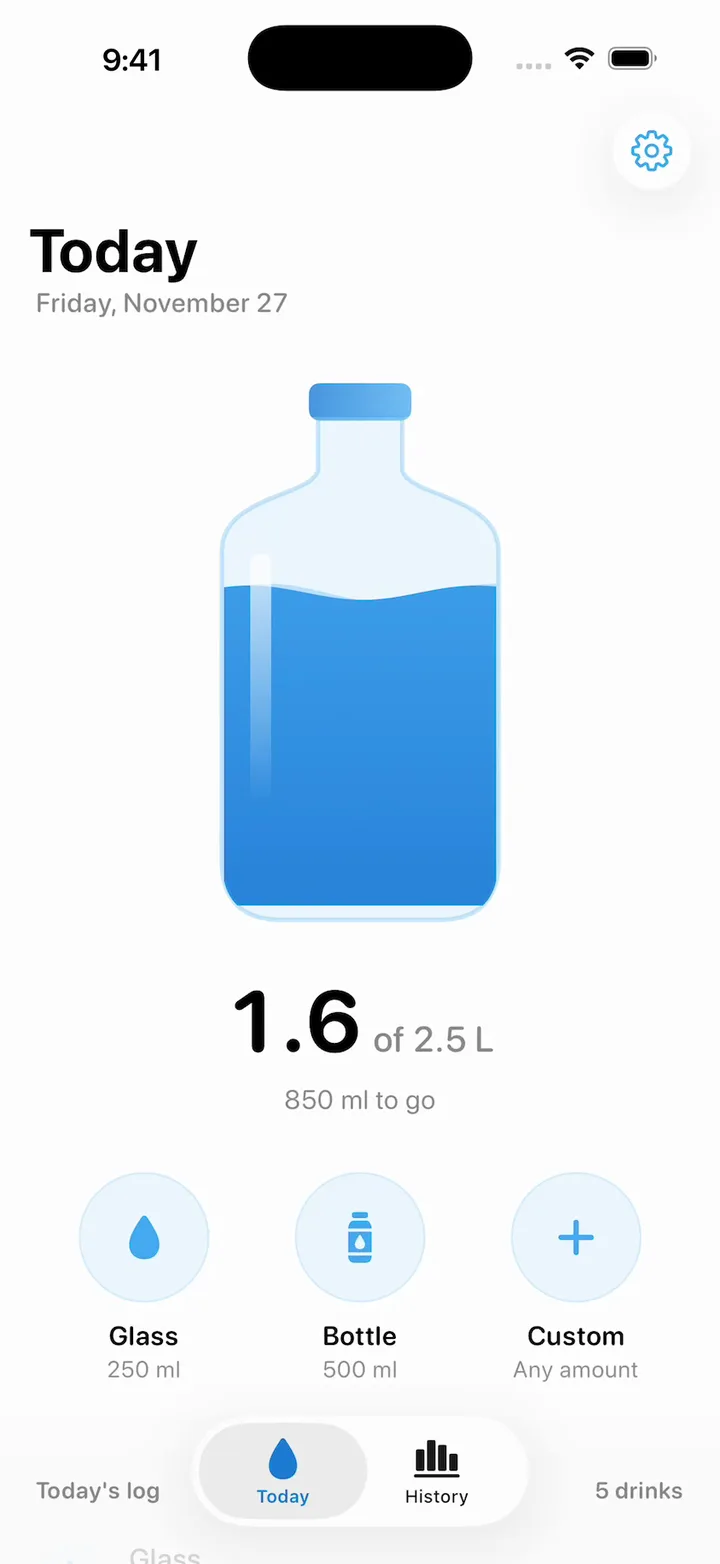
Here's how we made Sip in Vibecode on November 27, 2026. Every Sip screen below is from that build.
Step 1: Pick iOS app and describe your app
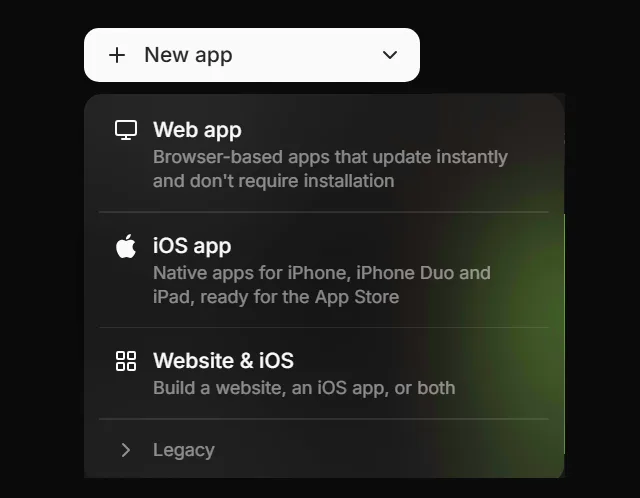
Go to vibecodeapp.com and sign up. Click New app, then iOS app. That creates a native Swift app for iPhone and iPad.
Then describe the app. Say what's on each screen and what each tap does. Name your colors. Ask for sample data, so the app looks real from the first build.
Here's the exact prompt we sent. Copy it and swap in your idea:
Message 1: the first version · 138 words
Build Sip, a water tracker for iPhone. The home screen shows a big glass bottle that fills with animated water as I drink, with today's total and my goal under it (for example 1.4 of 2.5 L). Below the bottle, add three round quick-add buttons: Glass 250 ml, Bottle 500 ml and Custom, which opens a slider. Each tap adds water with a small splash animation and a light haptic. Under that, show today's log as a list with the time and amount, and let me swipe a row to delete it. Add a Settings sheet behind a gear icon with my daily goal, ml or oz, and a reminder toggle. Make it calm and clean: white background, soft blue water (#3BA4F5), rounded numbers, lots of space. Start with sample data for today so it never looks empty.
Step 2: Let it build, then test it in the simulator
Press send. The agent writes the Swift code and builds it on a cloud Mac. Then it opens the app in a live iPhone simulator, right in your browser, and taps through its own work.
Sip's first version was ready 4 minutes and 53 seconds after we pressed send. It used $2.06 of AI credits.
While it worked, the agent added a glass and a custom 350 ml, swiped a drink away and switched to ounces. It also turned on reminders and checked that 7 a day were scheduled.
The simulator is a real iPhone simulator on a Mac in the cloud. Your clicks become taps, so you can try every button before you ever touch your phone.
Step 3: Change it by chat
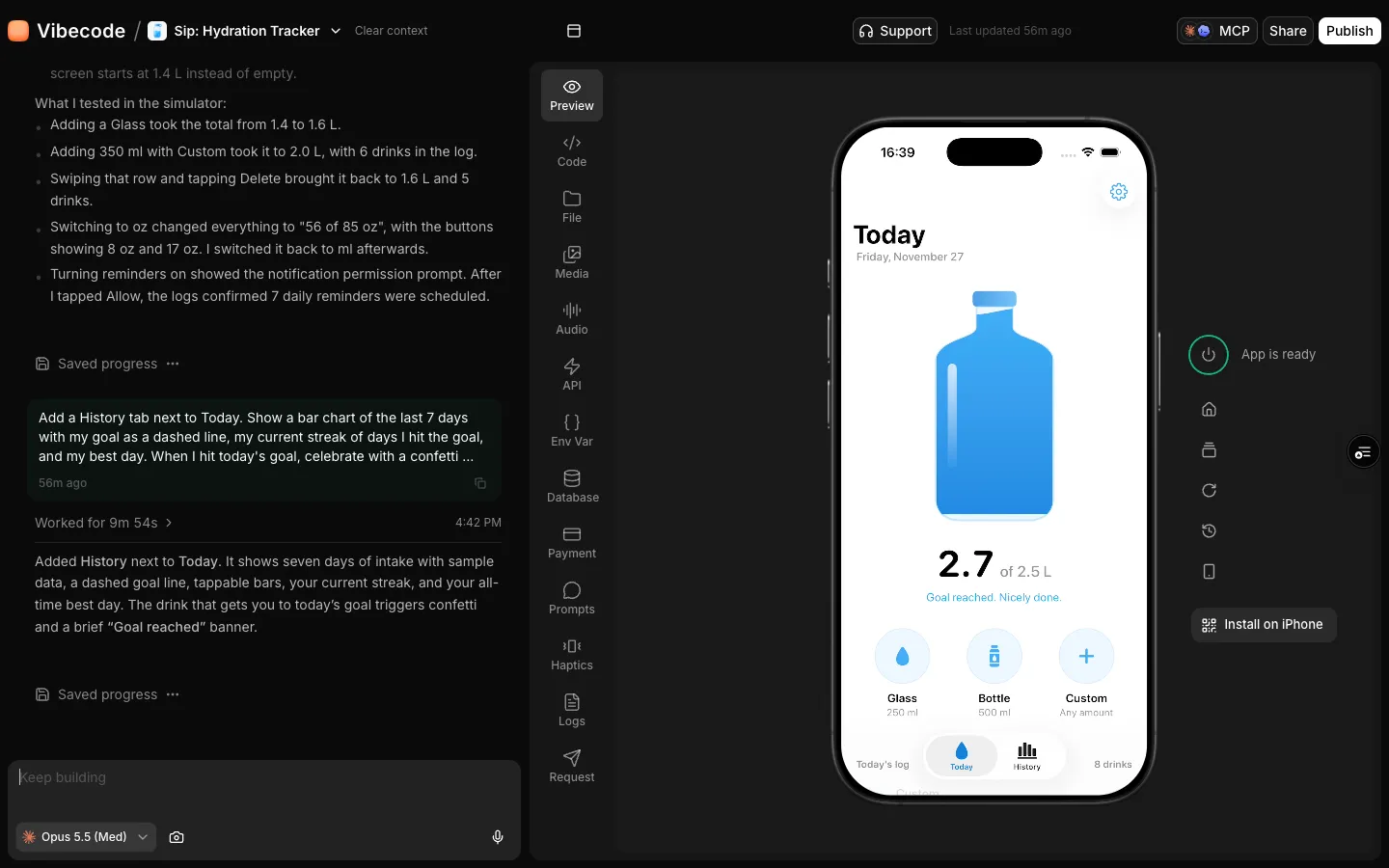
To change the app, type what you want. We asked for a History tab:
Message 2: a History tab · 65 words
Add a History tab next to Today. Show a bar chart of the last 7 days with my goal as a dashed line, my current streak of days I hit the goal, and my best day. When I hit today's goal, celebrate with a confetti burst and a short "Goal reached" banner. Fill the last 7 days with sample data so the chart looks real.
The second message took 9 minutes and 54 seconds and $1.79 of AI credits.
Before it finished, the agent filled the bottle to the 2.5 L goal in the simulator. It saw the confetti and the banner, and watched the streak go from 3 to 4 days.
| Message | Time | AI credits | Xcode and simulator | Total |
|---|---|---|---|---|
| 1. First version | 4 min 53 s | $2.06 | $0.40 | $2.46 |
| 2. History tab | 9 min 54 s | $1.79 | $0.65 | $2.44 |
| Total | 14 min 47 s | $3.85 | $1.05 | $4.90 |
That's well under the $20 of credits Plus includes each month, and unused credits roll over.
Want to see your own idea in the simulator? Your first app build is $0 on a new account.
Build and test your app for $0Step 4: Put it on your iPhone
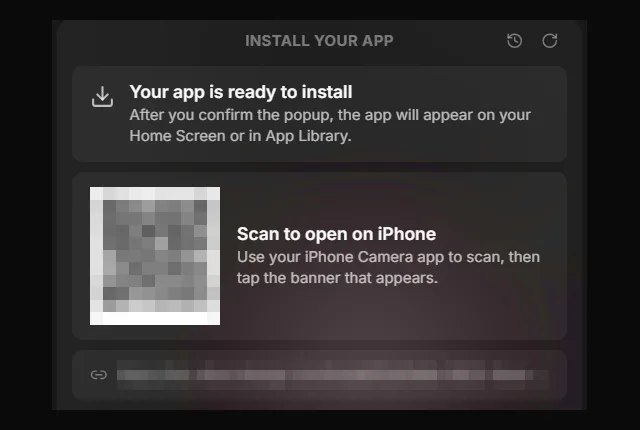
Click Publish, then Install. Vibecode builds the app on a cloud Mac and signs it with your Apple Developer account. You scan its QR code with your iPhone's Camera app, tap the banner and confirm.
The first time, you connect your Apple Developer account and register your iPhone. That needs Apple's $99 a year Developer Program and a paid Vibecode plan.
Once your Apple account and iPhone are connected, Vibecode builds an installable iPhone version after every message. For Sip, each phone build cost 6 cents.
Step 5: Publish it to the App Store
Click Publish, then Publish to App Store in the menu and again in the panel. Confirm your app's bundle ID, its permanent ID in Apple's system, then click Confirm and publish. Vibecode builds the app, signs it, uploads it to Apple and submits it for review.
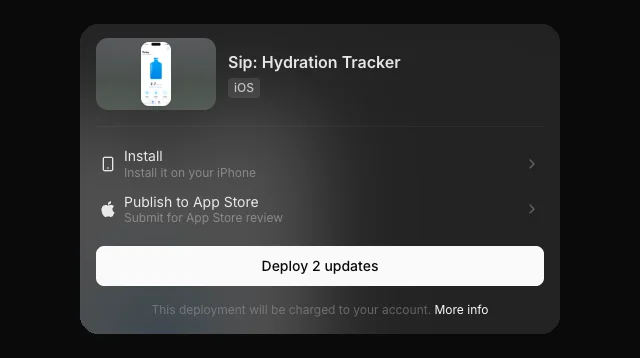
Apple reviews 90% of submissions in under 48 hours. Our guide to publishing to the App Store walks through each step, with screenshots.
The classic way to make an iOS app: Xcode on a Mac
You can also develop it yourself, in Swift. Apple's Xcode is free, and it only runs on a Mac.
- Install Xcode from the Mac App Store.
- Learn Swift and SwiftUI, Apple's language and UI framework.
- Build your screens and test them in Xcode's simulator.
- Run it on your iPhone with a free Apple Account.
- Join Apple's Developer Program, $99 a year, to publish.
It's the most control, and the most work. CoherentLab, an app agency, puts it at 1 to 2 months learning Swift and Xcode, then 2 to 3 weeks for a simple app.
You aren't locked in with Vibecode. It builds a standard SwiftUI Xcode project. On Pro and up, you can download it and open it in Xcode any time.
Can you make an iPhone app for free?
Yes, to start. Your first Vibecode app build is $0 on a new account, and you test it in the live simulator.
Xcode is free too, if you have a Mac. With a free Apple Account, it can put your app on your own iPhone.
After that, Vibecode plans start at $20 a month, App Store submission included. Apple charges $99 a year to publish.
Can you make an iPhone app just for yourself?
Yes. Plenty of people build an app only they will use, like a water tracker or a family chore list.
With Xcode and a free Apple Account, you can install your own app on your iPhone. You reinstall it every 7 days, on up to 3 devices. Those are Apple's limits.
In Vibecode, Install on iPhone puts the app on your phone with no Mac or Xcode of your own. It needs Apple's $99 a year program and a paid plan.
Can you make an iPhone app without coding?
That's exactly what Sip shows. You describe the app, the AI writes the Swift, and you change it by asking.
The trick is to be specific. A vague prompt gets a vague app. Name each screen, each button and each color, like our prompt above.
Can you make an iPhone app without a Mac?
Yes. Vibecode builds the app on cloud Macs and streams the simulator to your browser, or to the Vibecode iPhone app. So a Windows PC, a Chromebook or a phone works.
We tested it. Here's how to build an iPhone app without a Mac, in Edge on Windows, and on an Android phone. Want Xcode itself? Read Xcode for Windows.
Can one app run on iPhone and Android?
Yes, with a React Native app. In Vibecode, click New app, open Legacy and pick Mobile app. The same code runs on iPhone and Android.
iOS app projects, like Sip, are native Swift for Apple devices. Pick that when your app is iPhone-first.
How long does it take, and what does it cost?
An agency quotes $20,000 to $150,000 for an iPhone app, by CoherentLab's numbers. Sip took 14 minutes and 47 seconds and $4.90 of credits. Here's how all three compare, as of November 27, 2026:
| Vibecode | Xcode on a Mac | Hire an agency | |
|---|---|---|---|
| What you do | Describe it in plain English | Learn Swift and build it | Write a spec and pay a team |
| First version | Minutes (Sip: 4 min 53 s) | 1 to 2 months of learning, then 2 to 3 weeks | 1 to 2 months for a basic app |
| Cost to start | $0 on a new account | Free, on your own Mac | $20,000 to $150,000 |
| App Store | Plus at $20/mo, plus Apple's $99/yr | Apple's $99/yr | Apple's $99/yr |
The Xcode and agency numbers are CoherentLab's. Every path needs Apple's $99 a year program to publish.
Start your first iPhone app for $0Not sure where to start? Remix a template that's close to your idea, or read how to make an app for any device.
Frequently asked questions
How do I make an iPhone app for free?
Start with Vibecode. Your first build is $0 on a new account, tested in a live iPhone simulator in your browser. Xcode on a Mac is free too, and a free Apple Account puts the app on your iPhone. Either way, publishing needs Apple's $99 a year program, and in Vibecode it starts on Plus at $20 a month.
Can I make an iPhone app without coding?
Yes. In Vibecode you describe the app in plain English, and the AI writes the Swift code, builds it and tests it. You never have to open the code. Sip's first version came from one prompt.
Do I need a Mac to make an iPhone app?
No, not your own. Apple's Xcode only runs on a Mac, but Vibecode runs it on cloud Macs for you. You can build from a Windows PC, a Chromebook or your phone.
Can I make an iPhone app just for myself?
Yes. With a free Apple Account, Xcode can put your own app on your iPhone, and you reinstall it every 7 days. Vibecode's Install on iPhone needs no Mac or Xcode of your own, just Apple's $99 a year program and a paid plan.
How hard is it to make an iPhone app?
With AI, about as hard as describing it. Sip took two prompts and no code. Coding it yourself is harder. CoherentLab puts it at 1 to 2 months learning Swift and Xcode, then 2 to 3 weeks for a simple app.
How long does it take to make an iPhone app?
A simple first version can take minutes. Sip's first version was ready in 4 minutes and 53 seconds, and one more message added a History tab in 9 minutes and 54 seconds. Apple then reviews 90% of App Store submissions in under 48 hours.
How much does it cost to make an iPhone app?
Your first Vibecode build is $0 on a new account. After that, plans start at $20 a month, App Store submission included, plus $99 a year for Apple's Developer Program. Sip used $4.90 of credits for both messages.
Can I make an app for iPhone and Android at the same time?
Yes. In Vibecode, click New app, open Legacy and pick Mobile app. You get one React Native app that runs on iPhone and Android. iOS app projects are native Swift, for Apple devices only.
About the editorial team
Vishal is a product engineer at Vibecode. Before Vibecode he did product engineering at EarnIn and co-founded Ivella (YC S21), a banking app for couples. He studied computer science at Duke.

More from the Vibecode blog
Tips
Rork vs FlutterFlow (2026): Which is better for an iPhone app?
Rork writes native Swift from a chat, from $20 a month. FlutterFlow makes Flutter apps, from $39. Here's which to pick for an iPhone app, and who submits to the App Store.
Tutorial
How to turn a Blink.new project into a mobile app
Rebuild a Blink.new project as a mobile app in Vibecode. Map the Blink SDK calls, connect the backend, and test the new app in TestFlight.
New to AI app building? Read what vibe coding means or compare the best AI mobile app builders. Have an idea? See if you can vibe code it.