
YouTube Clone (Vidaroo)
YouTube clone · Video app · from our videos on X
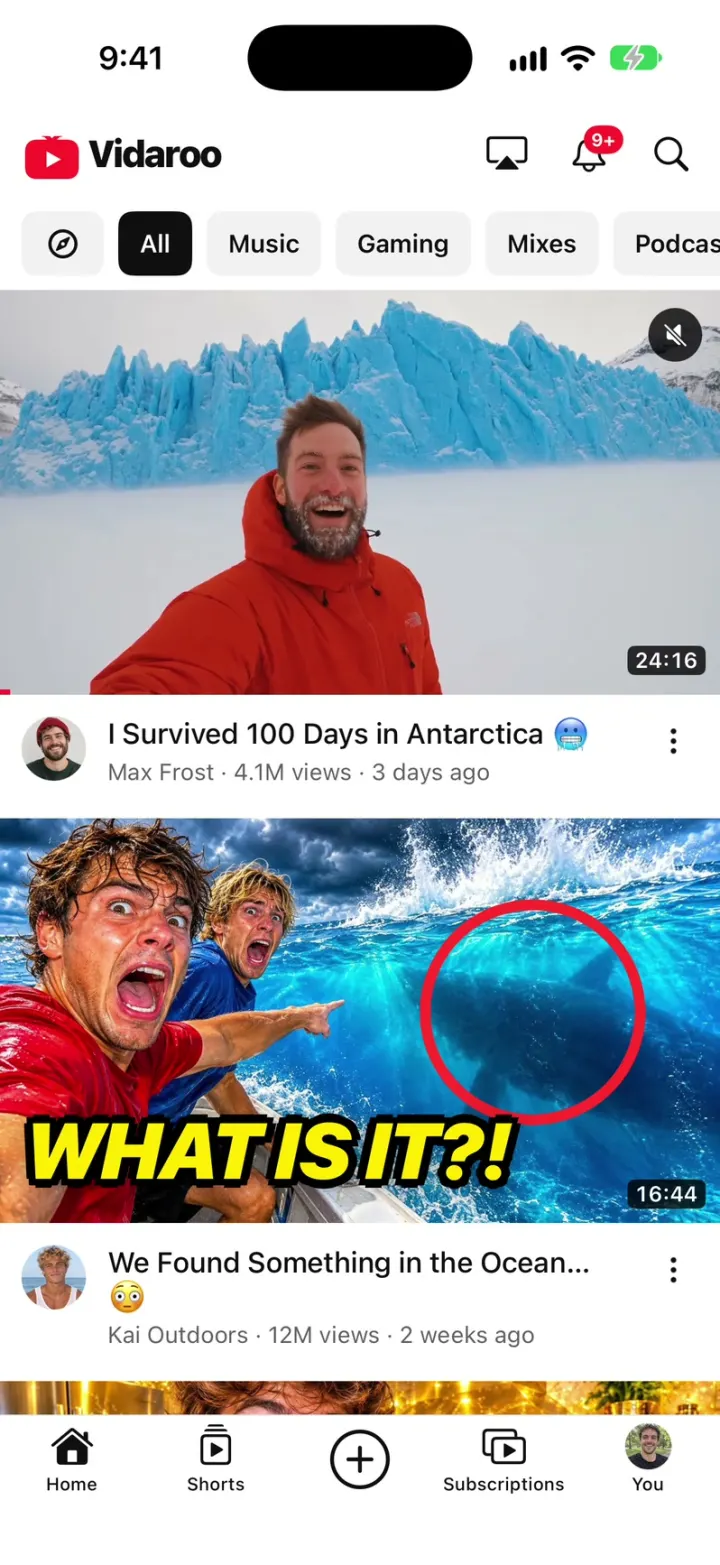
Vidaroo is a YouTube-style video app rebuilt in SwiftUI with its own brand. The Home feed has a chip row and big thumbnails with loud code-drawn overlays, and the top video already plays inline; tap it and the same picture grows into the Watch page. Like it with a burst, Subscribe with a ringing bell, double-tap the player to skip 10 seconds, open the comments, then drag the player down into the mini-player. Shorts, Subscriptions, You, Search and Notifications are all there, on fixture channels and videos.
- iPhone · Swift
- Built in 1 prompt
- Free to remix
Remix copies the working app into your account for free, exactly as we built it. It runs in Vibecode's cloud iOS simulator, in your browser.
Watch the video on X@vibecodeapp · Nov 28, 2026The prompt that builds it
We built YouTube Clone (Vidaroo) in one prompt. Paste it into a new app to build your own copy, or change it first.
Prompt · 3,000 words
Build Vidaroo, a polished native iPhone app in SwiftUI: a YouTube-style video app with its own brand (Vidaroo, a code-drawn red TV with rabbit-ear antennas). The hero is the Home feed: a chip row, big 16:9 thumbnails with loud code-drawn overlays, and the top video already playing inline; tap it and the same player grows into the Watch page (Like with a burst, Subscribe with a ringing bell, double-tap to skip 10 seconds, drag down into the mini-player, comments). Plus Shorts, Create, Subscriptions, You, Search and Notifications. The user is Alex Rivera (@alexrivera). Today is Saturday, November 28, 2026.

ASSETS
curl -L once and unzip flat: https://vidaroo-media.beacon.host/media.zip (vidaroo-icon.png: the app icon; vid-antarctica, vid-ocean: .mp4 1280x720 silent 6 s clips + a .jpg first frame each; t-<id>.jpg: 1280x720 thumbnail photos with NO text; s-skate, s-pasta, s-tokyo, s-biscuit: .mp4 720x1280 8 s Shorts + a .jpg first frame each; av-<name>.jpg: avatars). Add them all to the asset catalog (videos as bundle resources). Overlays and the logo are drawn in code. No image generation is needed.

SHELL
Opens on Home: no splash, onboarding, sign-in or permission prompts. Light only (force .light), status bar always visible (dark text; white on the Watch player and Shorts). Root = one ZStack: the selected tab's NavigationStack (Home, Shorts, Subscriptions, You), a custom bottom bar (white, hairline #E5E5E5 top border, 24 pt icons + 10 pt labels: house.fill "Home", play.square.stack "Shorts", a 40 pt plus.circle "Create" with no label, play.rectangle.on.rectangle "Subscriptions", av-me 26 pt circle "You"), the MiniPlayer docked right above the bar, the Watch cover layer, the sheet layer, the Toast, the TouchDot and the HOOK MODE window. Screens under a cover or sheet stay rendered at all times.

FORMAT (Format/)
One Count formatter with Locale(identifier: "en_US"): views "4.1M views", "812K views", "9,402 views"; likes "48K"; subscribers "4.2M subscribers"; comments "2.3K". Durations "24:16", times "0:13 / 24:16" (.monospacedDigit()). Ages "3 days ago". Never the device locale. Counts that change roll with .contentTransition(.numericText()).

FIXTURES (Data/: ONE list per kind; a new video, short, channel or chip is one entry)
Me: "Alex Rivera", "@alexrivera", av-me, 12 subscriptions.
Channels (ChannelCatalog; id · name · handle · avatar · subscribers · verified):
max · Max Frost · @maxfrost · av-max · 4.2M · yes; kai · Kai Outdoors · @kaioutdoors · av-kai · 6.8M · yes; slice · Slice Squad · @slicesquad · av-sam · 3.1M · yes; dev · TechTruth · @techtruth · av-dev · 2.4M · yes; tess · Sleepy Tess · @sleepytess · av-tess · 980K · no; office · Office Diaries · @officediaries · av-leo · 1.3M · no; gas · Gas Station Gourmet · @gasgourmet · av-mike · 2.9M · yes; cars · Car Kingdom · @carkingdom · av-jordan · 5.5M · yes.
Videos (VideoCatalog.all, in Home order; id · channel · title · views · age · duration · thumb · overlay · clip):
antarctica · max · "I Survived 100 Days in Antarctica 🥶" · 4.1M · 3 days ago · 24:16 · t-antarctica · loud "100 DAYS" yellow, arrow from the right pointing at the glacier · vid-antarctica
ocean · kai · "We Found Something in the Ocean… 😳" · 12M · 2 weeks ago · 16:44 · t-ocean · loud "WHAT IS IT?!" yellow, red circle around the dark shadow (right half) · vid-ocean
pizza · slice · "$1 vs $1,000,000 Pizza!! 🍕" · 8.7M · 1 week ago · 18:02 · t-pizza · loud "$1 vs $1M" white, red circle around the gold pizza · none
iphone · dev · "This Phone Changes EVERYTHING 😱" · 3.6M · 1 day ago · 12:09 · t-iphone · loud "IT'S OVER" red, arrow at the cracked phone · none
cheese · tess · "Don't Eat This Before Bed 🚫" · 3.3M · 5 days ago · 9:58 · t-cheese · loud "STOP!" red, arrow at the cheese · none
quit · office · "I QUIT My Job (emotional) 😭" · 2.2M · 4 days ago · 14:20 · t-quit · loud "I QUIT" white · none
gas · gas · "I Ate ONLY Gas Station Food for 7 Days" · 6.4M · 2 days ago · 21:37 · t-gas · loud "7 DAYS ⛽" yellow · none
car · cars · "This $3,000,000 Car SHOULDN'T Exist" · 9.1M · 6 days ago · 19:05 · t-car · loud "$3,000,000" yellow, arrow at the car · none
Each video also has likes (48K, 210K, 156K, 61K, 44K, 39K, 120K, 133K), comments (2.3K, 9.8K, 6.1K, 1.9K, 1.2K, 3.4K, 4.4K, 5.0K) and a 2-line description ("Day 1 vs Day 100 at the bottom of the world. Gear list below 👇" and the same spirit).
Shorts (ShortCatalog; id · channel handle · caption · likes · clip): skate · @kaioutdoors · "first try?? 🛹" · 312K · s-skate; pasta · @slicesquad · "5-minute pasta that slaps 🍝" · 88K · s-pasta; tokyo · @maxfrost · "Tokyo at night hits different" · 640K · s-tokyo; biscuit · @sleepytess · "he heard the treat bag 🐶" · 1.2M · s-biscuit.
Comments (per video 8: avatar, @handle, age, text, likes; antarctica's first, pinned by Max: "@snowdaze · 2d · the way his beard froze at 3:12 💀 · 4.1K"; others in the same spirit, reusing av-maya, av-nina, av-priya, av-linda).
Chips (ChipCatalog, in order): a compass icon chip, "All", "Music", "Gaming", "Mixes", "Podcasts", "Live", "Cooking", "Travel", "Recently uploaded", "New to you". A Chip has id, label, filter (a Video predicate or nil) and lens (a VideoLens id or nil; nil in this app).
Search suggestions (recent, clock icon): "antarctica survival", "gold pizza", "phone leak"; trending (magnifyingglass): "ocean mystery", "gas station food", "supercar".

THE SEAMS (Feed/ and Player/)
- VideoLens: a struct with id, title(Video) -> String, thumb(Video) -> String (asset name) and overlay(Video) -> ThumbOverlay. LensRegistry.all holds .original (the catalog's own values). ONE environment value `videoLens` (default .original) is read by every place a title, thumbnail or overlay appears: VideoCard, the Watch page, Up next, Search results, History, Notifications, the MiniPlayer. Selecting a chip that carries a lens sets it. A remix adds a lens as one registry entry.
- ThumbOverlay (Components/ThumbOverlay.swift), drawn over the photo in code, scaled to the thumbnail's width (designed at 402 pt): text, style .loud (SF Pro Black italic 44 pt, tracking -1, yellow #FFE600 / white / red #FF2D2D fill, a 5 pt black outline made of 8 offset copies, a soft black shadow, at the bottom-left 14 pt in) or .plain (SF Pro Regular 22 pt white on a black 45% rounded box, bottom-left, no arrow, no circle), an optional arrow (a thick red #FF2D2D arrow with a white 3 pt outline, 90 pt long, from a given unit-point toward a target unit-point) and an optional circle (a red 6 pt ring, 120 pt across, around a unit-point).
- Thumbnail (Components/Thumbnail.swift): the photo aspect-fill 16:9, the overlay, the duration badge (black 80%, white 12 pt semibold, corner 4, bottom-right 8 pt in). A lens change on a thumbnail cross-fades by default.
- PlayerPool: for every clip, one AVQueuePlayer + AVPlayerLooper created and prerolled at launch, muted, playing. PlayerSurface (UIViewRepresentable on AVPlayerLayer, resizeAspectFill) draws a clip; the clip's first-frame JPG is drawn under it until isReadyForDisplay, so a player never shows a black frame. The Home inline preview, the Watch player and the MiniPlayer show the SAME player (opening a video never restarts it). A video with no clip plays its thumbnail photo (no overlay) with a slow push-in (1.0 → 1.08 over 8 s).
- VideoClock: each open video's displayed time is its own clock (antarctica starts at 0:13), advancing 1 s per second while playing, independent of the looping clip; seek(±10) moves it and the progress bar.

SCREENS
1. Home: a top bar (the logo mark 30x24 pt + "Vidaroo" SF Pro Heavy 21 pt tracking -0.8; at the right airplayvideo, bell with a red "9+" badge (opens Notifications), magnifyingglass (opens Search)). The chip row (36 pt capsules, #F2F2F2 with #0F0F0F 14 pt semibold text; selected: #0F0F0F fill, white text; horizontal scroll, 12 pt side margin). Then the feed: VideoCards (full width, no side margin): the Thumbnail; under it 12 pt in: the channel avatar (36 pt), the title (16 pt medium #0F0F0F, 2 lines), "Max Frost · 4.1M views · 3 days ago" (13 pt #606060), ellipsis (vertical) at the right. The FIRST card is the inline preview: its clip plays over the thumbnail (no overlay while playing), a speaker.slash.fill badge top-right, a 3 pt red #FF1E2D progress line along its bottom edge, growing. After the 4th video a Shorts shelf: a header (a red play.square.stack.fill + "Shorts" 20 pt bold), then a 2-column grid of 9:16 tiles (corner 10) with the caption (15 pt semibold white, shadow) and "1.2M views" at the bottom. Tapping a card opens Watch; an avatar opens that channel's page (avatar 80 pt, name, handle, subscribers, Subscribe, its videos). Pull to refresh.
2. Watch (a cover over the tabs): the player at the top (full width, 16:9, black, under the status bar). Tap toggles controls (35% black dim, play/pause 56 pt, backward.end.fill/forward.end.fill 36 pt, chevron.down top-left that minimizes, captions + gear top-right, "0:13 / 24:16" bottom-left, fullscreen icon bottom-right; auto-hide after 2.5 s). A 3 pt red progress bar at the player's bottom edge (#FFFFFF 30% track) with a 12 pt red scrubber dot while controls show. Under the player, on white: the title (18 pt bold, 2 lines), "4.1M views  3 days ago  ...more" (13 pt #606060); the channel row: avatar 40 pt, name 16 pt semibold + a grey checkmark.seal.fill if verified, "4.2M" (13 pt #606060), and at the right the Subscribe pill (36 pt, #0F0F0F, white 14 pt semibold "Subscribe"). The action row (horizontal scroll, #F2F2F2 capsules 36 pt): the split Like pill (hand.thumbsup + "48K" | hand.thumbsdown), "Share" (arrowshape.turn.up.right), "Remix", "Download" (arrow.down.to.line), "Clip" (scissors), "Save" (bookmark). A comments card (#F2F2F2, corner 12): "Comments 2.3K" and the pinned comment one line; it opens the Comments sheet (a bottom sheet, detents medium/large: "Comments", chips "Top" "Newest", rows: avatar 28 pt, "@snowdaze · 2d ago", text 14 pt, hand.thumbsup + count, hand.thumbsdown, bubble; a "Pinned by @maxfrost" label on the first). Then Up next: the other videos as VideoCards.
3. Shorts: a full-screen vertical pager driven by ONE offset (black, clips aspect-fill, prerolled like the PlayerPool), the right rail (hand.thumbsup.fill + count, hand.thumbsdown.fill "Dislike", bubble.right.fill + count, arrowshape.turn.up.right.fill "Share", "Remix"), the bottom-left handle with a 32 pt avatar + a white "Subscribe" pill and the caption (15 pt white). Double-tap likes (a white thumb bursts at the tap).
4. Create (bar button): a sheet with rows "Create a Short", "Upload a video", "Go live", "Create a post" (toasts "Coming soon").
5. Subscriptions: a row of channel avatars (52 pt, name under, a blue #3EA6FF dot on 3 of them), chips "All" "Today" "Videos" "Shorts" "Live" "Posts", then the feed.
6. You: av-me 64 pt, "Alex Rivera" (24 pt bold), "@alexrivera · View channel ›"; "History" with "View all" and a horizontal row of 160x90 thumbnails with titles (videos watched this session first); "Playlists": "Liked videos" (count rolls when you like) and "Watch later"; rows Your videos, Downloads, Get Vidaroo Premium, Time watched, Help & feedback.
7. Search (pushed from the magnifier): a capsule field "Search Vidaroo" with a back arrow and mic; suggestions; typing filters titles live; results are compact rows (a 160x90 Thumbnail left, title + channel + views right).
8. Notifications (pushed from the bell): rows "Max Frost uploaded: <title>" with avatar, age and a 112x63 thumbnail, unread rows with a blue dot.

MOTION (what the eye sees)
- Opening a video: the playing picture grows continuously from the card's thumbnail to the Watch player (one floating player view animating its frame, spring 0.32 s, no bounce) while the page content slides up behind it; it never blinks, restarts or shows black; Home stays drawn underneath.
- Like: the thumb fills, scales 1.0 → 1.3 → 1.0 (0.3 s) with 8 short lines bursting out (0.35 s); the count rolls 48K → 48K (exact counts below 10K roll by one); unlike reverses.
- Subscribe: the black "Subscribe" pill morphs to the #F2F2F2 "Subscribed" pill with bell.fill + chevron.down (0.25 s, same height); the bell swings ±18° three times (0.5 s). Again toggles back.
- Double-tap on the player's right 40%: +10 s; left 40%: -10 s. A light semicircle (white 14%) grows from that edge to 170 pt (0.25 s), three ▶ (or ◀) triangles light up in turn 0.08 s apart, "10 seconds" (13 pt semibold white) under them, gone by 0.7 s; the clock and progress bar jump.
- Minimize: a downward drag on the player follows the finger; released past 25% (or chevron.down) it collapses into the MiniPlayer (spring 0.35 s, the picture shrinks continuously): 64 pt tall, white, the playing picture 114x64 at the left, title (14 pt, 1 line) over channel (12 pt #606060), play/pause and xmark at the right, a 2 pt red progress line along its top. Tapping it expands back.
- Lens or chip changes never empty the feed for even one frame. Photos decoded at launch off the main thread into one image cache.

HOOK (the video's first seconds)
- ScriptStep (absolute seconds from the start, action): reset, dot(to:, duration:), tap, doubleTap, drag(from:, to:, duration:), dotHide, call(action). ScriptPlayer runs a [ScriptStep] on the main actor against its start time (absolute times, so drift never builds). Scripted steps call the same code as real touches. Every wait uses the step's own time, never the app's normal delays.
- DemoScript helpers a remix appends to: openVideo(start:id:), like(start:), subscribe(start:), seek(start:forward:), minimize(start:), selectChip(start:id:), scrollFeed(start:dy:duration:) (moves the real scroll position), toast(start:text:), dotHide(start:). Each glides the dot to the real frame of its target (anchor preferences), never hardcoded.
- HOOK MODE: tapping an invisible 24x60 pt strip at the LEFT edge (x 0-24, y 430-490 pt), drawn in its own window above the Watch cover, every sheet and the MiniPlayer (a tap there closes whatever is open), resets everything and plays DemoScript.hook, identical every time (seconds from the tap):
 0.00 reset with no animation: Home tab, feed at the top, "All" selected, no MiniPlayer, the antarctica preview restarted at clip time 1.0 s and ALREADY playing, the ocean card fully visible under it, the dot ALREADY VISIBLE on the antarctica thumbnail's centre.
 openVideo(0.15, antarctica): the dot presses and the picture grows into Watch (done ~0.50), clock 0:13.
 like(0.60): the dot glides to the Like half (0.2 s), presses at 0.85.
 subscribe(1.20): glides 0.2 s, presses at 1.45.
 seek(1.95, forward): glides to the player's right third, double-taps at 2.20 and 2.32: the ripple, 0:15 → 0:25.
 minimize(2.95): the dot lands mid-player and drags down 460 pt over 0.40 s; the page follows the same drag and collapses into the MiniPlayer; Home is back.
 dotHide(3.50). Then hold (real taps work again).
- What the eye must see: frame 0 fully drawn (the top bar, chips, the playing preview, the ocean card under it; no fade-in, no black frame); the picture never vanishes or jumps between card, Watch and MiniPlayer; the dot sits above everything.
- TouchDot: drawn above everything in HOOK MODE only: a 44 pt circle, black 35% fill, a 3 pt white ring, a soft shadow; scales in as it lands (0.12 s), presses (scale 0.85, 0.1 s), glides between points.

LOOK
Vidaroo brand: red #FF1E2D (logo, progress, badges), ink #0F0F0F, secondary #606060, chips and pills #F2F2F2, hairlines #E5E5E5, white backgrounds, link blue #3EA6FF. The logo mark: a #FF1E2D rounded rectangle (30x22 pt, corner 6) with a white play triangle inside and two short #FF1E2D antenna strokes (2.5 pt, round caps) rising from its top centre in a V, each ending in a 4 pt dot (a rabbit-ear TV). SF Pro (never rounded). Springs under 450 ms, light haptics on Like and Subscribe, pressed states (scale 0.97).

RULES
- Native SwiftUI, iOS 26 (keep the template's target), iPhone portrait.
- Deterministic fixtures. No backend, login, permissions, notifications, analytics or network calls at runtime. No persistence: delete the SwiftData starter, no UserDefaults or files.
- Files under 300 lines, big bodies split into subviews, no long chained expressions; every animation smooth at 60 fps.
- Keep every file inside /home/user/workspace (/tmp is denied).

REMIX-READY
Theme/Theme.swift (colours, fonts, metrics; no colour literals elsewhere), Theme/Copy.swift (every word), Data/VideoCatalog.swift, Data/ChannelCatalog.swift, Data/ShortCatalog.swift, Data/CommentCatalog.swift, Data/ChipCatalog.swift, Data/DemoScript.swift, Feed/VideoLens.swift (+ LensRegistry). Codable models with String ids (Video, Channel, Short, Comment, Chip, ThumbOverlaySpec) behind one VideoDataSource protocol (FixtureSource) feeding FeedStore. PlayerPool, VideoClock, VideoLens, ThumbOverlay and ScriptPlayer are the seams. Components/: Thumbnail, ThumbOverlay, VideoCard, CompactVideoRow, ChipRow, LogoMark, PlayerSurface, PlayerControls, SeekRipple, LikePill, SubscribeButton, MiniPlayer, ShortsShelf, TouchDot, Toast; Features/Home, Features/Watch, Features/Shorts, Features/Create, Features/Subscriptions, Features/You, Features/Search, Features/Notifications, Features/Channel. README.md under 80 lines: the file map; how to rename the app, restyle it, add a video (one VideoCatalog entry + its photo or clip), a channel, a chip or a lens; 3 one-prompt remixes (a recipe video app with step chapters; a course platform with lessons and progress; a family video channel only grandparents can see). "Read README.md first." atop CLAUDE.md and ios/AGENTS.md; replace ios/CLAUDE.md's structure block with this app's files. No scratch folders.

FILMING
Long-press the Home logo for 1 s to reset everything to launch (Home at the top, no MiniPlayer, nothing liked or subscribed).

BUILD
Theme, Copy, Format and the catalogs, then Home with the bottom bar, ChipRow, Thumbnail + ThumbOverlay and VideoCard (launch and look first), then PlayerPool, PlayerSurface and the inline preview, then Watch (player, controls, title, channel row, actions, comments) with the open animation, Like, Subscribe, SeekRipple and the MiniPlayer, then Shorts, Create, Subscriptions, You, Search, Notifications and Channel, then ScriptPlayer, TouchDot, Toast and HOOK MODE; a one-line status per screen; launch in the simulator every two or three files. Fetch media.zip as soon as the shell runs; check the files exist, never view them. Walk each flow once and fix what breaks; no pixel measuring or debug modes. Deliver the whole app, not a plan. Do not publish.
More templates
All templates- View template
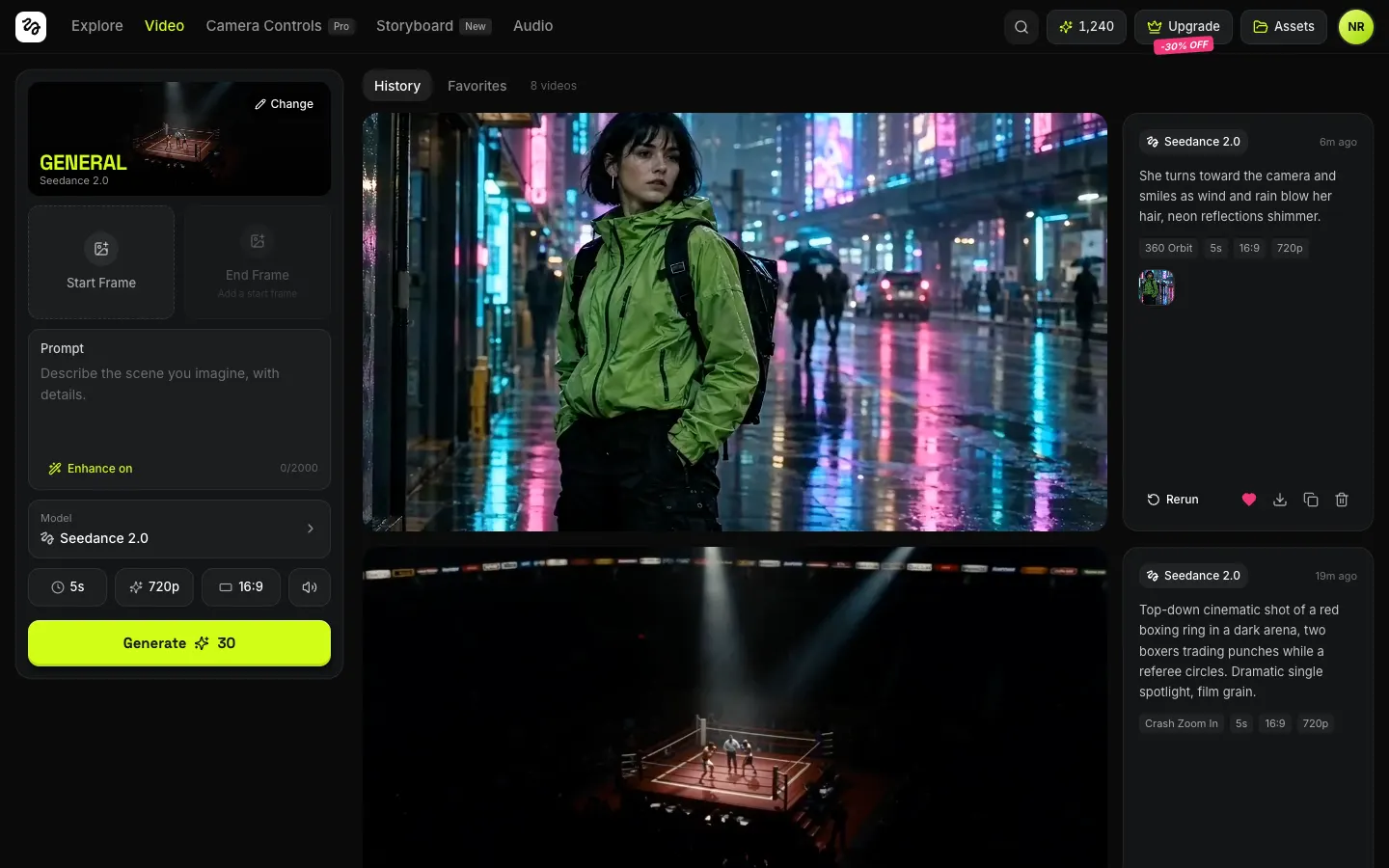
Higgsfield Clone
WebType a shot, pick Bullet Time or a Crash Zoom, and get a real Seedance, Kling or Veo video back.
- View template
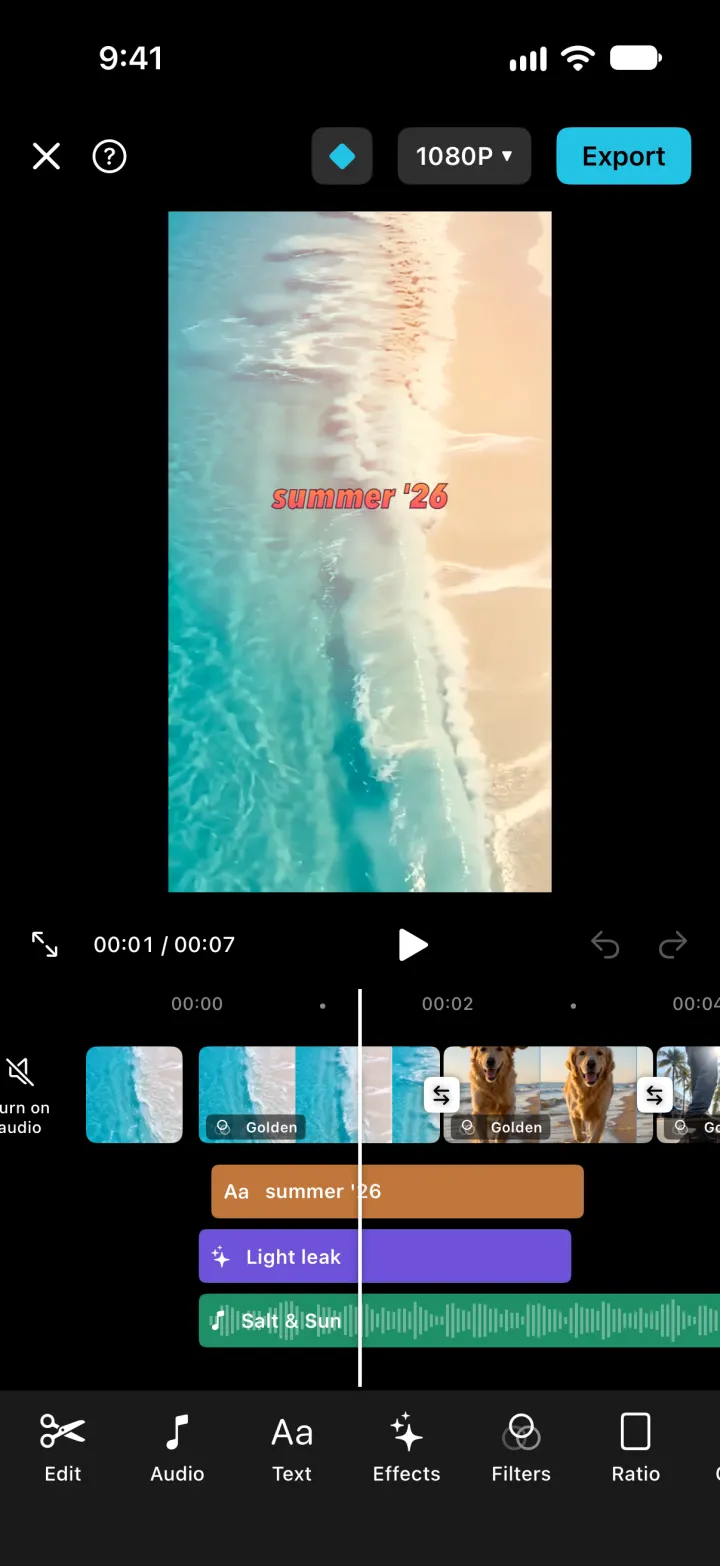
CapCut Clone
iOSCapCut with its real look: cut clips on a scrolling timeline, add transitions, text and music, export an MP4.
- View template
Netflix Clone
iOSNetflix's real look: chips swap the hero and its colour, giant Top 10 numerals, trailers, Clips and Love this!
- View template
Suite TV
iOSA dark TV show tracker: tick off episodes, rate and react, see where a show fell apart, import your history.