Kalshi Clone
Kalshi clone · Prediction markets app · from our videos on X
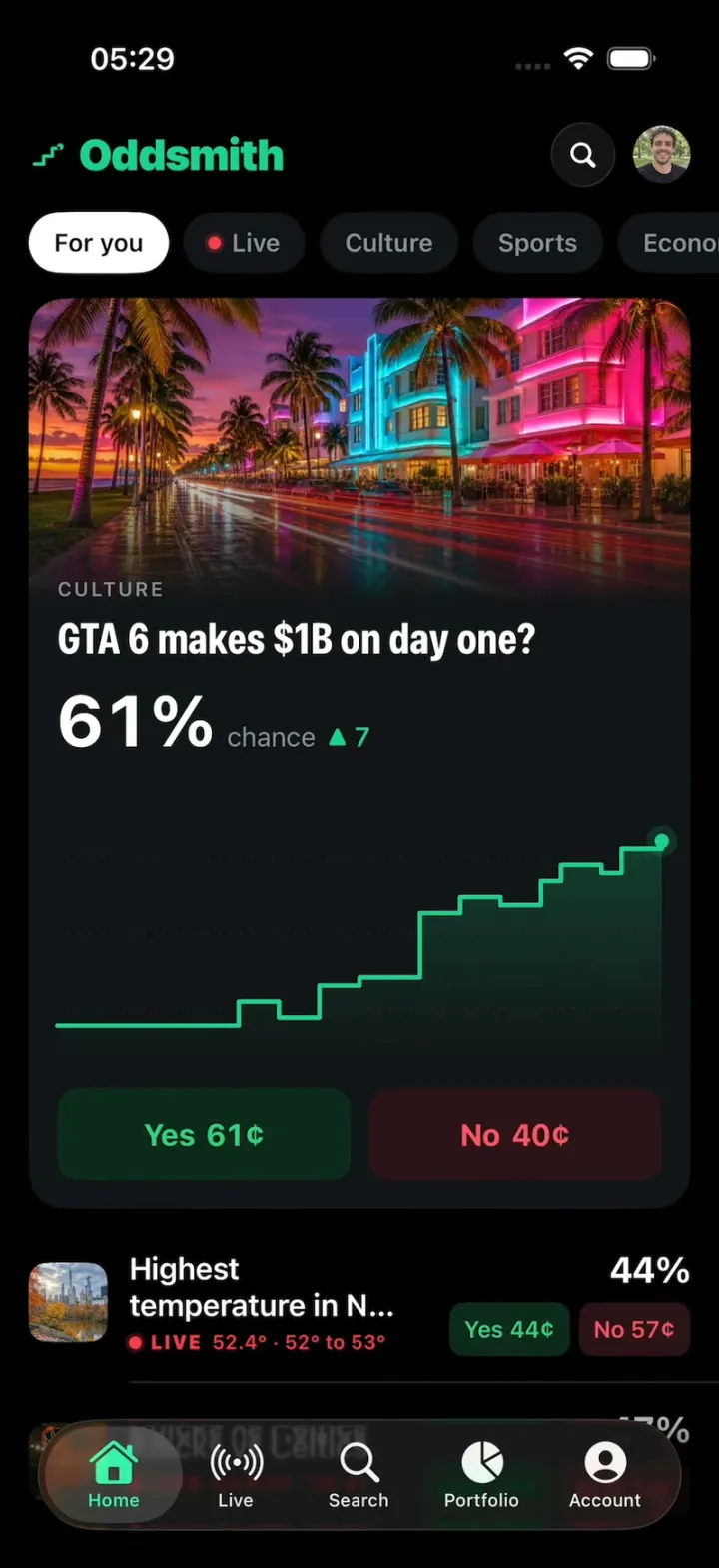
Kalshi Clone is a Kalshi-style prediction market built in SwiftUI as Oddsmith, an original brand, in Kalshi's black-and-mint look with play money only. The For you feed opens on a big hero market, "GTA 6 makes $1B on day one?", with a neon photo, the odds in big type and a stepped price chart you can scrub with your finger, plus category chips and rows of live markets whose cents tick. Tap Yes or No and a trade ticket rises with a keypad, quick +$1/+$10/+$100 chips, shares and the payout; Buy draws a check and your position appears on the card. Market pages carry multi-outcome charts, rules, a timeline and live chat, the Live tab ticks a Knicks game and NYC's temperature, and when a position resolves a RESOLVED · YES stamp slams down with confetti and a Position closed receipt rolls up the payout.
- iPhone · Swift
- Built in 1 prompt
- Free to remix
Remix copies the working app into your account for free, exactly as we built it. It runs in Vibecode's cloud iOS simulator, in your browser.
Watch the video on X@vibecodeapp · Nov 18, 2026The prompt that builds it
We built Kalshi Clone in one prompt. Paste it into a new app to build your own copy, or change it first.
Prompt · 2,972 words
Build Oddsmith, an original prediction-market app for iPhone in SwiftUI, in the genre of Kalshi: a black "For you" feed of event markets with category chips and a big hero market card, market pages with a scrubbable stepped price chart, Yes and No prices in cents, a trade ticket with a keypad, live markets that tick, a portfolio with positions and the "Position closed" payout receipt. Its own name, logo and words, all below. Play money only: no real payments. The user is Alex Rivera in New York. Today is Wednesday, November 18, 2026, the day before GTA 6 launches.

ASSETS
curl -L once and unzip flat: https://vibecode-oddsmith-media.beacon.host/media.zip (oddsmith-icon.png: the app icon; hero-night, hero-nyc, hero-court, hero-fed, hero-snow, hero-coin .jpg: market photos; jake, leo, maya, nina, priya, sam .jpg: friends' faces; me.jpg: Alex). Add them to the asset catalog. No image generation is needed.

BRAND
Name "Oddsmith" (wordmark: SF Pro black weight, tracking -0.5, #19D38C). OddsmithMark, a Shape in a unit square: a stepped line (0.14, 0.74) → (0.38, 0.74) → (0.38, 0.54) → (0.60, 0.54) → (0.60, 0.34) → (0.76, 0.34), stroked at 0.085 of the box with round caps and joins, plus a filled circle at (0.80, 0.30), radius 0.085. The mark (22 pt) + wordmark (24 pt) sit in the Home header.

LOOK
iOS 26, dark mode only (force .dark). Background #000000; cards #121417; raised #1A1D21; hairlines #24282D; text #FFFFFF; secondary #8B9199; tertiary #5D636B. Brand mint #19D38C. Yes: text #2BD47D on #0E2A1D (pressed #13392A). No: text #FF5468 on #2C1217 (pressed #3D1820). Chart colours in order: mint #19D38C, orange #FF8A3D, blue #4C8DFF, pink #FF5DA2. Titles: SF Pro bold with .fontWidth(.condensed) (market page titles 30 pt, card titles 24 pt); numbers .monospacedDigit(). Category labels: 11 pt semibold, tracking 1.2, uppercase, #8B9199. Native TabView (iOS 26 draws the floating Liquid Glass tab bar), tint #19D38C: Home (house.fill), Live (dot.radiowaves.left.and.right), Search (magnifyingglass), Portfolio (chart.pie.fill), Account (person.crop.circle). Opens on Home; no splash, onboarding, sign-in or permission prompts. Status bar visible (light) on every screen. Springs under 450 ms, light haptics, pressed states 0.97. Photos are aspect-filled and anchored 40% from the top (faces stay in view).

MONEY (Money/)
- One Money formatter, Locale(identifier: "en_US"): dollars "$1,284.17", "$100", volume "$4,218,334 vol"; cents "61¢"; chance "61%"; changes "▲ 7" mint, "▼ 3" red. Dates: Locale "en_US_POSIX" ("Nov 18", "Oct 19"). The simulator's region is not en_US: never use the device locale.
- A contract costs its price in cents and pays $1.00 if right. Ticket: shares = floor(amount / price); to win = shares × $1.00. Yes + No prices add to 100 or 101.

FIXTURES (Data/MarketCatalog.swift: ONE [Market] list; Data/CategoryCatalog.swift: ONE [Category] list. A new chip or market is one entry.)
Categories (chips, in order): "For you", "Live", "Culture", "Sports", "Economics", "Crypto", "Climate", "Tech". A chip lists the markets whose categoryIds include it ("For you" lists all, the hero first; "Live" lists live ones).
Markets (id · categories · title · image · kind · Yes/No · change · volume):
m01 culture, tech · "GTA 6 makes $1B on day one?" · hero-night · binary · 61¢ / 40¢ · ▲ 7 · $4,218,334 · THE HERO. Its 1M series, 31 daily points Oct 19 → Nov 18: 38 to Oct 27, then 41, 39, 43, 44 (Nov 3), 52 on Nov 6, 54, 53, 56 on Nov 12, 58, 57, 60, 61 today (fill the gaps flat). Rules: "Resolves Yes if first-day worldwide sales of GTA 6 are reported above $1 billion." Live chat: Leo "GTA V did $815M on day one. free money" 2m; Nina "my whole office is 'sick' tomorrow 💀" 4m; Sam "preloaded. see you never" 9m; Priya "No at 40¢ is the steal" 12m.
m02 climate · "Highest temperature in NYC today?" · hero-nyc · multi, LIVE ("52.4° forecast") · "50° to 51°" 18%, "52° to 53°" 44%, "54° to 55°" 29%, "56° or above" 9% · $472,951
m03 sports · "Knicks vs Celtics" · hero-court · teams, LIVE ("Q3 6:12", NYK 78 - 81 BOS) · NYK 47% / BOS 54% · $8,904,112
m04 economics · "Fed cuts rates in December?" · hero-fed · binary · 58¢ / 43¢ · ▼ 3 · $21,350,880
m05 climate · "Snow in NYC on Thanksgiving?" · hero-snow · binary · 9¢ / 92¢ · ▲ 2 · $310,442
m06 crypto · "Bitcoin above $120K on Dec 31?" · hero-coin · binary · 27¢ / 74¢ · ▼ 4 · $12,880,104
m07 tech · "PSN goes down on GTA 6 launch night?" · symbol wifi.exclamationmark, blue tile · 34¢ / 67¢ · ▲ 12 · $1,102,559
m08 culture · "Spotify Wrapped drops before Dec 4?" · symbol music.note, green tile · 72¢ / 29¢ · ▲ 1 · $688,210
m09 tech · "Apple services go down again this week?" · symbol icloud.slash, grey tile · 18¢ / 83¢ · ▲ 9 · $254,903
m10 economics · "Black Friday online sales above $12B?" · symbol cart.fill, orange tile · 66¢ / 35¢ · ▲ 2 · $1,940,377
Every other market: a seeded 1M series of 31 points ending at its price, 1D (48 points), 1W and ALL derived from it; a 2-line rules summary; closes Nov 19-Dec 31.
Positions at launch: m04 No × 120 @ 45¢; m03 NYK × 50 @ 51¢; m02 "52° to 53°" Yes × 169 @ 59¢. Cash $412.08; all-time P/L +$212.40.

SCREENS
1. Home: header (the mark + "Oddsmith" at the left; a search glass circle and me.jpg 32 pt at the right), then the ChipRow (horizontally scrolling 34 pt capsules, #121417 fill, 14 pt semibold #8B9199; selected: white fill, black text, the capsule sliding between chips with matchedGeometryEffect; "Live" has a pulsing red dot). Then the selected chip's feed:
 a. HeroMarketCard (the first market): 16 pt side margins, 20 pt corners, #121417. A 170 pt photo at the top fading to the card colour at its bottom; the category label and the title (24 pt condensed bold, 2 lines max) under it; a chance row: "61%" (40 pt bold, rolling digits) + "chance" (15 pt #8B9199) + the change; PriceChart (140 pt, the 1M series); two 52 pt buttons side by side "Yes 61¢" and "No 40¢" (12 pt corners, 17 pt bold). Holding a position adds a mint capsule under the chance row: "You: 163 Yes · $100" (slides in).
 b. MarketRow for every other market: 44 pt icon tile (photo or SF Symbol on a tint), title (17 pt semibold, 2 lines), "$8,904,112 vol" (12 pt #5D636B); at the right the chance (20 pt bold) over two 30 pt pills "Yes 47¢" / "No 54¢". LIVE rows show a red "LIVE" tag with the clock or "52.4°", and their numbers tick. Hairlines between rows.
 c. Changing chips swaps the feed in place: a 0.25 s cross-fade with a 12 pt rise, never a blank frame.
 Tap a card or row body: push the market page. Tap any Yes/No button: open the TradeTicket on that side.
2. Market page (push; the tab bar hides): back chevron, star (watchlist) and share glass circles; icon tile + category label; title (30 pt condensed bold); multi-outcome markets get a legend (colour dot, name, %). The chance "61%" + "chance" + change. PriceChart 260 pt (multi: one stepped line per outcome) with "1D 1W 1M ALL" (selected: white on a #1A1D21 capsule) and "$4,218,334 vol"; m02 shows "LIVE" and the forecast. Outcome rows for multi markets (name, %, Yes/No pills). Sections: "Rules summary" (2 lines + "Read more"), "Timeline" ("Opened Oct 1 · Closes Nov 19, 11:59 PM ET"), "Live chat" (32 pt avatar, name, time, message; a composer that posts as Alex). A fixed bottom bar with big Yes / No buttons (52 pt) over a black gradient.
3. PriceChart (Swift Charts; hero card and market page): stepped lines (.interpolationMethod(.stepEnd)), 2.5 pt, a soft gradient fill under the first line, a pulsing end dot, three faint dotted gridlines, no axes. The scrub, the signature gesture: touch-down on the chart starts it at once (DragGesture minimumDistance 0, a high-priority gesture on the chart only; scrolling works everywhere else): a 1 pt white vertical hairline at the finger, a 10 pt ring dot on the line, a date tag above it ("Oct 19", 12 pt semibold on a #1A1D21 capsule), and the chance number shows the scrubbed value, rolling digit by digit (.contentTransition(.numericText())), the change hidden. Release: hairline and tag fade out in 0.15 s and the number rolls back to live. Multi charts show each outcome's value in the legend while scrubbing.
4. TradeTicket (sheet .height(560), #121417, grabber): a "Buy Yes" | "Buy No" switch (mint / red when selected); the market title (15 pt #8B9199, 1 line) with its icon; the amount "$100" (56 pt bold, centred, rolling digits); chips "+$1", "+$10", "+$100", "Max"; rows "Avg price 61¢", "Shares 163", "To win $163.00" (mint, 22 pt bold); a keypad (1-9, ".", 0, delete; 56 pt keys); a full-width 56 pt "Buy Yes" button (mint fill, black 17 pt bold; No: #FF5468 fill, white text). The amount starts at the last amount ($100 default). Buy: the button shrinks into a 56 pt mint circle whose black checkmark draws itself (trim, 0.25 s), the line above becomes "Bought 163 Yes" (17 pt bold), success haptic; 0.55 s later the sheet closes itself, the position is added and the price ticks up 1¢.
5. Live: large title "Live"; LiveCards: m03 (monogram circles "NYK" #F58426 and "BOS" #007A33, the score, "Q3 6:12" counting down, a mini win-% chart; a basket every ~6 s moves the prices 2-4¢), m02 (the live "52.4°" + four outcome bars), and "S&P 500 up today?" (57¢, mini chart). Ticks follow a seeded schedule; a changed digit flashes mint or red (≤0.12 s, ≤35%).
6. Search: a "Search markets" field (filters titles live), "Trending" (numbered rows 1-6: title, chance, change), a 2-column grid of category tiles (SF Symbol, name, "128 markets").
7. Portfolio: large title; value "$1,284.17" (36 pt bold) + "▲ $212.40 (19.8%) all time" mint; a mint area chart (1D 1W 1M ALL); a Cash "$412.08" row with "Deposit" (mint capsule; a keypad sheet adds play money); segmented Positions | Activity. Positions: icon, title, "Yes · 169 @ 59¢", value and P/L (mint/red). Activity: fills and payouts with times. Tap a position: its market page.
8. Account: me.jpg 72 pt, "Alex Rivera", "@alexr · joined 2024"; stats (Markets traded 48 · Win rate 61% · Best payout $169.00); rows Watchlist, Notifications, Funding, Help, About Oddsmith.

RESOLUTION (Components/ResolutionLayer.swift, reusable: resolve(marketId:, outcome:))
- A stamp "RESOLVED · YES" (3 pt mint border, mint 26 pt condensed black text, rotated -8°) slams onto the market's card photo or page title (scale 1.6 → 1.0 with a fade in 0.2 s, heavy haptic); the chance rolls to "100%".
- Confetti bursts from the stamp: 90 pieces (mint, white, gold #F2C14E; 6×10 pt rectangles and dots), one Canvas whose particles are pure functions of (seed, time), falling and spinning for 1.6 s, drawn in a non-interactive window above every sheet.
- 0.30 s after the stamp the Position closed sheet rises (.height(610), black): "Position closed" (15 pt semibold); a receipt card (18 pt corners, amber gradient #5B3A17 → #2A1B0C, 1 pt #8A5A22 border): category label + the mark at the top right, the market title (17 pt semibold), the side "Yes @ 59¢" with the icon; a ticket-stub row (dashed perforation with half-circle notches at both edges and a repeating "ODDSMITH · 7F3A21C9 ·" in 11 pt monospaced mint 60%); two columns "COST" "$99.71" (28 pt bold white) and "PAID OUT" "$169.00" (28 pt bold mint, rolling up from $0.00 over 0.6 s); "11.18.26 9:41AM" and "CLOSED POSITION" (11 pt monospaced). Under it "Share with friends": Messages, Stories, More (56 pt glass circles); a full-width "Continue" (#1A1D21). Continue closes it; the payout moves to Activity and cash goes up.
- Opening the m02 position from Portfolio shows a "Closes in 0:06" pill on its page that counts down (it starts only when that page opens); at 0:00 "52° to 53°" resolves YES through ResolutionLayer (COST $99.71, PAID OUT $169.00).

INAPP BANNER (Components/InAppBanner.swift, reusable: show(image:, title:, body:))
An iOS-style notification banner under the Dynamic Island (8 pt below the safe area, 16 pt margins, 22 pt corners, .ultraThinMaterial over #1A1D21 80%): a 38 pt round photo, the title (15 pt semibold) + "now" (13 pt #8B9199), the body (15 pt) under it; springs down in 0.35 s, holds 2.5 s, slides up. The app uses it for price alerts on starred markets ("Yes jumped to 66¢ ▲").

TOUCH
- TouchFeed (@Observable: location in screen points, isDown): published by a passive window-level touch observer (a UIGestureRecognizer subclass on the key window, cancelsTouchesInView = false, delaysTouchesBegan = false, never recognizes), so it never blocks taps, drags or scrolling.
- TouchDot (HOOK MODE's finger): 44 pt, white 30% fill, a 3 pt white ring, a soft black shadow (radius 6), drawn in a top overlay window above everything; scales in 0.6 → 1.0 (0.15 s); 0.85 while pressed; glides between points (easeInOut). Every dot move and press writes TouchFeed; scripted presses, drags and releases call the same handlers as real touches (a scripted drag on a PriceChart scrubs it exactly like a finger).

HOOK (the video's first 3 seconds)
- HOOK MODE: tapping an invisible 24x60 pt strip at the RIGHT edge (x 378-402, y 400-460 pt), drawn in its own window above every sheet, card, banner and the tab bar (a tap there closes whatever is open), resets everything and plays DemoScript's steps through the real scrub, ticket, chip and TouchFeed code, identical every time (seconds from the tap):
 0.00 with no animation: Home tab, chip "For you", feed at the top, the hero card (m01) fully drawn (photo decoded, chart drawn, no pop-in), every sheet, banner, stamp and toast closed, positions, prices, cash and chats back to fixtures, live ticking paused; the TouchDot shown at rest on the hero chart at 12% of its width, vertical middle.
 0.00-0.45 hold exactly that.
 0.45 dot down on the hero chart at 12%: the scrub begins (hairline, ring dot, "Oct 19", the number shows 38%).
 0.45-1.15 the dot drags right to 97% of the chart width (0.70 s, easeInOut); the number rolls through the series to 61%.
 1.15 dot up: the scrub ends (0.15 s fade); 61% with "▲ 7".
 1.40 the dot glides to the hero's "Yes 61¢" (0.15 s); 1.55 down; 1.65 up = tap: the TradeTicket rises (0.30 s) with $100.
 2.20 the dot glides to "Buy Yes" (0.15 s); 2.35 down; 2.45 up = buy: the check draws, "Bought 163 Yes"; 3.00 the sheet closes; "You: 163 Yes · $100" slides in on the hero; the price ticks to 62.
 3.40 the dot fades out. Then hold; live ticking resumes 6 s later.
- DemoScript holds the steps as (absolute time from the tap, action): dotShow(target), dotMove(target, duration), press, release, drag(to: target, duration), dotHide, and call(AppAction) for app actions (selectChip(id), showBanner(image, title, body), resolve(marketId, outcome)). Targets are named and resolved to screen points when the step runs: hero.chart@<fraction>, hero.yes, hero.no, ticket.buy, chip:<id>, row:<marketId>. One HookPlayer runs them on the main actor against the tap time (absolute, no drift), never the app's normal delays.
- What the eye must see: frame 0 fully drawn (photo, chart, chips, the dot; no fade-in); the hairline sticks to the finger; digits roll and text never jumps; sheets rise already filled; no flash longer than 0.12 s.

RULES
- Native SwiftUI, iOS 26 (keep the template's target), iPhone portrait; Swift Charts for every chart.
- Deterministic fixtures, seeded randomness (one seed per market). No backend, login, notification permission, analytics or network calls at runtime. No persistence: delete the SwiftData starter, no UserDefaults or files.
- Preload and decode every image off the main thread at launch. Files under 300 lines, big bodies split into subviews, no long chained expressions; every animation smooth at 60 fps (the simulator streams video).
- Keep every file inside /home/user/workspace (/tmp is denied).

REMIX-READY
Theme/Theme.swift (colours, fonts, metrics; no colour literals elsewhere), Theme/Brand.swift (name, OddsmithMark, a Copy enum with every word), Data/MarketCatalog.swift, Data/CategoryCatalog.swift, Data/Fixtures.swift (positions, cash, chats, people), Data/DemoScript.swift; Money/ (Money, Pricing: shares, to win, P/L). Codable models with String ids: Market (title, categoryIds, image: MarketImage .photo(asset) / .symbol(name, tint), kind .binary / .multi([Outcome]) / .teams, yesCents, change, volume, series, rules, closesAt, live), Outcome, Position, Fill, ChatMessage, Person; behind one MarketsDataSource protocol (FixtureMarketsSource) feeding @Observable stores (FeedStore: chip, markets, live ticks; TradeStore: ticket, positions, cash, fills; ChatStore); views never read the catalogs. Components/: HeroMarketCard, MarketRow, LiveCard, PriceChart, ChancePill, YesNoButtons, ChipRow, TradeTicket, Keypad, InAppBanner, ResolutionLayer, ConfettiCanvas, ReceiptCard, TouchDot, GlassCircleButton. Features/<Tab>/. README.md under 80 lines: the file map; how to rename, recolour, swap the logo, add a chip, add a market (binary or multi-outcome), resolve a market and show a banner; 3 one-prompt remixes (markets on your friends in a group chat; a fantasy-sports pick'em with play money; office-pool markets with a leaderboard). "Read README.md first." atop CLAUDE.md and ios/AGENTS.md; replace ios/CLAUDE.md's structure block with this app's files. No scratch folders.

FILMING
Long-press the Oddsmith wordmark for 1 s to reset everything to launch.

BUILD
Theme, Brand, Money and the catalogs, then the TabView shell and Home with the hero card, chart and rows (launch and look first), then the scrub, TouchFeed, TouchDot and HOOK MODE, then the TradeTicket with the keypad, then the market page with Live chat, then ResolutionLayer and InAppBanner, then Portfolio (with the m02 countdown), Live, Search and Account; a one-line status per screen; launch in the simulator every two or three files. Fetch media.zip as soon as the shell runs; check the files exist, never view them. Walk each flow once and fix what breaks; no pixel measuring or debug modes. Deliver the whole app, not a plan. Do not publish.
More templates
All templates- View template
Apple Wallet Clone
iOSThe iPhone Wallet app: pay with Face ID, a card stack that rises, Cash with a shimmering keypad, and passes.
- View template
Copilot Money Clone
iOSCopilot's blue budgeting app: see what's left this month, clear your review queue, ask an AI about your money.
- View template
Wealthsimple
iOSReveal your balance with a red wipe, then swipe up to buy and watch the screen flood with neon lime.
- View template
X Pay
iOSX's new X Pay checkout: X Money with 5% cashback, sheets for privacy, Pay with and Ship to, then Paid $42.69.