Apple Wallet Clone
Apple Wallet clone · Finance app · from our videos on X
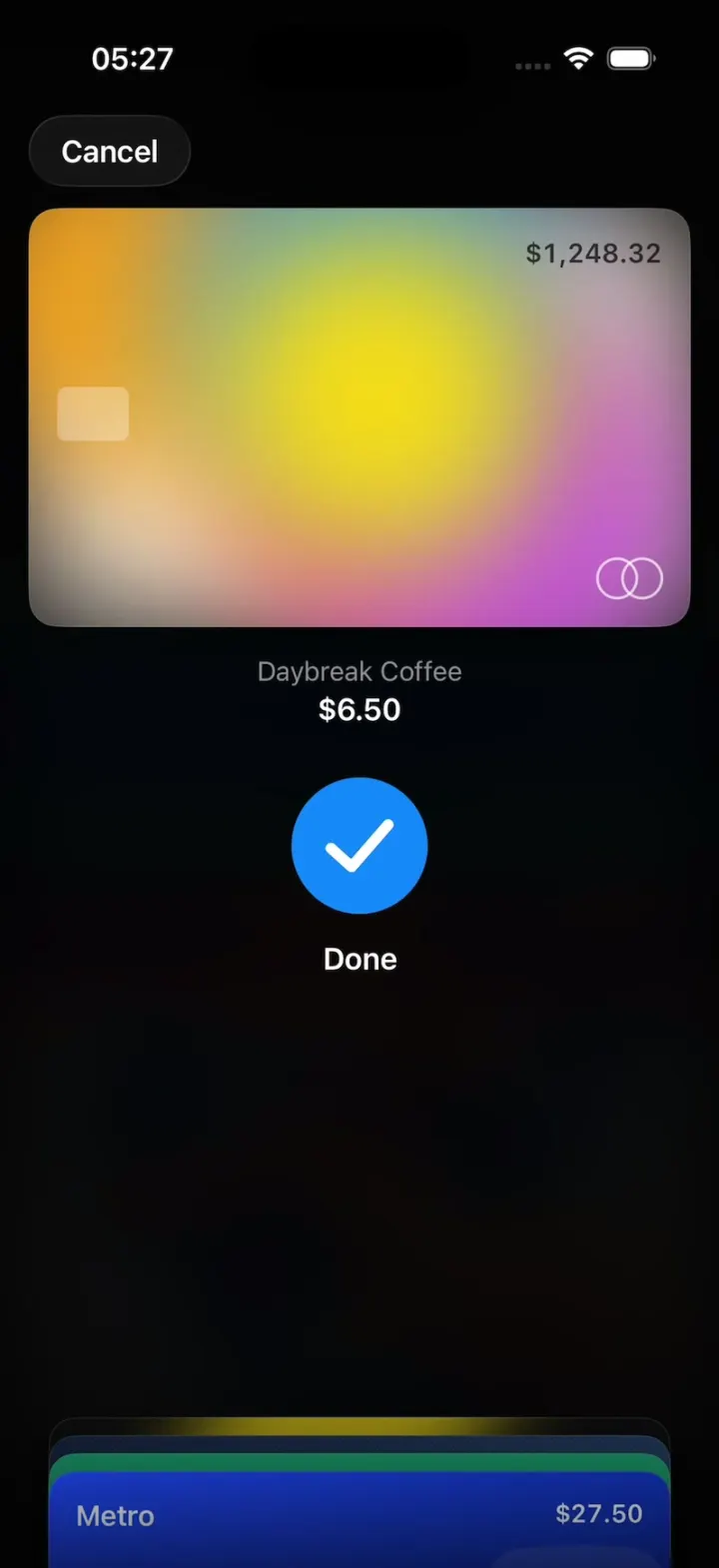
Apple Wallet Clone is the iPhone's Wallet app rebuilt in SwiftUI in the iOS 26 style, on black. The home is the stack of cards and passes: a drifting colour Card, a holographic Cash card, Hudson, Northline and a Metro transit card, a Skylark boarding pass and two poster tickets; tap one and it rises while the rest tuck into a deck at the bottom. Pay opens the pay sheet: Face ID, Hold Near Reader and the blue Done check, and the payment lands at the top of Latest Transactions. Cash sends and requests money with a shimmering amount keypad, the boarding pass has its QR and flight status, and the tickets flip in 3D to their QR codes. HOOK MODE (a hidden strip on the right edge) replays the pay sheet, and every way to approve a payment is one PaymentAuthorizer file, so a remix can add its own.
- iPhone · Swift
- Built in 2 prompts
- Free to remix
Remix copies the working app into your account for free, exactly as we built it. It runs in Vibecode's cloud iOS simulator, in your browser.
Watch the video on X@vibecodeapp · Nov 15, 2026The prompt that builds it
We built Apple Wallet Clone in 2 prompts. Here they are folded into one, so a single paste into a new app builds the finished version.
Prompt · 2,771 words
Build Wallet, a polished native iPhone wallet app in SwiftUI in the iOS 26 system style of the iPhone's built-in Wallet app (Apple Wallet): the stack of cards and passes, a tapped card rising to the top while the rest tuck into a small stack at the bottom, the pay sheet (Face ID, "Hold Near Reader", the blue check "Done"), card details with a balance, a weekly activity chart and latest transactions, a Cash card that sends and requests money with the shimmering amount keypad, a boarding pass, poster-style event tickets that flip to their QR code, and a transit card. Dark mode only, black background. It is Sunday, November 15, 2026, 8:41 AM. The user is Alex Rivera (me.jpg).

ASSETS
curl -L once and unzip flat: https://vibecode-wallet-media.beacon.host/media.zip (wallet-icon.png: use it as the app icon; poster-ferns.jpg and poster-gallery.jpg: the two event tickets' poster art; avatars me, mom, maya, jordan, priya, leo, sam, nina .jpg). Every card face, glyph, QR code, chart and icon is drawn in code or with SF Symbols. No image generation is needed.

SHELL
Opens on the Wallet home: no splash, onboarding, permission prompts, sign-in or Face ID setup. The status bar stays visible (white) on every screen. One NavigationStack, no tab bar.

CARDS (Cards/: drawn faces, 1.586:1, 16 pt corners, a 0.5 pt white 12% border, a soft shadow: black 50%, radius 14, y 8)
One CardFace view draws every item from its CardStyle: the name at the top left (17 pt semibold white), a right-aligned detail at the top right (15 pt semibold, a balance or the last four digits), the rest per style.
1. Card (id "card", the default card): a slowly drifting soft mesh of colour blobs (#FF9F0A, #FF375F, #BF5AF2, #0A84FF, #FFD60A) blurred 40 pt over #FFF1E6, moving on a 20 s loop (TimelineView); no name text; a small white 30% chip at the left middle; two overlapping outline circles (white 70%, 1.5 pt, 22 pt) at the bottom right; top-right detail "$1,248.32" in black 70%.
2. Cash (id "cash"): #0B0B0C with a visible holographic sheen (three diagonal bands about 40% of the card wide each, #64D2FF, #BF5AF2 and #FFD60A at 55%, blurred about 24 pt, drifting across every 6 s); "Cash" (20 pt semibold) with dollarsign.circle.fill before it; detail "$226.78".
3. Hudson Reserve (id "hudson"): #0E1B33 → #1D3557 with fine diagonal brushed lines (white 4%, 1 pt, every 3 pt) in one Canvas; "HUDSON" (15 pt, tracking 4, white 85%) over "Reserve" (13 pt white 60%); detail "•••• 4417"; "VISA" (22 pt heavy italic) at the bottom right.
4. Northline (id "northline"): #0F7B5F → #0A5A47 with three thin wave lines (white 10%); "Northline"; detail "•••• 0928"; "DEBIT" (11 pt bold, tracking 2) at the bottom left.
5. Metro (id "metro", transit): #1B4DFF → #0A2FA8 with a big faded tram.fill (white 10%) at the right; "Metro"; detail "$27.50"; an "EXPRESS MODE" capsule (11 pt bold, white 20% fill) at the bottom left.
6. Skylark boarding pass (id "skylark"; 1.2:1 in the stack, 0.7:1 when open): #0E7C86 → #0B5F73; top row "SKYLARK" (15 pt heavy, tracking 3) with airplane at the left, and at the right "GATE" / "B32" and "BOARDING" / "7:25 PM" (labels 10 pt semibold white 60%, values 17 pt semibold); "JFK" and "LAX" (48 pt bold) with an airplane between them and "New York" / "Los Angeles" (13 pt white 70%) under; a row PASSENGER "ALEX RIVERA", SEAT "14A", ZONE "2", FLIGHT "SK 482"; at the bottom a 150 pt white rounded square with a black QR code (CIQRCodeGenerator of "SK482-K7Q2ZP-14A", nearest-neighbour scaled).
7. The Midnight Ferns ticket (id "ferns", poster style, 0.66:1 when open): poster-ferns.jpg full bleed, a black gradient over the bottom 45%, "THE MIDNIGHT FERNS" (30 pt heavy, 2 lines max), "Brooklyn Steel" (15 pt semibold), "Sat, Nov 21 · 8:00 PM" (15 pt white 80%), "GA FLOOR · ADMIT 1" (11 pt bold, tracking 2, white 70%); an info.circle glass button at the top right.
8. Ribbon & Light ticket (id "ribbon", poster style): poster-gallery.jpg, "RIBBON & LIGHT", "The Hollis Museum", "Sun, Nov 22 · 11:00 AM", "GENERAL ADMISSION".

SCREENS
1. Wallet home (NavigationStack root, black):
 a. Header: large title "Wallet" (34 pt bold) at the left; at the right two 44 pt glass circles: plus (Add to Wallet, 7) and ellipsis (a menu: Orders, Edit Passes, Settings; each shows a toast "Not in this demo").
 b. The stack: items 1-5, then the passes 6-8 starting 22 pt lower; 16 pt side margins; each item overlaps the previous so only its top 58 pt shows (the name and detail row); the last item shows in full. Pressed: the item lifts 6 pt.
 c. Pull the stack down past the top: the items spread apart in proportion to the pull (each gap grows by pull × index × 0.12) and spring back on release (0.45 s spring).
 d. Tap an item: it rises to the top (matchedGeometryEffect, 0.45 s spring, scale 1.0 → 1.02 → 1.0 as it lands); the others slide down into a small stack at the bottom of the screen (top edges only, 10 pt apart, scale 0.94, under a black gradient), and its detail (2, 3, 5 or 6) fades in under it. Tap the risen item or the bottom stack: everything flies back into the stack.
2. Card detail ("card"): under the card a row of two glass buttons, "Pay" (the pay sheet on this card, 4) and an ellipsis (an info sheet: "•••• 2210", Billing Address, Card Number toast). Then #1C1C1E sections (20 pt corners, 16 pt margins, 12 pt gaps):
 a. "Card Balance" (15 pt #8E8E93), "$1,248.32" (28 pt bold), "$3,751.68 Available" (13 pt #8E8E93); at the right "Payment Due" / "Nov 30".
 b. "Weekly Activity": 7 stacked bars (Mon-Sun, max 120 pt, 20 pt wide, 6 pt corners) split by category: Food & Drinks #FF9F0A, Shopping #FF375F, Entertainment #BF5AF2, Transportation #0A84FF; day letters under; the bars grow from 0 when the section appears (staggered 0.04 s); a legend row with the four category dots.
 c. "Daily Cash" "$18.42 this month" with a "2%" chip.
 d. "Latest Transactions": rows (64 pt): a 40 pt rounded square in the merchant colour with a white SF Symbol, the merchant (17 pt semibold), the place and time (13 pt #8E8E93), the amount (17 pt, right) with "2%" (12 pt #30D158) under it; hairlines #38383A. A new payment slides in at the top with a 1 s highlight.
3. Cash detail ("cash"): "$226.78" (40 pt bold, centred), "Available Balance" (13 pt #8E8E93); two capsules "Send" (paperplane.fill) and "Request" (arrow.down.left) (#2C2C2E, 52 pt tall, 17 pt semibold); a "Tap to Cash" row; "Latest Transactions" with 40 pt avatars: Maya Chen +$20.00 "pizza 🍕" Yesterday; Jordan Ellis −$45.00 "Ferns tickets 🎸" Thursday; Mom +$50.00 "for gas ❤️" Tuesday; Priya Shah −$12.00 "boba 🧋" Monday (incoming in #30D158).
 Send or Request: a sheet "Send Money" with a search field and "Recents": a row of 64 pt avatars (Maya, Jordan, Mom, Priya, Leo, Sam, Nina) with names (12 pt). Tap one: the amount screen: their avatar (44 pt) and name at the top; the amount "$0" centred (72 pt bold SF Pro); a "−" and "+" glass circle either side ($1 steps); a keypad (1-9, ".", 0, delete.left; 72 pt keys, no background, 28 pt white digits, a press highlight circle; every key registers on touch-down, with no debounce or animation lock); "Request" and "Send" capsules at the bottom (Send #0A84FF). The amount's digits are filled with a moving iridescent gradient (#64D2FF → #BF5AF2 → #FF375F → #FFD60A, sliding left to right every 2.5 s) with 18 tiny white sparkles twinkling over them (one Canvas); each new digit pops in (scale 1.25 → 1.0, 0.25 s spring) and the amount re-centres smoothly.
 Send: the pay sheet (4) on Cash with that person and amount; when paid, a toast "Sent $20 to Maya" and the row at the top of Latest Transactions. Request: the pay sheet runs RequestAuthorizer: .avatar(their photo) "Requesting from Maya…" 0.8 s, then .done "Request Sent".
4. Pay sheet (full-screen cover): black 92% over the blurred Wallet; the payment card at the top (16 pt sides, top 70 pt, full face); under it the merchant (15 pt #8E8E93) over the amount (17 pt semibold), hidden until the outcome is paid or declined; the status centred at y ≈ 470 pt (glyph 76 pt, title 17 pt semibold, subtitle 15 pt #8E8E93); at the bottom the other cards as a deck of 4-5 top edges (10 pt apart, scale 0.94, no shadow blacking out the edge above). Tap the bottom stack: the current card slides down into it while the tapped card rises (0.45 s spring) and the authorizer starts over. A "Cancel" glass capsule at the top left closes the sheet.
5. Pass detail: the pass at full height. Boarding pass: "Flight Status" "On Time · Departs 7:55 PM" with a thin progress line (JFK dot → LAX dot), "Share" and "Pass Details" rows. Tickets: tap info.circle: the ticket flips in 3D about its vertical axis (rotation3DEffect, perspective 0.5, 0.6 s spring) to its back (#1C1C1E): a 220 pt white QR card ("FERNS-GA-0042" / "RIBBON-GA-0117"), "Section GA · Admit 1", "Doors 7:00 PM" and the venue address; tap again flips it back. Under the ticket "Event Guide": three small glass cards (Venue Map, Weather 52°F, Parking).
6. Transit detail: "$27.50", an "Add Money" capsule, "Express Mode" toggle (on), recent trips ("Bedford Av → 14 St–Union Sq · $2.90").
7. Add to Wallet (sheet): "Add to Wallet" (22 pt bold), rows with 40 pt coloured rounded squares: Debit or Credit Card, Transit Card, Driver's License or State ID, Previous Cards; each shows a toast "Not in this demo".

PAY (Pay/: the seams a remix uses)
- One PaymentAuthorizer protocol: func run(_ payment: Payment) -> AsyncStream<PayStatus>. Payment: id, card id, merchant, amount, optional person (image name). AuthorizerRegistry maps an id to an authorizer; each WalletItem has an authorizer id ("faceID" for every card here); Cash requests use "request".
- PayStatus: glyph (PayGlyph: .faceIDScanning, .faceIDSuccess, .reader, .done, .failed, .avatar(String)), title, optional subtitle, optional note (an image name + text) and outcome (pending, paid, declined). The pay sheet draws whatever statuses arrive with ONE StatusView: the glyph morphs or crossfades in place, the old title fades out (0.1 s) before the new one fades in (0.15 s), never overlapping and with no layout jump; a note is drawn under the subtitle as a grey #262628 message bubble (17 pt white, 18 pt corners, a tail at its bottom left) with the sender's 28 pt avatar at its left, popping in with a spring (scale 0.6 → 1.0 from the avatar).
- PayGlyphView (76 pt box): .faceIDScanning: the faceid symbol (56 pt white) inside a ring of 24 short dashes (2 pt, white 70%) turning once per second; .faceIDSuccess: the dashes close into a solid white ring and a white check strokes in (0.2 s); .reader: iphone.radiowaves.left.and.right (60 pt white), waves pulsing (variableColor iterative); .done: a #0A84FF ring trims 0 → 1 in 0.25 s, a bold white check strokes in (0.2 s), the disc fills #0A84FF (0.1 s) with a pop (1.0 → 1.08 → 1.0) and a success haptic; .failed: the same disc in #FF3B30 with a white ✕ and an error haptic; .avatar(name): the photo as a 72 pt circle with a 3 pt white ring and two white 40% rings expanding out of it and fading, every 0.8 s.
- FaceIDAuthorizer: .faceIDScanning "Pay with Face ID" 0.8 s → .faceIDSuccess 0.25 s → .reader "Hold Near Reader" 0.4 s → .done "Done" (paid). When paid, the sheet holds 1.5 s, slides down, and the card's detail shows the new transaction at the top.

FIXTURES (Data/Fixtures.swift)
Card transactions: Daybreak Coffee, Brooklyn, NY, Today 8:12 AM, $6.50 (cup.and.saucer.fill, #A2845E); Greenpoint Market, Yesterday, $42.18 (cart.fill, #30D158); Metro Transit, Yesterday, $2.90 (tram.fill, #0A84FF); Nitehawk Cinema, Friday, $36.00 (film.fill, #BF5AF2); Leaf & Grain, Friday, $14.25 (leaf.fill, #34C759); Brooklyn Steel, Thursday, $68.00 (music.note, #FF375F); Corner Bodega, Wednesday, $8.75 (bag.fill, #FF9F0A). Weekly activity: plausible category dollars per day adding up to about $310, Saturday the tallest. Contacts: Maya Chen, Jordan Ellis, Mom, Priya Shah, Leo Martin, Sam Park, Nina Brooks.

HOOK (the video's first 3 seconds)
- HOOK MODE: tapping an invisible 24x60 pt strip at the RIGHT edge (x 378-402, y 300-360 pt), drawn in its own window above every other window, the pay sheet's and the toasts' included (a tap there closes whatever is open, even a pay sheet showing Done), resets everything and plays DemoScript's pay steps through the real pay sheet, swap and authorizer code, identical every time (seconds from the tap): 0.00 with no animation: the Wallet home under, every other sheet closed, the pay sheet open on Card with the merchant line hidden and the Face ID status PRE-WARMED mid-scan (the dash ring already turning); 0.00-0.45 hold exactly that; 0.45 .faceIDSuccess; 0.70 .reader "Hold Near Reader" (the card lifts 6 pt); 1.10 .done "Done" with "Daybreak Coffee" / "$6.50"; then hold (in HOOK MODE the sheet stays open).
- DemoScript holds a list of pay steps (card id, merchant, amount, start time, each status's time). HOOK MODE plays them in order: a later step's card slides up through the same swap as a tap on the bottom stack, and its authorizer runs with the step's times, never the app's normal delays. This app has one step.
- What the eye must see: frame 0 fully drawn (the card's colours, the dash ring turning, the bottom stack; no fade-in, no empty sheet); something moves every frame; the blue disc draws smoothly; no flash longer than 0.1 s; text never jumps.

LOOK
iOS 26 Liquid Glass (.glassEffect, or .ultraThinMaterial with a 0.5 pt white 25% border) for bar buttons, the Cancel capsule and toasts. SF Pro (no rounded fonts), white text, secondary #8E8E93, sections #1C1C1E, separators #38383A, accent #0A84FF. Springs under 450 ms, light haptics on taps, pressed states (scale 0.97).

RULES
- Native SwiftUI, iOS 26 (keep the template's target), iPhone portrait, dark mode only.
- Every amount reads as US dollars in en_US ("$6.50", "+$20.00", "−$45.00", "$1,248.32") from one Money formatter with Locale(identifier: "en_US") and currency code USD, never the device locale.
- Deterministic fixtures. No backend, login, permissions, PassKit, LocalAuthentication, NFC, analytics or network calls at runtime. No persistence: delete the SwiftData starter, no UserDefaults or files.
- Files under 300 lines, big bodies split into subviews, no long chained expressions; card faces from Shapes and gradients, one Canvas each for lines and sparkles; every animation smooth at 60 fps (the simulator streams video).

REMIX-READY
Theme/Theme.swift (colours, fonts, metrics; no colour literals elsewhere), Theme/Copy.swift (every word), Data/Fixtures.swift, Data/DemoScript.swift (HOOK MODE steps and times). Codable models with String ids (WalletItem with kind card/pass/ticket/transit, a CardStyle and an authorizer id; Transaction; Contact) behind one WalletDataSource protocol (FixtureWalletSource) feeding an @Observable WalletStore (items, selected item, transactions, cash balance, toasts). CardStyle + CardFace, PaymentAuthorizer + AuthorizerRegistry and PayStatus are the seams: a new card is one WalletItem with a CardStyle; a new way to approve a payment is one authorizer file plus a registry entry, and the pay sheet already draws any status it emits (including .failed and notes). Components/: CardFace, WalletStack, BottomStack, PayGlyphView, StatusView, MessageNote, TransactionRow, ShimmerAmount, Keypad, QRCodeView, GlassCircleButton, TouchDot, Toast. Features/<Screen>/. README.md under 80 lines: the file map; how to rename the app, restyle a card and add a card or pass; 3 one-prompt remixes (a loyalty-card app for your own café whose payments stamp a punch card, the 10th coffee free; a gym membership wallet with a check-in pass; a ticket wallet for your own venue with poster tickets). "Read README.md first." atop CLAUDE.md and ios/AGENTS.md; replace ios/CLAUDE.md's structure block with this app's files. No scratch folders.

FILMING
Long-press the large title "Wallet" for 1 s to reset everything to launch (selected item, sheets, scroll, toasts, the Cash balance back to $226.78 and every payment made since launch).

BUILD
Theme, Copy and Fixtures, then CardFace with all eight styles (launch and look at the home stack first), then the stack, rise-to-top and bottom stack, then the pay sheet with StatusView, the glyphs, FaceIDAuthorizer and HOOK MODE, then Card detail, Cash with send, request and the shimmering keypad, then the passes, the ticket flip, Transit and Add to Wallet; a one-line status per screen; launch in the simulator every two or three files. Fetch media.zip as soon as the shell runs; check the files exist, never view them. Walk each flow once and fix what breaks; no pixel measuring or debug modes. Deliver the whole app, not a plan.
More templates
All templates- View template
Copilot Money Clone
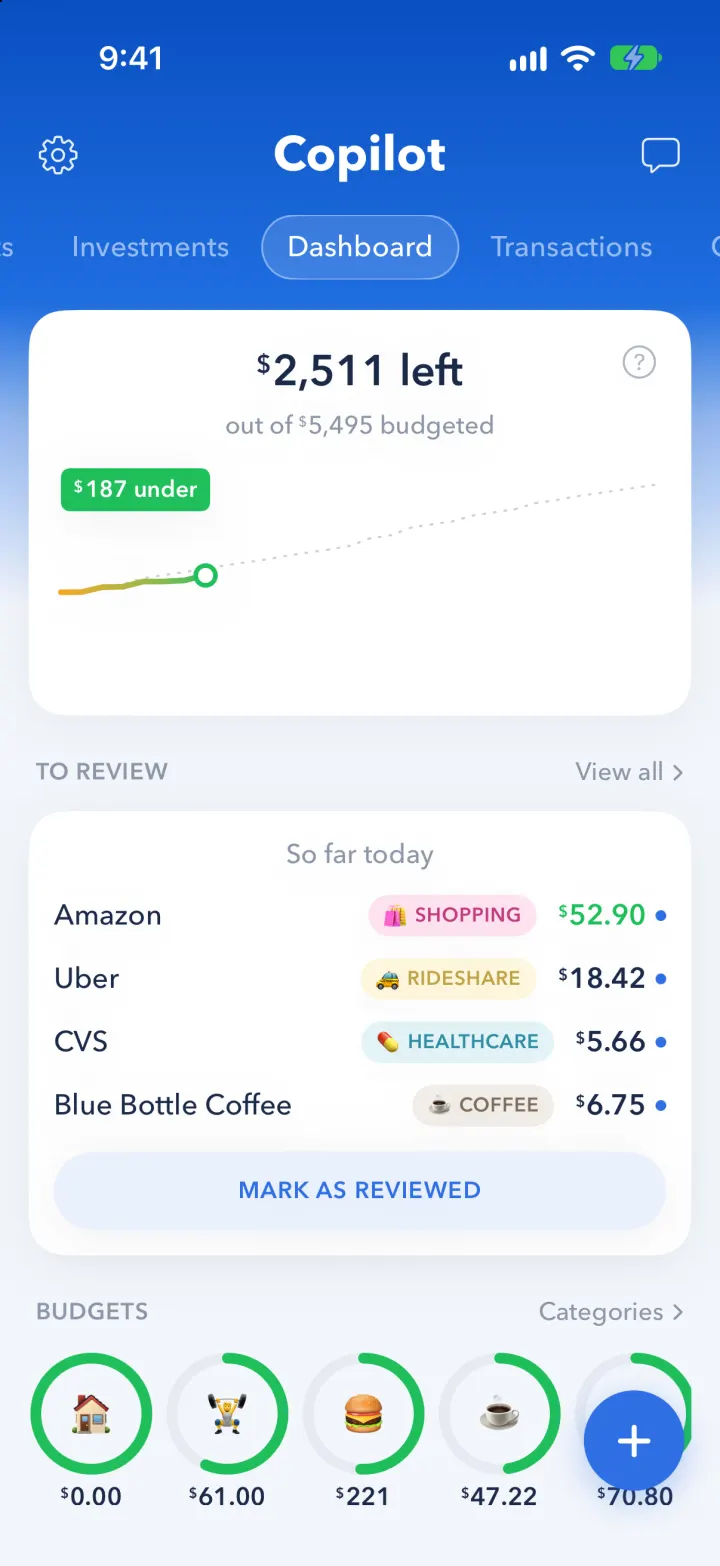
iOSCopilot's blue budgeting app: see what's left this month, clear your review queue, ask an AI about your money.
- View template
Wealthsimple
iOSReveal your balance with a red wipe, then swipe up to buy and watch the screen flood with neon lime.
- View template
X Pay
iOSX's new X Pay checkout: X Money with 5% cashback, sheets for privacy, Pay with and Ship to, then Paid $42.69.
- View template
Fomo Thesis
iOSScroll a holder's posts and the coin chart rewinds with you, every post pinned to its moment.