
Table of contents
- Can Lovable make a native iOS or Android app?
- How do I get a Lovable app into the App Store?
- How to rebuild a Lovable app as a native iPhone app in Vibecode
- What does each route cost?
- Is a Lovable web app enough for a gym or booking app?
- Replit or Lovable for an app my friends can download?
- Lovable vs Vibecode vs Rork for a first iPhone app
- Which route should you pick?
- Frequently asked questions
TL;DR
- No. As of November 2026, Lovable's docs say it "builds web apps" and can't package them for the App Store or Google Play.
- Route 1 is a home-screen web app (PWA). It's free, but not in the App Store.
- Route 2 is a wrapper like Capacitor or Median. Apple can reject it if it's just your website.
- Route 3 is a real mobile app. Vibecode's agent rebuilt our Lovable gym app as a native iPhone app in about 13 minutes, on the same database.
- On Plus, Vibecode submits Swift apps to Apple for you. Your first build is free!
Can Lovable build mobile apps? Not ones you can put in the App Store. Lovable builds web apps.
That's not us guessing. Lovable's publishing docs say "Lovable builds web apps and publishing always deploys to a web URL." They also say "Lovable does not generate projects in React Native." Both lines are there as of November 2026.
Your Lovable app can still reach phones. It takes one of three routes, and only two end in the App Store.
This guide compares all three on Apple's rules and real prices. Then it shows a real rebuild. We built a gym app in Lovable and rebuilt it as a native iPhone app in Vibecode, on the same database. Vibecode can also build it as a React Native app for iPhone and Android.
Rebuild your app in Vibecode. Your first build is freeCan Lovable make a native iOS or Android app?
No. Everything Lovable makes is a web app that runs in a browser. Its mobile app builder page says it plainly: "It doesn't produce App Store or Google Play packages."
What about Lovable's own iPhone and Android app? It came out on April 27, 2026. It's for building from your phone. Lovable's publishing docs say it "does not turn your project into a native app for end users."
How do I get a Lovable app into the App Store?
You can't do it from inside Lovable. Its docs say it "has no built-in flow that packages and submits your project to the App Store or Google Play."
So you pick a route. Here they are side by side:
| Route | What you get | App Store review risk | Needs a Mac? | Cost | Time |
|---|---|---|---|---|---|
| 1. PWA | An icon on the home screen that opens your site | None. It's not in the App Store | No | $0 | Minutes |
| 2. Wrapper | Your site inside an app shell, in the store | High if it's just your site (guideline 4.2) | Capacitor alone: yes. Capgo, Median, Despia: no | Capacitor alone: $0. Median or Despia: $229 to $249 once. Capgo: from $14 a month | Setup, then Apple's review |
| 3. Rebuild | A native app on the same backend | Low for guideline 4.2, since it's a real app | Not with Vibecode or Rork | Vibecode Plus, $20 a month | About 13 minutes of agent time for ours, plus Apple's review once you submit |
Prices checked on November 18, 2026. Apple's Developer Program adds $99 a year to routes 2 and 3. Apple's App Review page says it reviews 90% of submissions in less than 48 hours.
Route 1: a home-screen web app (PWA)
This is the fastest route. Lovable's mobile app builder page says you can "Ask Lovable to make your app a progressive web app (PWA)."
On iPhone, people open your site in Safari, tap Share, then Add to Home Screen. Those are Apple's own steps. After that, it opens full screen like an app.
The catch is there's no App Store listing. People need your link, and they have to add the icon themselves.
Route 2: wrap your site in a native shell
A wrapper is a small native app that loads your Lovable site. You submit that app to Apple and Google.
- Capacitor is free and open source. Lovable's docs say you set it up "outside of Lovable." Capacitor's docs say "To build iOS apps, you will need macOS."
- Capgo builds Capacitor apps in the cloud, so you don't need a Mac. Plans start at $14 a month, with a 14-day free trial.
- Median says you can launch store apps "without Xcode or Android Studio." Its Starter plan is $229 once, then $179 a year after 12 months. The free plan shows a "Powered by Median.co" watermark.
- Despia charges $249 once for one store, or $498 for both.
The risk is Apple's guideline 4.2. It says, "Your app should include features, content, and UI that elevate it beyond a repackaged website." Apple's App Review page adds that "websites served in an iOS app" don't make a quality app. So add real phone features before you submit.
Route 3: rebuild it as a real mobile app
This is how you convert a Lovable app into a real mobile app. A rebuild makes new app screens and keeps your backend, so your users and data stay where they are.
You can do it with Vibecode, Rork, FlutterFlow, or a developer using Expo. We tried it in Vibecode. Here's exactly what happened.
Start your rebuild in VibecodeHow to rebuild a Lovable app as a native iPhone app in Vibecode
We did this for real on November 18, 2026. First we built a members app for a made-up gym, Northside Strength, in Lovable. Then we rebuilt it in Vibecode.
Step 1: build (or open) your Lovable app
Here's the prompt we gave Lovable. It's a typical first Lovable project: four screens and a real database.
Our prompt in Lovable · 178 words
Build a members app for a small boutique gym called Northside Strength. It's mostly used on phones, so design it mobile-first.

Screens:
1. Today: a greeting for the member (Jordan Lee), their next booked class as a big card, and today's remaining classes.
2. Schedule: this week's classes grouped by day. Each class shows the name (HIIT, Spin, Yoga Flow, Strength 101, Boxing Basics), time, coach and spots left out of the class size. Tap a class to see details and book a spot. When a class is full, offer to join the waitlist instead.
3. My bookings: upcoming classes Jordan has booked, with a cancel button.
4. Membership card: Jordan's name, plan (Unlimited Monthly), member since date and a QR code to scan at the front desk.

Use a bottom tab bar for the four screens. Dark theme with a lime green accent, bold headings, rounded cards.

Store classes and bookings in a real database, seeded with a full week of realistic classes and coaches. Skip sign-in for now: everything is for the demo member Jordan Lee.
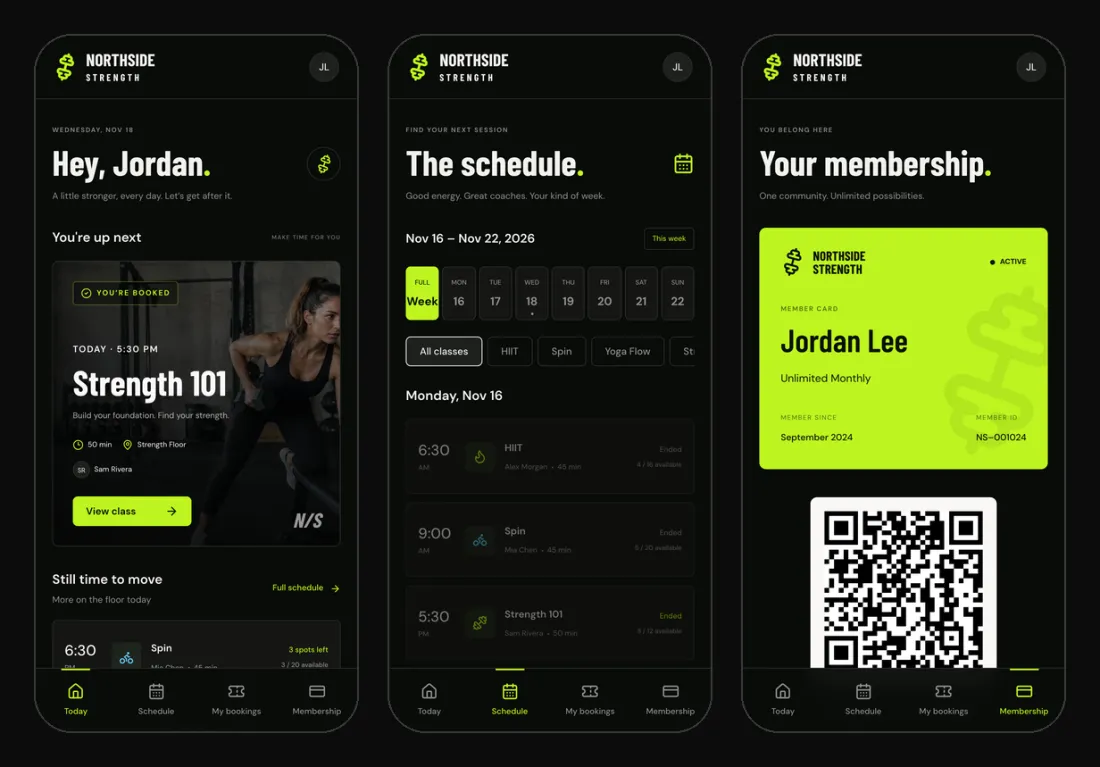
Lovable built it in one go. It asked us one question along the way (Jordan's member-since date) and tested the booking flow itself. The classes and bookings live in Lovable Cloud, its built-in backend. Lovable's docs say it's built on Supabase.
It looks good on a phone. But it's still a website.
Step 2: get your backend details from Lovable
Your iPhone app should talk to the same backend. Then it has the same classes, members and bookings.
We asked Lovable's chat for the details, in Chat mode so it changed nothing. It listed the backend address, the public key, every table and how booking works. You can also find the address and key in the .env file in Lovable's code editor.
What we asked Lovable's chat · 54 words
I'm rebuilding this app as a native iPhone app that should use this same backend. Don't change anything. In plain words, list for the mobile developer: the backend URL and publishable key it can use, each table and its columns, what the public key can read, and how booking and cancelling a class work.
Step 3: start an iOS app in Vibecode
In Vibecode, we started a new iOS app project. That makes a native Swift app, not a web view. Then we sent this message, with Lovable's answer pasted under it.
Message 1: the rebuild · 153 words
Rebuild my Lovable web app as a native iPhone app. It's a members app for my gym, Northside Strength. Keep the same backend, so the iPhone app shows the same classes and bookings as the web app.

It has 4 tabs:
1. Today: a greeting for the member (Jordan Lee), their next booked class as a big card, and today's remaining classes.
2. Schedule: this week's classes grouped by day, with time, coach and spots left. Tap a class for details and a Book button. When a class is full, offer Join waitlist instead.
3. My bookings: Jordan's upcoming classes with a cancel button.
4. Membership: Jordan's name, plan, member since date and a QR code to scan at the front desk.

Dark theme with a lime green accent, bold headings and rounded cards. It should feel like a real iPhone app, not a website.

Here's what Lovable told me about the backend:
Under that line, we pasted Lovable's answer, about 460 words.
Lovable's answer included the publishable key. That's fine. Supabase's docs say the publishable key is the one you ship in a browser or mobile app, and it only reaches what your security rules allow. Never paste a secret key into a prompt.
The agent worked for 6 minutes and 30 seconds. Before it wrote a single screen, it called the Lovable backend to check it worked. It found 30 classes this week and Jordan's 3 bookings.
Then it built all four tabs in SwiftUI and tested them in the simulator. It booked a spot, joined a waitlist on a full class, then cancelled both. Jordan's bookings went back to how they were.
Want iPhone and Android from one project? Pick a React Native app instead. Those reach the App Store through Expo Launch, and you publish to Google Play yourself.
Step 4: drag in screenshots of your Lovable screens
The first version worked, but it looked plainer than the Lovable app. So we took phone-size screenshots of the four Lovable screens. We dragged them into the Vibecode chat with one more message.
Message 2: match the Lovable look · 75 words
These are screenshots of the same app in Lovable. Match its look more closely, but keep it a native iPhone app: the Northside Strength logo and the JL avatar at the top, the big photo card for the next class on Today, the class rows with the time on the left and an icon for each class type, and the lime member card with the QR code under it on Membership. Keep the same backend.
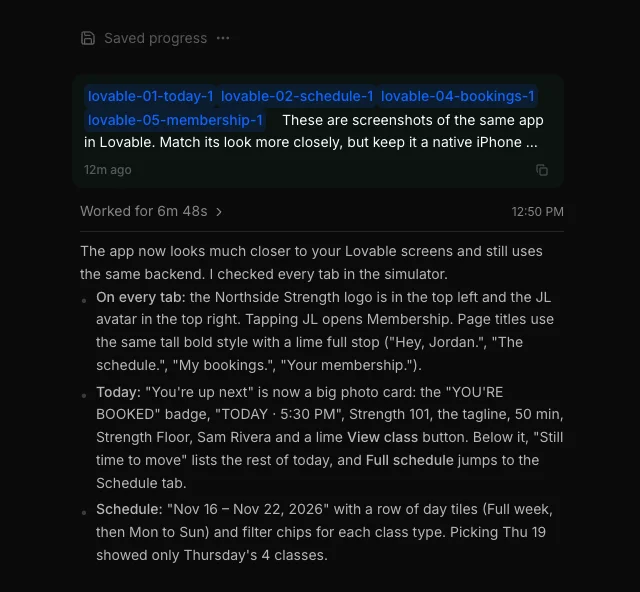
The agent opened all four screenshots and worked for 6 minutes and 48 seconds. It made five gym photos, one per class type, and restyled every screen.
It also told us what it couldn't copy. We had no logo file, so it used a lime dumbbell icon for now. And the backend doesn't store the member number from the Lovable card, so it showed Jordan's real ID instead.
Step 5: test it in the live iOS Simulator
Here's the finished app, filmed in Vibecode's simulator. It runs in your browser, so you don't need a Mac.
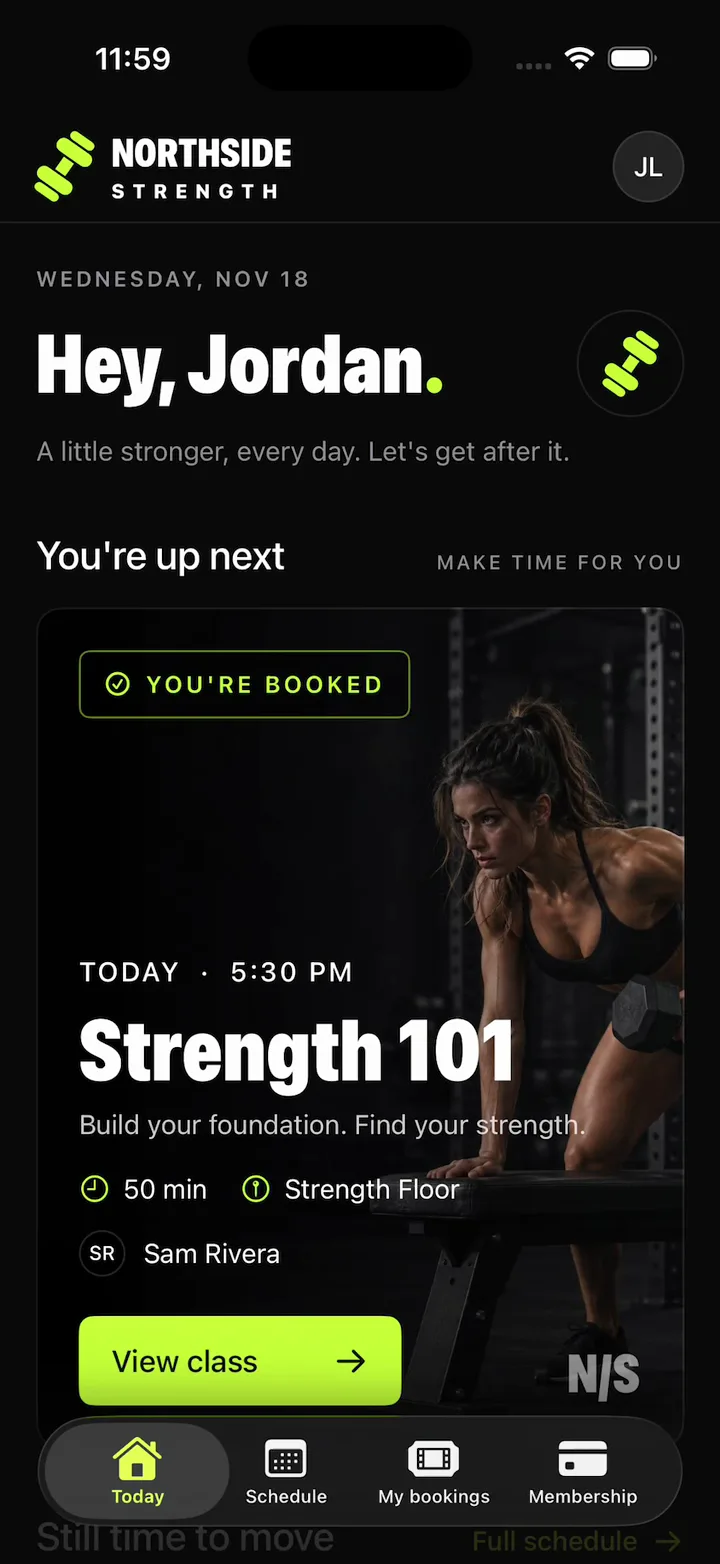
Then we tested the part that matters. We booked Yoga Flow at 8:00 PM in the iPhone app. Then we opened the Lovable web app, and the booking was already under My bookings.
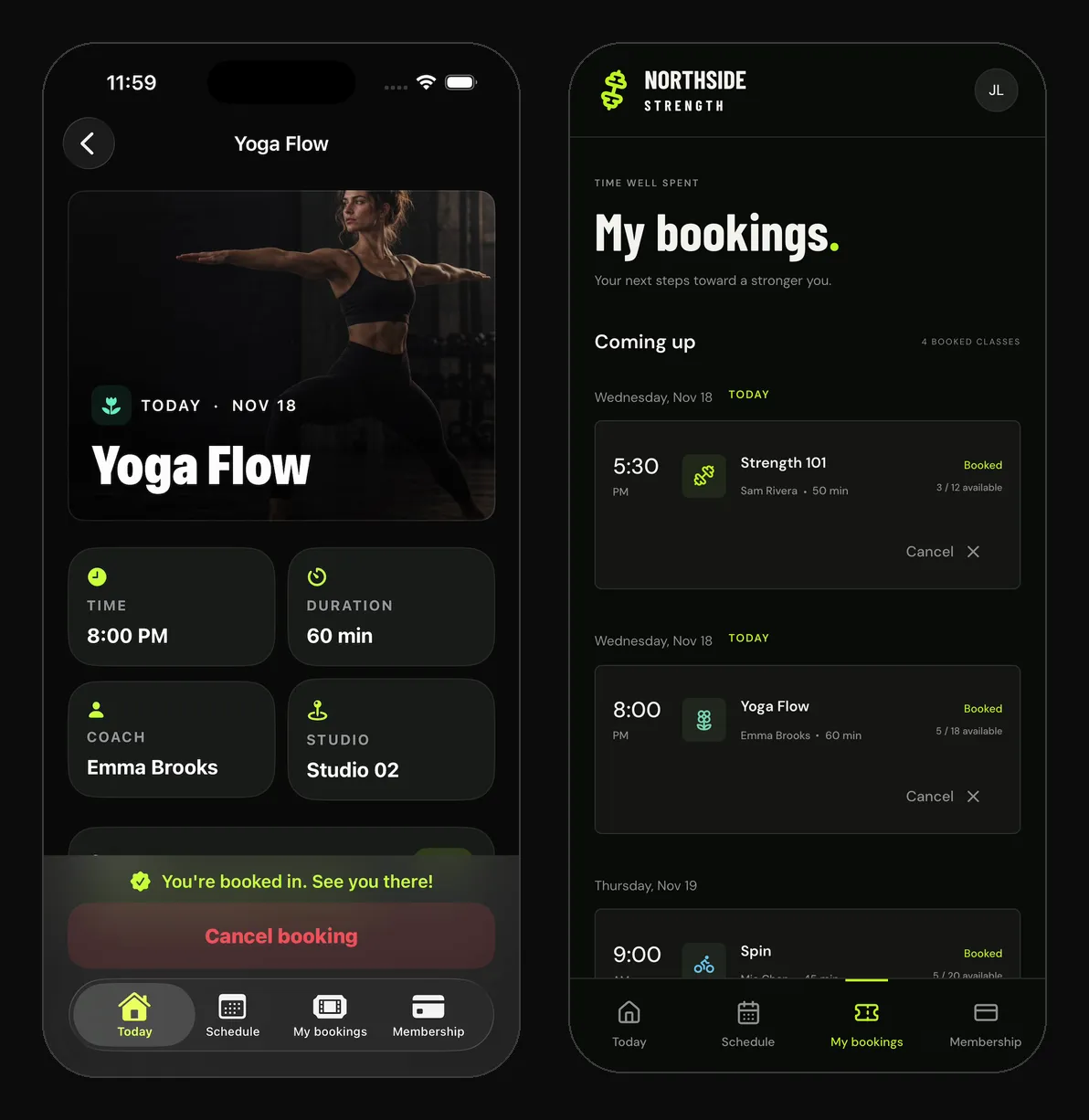
That's why you keep your backend. Your web app and your iPhone app show the same classes and the same bookings. We cancelled the test booking afterward.
Want to move off Lovable Cloud later? Lovable's database export includes your users and their password hashes. It leaves out storage files, edge function code and secrets, and you can export once every 24 hours.
The whole rebuild took two messages and about 13 minutes of agent time. It cost $13 in all: $11.41 in AI credits, $0.33 for the five photos and $1.26 of simulator and build time.
We ran both messages on a paid account with Claude Opus 5.5. On a new account, only the first build is free, and it always runs on GPT-6.1 Sol. Message 2 and everything after it use credits. Plus comes with $20 of credits a month.
Step 6: publish it to the App Store
When your app is ready, press Publish and pick Publish to App Store. For Swift apps, Vibecode builds, signs, uploads and submits the app for review with your Apple Developer account. App Store submission comes with Plus, at $20 a month.
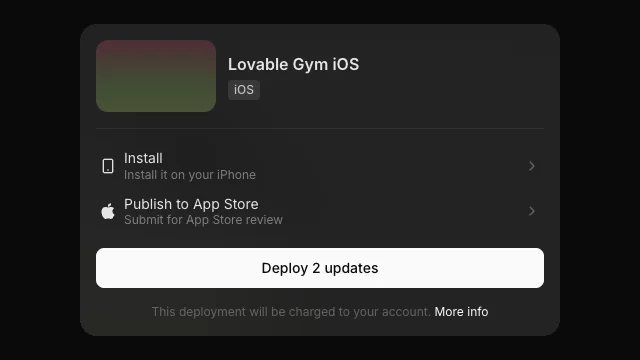
We stopped here. Northside Strength isn't a real gym, so we didn't send it to Apple. Our guide to publishing to the App Store covers the rest.
A few things weren't perfect:
- The QR code holds Jordan's member ID. The agent pointed out it doesn't know what the front desk's scanner expects.
- There's no sign-in, because the Lovable app had none. Lovable's chat offered to add logins on its backend, and a real gym app needs them.
- The logo is a stand-in until you upload your own.
What does each route cost?
Every App Store route starts with Apple's Developer Program, at $99 a year. Google Play's one-time fee is $25. On top of that:
| Option | Price, as of November 18, 2026 | What it covers |
|---|---|---|
| PWA from Lovable | $0 extra | Home-screen web app, no store listing |
| Capacitor | Free | The wrapper code. You build and submit it yourself |
| Capgo | From $14 a month ($12 billed yearly) | Cloud builds and live updates for Capacitor apps |
| Median Starter | $229 once, then $179 a year | A white-label wrapper app, no Xcode needed |
| Despia | $249 once per store, $498 for both | A wrapper app with native features |
| Vibecode | First app build free, then Plus at $20 a month | A native rebuild, with App Store submission on Plus |
| Rork | Free plan designs only, building from $20 a month | A native rebuild |
Up front, Vibecode costs less than Median or Despia. Median Starter is $229 and Despia is $249 per store, before you ship. Vibecode Plus is $20 a month, with App Store submission included.
Over a year, the totals are close. Plus is $240, or $200 billed yearly, and Median Starter renews at $179 a year. The difference is what you get, a native app instead of your website in a shell.
Both store routes keep your Lovable project running. A wrapper loads your Lovable site, and a rebuild like ours reads your Lovable Cloud backend. Lovable's docs say apps on its built-in backend "need available credits to serve requests." Its Free, Pro and Business plans include 20 Cloud credits a month, and Lovable Pro starts at $25 a month.
To download your full Vibecode project, you need Vibecode Pro at $50 a month.
Is a Lovable web app enough for a gym or booking app?
Yes, if a link and a home-screen icon are enough for your members. Our Lovable gym app showed the schedule, bookings and member card fine in a phone browser.
No, if members expect to find you in the App Store. Lovable can't make that.
Two more things to check before you decide:
- Reminders. A home-screen web app on iPhone can send push notifications. That works since iOS 16.4, and only after someone adds it to the home screen.
- The front desk. A QR code on a web page works. But members have to find the site and open it first.
So start with the web app if you're testing the idea. Move to a real app once members ask for one.
Replit or Lovable for an app my friends can download?
Between those two, pick Replit. Lovable gives your friends a web link. They can add it to their home screen, but they can't download it from the App Store.
Replit has a Mobile app type that builds an Expo (React Native) app. You preview it in a streamed iOS Simulator or on your phone with Expo Go. Its Launch flow builds the app in the cloud and sends it to App Store Connect for TestFlight. Replit's docs say Google Play publishing "is not yet supported."
With Vibecode, you describe the app and it builds a native Swift app. It submits it to Apple for review for you, and TestFlight is available on request. Want iPhone and Android from one project? Pick a React Native app instead, and publish the Android version to Google Play yourself.
Replit's Core plan is $20 a month, the same as Vibecode Plus.
Lovable vs Vibecode vs Rork for a first iPhone app
Here's how the three compare for someone shipping their first iPhone app, as of November 18, 2026:
| Lovable | Vibecode | Rork | |
|---|---|---|---|
| What it builds | Web apps | Native Swift iPhone apps, React Native apps for iPhone and Android, or web apps | Native Swift iPhone apps, Kotlin Android apps and web apps |
| App Store | No. PWA or a wrapper you set up | Builds, signs and submits Swift apps for review | Builds and submits to TestFlight and the App Store |
| Needs a Mac? | No | No | No |
| Free to start | 5 credits a day, up to 30 a month | First app build free | Designs only. Building needs a paid plan |
| Paid plans from | $25 a month | $20 a month | $20 a month |
| Best for | Web apps, dashboards and SaaS | Native Swift iPhone apps, starting with a free first build | Native iPhone and Kotlin Android apps in one project |
Sources: Lovable plans, Vibecode pricing, Rork plans and Rork's iPhone docs.
Rork also has a Lovable import. It reads the GitHub repo behind your Lovable project. For a full side-by-side, see Vibecode vs Lovable or our list of Lovable alternatives.
Which route should you pick?
- Just testing the idea? Ask Lovable for a PWA and share the link.
- Mostly content, and you need a listing fast? A wrapper can work. Add real phone features first, or guideline 4.2 can stop you.
- People will open it every day, book things or pay? Rebuild it as a real app and keep your backend.
To rebuild yours, describe it to Vibecode and paste in your backend details, like we did. Then read our guide to publishing to the App Store, or see what the iOS app builder does.
Rebuild your Lovable app. Your first build is freeFrequently asked questions
Is a Lovable PWA allowed in the App Store?
No. A PWA isn't an App Store app at all, since people add it to their home screen from Safari's Share menu. To get a listing, you wrap the site in a native shell or rebuild it as a real app. A thin wrapper risks rejection under Apple's guideline 4.2.
Do I need a Mac to put a Lovable app on the App Store?
Not always. Capacitor's docs say you need macOS to build iOS apps, unless you use a cloud build service. Capgo is one, and Median and Despia build in the cloud too. Vibecode needs no Mac either, since the simulator runs in your browser and Vibecode builds, signs and submits the app for you.
Will my Supabase data carry over to the mobile app?
Yes, if the new app uses the same backend. Ours does, and it reads the same Lovable Cloud database as the web app. To move off Lovable Cloud instead, Lovable's export includes your users and their password hashes. It leaves out storage files, edge function code and secrets, and you can export once every 24 hours.
Can I keep editing in Lovable after I wrap my app?
Yes, mostly. Lovable's docs describe wrapping your published URL, so what you publish from Lovable shows up inside the app. Changes to the native shell itself, like a new icon or permission, need a new build and a new App Store review. With a rebuild, the iPhone app is its own project, so screen changes in Lovable don't reach it.
Does a Lovable app get push notifications on iPhone?
Only in some cases. Since iOS 16.4, a web app that someone added to their home screen can ask to send push notifications. In a normal Safari tab, it can't. A wrapped or native app uses Apple's push service like any other app.
Can I download my Lovable app or export it as a mobile app?
You can download the code on Lovable's Pro plan, and Git sync works on every plan. But it's the code of a web app. It doesn't turn into an iPhone app by itself. You still need a wrapper or a rebuild.
Does the Lovable iPhone app publish my app to the App Store?
No. Lovable launched its iPhone and Android app in April 2026, and its docs say it's for building projects from your phone. It doesn't turn your project into a native app for your users.
About the editorial team
Vishal is a product engineer at Vibecode. Before Vibecode he did product engineering at EarnIn and co-founded Ivella (YC S21), a banking app for couples. He studied computer science at Duke.

More from the Vibecode blog
Tips
Xcode for Windows: does it exist? (What to use instead in 2026)
No, there's no Xcode for Windows. Here's what to use instead, with 2026 prices, and how to publish iOS apps without a Mac.
Tutorial
How to make an iPhone app on Android (no Mac needed)
Yes, you can make an iPhone app on Android. We built a first version in Chrome in 6 minutes. To publish, you pay Apple $99 a year, plus Vibecode Plus at $20/mo.
New to AI app building? Read what vibe coding means or compare the best AI mobile app builders. Have an idea? See if you can vibe code it.