Window Seat
Travel app · from our videos on X
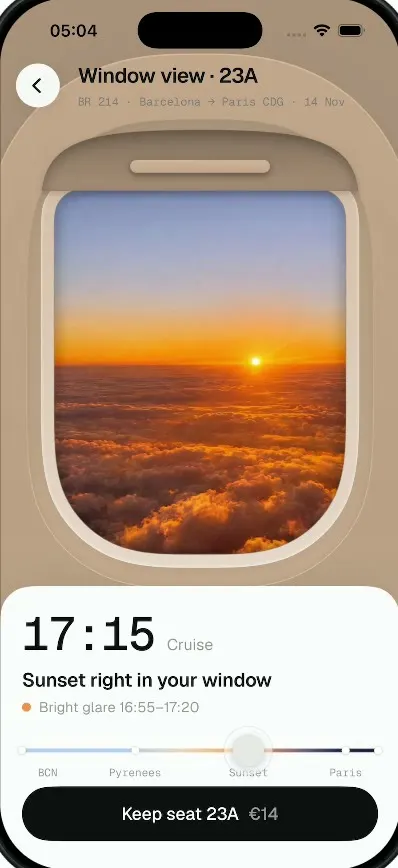
Window Seat is a seat picker for one flight, Barcelona to Paris, that shows you the view from your window before you book. Tap a window seat on the top-down plane and the map zooms into it. Some rows have no window at all, just the wall panel, and the app tells you so. Drag the timeline from 16:05 to 17:55 and the porthole cross-fades from the Barcelona coast to the Pyrenees, a sunset over the clouds, Paris at night and the runway at CDG, while the cabin tint follows the light. Pull the shade down to hide the sunset glare, then keep the seat.
- iPhone · Swift
- Built in 1 prompt
- Free to remix

Remix copies the working app into your account for free, exactly as we built it. It runs in Vibecode's cloud iOS simulator, in your browser.
Watch the video on X@anshnanda · Nov 10, 2026The prompt that builds it
We built Window Seat in one prompt. Paste it into a new app to build your own copy, or change it first.
Prompt · 1,626 words
[image attached][image attached][image attached][image attached][image attached][image attached][image attached][image attached][image attached][image attached]
Download/reference the app shown in this post and clone it exactly, including the iPhone visual design, layout, interactions, animations, typography, spacing, and all visible states. Make it functional and runnable in the simulator. Match the reference as closely as possible and include any interaction shown in the source. Reference: https://x.com/RaminNasibov/status/2119945327595716717 ("Flight app design that shows you the view from your window before you book."). The 10 attached screenshots are frames of the 19-second source video, in time order (file names carry the second, e.g. ref04-7.6 = 7.6 s). Study every one before writing code.

Build a native SwiftUI iOS app named Window Seat using Opus 5.5. It is a seat picker for one flight that shows you the real view from your window seat before you book, across the whole flight timeline. Do NOT put a fake handset frame or fake status bar inside the app; the simulator provides that. Portrait only. Use deterministic fixture data, no backend, no permissions. Do not publish externally.

Observed video sequence (0-19 s):
- 0.0-0.9 s: Seat map screen "Choose your seat". The user taps seat 11A (row 11, left window); it turns orange.
- 0.9-2.0 s: zoom transition: the map scales up fast around the tapped seat with a strong zoom/motion blur, the sheet fades, then the seat's view fades in from a soft blur to sharp (about 1 s total).
- 2.0-3.7 s: 11A screen: a photoreal cabin interior: the beige wall panel BETWEEN two windows (the windows are cut off at the left and right edges), an orange-and-grey economy seat with a white headrest cover on the left, the back of a grey seat with a tray table on the right, overhead bins and a warm light strip at the top. Bottom sheet: "11A" + "Sold as a window seat", "No window in this row", grey dot "Just the wall panel between two windows", buttons "Change seat" (black pill) and "Keep 11A · €9" (light grey pill).
- 3.7 s: user taps "Change seat". The reverse transition: the cabin blurs and zooms out back into the seat map (about 1 s); the map shows no selection.
- 5.3 s: user taps seat 23A (row 23, left window); it turns orange; same zoom-in transition.
- 6.6-7.3 s: the 23A window view fades in from blur: a big airplane porthole filling the top 2/3 of the screen with the takeoff view. Sheet: "16:05" Takeoff.
- 7.5-10.5 s: user drags the timeline knob from left to right; the window photo cross-fades through the flight (Barcelona coast -> Pyrenees -> sunset over clouds), time, phase, headline and detail update live, the background tint around the porthole warms.
- 10.5-11.2 s at 17:15: a small dark pill tooltip "Pull the shade down" pops in at the top of the window.
- 11.5-13.0 s: the user drags the window shade down from the top of the porthole to ~70 %: a cream plastic shade panel with a darker rounded handle bar slides down over the photo; the text crossfades to "Sunset, without the glare" / "Shade at 70% · sun hidden". Then the shade is pushed back up and text returns.
- 13.5-17.6 s: user keeps dragging the knob to the end: dusk then night over Paris with the Eiffel Tower lit, then landing at night with the wing and runway lights. The background around the porthole goes from warm tan to slate blue-grey / dark navy.
- 17.6-18.2 s: user taps "Keep seat 23A €14"; the button springs and becomes an orange pill "✓ 23A is yours".

Visual details:
- Header on every screen (overlaid at the top, left aligned): a round white back button (44 pt, chevron.left) at the left, then the title in a bold geometric grotesk ~22 pt ("Choose your seat" / "Window view · 11A" / "Window view · 23A") and under it a grey monospaced subtitle ~13 pt "BR 214 · Barcelona → Paris CDG · 14 Nov".
- Seat map: background #EEEEEC light warm grey. A top-down white airplane: a long white fuselage (rounded nose at the top, running off the bottom) about 37 % of the screen wide, centred, with swept white wings left and right starting at about row 7 and ending near row 19, and two white engine pods (vertical rounded capsules) on the wings at the screen edges near rows 7-10. Inside the fuselage: 26 rows of 3+3 seats (A B C | aisle with the grey row number | D E F), small rounded squares ~28 pt with a slightly darker bottom lip. Available seats white, taken seats grey #C8C8C5. Short grey dashes on the outside of the fuselage walls mark the windows at every row. Taken seats (fixed fixture): row 1 A C D; 2 A; 3 B C F; 4 E; 6 A B D E F; 7 A B; 8 A B E F; 9 B C D; 10 all; 11 B D; 13 B D F; 14 A B E; 15 A B C D F; 16 B E; 17 F; 18 A B C D F; 19 E F; 20 A C E; 21 C E; 22 A C D E; 23 B F; 24 A C F; 25 F; 26 A D E F. Seats 11A and 23A are available (white). Selected seat = orange #FF5A1F. Bottom sheet (white, 32 pt top corner radius, ~15 % of the screen tall): "Tap a window seat" bold ~26 pt and "See the view before you pay for it" grey ~16 pt.
- Only window seats (A and F) are tappable. Rows 5, 11 and 17 have no window ("Sold as a window seat" screen with the cabin wall image, price €9). Every other window seat shows the window view screen with price €14.
- Window view screen: full-bleed background colour behind the porthole that follows the timeline: #EDEAE5 (takeoff), #E8E1D7 (Pyrenees), #C9A586 warm tan (sunset), #5E5F78 slate (Paris), #4A4C66 (landing), interpolated as the knob moves. The porthole is drawn in SwiftUI: a large rounded-rect/stadium inner window (about 75 % of the screen width, from y≈17 % to y≈60 %), inset in a thick soft plastic frame with an inner bevel and soft shadows tinted with the background colour, and a closed-shade lip (a rounded bar) at its top. The photo fills the inner window, clipped.
- Bottom sheet (white, 32 pt top radius, from y≈69 %): big monospaced time ~52 pt ("16:05") with the phase in grey next to it ("Takeoff"), then a bold headline ~20 pt, then a coloured dot + grey detail line ~14 pt. Then the timeline slider: a 4 pt track with a gradient light blue #A9C7F0 -> beige #E6D3B5 -> orange #F7A24B -> deep navy #1B1D3A, small white stop dots at BCN, Pyrenees, Sunset, Paris and the end; grey monospaced labels under it "BCN", "Pyrenees", "Sunset", "Paris". The knob is a white 36 pt circle with a soft shadow (it grows slightly while dragged). Then a full-width black pill button "Keep seat 23A" with "€14" in grey after it.
- Timeline fixtures (time maps linearly from 16:05 at the left to 17:55 at the right; text changes by time):
  16:05-16:19 "Takeoff": "Barcelona and the sea" / light-blue dot "Soft afternoon sun from behind" (photo: aerial of Barcelona city and the coastline, afternoon).
  16:20-16:54 "Cruise": "The Pyrenees on your left" / yellow dot "Low sun on your side" (photo: snowy Pyrenees peaks with clouds from altitude).
  16:55-17:34 "Cruise": "Sunset right in your window" / orange dot "Bright glare 16:55–17:20" (photo: orange sunset sun just above a sea of clouds). The "Pull the shade down" tooltip shows in this range when the shade is up.
  17:35-17:47 "Descent", 17:48-17:54 "Approach": "Paris lights on your left" / navy dot "Night · Eiffel Tower in view" (photo: Paris at night from above, Eiffel Tower lit, dusk sky band at the horizon).
  17:55 "Landing": "Touchdown at CDG" / navy dot "Dark outside · 17:55" (photo: night from the window, the wing in the lower right, airport lights).
  Cross-fade the photos smoothly with the knob position (blend the two neighbouring photos), not hard cuts.
- Shade: a vertical drag that starts in the top third of the window pulls a cream (#F3EDE6) shade panel down from the top lip, with a rounded darker handle bar at its lower edge; it follows the finger and stays where released. When the shade covers ≥ 50 % during the sunset range the headline becomes "Sunset, without the glare" and the detail "Shade at 70% · sun hidden" (use the real percentage, rounded to 10). Drag up to raise it.
- Keep button: tap springs (scale 0.96 -> 1) and turns into an orange #FF6A1A pill "✓ 23A is yours" (white). Tapping it again, or the back button on any screen, resets the whole app to the seat map with nothing selected, knob at 16:05, shade up (I need this to film several takes).

Images: generate the 6 photos (cabin wall between two windows with the orange seat for 11A, Barcelona coast aerial, Pyrenees, sunset over clouds, Paris at night with the Eiffel Tower, night landing with wing) with gpt-image-2.5-flare. Run env and use the project's proxied OPENAI_API_KEY with https://api.openai.com/v1/images/generations, portrait 1024x1536, photoreal. Save them as assets in the app.

Keep every file you create inside /home/user/workspace (fonts, generated images, scripts): tool access to /tmp and other paths outside the workspace is denied in this sandbox.

Build fully, run compile/build validation, resolve all errors, and launch in the web simulator. Prioritize fidelity to the attached screenshots and the main interaction flow (map -> 11A -> change seat -> 23A -> scrub -> shade -> keep). Deliver complete implementation rather than a plan.
More templates
All templates- View template
Wanderlog Clone
iOSPlan a whole trip on one screen: day-by-day stops on a map, bookings, split costs and an AI itinerary.
- View template
Waze Clone
iOSReal routes, a purple drive line, police alerts you confirm and one-tap hazard reports, all in Waze's look
- View template
Airbnb Clone
iOSAirbnb's 3D tabs, the Where/When/Who search, the price map, Guest favorite stays, Reserve and Compare.
- View template
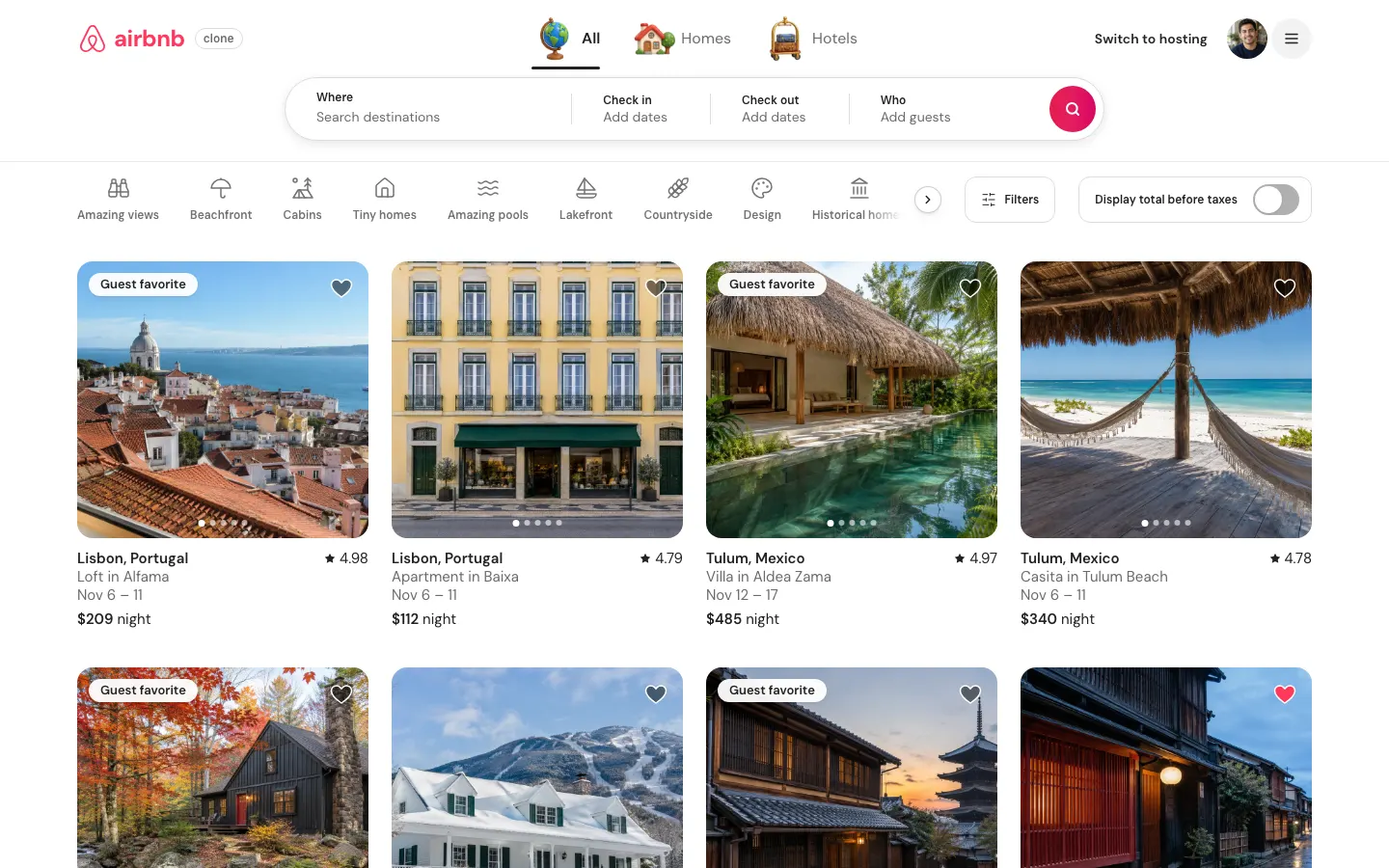
Airbnb Clone (Web)
WebSearch 80 stays on a live price map, save wishlists, book with a test card, then list your own place.