Studio Booking
Booking app · built by the Vibecode team
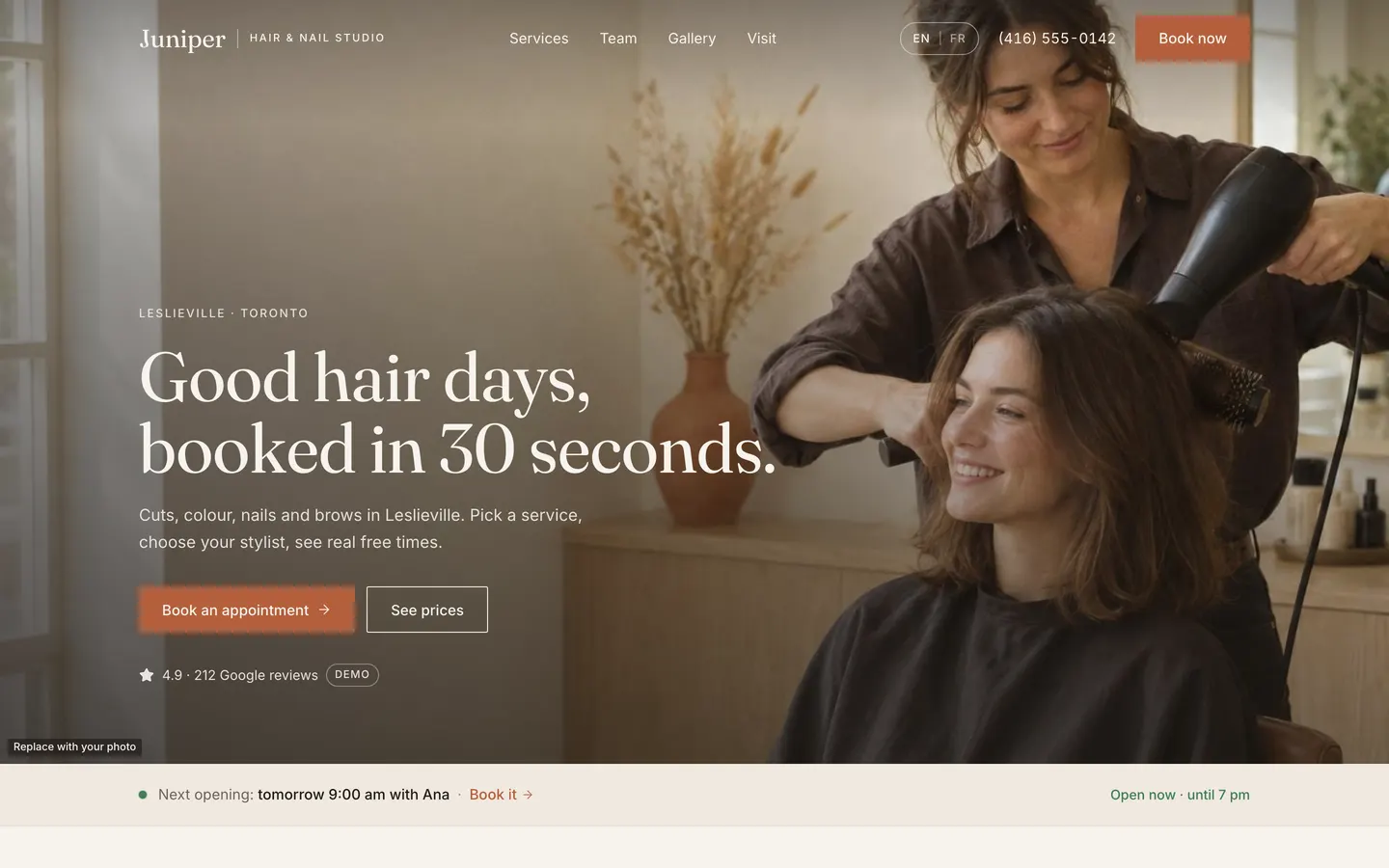
Studio Booking is the website and back office for a hair, nail and brow studio, shown as the fictional Juniper Hair & Nail Studio in Toronto. Clients pick services, choose a stylist or anyone, see only truly free times in a Calendly-style picker and book in a few taps, then reschedule or cancel from their own link. The owner signs in to a Today view, a day and week calendar, phone bookings, time off, prices, staff hours, customers with CSV export, a content editor, French text and a publish checklist. Two clients can never take the same slot, every email and text is logged, and every photo, review and the rating are marked as demo until you replace them.
- Web app
- Built in 8 prompts
- Free to remix
Remix copies the working app into your account for free, exactly as we built it. It runs in your browser.
The prompt that builds it
We built Studio Booking in 8 prompts. Here they are folded into one, so a single paste into a new app builds the finished version.
Prompt · 6,914 words
Build "Juniper Hair & Nail Studio", a complete, working booking website plus owner admin for a hair, nail and brow studio. It is a template that salons, barbers, nail and lash studios, med spas, groomers and clinics will remix, so it must feel like a real, designed product. Visitors arrive on a phone to answer one question: "can I get in, when, and for how much?" Use the platform's standard stack: the React + Vite webapp, the Hono backend, Prisma (SQLite) with seeded demo data, and Better Auth for the owner login. Use Opus 5.5.

Design references (the original screenshots are not included; build from these descriptions):
- Reference: Calendly's slot picker. Month calendar where bookable days are tinted circles and the chosen day is a solid circle, ONE column of outlined time buttons for that day, and the picked time splits into a grey time half plus a "Next" half.
- Reference: Calendly's "Enter Details" form (labels above inputs, plain, roomy).
- Reference: Calendly on a phone: day header, then one full-width column of time buttons.
- Reference: Fresha step 1, service-first: breadcrumb "Services > Professional > Time > Confirm", big title, category chips, service cards with duration, price and a square add button.
- Reference: Fresha step 2 starts with "Any professional / Maximum availability".
- Reference: Fresha step 3: stylist chip, horizontal row of day cards, one column of time rows, "Can't find a suitable time?" line.
- Reference: Fresha's sticky summary card on the right: chosen services, total, Continue.
- (described, no screenshot) local-business patterns we copy: green "Open Now" chip next to the hours, a primary CTA with Call / Text / Get Directions buttons, a floating live-status chip stacked above a floating "Book Now" button (bottom-left), and two floating round call and chat buttons (bottom-right).
- Reference (Aesop hero, Aesop split section): the restraint we want on the home page: warm cream background, serif headings, thin rectangular buttons with an arrow, big photos, lots of space.

## Look and feel ("Warm Neutral" default theme)

- Background ivory #F7F3EE. Alternate sections sand #EFE8DF. Cards #FFFDF9 with a 1px #E6DED4 border. Text espresso #211C18, secondary #6B6159, muted #9A8F85, hairlines #E6DED4. ONE accent: terracotta #B5603B (hover #9E5132, tint #F3E3D9). Success green #3F7D58 only for "open/free" dots. Error #B3261E.
- Type: headings "Fraunces" (Google Fonts, weight 400, opsz on, letter-spacing -0.01em). Body "Inter" 400/500. Sizes: H1 72px/1.02 desktop and 44px/1.05 phone; H2 48px/1.08 desktop and 34px phone; H3 26px; body 16px/1.6; small 14px; kicker labels 12px Inter 500 uppercase, letter-spacing 0.14em, terracotta.
- Spacing scale 4, 8, 12, 16, 24, 32, 48, 64, 96, 128. Container max 1200px with 24px gutters (16px on phone). Sections 112px top and bottom on desktop, 72px on phone.
- Buttons are rectangular: radius 2px, height 48px (40px small), Inter 15px 500, sentence case. Primary = terracotta fill with ivory text. Secondary = 1px espresso outline. On photos use an ivory outline. Text links get an arrow icon. Only status chips and the language toggle are pill-shaped.
- Icons: lucide-react at 1.5px stroke. No emoji anywhere. No purple or blue gradients, no glassmorphism, no default shadcn look: override every shadcn token to this palette and radius 2px.
- Motion: gentle fades only (opacity plus a 8 to 12px rise, 200 to 300ms, ease-out). Respect prefers-reduced-motion (no motion at all then).
- Theme presets in Admin > Settings > Theme, done with CSS variables on the html element: "Warm Neutral" (above), "Dark Luxe" (background #0E0E0E, cards #171615, text #F3EEE6, accent gold #C6A15B) and "Clinical" (background #FFFFFF, cards #F5F8FA, text navy #0B2A4A, accent teal #1BA3A3, headings in Inter 600).
- Copy tone: warm, plain and confident. Short sentences. Never use an em dash in any visible text. Never invent stats, press or testimonials. Dates are always human: "Thursday, November 5", "today 4:30 pm", "tomorrow 10:00 am". Times use "4:30 pm" style.

## The demo business (single source of truth)

Every fact below lives in ONE place in the database (Business, OpeningHours, Service, Staff) and the home page, booking flow, FAQ, footer, JSON-LD schema and llms.txt all read from it. Never hardcode a price, an hour or the address in a component.

- Name "Juniper Hair & Nail Studio" (short "Juniper"). Tagline "Hair, nails and brows in Leslieville".
- Address "212 Larch Street, Toronto, ON M4M 2J1", neighbourhood "Leslieville". lat 43.6628, lng -79.3346. Timezone America/Toronto. Currency CAD, locale en-CA, shown as "$65" (no decimals on whole dollars). Languages English (default) and French.
- Phone and WhatsApp "+1 416-555-0142", shown as "(416) 555-0142". Email "hello@juniperstudio.example".
- Opening hours: Monday closed; Tuesday 9:00 am to 7:00 pm; Wednesday 9:00 am to 7:00 pm; Thursday 9:00 am to 8:00 pm; Friday 9:00 am to 7:00 pm; Saturday 9:00 am to 5:00 pm; Sunday 10:00 am to 4:00 pm.
- Parking note: "Paid street parking out front. The 501 streetcar stops at the corner."
- Booking rules (Settings): minimum lead time 60 min, booking window 60 days, slot step 15 min, cancellation cutoff 24 hours, auto-confirm on, deposit 20% (only used when Stripe is connected).
- Services (category, name, duration, price, buffer after, description):
  - Hair: "Women's cut & blow-dry" 60 min $65, buffer 10, "Consultation, wash, cut and a smooth blow-dry." · "Men's cut" 30 min $35, buffer 10, "Scissor or clipper cut, wash and style." · "Kids' cut (under 12)" 30 min $25, buffer 10, "A relaxed cut for kids under 12." · "Blow-dry & style" 45 min $45, buffer 10, "Wash and a sleek or bouncy finish."
  - Colour: "Root touch-up" 90 min from $85, buffer 15, "Colour on the regrowth, finished with a gloss." · "Full colour" 120 min from $120, buffer 15, "One shade from roots to ends." · "Balayage" 180 min from $180, buffer 15, deposit required, "Hand-painted, soft, lived-in lightness."
  - Nails: "Gel manicure" 45 min $40, buffer 10, "Shape, cuticle care and long-wear gel." · "Classic pedicure" 50 min $45, buffer 10, "Soak, shape, buff and polish." · "Gel removal" 15 min $10, buffer 5, "Gentle soak-off with nail care."
  - Brows & lashes: "Brow shape & tint" 30 min $28, buffer 5, "Wax, tweeze and tint to suit your face." · "Lash lift & tint" 60 min $60, buffer 5, "Lifted, darker lashes for about six weeks."
  - Small print under the list: "'From' prices depend on hair length. We confirm before we start."
- Team (all fictional):
  - "Ana Ruiz", "Senior stylist", specialty "Lived-in colour, balayage and soft layers." Does all Hair and Colour services. Hours: Tue, Wed, Fri, Sat 9:00 am to 5:00 pm (break 1:00 to 1:30 pm); Thu 12:00 pm to 8:00 pm (break 4:00 to 4:30 pm).
  - "Theo Park", "Stylist and barber", specialty "Precision cuts, fades and short styles." Does Women's cut & blow-dry, Men's cut, Kids' cut, Blow-dry & style, Brow shape & tint. Hours: Tue, Wed, Fri 11:00 am to 7:00 pm; Thu 11:00 am to 8:00 pm; Sun 10:00 am to 4:00 pm (break 3:00 to 3:30 pm).
  - "Priya Shah", "Nail and brow artist", specialty "Gel manicures, brow shaping and lash lifts." Does all Nails and Brows & lashes services. Hours: Wed, Fri 9:00 am to 7:00 pm; Thu 9:00 am to 5:00 pm; Sat 9:00 am to 5:00 pm; Sun 10:00 am to 4:00 pm (break 1:00 to 1:30 pm).
  - Staff colours in admin: Ana #B5603B, Theo #6B7A4B, Priya #7A4E6B.
- Offers (each can be switched off in admin): "New here? 20% off your first visit." body "For first-time clients on any hair or nail service." code HELLO20, 20% off, new clients only. And "3 blow-dries for $120." body "Three Blow-dry & style visits for $120 instead of $135. Ask at the desk." (no code).
- Demo reviews (isDemo true, source Google, 5 stars): "Ana fixed a box-dye mistake I had been hiding for a year. She explained every step and the price before she started." by "Hannah L.", October 2026. "Quick, careful fade from Theo. I booked at 8 am and sat in the chair at 12:30." by "Marcus T.", October 2026. "My gel manicure lasted three full weeks. The studio is calm and spotless." by "Sofia R.", September 2026. Rating line "4.9 · 212 Google reviews" is also demo until edited.
- FAQ (editable, per locale), in this order: "What's your cancellation policy?" (GENERATED from settings: "You can cancel or move your appointment for free until 24 hours before it starts, using the link in your confirmation. After that, please call or text us at (416) 555-0142."); "Do I need to pay a deposit?" (GENERATED: when Stripe is not connected "No. You pay in the studio after your appointment. Balayage bookings are confirmed by the studio first." When connected: "Only for Balayage: a 20% deposit holds your time. The rest is paid in the studio."); "What if I'm running late?" ("Text us as soon as you can. If you are more than 15 minutes late we may need to shorten your service or move it."); "How can I pay?" ("Cash, debit and all major cards in the studio."); "Do you cut kids' hair?" ("Yes. Kids' cuts are for children under 12, and a parent or guardian stays with them."); "Is the studio accessible?" ("Yes. We are on the ground floor with a step-free entrance.").
- Customers: seed 28 fictional customers (first name plus last initial style names, phones 416-555-01xx, emails at example.com), with a few notes such as "Patch test before colour", "Prefers a quiet appointment", "Usually books Theo, #2 on the sides".
- Bookings: seed relative to the current date in America/Toronto when the database is empty: about 45 past bookings over the last 30 days (completed, 2 no-shows, 3 cancelled), 5 to 8 bookings TODAY spread across the three staff with free gaps left (for example Ana free from 4:30 pm), and about 35 upcoming bookings over the next 14 days, including ONE "requested" Balayage. Sources mixed web and phone.
- Time off (durable): studio closed Dec 25 to Dec 26 "Holiday"; Theo all day next Wednesday "Training"; Priya this Friday 1:00 to 3:00 pm "Personal".
- Owner login: owner@juniperstudio.example / JuniperDemo2026. Public sign-up is disabled.

## Photos (AI-generated people only)

Generate them early, in a background script, then keep building. Run env to find the project's proxied OPENAI_API_KEY and call POST https://api.openai.com/v1/images/generations with model "gpt-image-2.5-flare" (decode b64_json, save as optimised JPG under 300 KB with sharp into webapp/public/demo/). Every image has no text, no logos and no brand labels, natural light, warm muted palette (ivory, oak, terracotta, espresso), 35mm film look, real skin texture.
- hero.jpg 1536x1024: candid photo in a calm, light-filled salon, a stylist with rolled sleeves blow-drying a smiling client's shoulder-length hair with a round brush; ivory walls, pale oak counter, terracotta vase with dried grasses, morning window light from the left; quiet space on the left third for text.
- hero-phone.jpg 1024x1536 portrait for phones: the same scene, stylist and client, with both faces in the top 40% of the frame and the calm, darker wall and cape in the lower half where the text sits.
- team-ana.jpg, team-theo.jpg, team-priya.jpg 1024x1536 portraits against a warm ivory wall, soft smile, looking at camera: Ana a stylist in her mid-30s with dark wavy shoulder-length hair and a linen apron; Theo a stylist and barber in his late 20s with short textured hair, neat beard, oatmeal knit sweater and canvas apron; Priya a nail and brow artist in her early 30s, black hair in a low bun, small gold hoops, sage linen top.
- gallery-1..9.jpg 1024x1024 result close-ups: soft caramel balayage on long wavy hair (back view); a man's low skin fade with a textured top (side profile); a sleek chin-length bob (three-quarter back view); defined shoulder-length natural curls; glossy terracotta gel manicure on a linen towel; short milky-nude gel nails holding a ceramic cup; freshly shaped and tinted brows (eyes closed); a lash lift and tint (eyes looking down); a bouncy blow-dry on medium blonde hair (back view).
- before.jpg 1024x1280: back view of shoulder-length hair with 4 cm of dark regrowth and faded brassy ends against an ivory wall. after.jpg: an EDIT of before.jpg with model "gpt-image-2.5-sunburst" (https://api.openai.com/v1/images/edits) that changes only the hair to seamless glossy honey-brown colour with no regrowth.
- interior.jpg 1536x1024: empty salon in the morning, two styling stations with round mirrors, oak shelves, cream plaster walls, terracotta tile floor, big window with linen curtains, plants.
- offer.jpg 1024x1024: still life of an unlabelled amber hair oil bottle, a wooden paddle brush, a folded cream towel and a sprig of juniper on travertine.
- offer-2.jpg 1024x1024: close-up of a round brush and dryer smoothing glossy brown hair, no face.
Every seeded photo has isDemo true and shows a small chip "Replace with your photo" (11px, espresso at 70% with ivory text, bottom-left corner) until the owner uploads a replacement in admin (use Vibecode Storage for uploads). On tiles narrower than 200px (the phone gallery grid) show a compact "Demo" chip instead, with one line under the grid: "Demo photos. Replace them with your own work in Admin > Content." If generation fails, use a warm sand placeholder block with the same chip; never a broken image.

## Brand assets and SEO

- Favicon: an SVG monogram, terracotta square with an ivory Fraunces "J". Also a 180px apple-touch-icon PNG. Remove every default or Vibecode favicon, title and meta. No Vibecode branding anywhere.
- Title "Juniper Hair & Nail Studio | Hair, nails and brows in Leslieville". Meta description "Book cuts, colour, nails and brows at Juniper in Leslieville, Toronto. See real prices and real free times, and book in 30 seconds." og:title, og:description, og:url, twitter:image and og:image = /og-image.png 1200x630, all as absolute URLs (SITE_URL from the ENV tab first, else the deployment's public URL known at build time, relative only as a last resort; list SITE_URL in the README), composed with sharp: ivory panel on the left with the "Juniper" wordmark, "Hair & Nail Studio · Leslieville" and "Book online", the hero photo on the right half.
- JSON-LD HairSalon (LocalBusiness) built from the database: name, address, geo, telephone, url, openingHoursSpecification, priceRange, and the services as an OfferCatalog. Serve /api/llms.txt (plain text: who we are, address, hours, every service with duration and price, how to book, cancellation policy) from the same data, and proxy /llms.txt to it in the Vite config.
- Settings > Tracking: Google Tag Manager ID and Meta Pixel ID. When set, inject them on public pages only and push a "booking_confirmed" event on the confirmation screen.

## Home page "/" (top to bottom)

1. Header, sticky. Transparent with ivory text over the hero, then ivory background with a hairline bottom border after scrolling. Left: wordmark "Juniper" (Fraunces 26px) plus a thin vertical rule and "HAIR & NAIL STUDIO" (Inter 11px, tracking 0.16em). Centre nav: "Services" · "Team" · "Gallery" · "Visit" (smooth-scroll anchors with header offset). Right: "EN | FR" pill toggle, the phone number as a tel: link (desktop only), and a "Book now" primary button to /book. Phone: wordmark, small "Book" button and a menu icon that opens a full-height sheet with the nav, language toggle, phone, WhatsApp and today's hours.
2. Hero, full-bleed hero.jpg (height 88vh, min 560px, max 860px) with a soft espresso gradient from the bottom-left for legibility. Bottom-left content: kicker "LESLIEVILLE · TORONTO"; H1 "Good hair days, booked in 30 seconds."; subline "Cuts, colour, nails and brows in Leslieville. Pick a service, choose your stylist, see real free times."; buttons "Book an appointment" (primary, to /book) and "See prices" (ivory outline, scrolls to Services); trust line "★ 4.9 · 212 Google reviews" followed by a small "Demo" chip while it is still the demo value. Below 768px serve hero-phone.jpg through a picture element and keep the content anchored to the bottom: hero height 100svh minus the bottom bar (min 640px), a deeper gradient (espresso 0% to 75%), at least 40px between the header and the kicker, headline 40px with 1.04 line height, subline 16px with 1.5, the two buttons side by side in one row ("Book an appointment" about 60% wide, "See prices" about 40%, both 48px tall, 8px apart), trust line 13px, gaps of 12px (kicker to headline, headline to subline), 20px (subline to buttons) and 14px (buttons to trust line), so both faces sit fully above the kicker on a 390x844 phone.
3. Next-opening strip directly under the hero, sand background, 64px tall: a green dot (gently pulsing unless reduced motion) and "Next opening: today 4:30 pm with Ana · Book it" where "Book it" is a terracotta link to /book?staff=<id>&date=<date>. Computed LIVE from the availability engine for a 30-minute service across all staff ("tomorrow 10:00 am with Theo", "Thursday 9:00 am with Priya"). Right side: the live open status "Open now · until 7 pm" or "Closed · opens Wednesday 9 am".
4. Services & prices (id services). Kicker "SERVICES & PRICES", H2 "Clear prices, real free times." Four groups (Hair, Colour, Nails, Brows & lashes) in two columns on desktop. Each group: serif H3 with a hairline under it, then rows: name (16px 500) with description below (14px secondary), and on the right the duration ("60 min", secondary), the price (Fraunces 20px, "from $85" with "from" in 12px) and a small "Book" outline button that opens /book?service=<id> with that service preselected and the flow on the stylist step. Balayage shows a small terracotta-outlined tag "Deposit required". Small print below the groups.
5. Offers. Two tiles side by side, each leading with the deal in Fraunces 36px ("New here? 20% off your first visit." / "3 blow-dries for $120."), then the body, then a button ("Book with this offer" to /book?offer=HELLO20, and "Book a blow-dry" to /book?service=<blow-dry id>). Both tiles use the same layout with a side image (offer.jpg and offer-2.jpg). Hidden when the offer is off.
6. Team (id team). Kicker "THE TEAM", H2 "The people doing your hair and nails." Three cards: 4:5 portrait, name (Fraunces 28px), role (12px uppercase), the specialty line, a live "Next free: today 4:30 pm" line with a green dot, and a "Book with Ana" outline button (/book?staff=<id>). Phone: a horizontal snap carousel with cards at 80% width.
7. Gallery (id gallery). Kicker "RECENT WORK", H2 "Fresh from the chair." Left: a before/after slider (before.jpg and after.jpg, 4:5, draggable handle and keyboard arrows, labels "Before" and "After", hint "Drag to compare"). Right: a 3x3 grid of the nine square photos with 4px gaps; hover shows the caption. The slider column is exactly as tall as the grid (object-fit cover) so both columns end on one line, with "Drag to compare" inside the slider. Phone: slider full width, then the grid in three small columns.
8. Reviews. Kicker "REVIEWS", H2 "What clients say." Three cards with five stars, the quote in Fraunces italic 20px, name, "Google · October 2026", and a "Demo review" chip on demo reviews. Link "Read all reviews on Google" to the Google URL from settings. The section hides itself when the site is live and only demo reviews exist.
9. Visit us (id visit). A full-width interior.jpg band (21:9) above two columns. Left: a static map card that ALWAYS renders (no map iframe, no API key): a warm, minimal neighbourhood map drawn as inline SVG: 10 to 12 streets of varied widths (one main street 14px, side streets 6px, lanes 3px) in ivory on a sand #EFE8DF ground, small city blocks with 2px radius in #E6DED4, a park in muted sage #C9D3BF with tree dots, the streetcar line as a thin dashed terracotta line along the main street, one small uppercase label "LARCH ST" (Inter 9px, letter-spacing 0.12em, #9A8F85), a terracotta pin, and the address label card in the top-left corner where it never covers the pin, plus a "Get directions" button (Google Maps directions URL built from the address) and an "Apple Maps" text link. Right: H2 "Visit the studio", the address on two lines, the live status chip ("Open now · until 7 pm" in green or "Closed · opens Wednesday 9 am" in muted), an hours table Monday to Sunday with today's row in 500 weight and a 2px terracotta bar, a row of three outline buttons with icons "Call" (tel:+14165550142), "Text" (sms:+14165550142) and "WhatsApp" (https://wa.me/14165550142 with prefilled text "Hi Juniper, I'd like to book an appointment."), the email link and the parking note. Never show a contact method that can't open directly (no Viber).
10. FAQ. Left column: H2 "Good to know" and "Still wondering? Text us at (416) 555-0142." (sms link). Right column: an accordion with hairline separators, plus and minus icons and a smooth height animation, using the FAQ above.
11. Footer, espresso background with ivory text: wordmark and tagline; "Visit" (address and a short hours summary), "Contact" (phone, WhatsApp, email), "Follow" (Instagram and TikTok icons, only rendered when set in settings; seed them with https://www.instagram.com/ and https://www.tiktok.com/ ), and a "Book now" button. Bottom row: "© 2026 Juniper Hair & Nail Studio" · "Privacy" (/privacy) · "Cancellation policy" (/policies) · "Owner login" (/admin). /privacy and /policies are simple pages generated from settings in the same style.

Floating actions, desktop only, fading in after the hero scrolls out: bottom-left a pill chip with a green dot "Next opening: today 4:30 pm" stacked above a rectangular "Book now" button with a calendar icon; bottom-right two 56px round buttons, Call (terracotta) and WhatsApp (espresso, with a 1px ring in the text colour at 20% and a soft shadow so it stays visible on dark backgrounds). The whole floating set fades out while the footer is in view. On phones (below 768px) replace them with a sticky bottom bar on all public pages except /book: four equal buttons "Book" (terracotta fill), "Call", "WhatsApp" and "Directions", icon above an 11px label, ivory background with a top hairline, padded for the safe area, and add bottom padding to the page so nothing hides behind it.

First-run notice: until the owner signs in for the first time, show a slim espresso strip at the very top of the home page: "New site? You're the owner. Open your admin" linking to /admin, with a close button (remembered in localStorage).

## Booking flow "/book"

Layout like Fresha: a minimal header (wordmark left, round back arrow, close X back to the home page), a step breadcrumb "Services > Stylist > Time > Details > Payment" (current step in espresso, others muted), the step on the left (max 640px) and a sticky summary card on the right (380px): studio name and address, the chosen services with duration and price, the stylist, the date and time, a discount line if an offer applies, the total, and a full-width "Continue" button. On phones the summary becomes a sticky bottom bar ("2 services · 1 h 45 min · $150" and "Continue") that expands into a sheet. Steps fade between each other. The URL keeps the state (?step=time&services=...&staff=...), so refresh and back work.

1. "Choose services": category chips (All, Hair, Colour, Nails, Brows & lashes), then service cards (name, "60 min · $65", description) with a square add button that turns into a terracotta check when added. Several services can be added. Continue is disabled until one is chosen.
2. "Choose your stylist": first card "Anyone" with "Most availability"; then a card per staff member with a round portrait, name, role, a live "Next free: Thursday 10:15 am" for the chosen services, and "Select". Staff who don't offer every chosen service are shown disabled with "Doesn't do Gel manicure". If nobody does all of them, say "No one person does all of these. Book them as two appointments." with a button that keeps the first group.
3. "Pick a time": desktop is Calendly's picker: month calendar (bookable days as terracotta-tint circles with terracotta numbers, the chosen day solid terracotta with ivory number, unavailable days muted, a dot under today, month arrows), and to its right the day heading ("Thursday, November 5") over ONE column of outlined terracotta time buttons (48px tall, 15px 600) with small "Morning", "Afternoon" and "Evening" labels. Clicking a time splits it into a grey time half and a terracotta "Next" half. Under the calendar: a globe icon and "Times are in Toronto time (EST)"; if the visitor's own time zone differs, add "Your device is in a different time zone." Phone is Fresha's: a horizontal row of day cards (weekday, date number, month; unavailable days muted) and a full-width column of time rows. Loading shows skeleton rows. Empty day: "No free times on Thursday." with "Next free day: Friday, November 6" as a button. Error: "We couldn't load times." with "Try again". Below the times: "Can't find a time? Text us at (416) 555-0142."
4. "Your details": "Full name", "Mobile number" (formats as you type), "Email" (all required), "Anything we should know?" (placeholder "Allergies, hair history, the look you want"), a checkbox "Send me the occasional offer (no more than one a month)", and a hidden honeypot field. Inline, human error messages. Nothing typed is ever lost on errors.
5. "Payment": radio cards. "Pay in studio" is selected by default ("Pay after your appointment. Cash, debit or card."). "Pay a 20% deposit now" only appears when Stripe is connected (STRIPE_SECRET_KEY in the backend env: create a Stripe Checkout session with fetch and return to the manage page; refunds follow the cancellation cutoff). Without a deposit, a deposit-required service (Balayage) is saved as "requested" and the page says "Balayage bookings are confirmed by the studio. We'll text you within a day." A policy box shows the generated rule with the real date: "Free cancellation until Wednesday, November 4 at 4:30 pm. After that, please call or text us." A "Have an offer code?" link opens a code field (HELLO20 applies 20% for new clients only, checked on the server by phone and email). Primary button "Confirm booking".
6. Confirmation (then lives at /booking/:token): a terracotta circle with a check that scales in, "You're booked, Maya." in Fraunces 56px (or "Request sent, Maya." for requested), a card with the services, stylist, "Thursday, November 5 · 4:30 to 5:30 pm", the address with directions, the total and "Pay in studio" (for "from" priced services show "from" on the line and the total, with "Final price confirmed in the studio." under it, as in the summary card), the reference "JUN-4821", buttons "Add to Google Calendar" (prefilled calendar link) and "Apple or Outlook (.ics)" (download from /api/public/bookings/:token/ics), and "Save this link to change or cancel:" with the manage link and a copy button. Only say "We emailed you a confirmation" when the email really sent.

If the time was taken in the meantime, the server answers 409 and the page goes back to the time step with "Someone just booked that time. Here are the next free ones." and fresh slots.

## Manage booking "/booking/:token" (no account needed)

The confirmation card plus "Reschedule" and "Cancel booking". Reschedule opens the same time picker for the same services and stylist (with an "Anyone" switch) and "Confirm new time", then shows "Moved to Friday, November 6 at 10:00 am." Cancel opens a dialog "Cancel this booking?" with an optional reason, then the page shows a "Cancelled" state and "Book again". Inside the cutoff both buttons are disabled with "It's less than 24 hours to your appointment, so please call or text us." and Call, Text and WhatsApp buttons.

## Owner admin "/admin"

- Login page: centred card on ivory, "Owner login", email and password, "Forgot password?" (Better Auth email code). Until the demo password is changed it shows a first-run card ABOVE the form: "First time here? Sign in with owner@juniperstudio.example and JuniperDemo2026, then change the password in Settings." Hide that card once the password changes or the site goes live. The pre-login session check must not log a 401 in the console: signed-out visits to /admin simply redirect to the login page.
- Layout: left sidebar 240px (ivory, hairline right border): "Juniper" wordmark with "Admin", then Today, Calendar, Bookings, Customers, Services, Staff & hours, Time off, Offers, Content, Notifications, Settings, Publish checklist; at the bottom "View site", the owner email and "Sign out". Top bar: the date, "+ New booking" (primary) and "Block time" (outline). Phone: the sidebar becomes a menu sheet and Today is the landing screen.
- Banners: a red banner at the top of every admin page when any notification failed in the last 7 days ("2 notifications weren't delivered: email isn't connected yet. Fix it in Settings > Notifications") and an amber banner while the demo password is in use. Below 768px each banner is one line: "13 messages not delivered · Fix" and "Demo password in use · Change".
- Today: four numbers computed from real data (never invented): "Appointments today", "Booked today" (sum in $), "Next free" ("4:30 pm · Ana") and "Requests to confirm". Then a timeline of today's bookings: time, client, services, staff colour dot, status chip, Call / Text / WhatsApp icon links, and actions (Confirm, Completed, No-show, Cancel). Side column: requests to confirm, latest notifications with status, publish checklist progress ("3 of 8 done").
- Calendar: Day view with one column per staff member (8 am to 9 pm grid, 15-minute rows) and a Week view with a staff filter. Booking blocks use a 12% tint of the staff colour with a 3px left border: time, client, services. Requested bookings have a dashed border and "Request". In Week view a booking takes the full width of its day column unless it overlaps another booking in time, and hour rows are 64px tall so a 30-minute booking shows its time and client, with the service as a third line when there is room. Time off shows a grey diagonal hatch with a lock icon and the reason. Click an empty slot to open New booking prefilled; click a booking to open its drawer (client with call/text/WhatsApp, services, staff, status actions, Reschedule with the same picker, notes, notification history). Phone: day view with staff chips to switch columns.
- New booking (taken by phone): a drawer with client search or "New client" (name, mobile formatted as you type like the public form, email optional), services, staff, date and ONLY truly free times from the same engine (the owner may skip the lead time and booking window, never overlaps or hours), a note, "Send confirmation to client", source "phone".
- Block time: whole studio or one staff member, all-day date range or start and end time, reason (Holiday, Training, Personal, Break, Other). Upcoming blocks are listed; removing one needs a confirmation dialog. Blocks are never removed by any other action.
- Bookings: a filterable list (date range, staff, status, source) with search.
- Customers: table with name (column at least 200px wide, no wrapping, Demo chip inline), mobile, email, visits, last visit, next visit, total spent and notes, shown as stacked rows below 768px (name with the Demo chip, mobile, "2 visits · $70 spent", next visit); search; a drawer with editable notes and booking history; "Export CSV" downloads all customers.
- Services: grouped list with inline editing of name, category, duration, buffer, price, "from" price, deposit required, active, order and which staff do it; add service and add category. Changes show on the home page and booking flow at once.
- Staff & hours: cards per person; edit name, role, specialty, photo, active, weekly hours with one or two time windows per day (for breaks), services with optional price or duration overrides, and an optional staff login.
- Offers: edit title, body, code, percent, new clients only, dates, active switch.
- Content: every home section in order with a Show/Hide switch and an Edit drawer for its text and photos (hero, next-opening strip, services intro and small print, offers, team, gallery with replace, captions and the before/after pair, reviews with add, edit, delete and the demo flag, visit section and parking, FAQ per language, footer and socials). Each demo photo has a "Replace with your photo" upload. Content > Hero has the main photo and an optional "Phone photo"; if the owner replaces the main photo and has no phone photo, phones show the owner's main photo too, so the demo phone picture never outlives the demo. Every customer-facing text field (service names and descriptions, categories, offers, team roles and specialties, gallery captions, the "'From' prices" small print, the parking note, hero and FAQ) has a French version shown next to the English one, falling back to English when empty; seed natural Canadian French (for example "Coupe femme et brushing", "Coupe homme", "Coupe enfant (moins de 12 ans)", "Brushing et coiffage", "Retouche des racines", "Coloration complète", "Balayage", "Manucure gel", "Pédicure classique", "Retrait du gel", "Sourcils : forme et teinture", "Rehaussement et teinture des cils"). Reviews stay in their original language.
- Notifications: a log table (time, booking reference, type: owner alert, confirmation, 24-hour reminder, cancellation, reschedule; channel; to; status sent, failed or skipped; error) and "Send a test email".
- Settings tabs: Business (name, tagline, logo, phone, WhatsApp, email, address, lat and lng, socials, Google reviews link), Booking rules (lead time, window, slot step, cancellation cutoff, auto-confirm), Payments (deposit %, Stripe status with "Add STRIPE_SECRET_KEY in the ENV tab to take deposits"), Notifications (owner email and mobile, email provider status, SMS status), Language & region (currency, locale, timezone, enabled languages; Arabic can be enabled to test right-to-left), Tracking, Theme (three presets with swatches and live preview), Account (change email and password), Demo data ("Remove demo bookings and customers", "Reset demo data").
- Publish checklist: each item shows done or not with a "Fix" link: replace demo reviews (BLOCKS going live), replace the demo rating line (BLOCKS), change the demo owner password (BLOCKS), replace demo photos ("14 left"), a test booking delivered its email, connect your domain and HTTPS (manual tick, with a short how-to), share preview uses your logo (shows the og image and favicon), business details and hours complete, remove demo bookings. A "Go live" button is disabled while a blocking item is open; going live sets isLive, hides demo-only content and the first-run notices.

## Functions that must really work (backend)

- Availability engine (one module, used by the public flow, the next-opening strip, "Next free" lines and admin): for the chosen services, duration = sum of durations (with staff overrides) and the busy block = duration plus the largest buffer. Candidate starts every slot step inside each staff member's working windows for that weekday AND inside the studio's opening hours; the whole busy block must fit; skip anything before now plus lead time or after the booking window; skip overlaps with requested or confirmed bookings (including their buffers), studio-wide time off and that staff member's time off. Build wall-clock times in America/Toronto and convert to UTC (date-fns-tz), so DST and day boundaries are right. Store every DateTime in UTC; display in the business timezone everywhere.
- No double booking, enforced by the database: create, reschedule and admin bookings run in one Prisma transaction that re-checks availability, writes the Booking and BookingItems, and inserts one SlotLock row per slot-step block of the busy block with @@unique([staffId, blockStart]). A unique violation rolls back and returns 409 slot_taken. Cancelling deletes the booking's locks. Prove it with a script that fires two simultaneous POSTs for the same slot: exactly one 201 and one 409.
- Location lock: Location is optional (one seeded). StaffDayLocation(staffId, date, locationId) with @@unique([staffId, date]) is written in the same transaction, so one staff member's day can only ever hold bookings at one location. With more than one location the booking flow adds a location choice.
- Durable time blocks: TimeOff rows are only ever deleted by an explicit confirmed delete; seeds and "Reset demo data" only touch rows flagged isDemo.
- Demo data stays fresh for remixes: the SQLite database ships with the project, so on every server start and once a day, while the site is not live and demo bookings exist that were generated for an earlier day, delete only the isDemo bookings (with their items, slot locks, day-location rows and logs) and the isDemo time off and generate them again relative to today with the same seed logic, skipping any time that is not free. Never touch owner-made bookings, owner-made time off or customers. Let only one process run it per day, store the day on Business and log one line when it refreshes.
- Forms save before they notify: the booking commits first; notifications run after commit and can never fail the booking.
- Owner alerts and client messages: on every new booking, cancellation and reschedule, send an email to the owner (with the details, a tel: link and a wa.me link to the client) and a confirmation to the client; a scheduler every 10 minutes sends a 24-hour reminder once per booking. Email counts as set up only when the project has its own RESEND_API_KEY and an EMAIL_FROM sender in the ENV tab; never call the platform's built-in test sender. Until then do not call Resend at all and log each email as failed with "Email isn't set up yet. Add RESEND_API_KEY and EMAIL_FROM in the ENV tab." (so the red admin banner shows), and say "Email isn't set up" in Settings > Notifications and on the Notifications page. When the provider refuses a message, store a short human message by status code (403: "Resend refused the message. Verify your sending domain in Resend.", 422: "Resend rejected this address.", other: "Resend couldn't send this message (error <code>)."), never the provider's raw JSON or any address except the recipient. SMS goes through Twilio's REST API when TWILIO_ACCOUNT_SID, TWILIO_AUTH_TOKEN and TWILIO_FROM are set, and Twilio failures are stored the same way (400: "Twilio rejected this number.", 401 or 403: "Twilio refused the message. Check your Twilio keys.", other: "Twilio couldn't send this message (error <code>)."). Every log write goes through one function that replaces any email address in the error with "[email removed]" except the message's own recipient. Every attempt writes a NotificationLog row (sent, failed, or skipped when not configured).
- Contact links: tel:, sms: and https://wa.me/ links built from the stored numbers in E.164.
- Remixes work out of the box: a remix gets backend/.env with BETTER_AUTH_SECRET cleared, so add backend/src/lib/authSecret.ts with ensureAuthSecret() and call it in backend/src/env.ts right before the environment is validated (keep the validation). When the secret is missing it reuses one saved in backend/.env, otherwise generates 32 random bytes as base64, saves them to backend/.env and uses them, so a fresh copy boots on its first start.
- Locale: all money through one formatMoney(cents) using Business.currency and locale; all dates through one formatter. UI strings in en and fr dictionaries (ar included for the right-to-left test), dir="rtl" when the language is right-to-left, logical Tailwind classes (ms, me, ps, pe, start, end) throughout.

Data model (Prisma, SQLite, string fields for enum-like values validated with Zod): Business (name, tagline, logoUrl, phone, whatsapp, email, address, neighbourhood, lat, lng, timezone, currency, locale, languages, socials JSON, googleReviewsUrl, gtmId, metaPixelId, leadTimeMin, windowDays, slotStepMin, cancelCutoffHours, depositPercent, autoConfirm, theme, ratingValue, ratingCount, ratingIsDemo, isLive, demoPasswordInUse, ownerSignedIn, demoGeneratedFor, French text fields), Location, OpeningHours (locationId, weekday, opens, closes), ServiceCategory, Service (categoryId, name, description, durationMin, bufferMin, priceCents, isFromPrice, depositRequired, active, sortOrder), Staff (name, role, specialty, bio, photoUrl, photoIsDemo, color, active, sortOrder), StaffService (priceOverrideCents, durationOverrideMin), WorkingHours (staffId, locationId, weekday, start, end; several rows per day allowed for breaks), TimeOff (staffId nullable = whole studio, locationId, startsAt, endsAt, reason, isDemo), Customer (name, phone, email, notes, marketingOptIn, isDemo, createdAt), Booking (reference, customerId, staffId, locationId, startsAt, endsAt, busyUntil, status requested|confirmed|cancelled|completed|no_show, source web|admin|phone, totalCents, discountCents, depositCents, paymentStatus, stripeSessionId, manageToken unique, note, offerCode, reminderSentAt, isDemo, createdAt), BookingItem (bookingId, serviceId, priceCents, durationMin), SlotLock (staffId, blockStart, bookingId, @@unique([staffId, blockStart])), StaffDayLocation, Offer, Review (author, rating, text, source, date, isDemo), GalleryImage (url, caption, pairRole before|after|null, sortOrder, isDemo), ContentBlock (key, locale, valueJson, hidden), FAQ (locale, question, answer, sortOrder, generatedKey), NotificationLog (bookingId, type, channel, to, status, error, sentAt), plus the Better Auth tables with a role field (owner or staff) and staffId.

## Build order (small source files, one component or module per file, nothing over 300 lines)

1. Prisma schema, the time and money helpers, the availability engine, the booking transaction with SlotLock, the seed (runs only when the database is empty) and the public API. Check with curl: availability for "Women's cut & blow-dry" with Anyone returns slots; the double-booking script returns one 201 and one 409. Start the photo generation script in the background now.
2. Theme tokens, fonts, favicon, meta, og image.
3. Home page sections in the order above, then the floating actions and the phone bottom bar.
4. /book (all six steps), confirmation and /booking/:token.
5. Admin login, layout, banners, Today, Calendar, New booking, Block time.
6. Bookings, Customers with CSV, Services, Staff & hours, Time off, Offers, Content, Notifications, Settings, Publish checklist.
7. French and right-to-left, JSON-LD, llms.txt, tracking.
8. A phone pass at 390px on every page, then run everything, open the preview and fix every console and server error.
9. Ship it clean: delete every test customer and booking you created (keep only isDemo rows), all notification logs and all Better Auth sessions and verification rows, reset the owner's first-sign-in flag, run the demo refresh for today, then run PRAGMA wal_checkpoint(TRUNCATE) and VACUUM on backend/prisma/dev.db so no deleted rows stay in its free pages. Delete refs/, test screenshots and any image the app does not serve, and commit.

Build it fully, run it, and fix every error. Deliver the complete app, not a plan.
More templates
All templates- View template
Local Pro Quotes
WebContractor website with a quote form in the hero, a project map, a ballpark estimator and a built-in lead CRM.
- View template
Launch Page
WebAn editorial launch page with a real waitlist: live spot numbers, referral boosts, owner admin and CSV export.
- View template
Calendly Clone
WebYour own Calendly: booking links that respect weekly hours, buffers and time zones, and never double-book.
- View template
Sheet to Dashboard
WebDrop in a CSV, Excel file or Google Sheet and get a live dashboard: KPIs, click-to-filter charts, share links.